
Ortur LU2-10A
Ortur LU2-10A 10000mW Laser Module Instruction Manual
Model: LU2-10A
1. Introduction
This manual provides essential information for the safe and effective use of your Ortur LU2-10A 10000mW Laser Module. Please read these instructions carefully before installation and operation. This laser module is designed for high-precision engraving and cutting with Ortur Laser Engravers.
2. Package Contents
Verify that all components listed below are present in your package:

Image: Detailed view of all components included in the Ortur LU2-10A Laser Module package, such as the laser module, laser shield, air assist, various screws, cables, and tools.
- LU2-10A Laser Module
- Laser Shield
- Air Assist
- Support Block
- Slider
- OUC2.0
- Small Coupling
- 24V 2A Power Adapter
- Dedicated LaserWire
- Air Pipe
- Pipe Connector
- Normal Adapter Cable
- Laser Backboard
- M3x5mm Screws*6 (Used for Slider)
- Thumb Screws*2
- M3x8mm Screws*4 (Used for OLM2S2)
- M3x12mm Screws*4 (Used for OLM2)
- Cable Tie*10
- M3 Gasket*1
- Wrench
- Lens
- Air Flow Regulator
- OLM2/S2 OUC Exclusive Adapter Cable
3. Setup and Installation
This section guides you through the assembly and installation of the LU2-10A Laser Module onto your Ortur Laser Engraver. Ensure the engraver is powered off and disconnected from the power source before beginning installation.
3.1. Installation Tutorial Video
Video: A detailed installation tutorial for the Ortur Laser Master 2 Pro S2 LU2-10A, demonstrating step-by-step assembly and connection procedures.
3.2. Laser Module Installation Steps
- Attach the laser module to the engraver's carriage.
- Secure the laser module using the provided thumbscrews.
- Insert the 5-pin terminal of the dedicated laser line into the laser module's port.
- Connect the other end of the laser line to the appropriate port on the engraver's control board.
- Install the laser shield onto the laser module to ensure eye protection during operation.
- Connect the air assist hose to the air intake port on the laser module and to an external air pump (not included).

Image: The Ortur LU2-10A Laser Module actively cutting a piece of wood, demonstrating its operational capability.
4. Operating Instructions
The Ortur LU2-10A Laser Module offers powerful and precise capabilities for various materials.
4.1. Key Features
- Wide Compatibility: Compatible with Ortur Laser Master 2, Ortur Laser Master 2 S2, Ortur Laser Master 2Pro S2, and Ortur Laser Master 3 Laser Engravers.
- Material Versatility: Engrave and cut acrylic, metal, wood, stainless steel, glass, ceramics, leather, food, paper, fabric, and more.
- Powerful Output: True 10000mW laser output for effective cutting and engraving.
- High Precision: Compressed spot size of 0.05mm x 0.1mm for detailed work.
- High Efficiency: Lightweight design (235g) allows for engraving speeds up to 15000mm/min.
- Dual Fan Cooling: Optimized cooling system ensures stable long-term operation without overheating.
- Stable Operation: 24V electrical system and high-quality cables support 24 hours of uninterrupted, consistent engraving.
4.2. Engraving and Cutting Capabilities
The LU2-10A module is capable of cutting various materials with significant thickness:
- Up to 30mm acrylic.
- Up to 20mm wood.

Image: An internal diagram illustrating how two 5.5W laser beams are combined using light combing lenses to achieve a true 10W output with a precise 0.05 x 0.1mm compressed spot.

Image: The Ortur LU2-10A Laser Module highlighting its air intake for cooling and its lightweight design (only 235g), contributing to high engraving speeds.

Image: A transparent view of the Ortur LU2-10A Laser Module, showing the internal arrangement of two 5.5W lasers combining to form a single 10W output beam.

Image: The Ortur LU2-10A Laser Module featuring its built-in air assist system, with an example showing a cleaner cut (labeled "Ours") compared to a cut without air assist (labeled "Other").
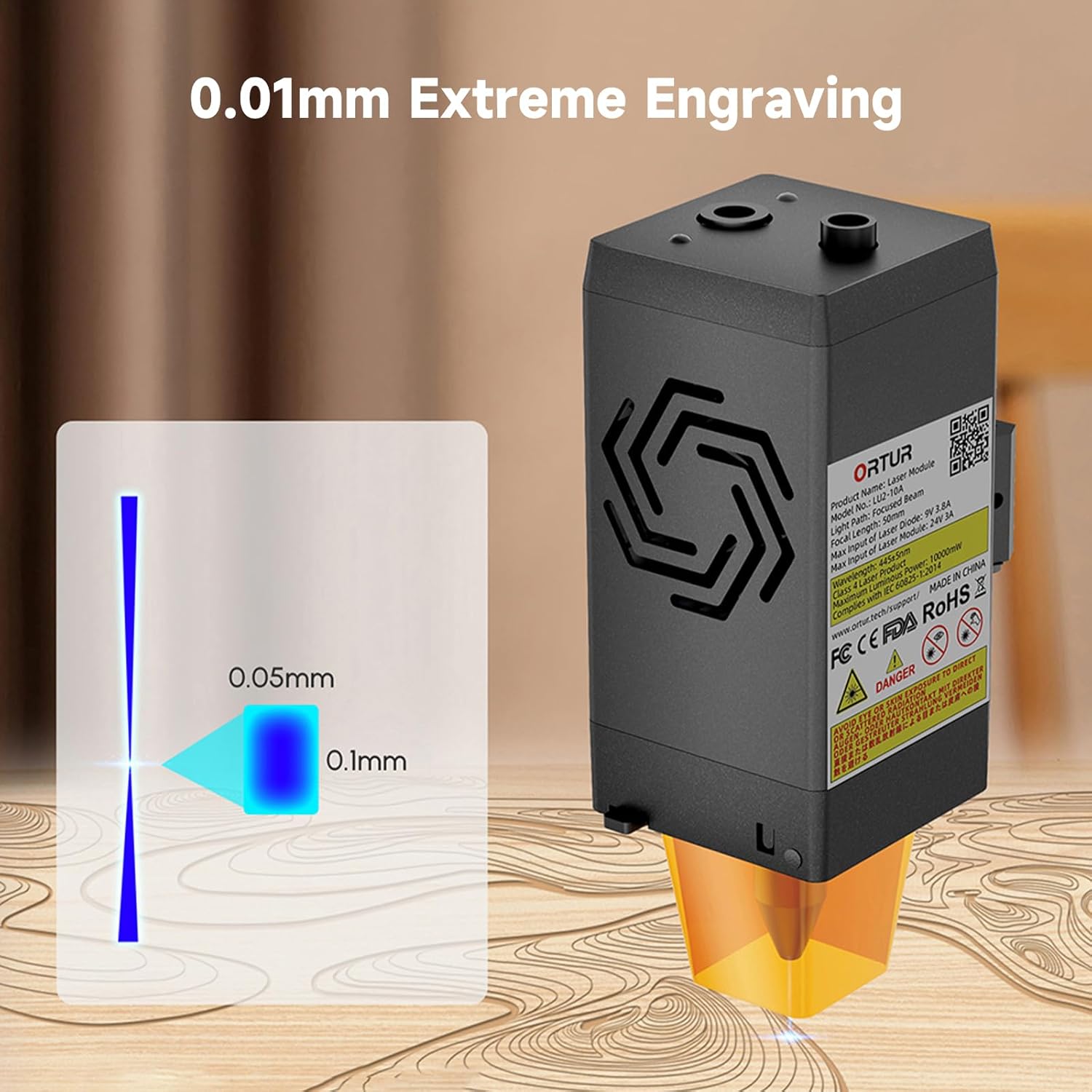
Image: A visual representation of the laser's compressed spot, showing its dimensions of 0.05mm x 0.1mm, which enables extreme precision in engraving.
5. Maintenance
Regular maintenance ensures optimal performance and extends the lifespan of your laser module.
- Lens Cleaning: Periodically clean the laser lens with a soft, lint-free cloth and appropriate lens cleaning solution to prevent residue buildup that can affect laser performance.
- Air Assist Nozzle: Ensure the air assist nozzle is clear of debris to maintain effective airflow during cutting and engraving.
- Cooling Fans: Check the dual cooling fans for dust accumulation and clean them gently to ensure proper heat dissipation.
- Cable Inspection: Regularly inspect all cables for any signs of wear, damage, or loose connections.
6. Troubleshooting
This section addresses common issues you might encounter with your Ortur LU2-10A Laser Module.
| Problem | Possible Cause | Solution |
|---|---|---|
| Laser not firing or weak output. |
|
|
| Inconsistent engraving/cutting results. |
|
|
| Air assist not functioning. |
|
|
7. Specifications
| Feature | Detail |
|---|---|
| Product Dimensions | 4.72 x 1.97 x 1.73 inches |
| Item Model Number | Ortur-LaserMaster2-ProS2 (LU2-10A variant) |
| Item Weight | 1.54 pounds |
| Laser Output Power | 10000mW (10W) |
| Compressed Spot Size | 0.05mm x 0.1mm |
| Engraving Speed | Up to 15000mm/min |
| Cooling System | Dual Fan Cooling |
| Electrical System | 24V |
| Compatibility | Ortur Laser Master 2, 2 S2, 2Pro S2, 3 |
8. Warranty and Support
For warranty information, technical support, or further assistance, please refer to the official Ortur website or contact their customer service directly. Keep your purchase receipt as proof of purchase.
Official Ortur Website: www.ortur.net
Related documentsLU2-10A


Ask a question about this manual
Ask about setup, troubleshooting, compatibility, parts, safety, or missing instructions. Manuals+ will review the question and use this page’s manual context to help answer it.