
1. Introduction
Thank you for choosing the Fszdorj 20-inch Ceiling Fan with Light. This manual provides essential information for the safe installation, operation, and maintenance of your new ceiling fan. Please read this manual thoroughly before installation and keep it for future reference.

Image: The Fszdorj 20-inch Ceiling Fan with Light, showcasing its modern design and integrated lighting. The image also displays the remote control and a smartphone screen with the control app.
2. Safety Information
Always follow basic safety precautions when installing and operating electrical appliances to reduce the risk of fire, electric shock, and personal injury.
- Electrical Safety: Ensure the power is turned off at the circuit breaker before installation or maintenance. All wiring must be in accordance with national and local electrical codes.
- Mounting: The mounting structure must be capable of supporting the weight of the fan (approximately 8 pounds).
- Blade Clearance: Ensure there is adequate clearance between the fan blades and any obstacles.
- Professional Installation: If you are unsure about the installation process, consult a qualified electrician.
- Indoor Use Only: This fan is designed for indoor use only. Do not expose to water or high humidity.
3. Package Contents
Verify that all components are present and undamaged before beginning installation. If any parts are missing or damaged, contact customer support.
- Ceiling Fan Unit (with integrated LED light)
- Remote Control
- Mounting Hardware Kit
- User Manual
4. Specifications

Image: A table detailing the product specifications, including dimensions, voltage, and power.
| Feature | Specification |
|---|---|
| Brand | Fszdorj |
| Model Name | F098 (2-F098-D) |
| Color | Black F098 |
| Size | 20 INCH (19.7"L x 19.7"W x 5.7"H) |
| Material | Acrylic, Iron Frame |
| Rated Voltage | 110-120 Volts |
| Rated Power | 80 Watts |
| Light Source Type | LED |
| Brightness | Up to 8000 lumens |
| Color Temperature | 3000K (Warm) to 6500K (Cool White) |
| Fan Speeds | 6 adjustable speeds |
| Control Method | App (Bluetooth), Remote Control |
| Motor Type | Quiet DC Motor |
| Special Features | Stepless Dimming, Adjustable Color Temperature, Night Light Function, Reversible Airflow, Memory Function, Timer Function |
| Installation Type | Flush Mount |
| Item Weight | 8 Pounds |
5. Setup and Installation
This ceiling fan is designed for easy installation. Follow these general steps. Refer to the included user manual for detailed diagrams and specific instructions.
- Turn Off Power: Before starting, ensure the power supply to the installation location is turned off at the circuit breaker.
- Prepare Mounting Location: Ensure the electrical box is securely mounted to the building structure and can support the fan's weight.
- Install Mounting Bracket: Attach the mounting bracket to the electrical box using the provided screws.
- Connect Wiring: Carefully connect the fan's electrical wires to the household wiring according to the wiring diagram in your specific manual. Ensure all connections are secure.
- Mount Fan Unit: Secure the fan unit to the mounting bracket.
- Test Functionality: Restore power and test all fan and light functions using the remote control or app.
6. Operating Instructions
Your Fszdorj ceiling fan can be controlled via the included remote control or a dedicated smartphone application (Bluetooth connection required).
6.1. Remote Control & App Operation

Image: Visual representation of the ceiling fan's features, including App & Remote Control, Stepless Dimming, Night Light Function, Adjustable Color Temperature, Timer, 6-Speed Fan, and Low Noise operation.
The remote control and app provide comprehensive control over the fan and light functions. The remote control's beep noise has been cancelled for a quieter experience.
- Power On/Off: Use the dedicated power buttons for the fan and light.
- Pairing (App): Scan the QR code provided in the physical manual or on the product packaging to download the app. Follow in-app instructions to pair your device via Bluetooth.
6.2. Lighting Functions
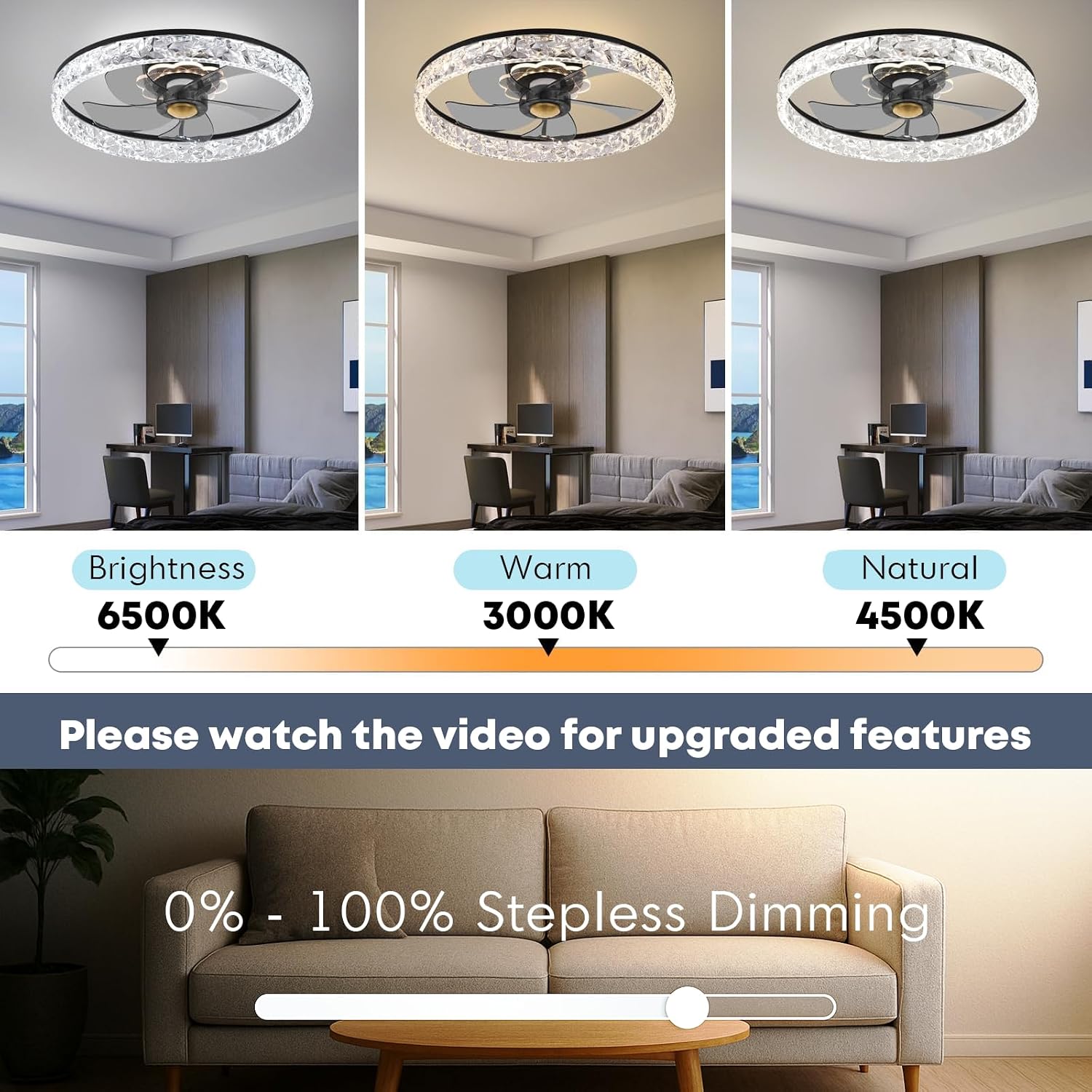
Image: Demonstrates the adjustable brightness and color temperature settings of the LED light, ranging from 6500K (Brightness) to 3000K (Warm) and 4500K (Natural), with a stepless dimming slider.
- Stepless Dimming: Adjust the brightness from 10% to 100% using the remote or app.
- Color Temperature Adjustment: Change the light color from warm white (3000K) to cool white (6500K). Natural white (4500K) is also available.
- Memory Function: The fan remembers your last light settings (brightness and color temperature) when turned off and restores them upon next power-on.
- Night Light: The fan features a standalone night light with independent control. Select from three preset colors: violet, warm blue, and soft warm. This function allows for mixing and matching colors with the main light.

Image: Illustrates the independent night light feature with three distinct color options: Warm Light, Violet, and Calming Blue.
6.3. Fan Functions

Image: Highlights the quiet operation of the fan (below 30 dB(A)) and its 6-speed settings, along with timer and adjustable wind speed features.
- 6 Fan Speeds: Choose from 6 adjustable fan speeds to customize airflow to your comfort needs.
- Quiet DC Motor: The pure copper silent DC motor ensures quiet, smooth, and stable airflow, operating below 30 dB(A).
- Reversible Airflow: The fan features two airflow modes:
- Downdraft (Summer Mode): Creates a cooling breeze.
- Updraft (Winter Mode): Enhances air circulation to distribute warm air.

Image: Illustrates the two airflow modes: Summer Downdraft Flow (blue arrows) for cooling and Winter Updraft Flow (orange arrows) for air circulation.
6.4. Timer Function
Set a timer for the fan to automatically turn off after a specified duration. Refer to the remote control or app interface for available timer settings.
7. Care and Maintenance
Regular maintenance helps ensure the longevity and optimal performance of your ceiling fan.
- Cleaning: Before cleaning, ensure the power is turned off at the circuit breaker. Use a soft, damp cloth to wipe down the fan and light fixture. Do not use abrasive cleaners or solvents.
- Dusting: Regularly dust the fan blades and light cover to prevent dust buildup, which can affect performance and light output.
- Tighten Screws: Periodically check and tighten all screws on the fan and mounting bracket to ensure secure operation.
- No Lubrication Needed: The DC motor is permanently lubricated and does not require additional oiling.
8. Troubleshooting
If you encounter issues with your ceiling fan, refer to the following common problems and solutions.
| Problem | Possible Cause | Solution |
|---|---|---|
| Fan does not operate | No power supply Loose wiring connection Remote control battery low | Check circuit breaker and wall switch Verify all wiring connections are secure (power off first) Replace remote control batteries |
| Light does not turn on | No power supply Loose wiring connection LED module issue | Check circuit breaker and wall switch Verify all wiring connections are secure (power off first) Contact customer support if LED module is faulty |
| Fan makes excessive noise | Loose screws Improper installation | Check and tighten all screws on the fan and mounting bracket Ensure fan is securely mounted and balanced |
| Remote control not working | Battery low/dead Not paired correctly | Replace batteries Refer to pairing instructions in the full manual or app |
If the problem persists after attempting these solutions, please contact Fszdorj customer support.
9. Warranty and Support
Fszdorj provides support for your ceiling fan product.
- Warranty: This product comes with a 2-year warranty on all parts.
- Customer Support: If you have any questions, require assistance, or encounter any issues with the product, please contact the Fszdorj after-sales team.
For further assistance, please visit the Fszdorj Storefront on Amazon.
