
1. Introduction
This manual provides essential information for the safe and efficient operation of your WEMAX S5 Laser Projector. Please read this manual thoroughly before using the product and retain it for future reference.
The WEMAX S5 is a portable laser projector featuring ALPD technology, native 1080P resolution, 500 ISO lumens brightness, HDR10 support, and integrated smart streaming capabilities including officially licensed Netflix. It also includes 2x5W Dolby Audio speakers and dual-band WiFi for enhanced connectivity.
2. Safety Information
WARNING: LASER RADIATION
- Do not stare directly into the projector lens when the device is operating.
- Avoid direct eye exposure to the laser beam.
- Keep the device away from children.
- Ensure proper ventilation to prevent overheating.
- Use only the power adapter provided with the projector.
- Do not attempt to disassemble or modify the projector. Refer all servicing to qualified personnel.
- Avoid placing the projector on unstable surfaces.
The WEMAX S5 includes a Smart Eye Protection feature that dims the light and pauses projection when an object or person is detected in front of the lens. This is designed to enhance user safety.
3. Package Contents
Verify that all items are present in the package:
- Smart Projector (WEMAX S5)
- Power Adapter
- User Manual
- Remote Control
- International Plug Adapters (various types)
- USB-C Cable
- AAA Batteries for Remote Control

Image: The WEMAX S5 Laser Projector and its remote control, as typically found in the package.
Video: An unboxing video demonstrating the contents of the WEMAX S5 Laser Display Projector package, including the projector unit, power adapter, remote control, and various international plug adapters.
4. Product Overview
4.1 Front View
Image: The front of the WEMAX S5 projector, showing the lens and indicator lights.
- Projector Lens: Emits the image.
- Sensors: For auto-focus and eye protection.
4.2 Rear View (Connectivity Ports)
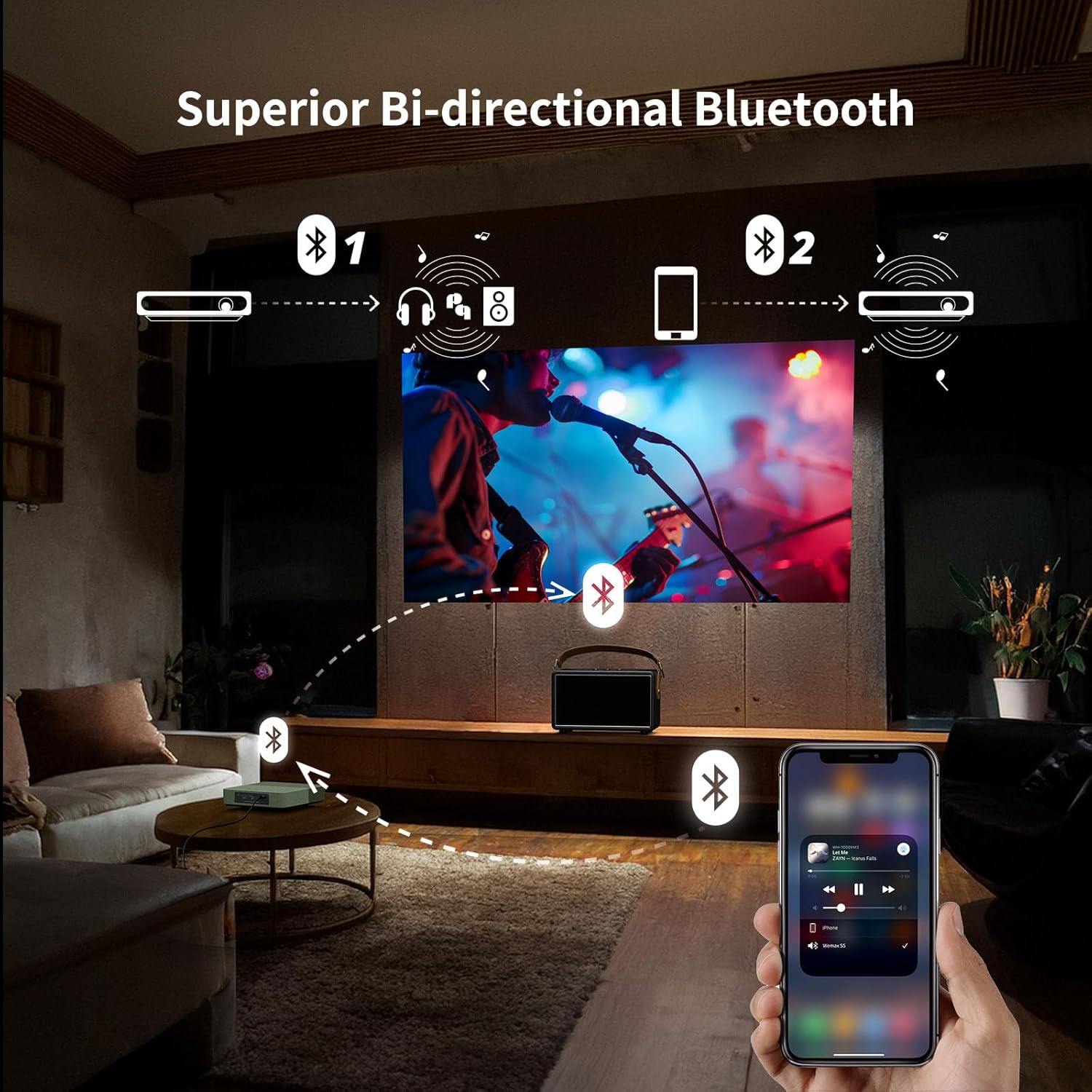
Image: The rear panel of the WEMAX S5 projector, displaying various input and output ports.
- Power Button: To turn the projector on/off.
- USB 2.0 Port: For connecting USB devices (e.g., flash drives for media playback, firmware updates).
- HDMI Port: For connecting external video sources (e.g., game consoles, laptops, Blu-ray players).
- 3.5mm Audio Jack: For connecting external headphones or speakers.
- USB-C Power Input: For connecting the power adapter or a compatible 65W power bank.
4.3 Top and Bottom Views
Image: Top view of the WEMAX S5 projector, highlighting its compact design and fabric finish.
- Speaker Grille: Integrated stereo speakers.
- Mounting Thread: Standard thread for tripod or ceiling mount.
5. Setup
- Power Connection: Connect the power adapter to the USB-C port on the projector and then to a power outlet. Alternatively, use a compatible 65W power bank for portable use.
- Placement: Place the projector on a stable, flat surface or mount it on a tripod. Ensure the lens is facing the projection surface (wall or screen).
- Power On: Press the power button on the projector or the remote control to turn on the device.
- Initial Setup: Follow the on-screen instructions to complete the initial setup, including language selection, network connection (Wi-Fi), and account login for streaming services.
- Automatic Adjustments: The projector features automatic keystone correction and auto-focus for quick and clear image alignment.

Image: Illustration of the projector's auto keystone, auto focus, and 50%-100% zoom features for quick setup.
Video: A first look at the WEMAX S5 Portable Laser Projector, demonstrating its features and ease of setup.
6. Operating Instructions
6.1 Smart Operating System & Streaming
The WEMAX S5 runs on a smart Linux-based operating system with pre-installed applications like Netflix, YouTube, and Prime Video. Access additional apps via the dedicated App Store.

Image: The projector's interface showing one-click access to pre-installed streaming applications like Netflix, YouTube, and Prime Video.
6.2 Image Quality & ALPD Technology
Experience native 1080P resolution with 500 ISO lumens brightness and HDR10 support. The advanced ALPD (Advanced Laser Phosphor Display) technology ensures vibrant colors, sharp details, and high contrast.

Image: Illustration of the true brightness and clarity of 1080P resolution with ALPD technology on the WEMAX S5 versus other 720P projectors.
6.3 Audio Features
The projector is equipped with 2x5W Dolby Audio speakers, providing an immersive cinematic sound experience. It also supports bi-directional Bluetooth, allowing it to function as a standalone Bluetooth speaker or connect to external Bluetooth audio devices.

Image: Visual representation of the WEMAX S5's 2x5W Dolby Audio speakers delivering cinematic sound.
6.4 Smart Eye Protection
The projector features an Eye Guard function that uses a ToF laser sensing module to detect when someone is in front of the projected image. It automatically dims the light and pauses projection to protect viewers' eyes.

Image: Diagram illustrating the Smart Eye Protection feature, showing the laser sensing module detecting a child in the projection path and dimming the light.
7. Connectivity
The WEMAX S5 offers multiple connectivity options:
- Wi-Fi: Supports 2.4G/5G dual-band Wi-Fi for fast and stable wireless streaming and screen mirroring.
- Bluetooth: Bi-directional Bluetooth for connecting to mobile devices as a speaker or pairing with external Bluetooth speakers/headphones.
- HDMI: Connect external devices such as laptops, game consoles, or Blu-ray players.
- USB 2.0: For connecting USB storage devices to play media or for firmware updates.
- 3.5mm Audio Jack: For wired audio output to headphones or external speakers.
- USB-C: Power input, also supports power from a 65W power bank for portability.

Image: Diagram showing various devices that can be connected to the WEMAX S5, including mobile hard disks, USB drives, PCs, game consoles, soundbars, and headsets.
Video: A short video showcasing the WEMAX S5 Portable Laser Projector being used for outdoor entertainment, highlighting its portability and power bank compatibility.
8. Maintenance
- Cleaning the Lens: Use a soft, lint-free cloth specifically designed for optical lenses. Do not use abrasive cleaners or solvents.
- Cleaning the Exterior: Wipe the projector's exterior with a soft, dry cloth. For stubborn stains, use a slightly damp cloth and mild detergent, then wipe dry.
- Ventilation: Ensure the ventilation vents are clear of obstructions to prevent overheating.
- Storage: When not in use for extended periods, store the projector in a cool, dry place, protected from dust and extreme temperatures.
- Optical Engine: The WEMAX S5 features a fully sealed optical engine to prevent dust pollution and extend lifespan.

Image: Illustration of the fully sealed optical engine design, which helps prevent dust accumulation and extends the projector's lifespan compared to semi-enclosed or open light engines.
9. Troubleshooting
| Problem | Possible Cause | Solution |
|---|---|---|
| No image displayed | Power not connected, input source incorrect, lens cap on. | Check power connection, select correct input source (HDMI), remove lens cap. |
| Image blurry | Out of focus, projector moved. | Allow auto-focus to adjust or manually adjust focus if available. Ensure projector is stable. |
| No sound | Volume too low, external speakers not connected, audio output settings. | Increase volume, check external speaker connection, verify audio output settings in menu. |
| Remote control not working | Batteries low/dead, obstruction, remote not paired. | Replace batteries, remove obstructions, re-pair remote control according to instructions. |
| Wi-Fi connection issues | Incorrect password, router too far, interference. | Verify Wi-Fi password, move projector closer to router, check for interference. |
10. Specifications
| Feature | Detail |
|---|---|
| Brand | WEMAX |
| Model Number | FMM4101 |
| Display Technology | ALPD Laser & DLP |
| Native Resolution | 1920 x 1080 (1080P HD) |
| Brightness | 500 ISO Lumens |
| HDR Support | HDR10 |
| Audio | 2x5W Dolby Audio Speakers |
| Connectivity | 2.4G/5G Dual-band Wi-Fi, Bi-directional Bluetooth, HDMI, USB 2.0, 3.5mm Audio Jack, USB-C Power |
| Special Features | Officially Licensed Netflix, Auto Focus, Auto Keystone, Smart Eye Protection, Lightweight, Portable |
| Item Weight | 1.83 pounds |
| Product Dimensions | 6.89 x 6.89 x 1.89 inches |
| Power Supply | AC Adapter or 65W Type-C Power Bank (20VDC/3.25A) |
11. Warranty and Support
For warranty information and technical support, please contact WEMAX customer service:
- Email: support@wemax.com
- Online Support: Visit the official WEMAX website for FAQs and additional resources.
WEMAX is committed to providing prompt assistance. Expect a quick response within 24 hours for email inquiries.

Image: WEMAX customer support details, including email address and response time.


