
Introduction
Thank you for purchasing the Fisher Portable Bluetooth Speaker, Model SBT950GRN. This speaker is designed to provide high-quality audio with features such as IPX5 water resistance, Bluetooth 5.3 connectivity, LED lights, and True Wireless Stereo (TWS) pairing. Please read this manual carefully before using the product to ensure proper operation and to maximize its lifespan.
Package Contents
- Fisher Portable Bluetooth Speaker (Model SBT950GRN)
- Power Cable (USB-C)
- Quick Start Guide
- Warranty Card
Product Overview
The Fisher Portable Bluetooth Speaker features a robust design with intuitive controls and dynamic audio capabilities. Key components include:
- Control Panel: Located on the top surface, includes buttons for power, volume, play/pause, mode selection, and LED light control.
- Speaker Grille: Covers the dual 2.75-inch speakers.
- LED Light Rings: Located on both ends of the speaker, providing visual effects.
- USB-C Charging Port: For charging the internal battery.
- USB Port: For media playback.
- Microphone: For hands-free calling.
- Carrying Handle: For portability.

Image: Fisher Portable Bluetooth Speaker with its carrying strap attached.

Image: Internal diagram illustrating the speaker's 2-way audio system and dynamic rhythm lights.
Setup
1. Charging the Speaker
Before first use, fully charge the speaker. Connect the provided USB-C power cable to the speaker's USB-C charging port and the other end to a compatible USB power adapter (not included). The charging indicator will illuminate. A full charge takes approximately 4 hours and provides up to 7 hours of playback time.
2. Power On/Off
- To power on, press and hold the Power button for a few seconds until the LED lights activate.
- To power off, press and hold the Power button again until the LED lights turn off.
3. Bluetooth Pairing
- Ensure the speaker is powered on and in Bluetooth pairing mode (indicated by a flashing LED).
- On your device (smartphone, tablet, laptop), enable Bluetooth and search for available devices.
- Select "Fisher SBT950GRN" from the list.
- Once paired, the speaker will emit a confirmation sound, and the LED will stop flashing.
- The speaker will automatically attempt to reconnect to the last paired device when powered on.

Image: Top view of the speaker showing the control panel with buttons for power, volume, and mode.
4. True Wireless Stereo (TWS) Pairing
TWS allows you to connect two Fisher SBT950GRN speakers for a stereo sound experience.
- Ensure both speakers are powered on and not connected to any Bluetooth device.
- On one speaker (this will be the primary speaker), press and hold the TWS button (often combined with the Mode button or a dedicated button). The speaker will enter TWS pairing mode.
- The primary speaker will search for the secondary speaker. Once connected, both speakers will emit a confirmation sound.
- Now, connect your device to the primary speaker via Bluetooth as described in step 3. Both speakers will play audio in stereo.

Image: Two speakers demonstrating True Wireless Stereo pairing for an immersive audio experience.
Operating Instructions
Basic Controls
- Power Button: Press and hold to power on/off.
- Play/Pause Button: Press once to play or pause audio.
- Volume Up (+): Press once to increase volume. Press and hold for next track.
- Volume Down (-): Press once to decrease volume. Press and hold for previous track.
- Mode Button (M): Press to switch between Bluetooth, FM Radio, and USB playback modes.

Image: A user interacting with the speaker's control panel.
LED Light Modes
The speaker features dynamic RGB LED lights. Press the Light button (often combined with another function or a dedicated button) to cycle through different light modes or to turn the lights off. There are 3 vibrant color FX modes available.

Image: The speaker showcasing its colorful RGB LED light effects.
FM Radio
- Press the Mode button (M) to switch to FM Radio mode.
- Press the Play/Pause button to automatically scan and save available FM stations.
- Use the Volume Up (+) and Volume Down (-) buttons to navigate between saved stations.
Hands-Free Calling
When connected to your smartphone via Bluetooth, the speaker can be used for hands-free calls.
- To answer an incoming call, press the Play/Pause button once.
- To end a call, press the Play/Pause button once.
- To reject an incoming call, press and hold the Play/Pause button.
Maintenance
- Cleaning: Use a soft, dry cloth to clean the speaker's exterior. Do not use abrasive cleaners or solvents.
- Storage: Store the speaker in a cool, dry place away from direct sunlight and extreme temperatures.
- Water Resistance (IPX5): The speaker is IPX5 water-resistant, meaning it can withstand splashes and light rain. Do not submerge the speaker in water. Ensure the USB-C port cover is securely closed when exposed to water.

Image: The speaker positioned near water, illustrating its IPX5 water-resistant design.
Troubleshooting
| Problem | Possible Solution |
|---|---|
| Speaker does not power on. | Ensure the battery is charged. Connect the speaker to a power source using the USB-C cable. |
| Cannot pair via Bluetooth. |
|
| No sound or low volume. |
|
| TWS pairing fails. |
|
| FM radio reception is poor. |
|
Specifications
| Feature | Detail |
|---|---|
| Model Number | SBT950GRN |
| Bluetooth Version | 5.3 |
| Wireless Range | Up to 32.8 feet (10 meters) |
| Speaker Output Power | 26W Peak (13W RMS) |
| Speaker Size | 2 x 2.75 inches (69.85 mm) |
| Frequency Response | 80Hz - 16kHz |
| Impedance | 4 Ohms |
| Signal-to-Noise Ratio | 80 dB |
| Battery Capacity | 3000 mAh |
| Playback Time | Up to 7 hours (at moderate volume) |
| Charging Time | Approximately 4 hours |
| Charging Port | USB-C |
| Water Resistance | IPX5 |
| Product Dimensions (W x D x H) | 11.26" x 4.88" x 4.72" (28.6 cm x 12.4 cm x 12 cm) |
| Item Weight | 3.63 lbs (1.65 kg) |
| Material | Plastic |
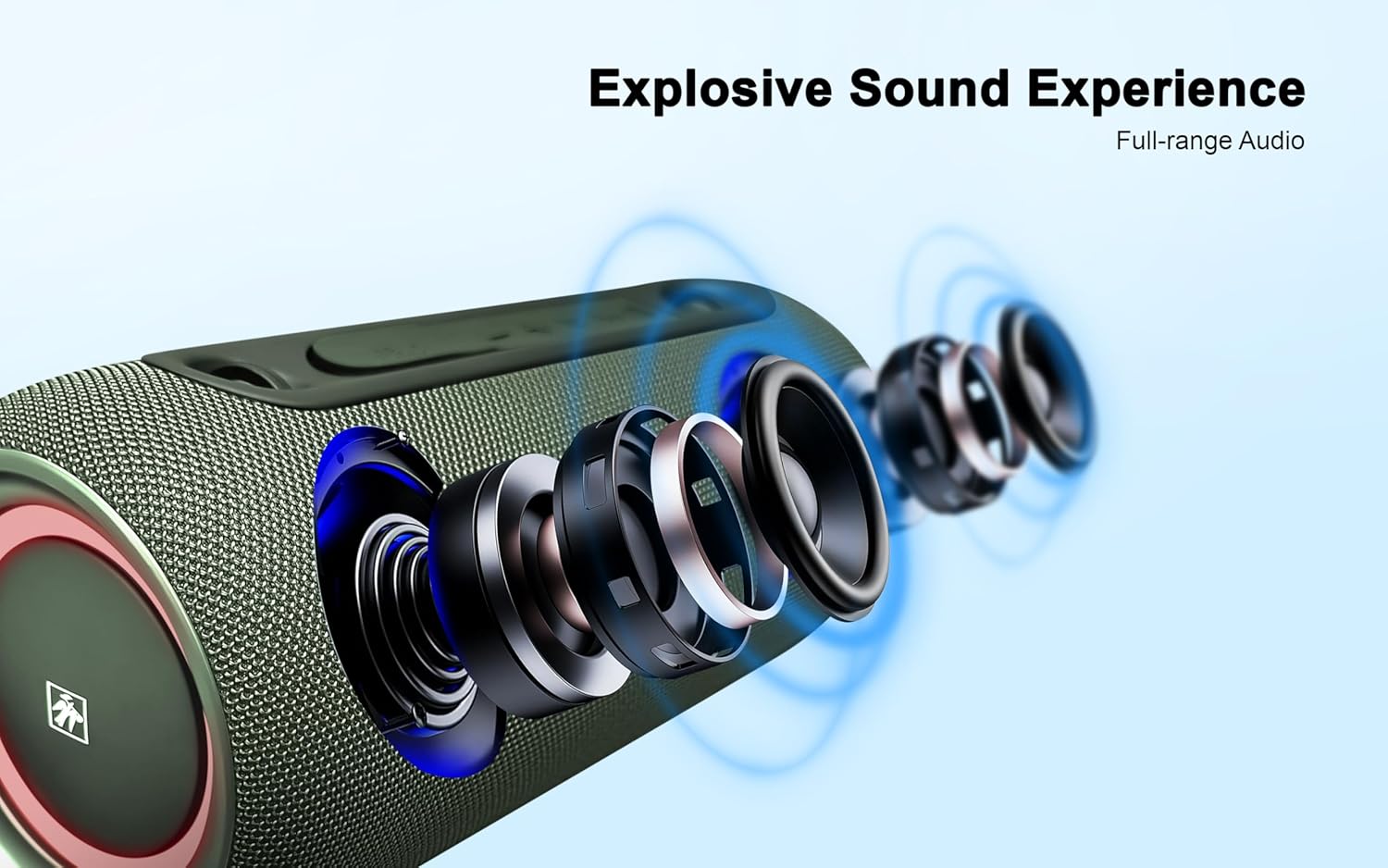
Image: Dimensional drawing of the speaker, indicating its width, depth, and height.
Warranty Information
This Fisher Portable Bluetooth Speaker comes with a Limited Warranty. Please refer to the included Warranty Card for detailed terms, conditions, and registration information. Keep your purchase receipt as proof of purchase for warranty claims.
Customer Support
For further assistance, technical support, or warranty inquiries, please refer to the contact information provided on your Warranty Card or visit the official Fisher website. You may also contact the retailer where the product was purchased.