
1. Introduction
The MiBOXER FUTD01 DMX512 Wireless LED Transmitter is designed for wireless DMX512 lighting control. It facilitates seamless communication between DMX512-compatible devices and lighting systems using 2.4GHz wireless technology. This device is suitable for various lighting applications, including stage, architectural, and event lighting, providing reliable and responsive control.

Figure 1: MiBOXER FUTD01 DMX512 Wireless LED Transmitter, showing its compact design with an antenna.
2. Key Features
- DMX512 Wireless Control: Transmits DMX512 signals wirelessly to compatible lighting fixtures with precision.
- 2.4GHz Technology: Ensures a stable and interference-free connection with a control range of up to 30 meters.
- Multi-Zone Control: Supports control of up to 16 groups of 2.4G RGB+CCT lamps simultaneously.
- 80 Channels: Capable of transmitting DMX512 data for 80 channels concurrently.
- Compact and Lightweight Design: Easy to integrate into any setup, enhancing portability and user-friendliness.
- High Performance: Delivers real-time data transmission for smooth and responsive lighting control.
- Broad Compatibility: Works with a wide range of DMX512-compatible devices for versatile lighting configurations.
- Plug-and-Play Setup: Simple installation and pairing process for hassle-free operation.
- Energy Efficient: Low power consumption for extended operation and reduced energy costs.
3. Product Components and Diagram
The FUTD01 transmitter features a male DMX connector, a digital display, control buttons, and an antenna for wireless transmission.
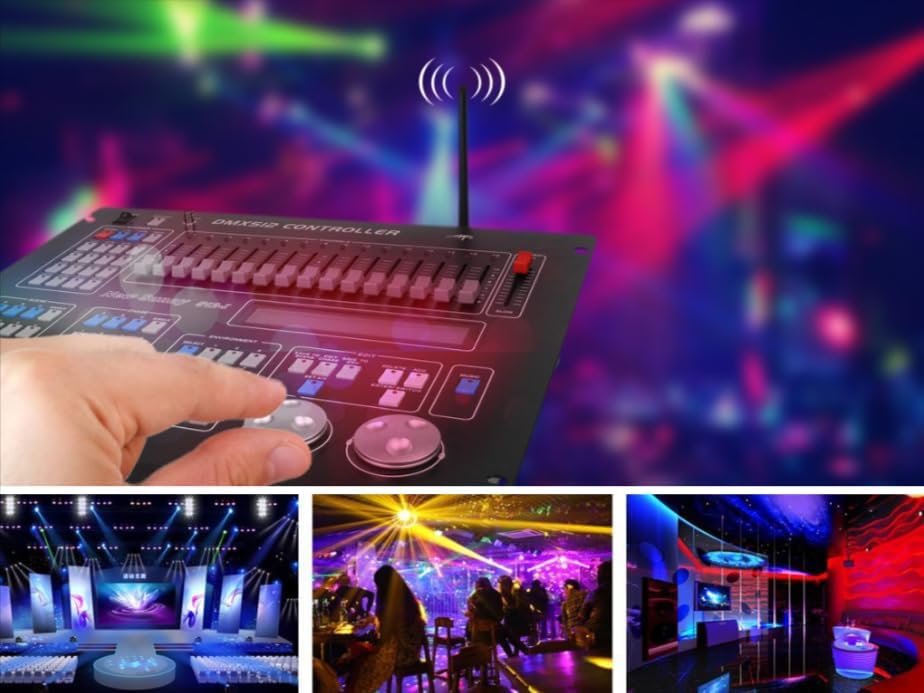
Figure 2: Diagram illustrating the key components of the FUTD01 transmitter, including the Male Connector, Set button, Digital Screen, Indicator light, and Antenna.
- Male Connector: Standard DMX512 3-pin male connector for connecting to a DMX controller.
- Set Button: Used for configuration and pairing.
- Digital Screen: Displays current settings, suchs as channel or zone.
- Indicator: LED light indicating operational status.
- Antenna: For 2.4GHz wireless signal transmission.
- '+' and '-' Buttons: Used to adjust settings displayed on the digital screen.
4. Setup Instructions
- Connect to DMX Controller: Insert the male DMX connector of the FUTD01 transmitter into the DMX output port of your DMX512 control panel. Ensure a secure connection.
- Power On: The transmitter typically draws power directly from the DMX controller. Once connected, it should power on automatically.
- Pairing with Receivers:
- Ensure your 2.4G RGB+CCT lamps or strip controllers are powered on and within the 30-meter control range.
- Refer to the specific instructions for your MiBOXER 2.4G receivers/lamps for their pairing procedure. Generally, this involves putting the receiver into pairing mode and then initiating pairing from the transmitter or a remote control.
- The FUTD01 transmits the DMX data, which compatible MiBOXER 2.4G receivers can then interpret.

Figure 3: Close-up view of the male connector and an example of connecting the transmitter to a DMX512 control panel.
5. Operating Instructions
The FUTD01 transmitter allows you to control up to 16 groups of 2.4G RGB+CCT lamps or strip controllers by transmitting DMX512 data across 80 channels.
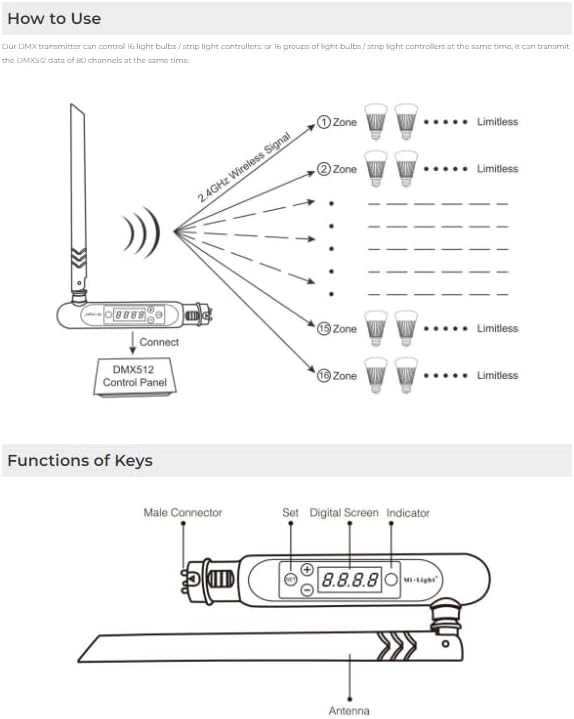
Figure 4: Diagram illustrating the wireless signal transmission from the FUTD01 transmitter to multiple lighting zones (up to 16 zones shown).
- Channel Selection: Use the '+' and '-' buttons on the transmitter to navigate through the available DMX channels or zones. The digital screen will display the current selection.
- DMX Data Transmission: Once connected to a DMX512 control panel, the transmitter will automatically convert the wired DMX signals into 2.4GHz wireless signals.
- Controlling Lights: Operate your DMX512 control panel as usual. The wireless transmitter will send these commands to the paired MiBOXER 2.4G RGB+CCT lamps or controllers, allowing you to adjust colors, brightness, and other lighting effects wirelessly.
- Multi-Group Control: The transmitter can control 16 groups of 2.4G RGB+CCT lamps. Ensure your receivers are correctly assigned to the desired groups for independent or synchronized control.
6. Technical Specifications
| Specification | Value |
|---|---|
| Model | FUTD01 |
| Brand | MiBOXER |
| Wireless Technology | 2.4GHz |
| Control Channels | 80 DMX512 channels |
| Control Groups | 16 groups of 2.4G RGB+CCT lamps |
| Display Type | LED Digital Screen |
| Color | Black |
| Dimensions (Approx.) | 188mm (Length) x 23mm (Width) x 47mm (Height with antenna) |
| Weight (Approx.) | 0.105 KGS |

Figure 5: Dimensional drawing of the FUTD01 transmitter, showing approximate measurements.
7. Maintenance
To ensure the longevity and optimal performance of your MiBOXER FUTD01 DMX512 Wireless LED Transmitter, follow these general maintenance guidelines:
- Cleaning: Use a soft, dry cloth to clean the exterior of the device. Avoid using abrasive cleaners, solvents, or harsh chemicals, as these can damage the finish or internal components.
- Storage: When not in use, store the transmitter in a cool, dry place away from direct sunlight, extreme temperatures, and high humidity.
- Handling: Handle the device with care to prevent physical damage. Avoid dropping or subjecting it to strong impacts.
- Connections: Periodically check the DMX connector for any signs of wear or corrosion. Ensure connections are secure when in use.
8. Troubleshooting
If you encounter issues with your FUTD01 transmitter, consider the following troubleshooting steps:
- No Power/No Display:
- Ensure the DMX connector is fully inserted into the DMX output of your control panel.
- Verify that your DMX control panel is powered on and functioning correctly.
- No Wireless Control:
- Check that the transmitter's indicator light is active, indicating it is powered and transmitting.
- Confirm that the MiBOXER 2.4G receivers/lamps are powered on and within the 30-meter control range.
- Re-attempt the pairing process between the transmitter and the receivers/lamps as per their respective manuals.
- Ensure there are no significant obstructions (e.g., thick walls, metal structures) between the transmitter and receivers that could interfere with the 2.4GHz signal.
- Check for other 2.4GHz devices in the vicinity that might cause interference.
- Inconsistent Control:
- Reduce the distance between the transmitter and receivers.
- Ensure the antenna is positioned optimally for signal transmission.
- Verify that the DMX output from your control panel is stable.
If these steps do not resolve the issue, please contact MiBOXER customer support for further assistance.
9. Warranty and Support
This product is covered by the standard manufacturer's warranty. For specific warranty terms and conditions, please refer to the documentation provided with your purchase or visit the official MiBOXER website. For technical support, troubleshooting assistance, or warranty claims, please contact MiBOXER customer service through their official channels.
Manufacturer: Miboxer
Brand: MiBOXER
ASIN: B0DRLKG7G7


