
1. Introduction
The TECLAST T50 Mini is an 8-inch tablet designed for versatile use, featuring a powerful Helio G99 processor, the Android 15 operating system, and a 120Hz high refresh rate display. This manual provides essential information for setting up, operating, maintaining, and troubleshooting your device to ensure optimal performance and user experience.

Image: The TECLAST T50 Mini tablet, highlighting its compact size and modern aesthetic.
2. What's in the Box
Upon opening your TECLAST T50 Mini package, please verify that all the following items are included:
- TECLAST T50 Mini Tablet
- Power Adapter (may vary by region)
- USB Type-C Data Cable
- SIM Ejector Tool
- Maintenance Card
- User Manual (this document)

Image: A visual representation of the items included in the TECLAST T50 Mini packaging.
3. Product Overview
The TECLAST T50 Mini features a compact and lightweight design with an 8.7-inch IPS display. Familiarize yourself with the device's physical components and ports.
Physical Features:
- Display: 8.7-inch IPS, 1340x800 resolution, 120Hz AdaptiveSync refresh rate.
- Dimensions: Approximately 125mm width, 8.2mm thickness.
- Weight: Approximately 368g.
- Body Material: Metal body in Azure Blue.
- Ports: USB Type-C for charging and data transfer, SIM/microSD card slot.
- Cameras: 13MP Rear Camera with autofocus and LED flash, 5MP Front Camera.
- Audio: Dual speakers.

Image: The TECLAST T50 Mini, illustrating its slim design and metal construction.
4. Setup
4.1 Initial Power On
- Press and hold the Power button located on the side of the tablet until the TECLAST logo appears.
- Follow the on-screen prompts to select your language, connect to a Wi-Fi network, and set up your Google account.
4.2 SIM Card Installation
The T50 Mini supports dual SIM cards for 4G LTE connectivity.
- Locate the SIM card tray on the side of the tablet.
- Insert the SIM ejector tool into the small hole next to the tray and gently push until the tray pops out.
- Place your Nano-SIM cards and/or microSD card into the designated slots on the tray. Ensure they are correctly oriented.
- Carefully reinsert the tray into the tablet until it clicks into place.
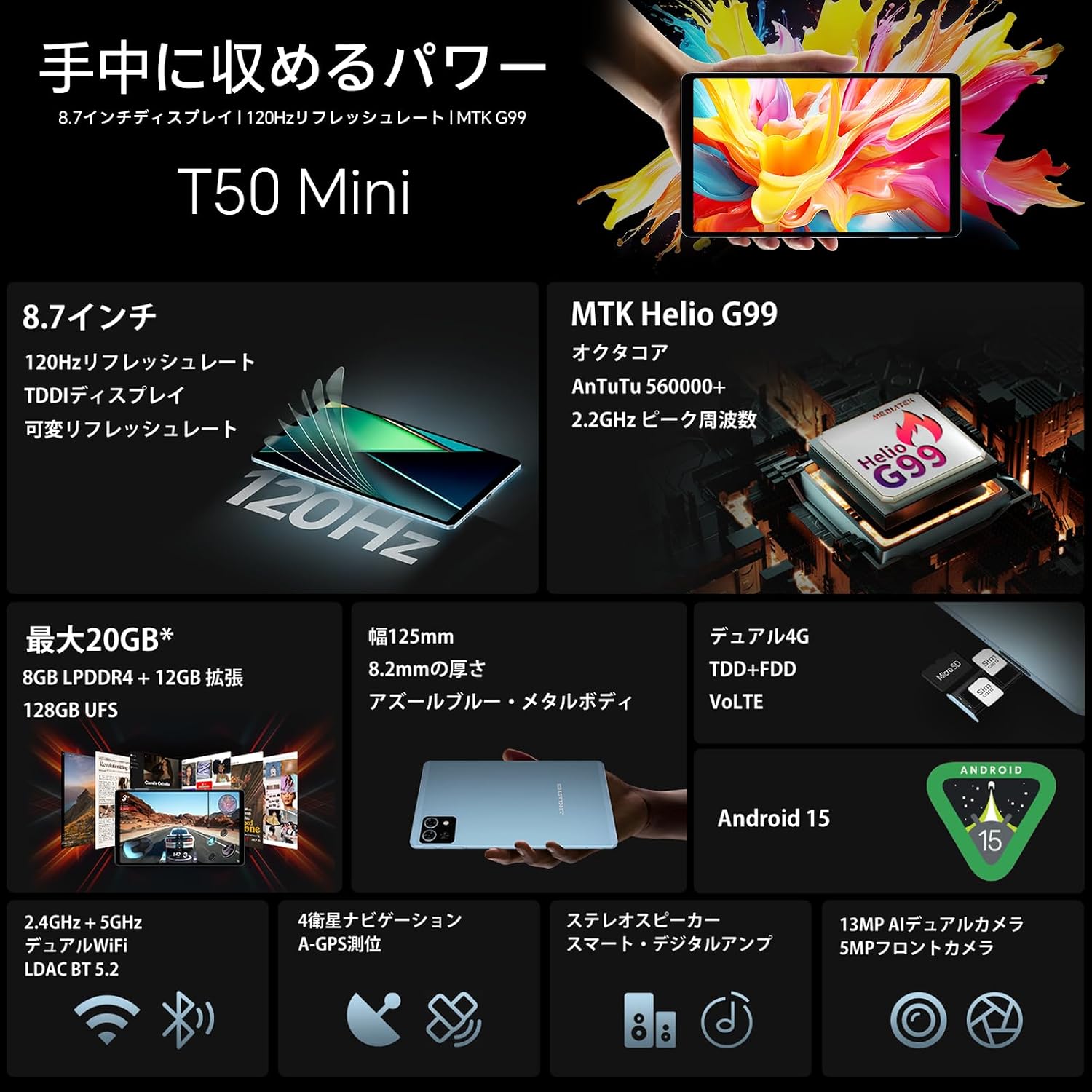
Image: Detailed view of the SIM and microSD card tray, demonstrating proper card placement.
5. Operating Instructions
5.1 Display Features
The 8.7-inch IPS display offers a 120Hz AdaptiveSync refresh rate for smooth visuals and responsive touch.
- 120Hz AdaptiveSync: Automatically adjusts the refresh rate (60Hz/90Hz/120Hz) based on content to optimize power consumption and provide a fluid experience for browsing, gaming, and video playback.
- T-Colour 6.0: Enhances image quality and color optimization.
- Sensitive Touch Control: Features TDDI full lamination and up to 240Hz touch sampling rate for precise and responsive interaction.

Image: The 120Hz AdaptiveSync display in action, demonstrating smooth transitions.

Image: Illustrates the responsive touch and display technology for an enhanced user experience.
5.2 Performance
Powered by the MediaTek Helio G99 octa-core processor, the T50 Mini delivers efficient performance for multitasking and gaming.
- Processor: MediaTek Helio G99 (2x Cortex-A76 at 2.2GHz, 6x Cortex-A55 at 2.0GHz).
- GPU: Mali-G57 MC2 with HyperEngine 2.0 for smooth gaming.
- RAM: 8GB LPDDR4 (expandable to 20GB with virtual RAM).
- Storage: 128GB UFS high-speed storage, expandable up to 1TB via microSD card.

Image: Visual representation of the Helio G99 processor and its architecture.

Image: Details on the tablet's memory and storage capabilities.
5.3 Connectivity
Stay connected with robust wireless and cellular options.
- 4G LTE: Supports TDD+FDD dual mode 4G with dual SIM standby for internet and calls on the go.
- Wi-Fi: Dual-band Wi-Fi (2.4GHz/5GHz) for high-speed internet access.
- Bluetooth: BT 5.2 with LDAC lossless audio support for wireless accessories.
- OTG: Supports On-The-Go functionality for connecting external devices.

Image: Overview of the tablet's connectivity features.
5.4 Camera
Capture moments and make video calls with the integrated cameras.
- Rear Camera: 13MP with autofocus and AI assistance for optimized imaging, including LED flash for low-light conditions.
- Front Camera: 5MP for clear HD video calls.

Image: Highlights the tablet's camera specifications and features.
5.5 Sensors and Navigation
The tablet is equipped with multiple sensors for enhanced functionality and precise navigation.
- Sensors: Gyroscope (motion sensing), Gravity sensor (orientation), Light sensor (adjustable backlight), Hall sensor (smart control), Proximity sensor.
- Navigation: 4-mode satellite system (GPS, BDS, Galileo, Glonass) with A-GPS support for accurate global navigation.

Image: Depicts the various sensors and navigation features of the tablet.
5.6 Charging and Battery
The T50 Mini is equipped with a high-capacity battery for extended use.
- Battery: 5100mAh cobalt lithium battery.
- Charging: Type-C port for convenient and fast charging.

Image: The tablet being charged via its Type-C port.
5.7 Software Features (Android 15)
The TECLAST T50 Mini runs on Android 15, offering optimized responsiveness and intuitive daily use, along with enhanced privacy and multitasking capabilities.
- GMS Certified: Full access to Google Play Store and Google services.
- Widevine L1 Support: Stream high-definition content from platforms like Netflix, Amazon Prime Video, Disney+, and Hulu.
- Wireless Projection: Easily connect to larger screens for an immersive viewing experience.
- Split Screen & Parallel View: Multitask efficiently by running two applications simultaneously or optimizing landscape mode for productivity.
- Private Space: Create a separate, encrypted space for sensitive apps and data.
- Pinned Taskbar: Quickly access frequently used apps and enhance customization.
- 64-bit Apps: Ensures high-speed and smooth operation for modern applications.
- Camera Sharing: Use the tablet's camera as a webcam when connected to a computer via USB.
- Parental Control (Google Family Link): Manage screen time, monitor app usage, remotely lock the device, and track location for child safety.
- AI Tool Compatibility: Supports AI applications like ChatGPT and Gemini for various tasks including document creation, translation, information retrieval, and learning support.

Image: Key features of the Android 15 operating system on the T50 Mini.

Image: Demonstrates the wireless projection feature for media consumption.

Image: Face recognition unlock feature for quick and secure access.

Image: Google Family Link parental control feature for managing child usage.
6. Maintenance
Proper maintenance ensures the longevity and optimal performance of your tablet.
- Cleaning: Use a soft, lint-free cloth to clean the screen and body. Avoid abrasive materials or harsh chemicals.
- Storage: Store the tablet in a cool, dry place away from direct sunlight and extreme temperatures.
- Battery Care: Avoid fully discharging the battery frequently. For long-term storage, charge the battery to around 50-60%.
- Software Updates: Regularly check for and install system updates to ensure security and performance improvements.
7. Troubleshooting
If you encounter issues with your TECLAST T50 Mini, try the following common troubleshooting steps:
- Device not turning on: Ensure the battery is charged. Connect the tablet to the charger and wait a few minutes before attempting to power it on again.
- Screen frozen or unresponsive: Press and hold the Power button for about 10-15 seconds to force a restart.
- Wi-Fi connection issues: Try restarting your Wi-Fi router and the tablet. Ensure you are within range of the Wi-Fi signal.
- Apps crashing or slow performance: Close background applications. Clear the cache of problematic apps in Settings > Apps. Consider restarting the tablet.
- SIM card not detected: Ensure the SIM card is correctly inserted into the tray. Restart the tablet. Verify that your SIM card is active and has a valid plan.
If problems persist, please refer to the Warranty and Support section for contact information.
8. Specifications
Detailed technical specifications for the TECLAST T50 Mini tablet.
| Feature | Specification |
|---|---|
| Brand | TECLAST |
| Memory Storage Capacity | 128 GB |
| Screen Size | 8.7 inches |
| Display Max Resolution | 1340x800 Pixels |
| Operating System | Android |
| Included Components | Stylus, Tablet Body |
| Product Use | Entertainment |
| Style Name | HD Screen |
| Manufacturer Name | TECLAST |
| Max Memory Capacity (GB) | 128 GB |
| Internal Memory Capacity | 20 GB |
| Memory Slots and Type | 1 |
| Flash Memory Max Supported Size | 20 GB |
| Supported Flash Memory Type | SD Card |
| Computer Memory Size | 128 GB |
| HDD Capacity | 2 TB |
| Hardware Interface | 802.11 ac/b/g/n, Bluetooth 5, MicroSD, SD Card, SIM Card, USB-C |
| Wireless Type | Bluetooth, Wi-Fi |
| Mobile Phone Technology | 4G |
| USB Port Count | 1 |
| Communication & Connectivity Interface | Bluetooth, LTE, USB, Wi-Fi |
| Wireless Communication Standard | 802.11ac |
| Video Pixels | HD 720p |
| Camera Description | Front, Rear |
| Rear Camera Count | 2 |
| Color | Blue |
| GPU Manufacturer | MediaTek |
| Touch Screen, Voice Recognition, Other Features | Touch Screen |
| Graphics Description | Dedicated |
| Compatible Devices | Keyboard, Stylus, Speaker, Headphones, Mouse |
| Warranty Type | Limited Warranty |
| Display Type | LCD Display |
| Native Resolution | 1340x800 Pixels |
| Aspect Ratio | 16:10 |
| Display Max Brightness | 300 Nits Coating |
| Display Refresh Rate (Hz) | 120 |
| Battery Capacity | 5100 Milliampere Hours |
| Battery Cell Type | Lithium Polymer |
| Voltage | 5100 Milliampere Hours |
| Lithium Battery Packaging Form | 18.99 Watt Hours |
| Computer CPU Speed | 2.2 GHz |
| Processor Description | Helio G99 |
| Computer CPU Manufacturer | MediaTek |
| CPU | Helio G99 |
| CPU Model Max Speed | 2.2 GHz |
| Additional Product Description 1 | Stereo Speaker, Storage Expansion, Cellular Connection, Call Function |
| Sensor Type | Hall Sensor |
| Biometric Authentication Function | Face Recognition |
9. Warranty and Support
TECLAST provides a 12-month manufacturer's warranty for this product. For any questions or concerns, please contact our support team.
9.1 How to Contact Support
You can reach our support team through the following methods:
- Before Ordering: On the product page, click on the store name "TECLAST Official Store" below the "Add to Cart" button, then click "Ask a Question" in the upper right corner to send an email.
- After Ordering: Go to your Amazon Account > Order History > Select the relevant order > Contact Seller.
9.2 Support Hours
Our Japanese-speaking support team is available via email:
- Monday - Friday: 10:00 AM - 7:00 PM (JST)
Please note: Inquiries received after 7:00 PM on weekdays or on holidays will be answered on the next business day. We aim to respond within 24 hours on weekdays and within 48-72 hours on holidays.

Image: A TECLAST tablet being used with a keyboard, symbolizing productivity and reliable support.


