1. Introduction
Thank you for choosing the ELECBRAiN 40V 4.0Ah Lithium-ion Replacement Battery. This battery is engineered to provide reliable and long-lasting power for your Kobalt 40V cordless power tools. Designed for seamless compatibility, it offers an excellent alternative to original equipment manufacturer (OEM) batteries, ensuring your tools operate efficiently for extended periods. This manual provides important information on the safe and effective use, charging, and maintenance of your new battery.

Figure 1.1: The ELECBRAiN 40V 4.0Ah Lithium-ion Replacement Battery. This image displays the main view of the battery, highlighting its compact design and the prominent '40VOLT' branding.
2. Safety Information
Always adhere to the following safety guidelines to prevent injury or damage to the battery and tools:
- Do not disassemble, open, or shred the battery pack.
- Do not expose the battery to heat or fire. Avoid storage in direct sunlight.
- Do not short-circuit a battery pack. Do not store battery packs indiscriminately in a box or drawer where they may short-circuit each other or be short-circuited by conductive materials.
- Do not subject battery packs to mechanical shock.
- In the event of a battery leaking, do not allow the liquid to come into contact with the skin or eyes. If contact has been made, wash the affected area with copious amounts of water and seek medical advice.
- Keep battery packs clean and dry.
- The battery case is constructed from durable ABS+PC materials, designed for sturdiness, fire resistance, and efficient heat dissipation.
- This battery features built-in protections against over-charging, over-discharging, over-current, and over-heating to ensure safe operation.

Figure 2.1: Multi-Protection Technology. This image illustrates the internal components and various protection mechanisms of the battery, including safeguards against over-charging, over-heating, short-circuit, over-leading, over-voltage, and over-current.
3. Setup
3.1. Initial Charging
Before first use, fully charge the battery. The ELECBRAiN 40V 4.0Ah battery is designed to be perfectly compatible with original Kobalt 40V Max lithium-ion chargers, including models like KRC60-06, KRC40-06, and KRC840-03. Simply insert the battery into a compatible charger and allow it to charge until the charger's indicator shows a full charge.

Figure 3.1: Compatible Chargers. This image shows the ELECBRAiN battery being charged by a compatible Kobalt charger, alongside other compatible charger models (KRC60-06, KRC40-06, KRC840-03), emphasizing fast charging capabilities.
3.2. Installing the Battery
To install the battery into your Kobalt 40V power tool, align the battery with the tool's battery port. Slide the battery firmly into place until you hear a click, indicating it is securely locked. Ensure there is no wiggle or looseness. To remove, press the battery release button (if applicable on your tool) and slide the battery out.

Figure 3.2: Battery Dimensions and Compatibility. This image illustrates the physical dimensions of the 40V Lithium battery and showcases its compatibility with various Kobalt 40V tools and chargers, including lawnmowers, chainsaws, and trimmers.
4. Operating
4.1. Using the Battery
Once installed, the battery is ready to power your Kobalt 40V cordless tools. The 4.0Ah capacity provides extended runtime, making it suitable for various applications such as powering chainsaws, weed whackers, leaf blowers, lawn mowers, string trimmers, pole saws, and hedge trimmers.

Figure 4.1: Compatible Kobalt 40V Power Tools. This image displays the ELECBRAiN battery surrounded by various Kobalt 40V tools it is compatible with, such as chainsaws, hedge trimmers, leaf blowers, and string trimmers.
4.2. LED Power Indicator
The battery features an integrated LED indicator that allows for easy monitoring of the battery level and condition. Press the LED light switch on the battery to view the current charge status. The indicator typically uses four LED lights to show the remaining power:
- 1 LED: 0-25% charge remaining
- 2 LEDs: 25-50% charge remaining
- 3 LEDs: 50-75% charge remaining
- 4 LEDs: 75-100% charge remaining
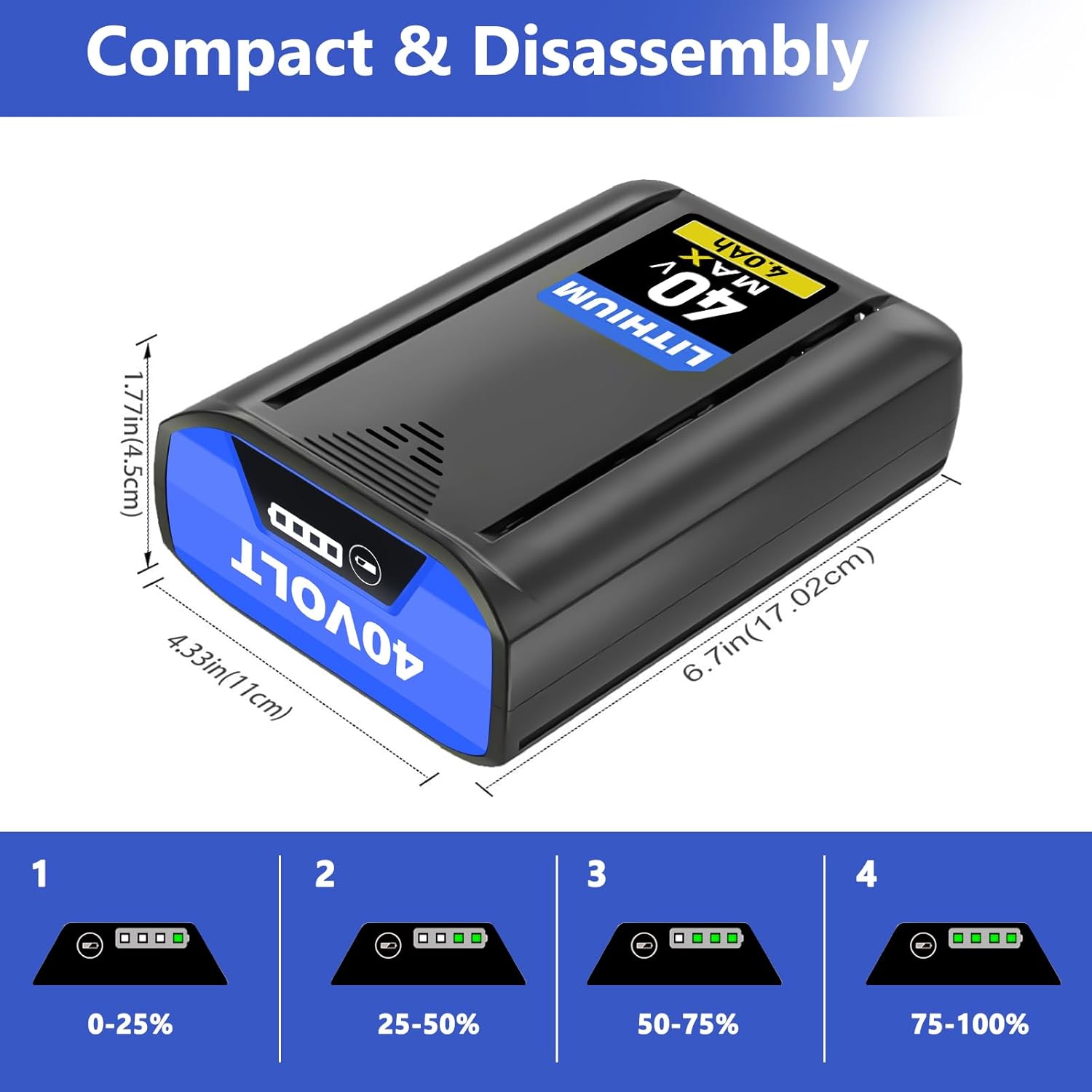
Figure 4.2: Battery LED Power Indicator. This image details the battery's LED indicator, showing how different numbers of illuminated lights correspond to the remaining charge percentage (0-25%, 25-50%, 50-75%, 75-100%).
5. Maintenance
5.1. Charging Practices
Unlike older battery technologies, this Lithium-ion battery has no memory effect. This means you can charge or discharge it at any time without worrying about losing capacity or reducing its overall lifespan. For optimal performance, it is recommended to fully charge the battery before each significant use.
5.2. Storage
When storing the battery for extended periods, ensure it is partially charged (around 50%). Store it in a cool, dry place, away from direct sunlight, extreme temperatures, and moisture. Avoid storing the battery in a completely discharged state, as this can lead to irreversible damage.
6. Troubleshooting
If you encounter issues with your ELECBRAiN battery, refer to the following table for common problems and solutions:
| Problem | Possible Cause | Solution |
|---|---|---|
| Battery not charging | Charger not plugged in; Faulty charger; Battery too hot/cold; Battery not seated correctly. | Ensure charger is properly connected. Try a different charger. Allow battery to reach room temperature. Re-seat battery firmly in charger. |
| Tool not powering on with battery | Battery not charged; Battery not seated correctly; Tool malfunction. | Charge the battery fully. Re-seat battery firmly in tool. Test with another known-good battery if available. Consult tool's manual. |
| Reduced runtime | Battery not fully charged; Battery nearing end of life; Extreme operating conditions. | Ensure battery is fully charged before use. Consider replacing battery if it's old. Avoid using in extremely hot or cold conditions. |
| LED indicator not working | Faulty LED; Battery completely discharged. | Attempt to charge the battery. If still unresponsive, contact customer support. |
7. Specifications
Key technical specifications for the ELECBRAiN 40V 4.0Ah Replacement Battery:
| Attribute | Value |
|---|---|
| Battery Type | Lithium-ion |
| Voltage | 40V |
| Capacity | 4.0Ah |
| Item Weight | 2.7 pounds (approx. 1.22 kg) |
| Package Dimensions | 7.05 x 4.8 x 2.44 inches (approx. 17.9 x 12.2 x 6.2 cm) |
| Compatible Chargers | Kobalt 40V Max lithium ion original chargers (e.g., KRC60-06, KRC40-06, KRC840-03) |
| Recommended Use | Cordless Power Tools |

Figure 7.1: Key Battery Specifications. This image visually confirms the battery type as Li-ion, its voltage as 40V, and its capacity as 4.0Ah, reinforcing the product's core specifications.
8. Warranty and Customer Support
ELECBRAiN stands behind the quality of its products. Your purchase includes:
- 30-Day Worry-Free Refund: If you are not satisfied with your purchase within 30 days, you may be eligible for a refund.
- 12 Months Free Replacement: The battery is covered by a 12-month free replacement policy for manufacturing defects.
- 7 x 24 Hours Email Support: For any questions, concerns, or issues, our customer support team is available via email around the clock.
To contact customer support, please use the "Ask a question" option on our storefront or the "contact seller" option within your order details.


