
1. Product Overview
The EWEADN G98 is a wired RGB gaming keyboard featuring a retro creamy membrane design with a media knob and a number pad. It offers a 98-key layout, providing essential functionality in a compact form factor. This keyboard is designed for compatibility with MAC, Xbox, and PC systems, catering to both gamers and general computer users.

Figure 1.1: The EWEADN G98 RGB Gaming Keyboard in Black & White, showcasing its full layout and RGB backlighting.

Figure 1.2: Key features of the EWEADN G98 membrane keyboard, including double-layer feet, 98-key layout, Type-C interface, PBT ball caps, RGB rainbow light, and MDA keycap height.
Key Features:
- Cream Keyboard with Number Pad: Equipped with dual-stage adjustable feet for comfortable typing angles (11° tilt). Ergonomic design reduces strain during long sessions.
- 2-in-1 Function Knob: A dedicated knob for backlit mode switching, brightness adjustment, and media control (previous song, next song, pause).
- Compact 96% Layout & Dual Color Keyboard: Full-function 98-key layout maximizes space efficiency while preserving essential keys.
- Cool RGB Backlit Keyboard: Features 16.8 million RGB light colors with customizable brightness for a personalized atmosphere.
- Ergonomic Design: Combines comfort, convenient design, and advanced features for enhanced typing, gaming, and productivity. Offers a stable wired connection.
- Smooth Typing Experience: Silent membrane keys provide a quiet typing feel. Round full ABS keycaps are durable and comfortable for fast typing or gaming.
2. Setup
The EWEADN G98 keyboard is designed for simple plug-and-play setup. No additional drivers are typically required for basic functionality on most operating systems.
2.1 Connecting the Keyboard
- Locate an available USB port on your computer (PC, Mac, or compatible device).
- Insert the USB connector of the EWEADN G98 keyboard into the USB port.
- The keyboard should be automatically recognized by your system, and the RGB backlighting will illuminate.

Figure 2.1: The EWEADN G98 keyboard connected via USB, illustrating its high-speed, lag-free connection.
2.2 Adjusting Keyboard Angle
The keyboard features dual-stage adjustable feet on its underside. Flip out these feet to set the keyboard to your preferred typing angle for enhanced ergonomic comfort.
3. Operating Instructions
3.1 Media Knob Functionality
The 2-in-1 function knob located on the top right of the keyboard provides convenient control over media and backlighting.
- Volume Control: Rotate the knob clockwise to increase volume, and counter-clockwise to decrease volume. Press the knob to mute/unmute audio.
- Media Playback: Use the three dedicated buttons next to the knob for quick access to previous song, next song, and play/pause functions.
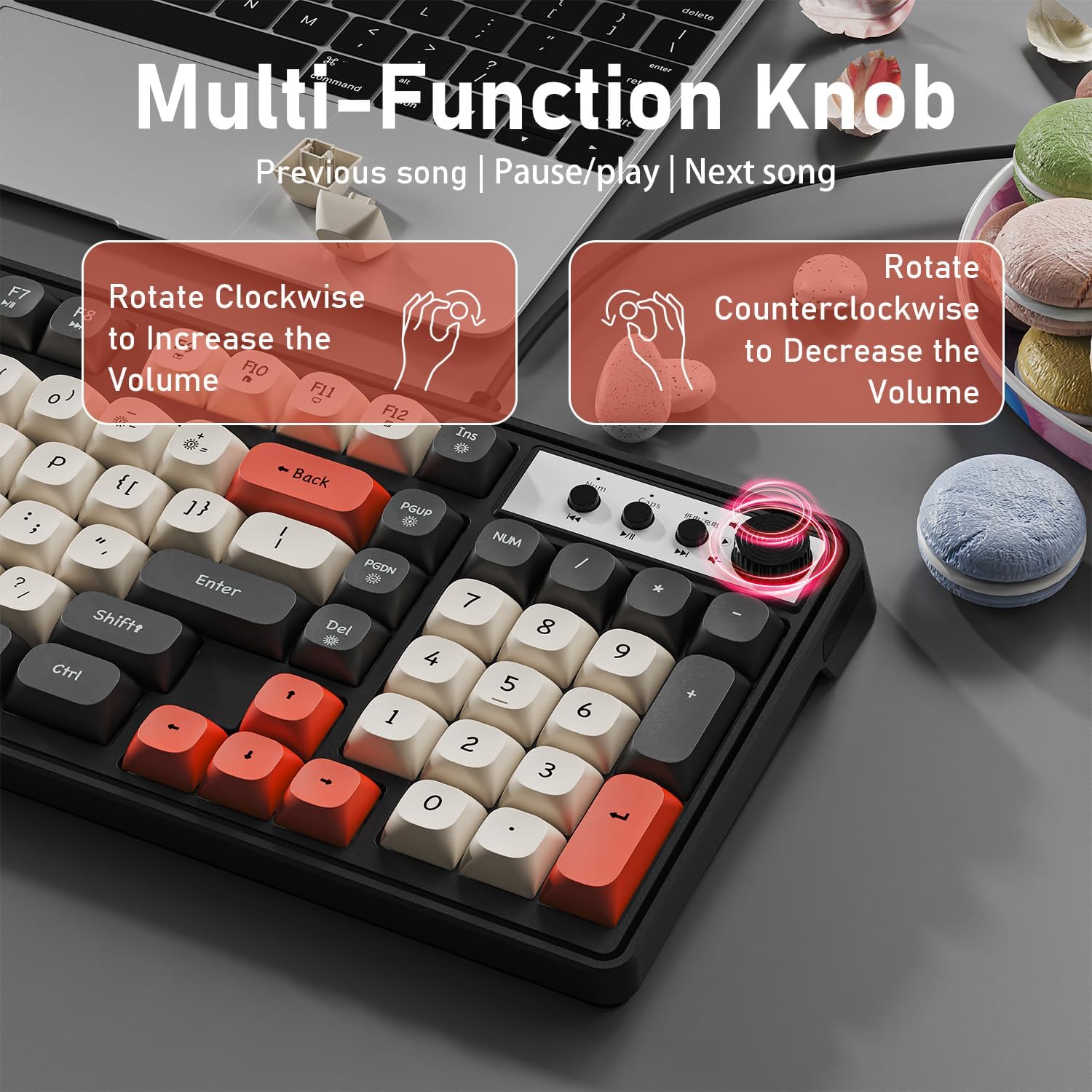
Figure 3.1: Detailed view of the multi-function knob and media control buttons, illustrating their use for volume and track navigation.
3.2 RGB Backlight Control
The EWEADN G98 keyboard features vibrant RGB backlighting with various customization options.
- Backlight On/Off: Press FN + INS to toggle the backlight on or off.
- Switch Light Modes: Press FN + DEL to cycle through different RGB lighting effects and modes.
- Adjust Brightness: Press FN + PGUP to increase brightness and FN + PGDN to decrease brightness.
- Adjust Light Speed: Press FN + - to slow down the lighting effect and FN + = to speed up the lighting effect.

Figure 3.2: Visual guide to RGB backlight control shortcuts using the FN key combinations.
3.3 N-Key Rollover
The keyboard supports N-key rollover, allowing multiple keys to be pressed simultaneously without ghosting or missed inputs. This feature is beneficial for fast typing and complex gaming commands.

Figure 3.3: Illustration of N-key rollover capability, ensuring accurate input even with multiple simultaneous key presses.
3.4 Multimedia Shortcut Keys
The EWEADN G98 includes 12 multimedia shortcut keys (F1-F12) for quick access to common functions, designed for uninterrupted gaming or working.

Figure 3.4: Overview of the 12 multimedia shortcut keys (F1-F12) for enhanced productivity and entertainment control.
3.5 Windows Key Lock
To prevent accidental interruptions during gaming, the keyboard allows you to lock the Windows key. Refer to the specific key combination in the included user manual for this function.
4. Maintenance
Proper maintenance ensures the longevity and optimal performance of your EWEADN G98 keyboard.
- Cleaning the Keycaps: Use a soft, lint-free cloth slightly dampened with water or a mild cleaning solution to wipe down the keycaps. Avoid excessive moisture.
- Removing Dust and Debris: Use compressed air to blow away dust and debris from between the keycaps. For deeper cleaning, keycaps can be carefully removed using a keycap puller (not included) to clean the membrane switches underneath.
- Cable Care: Avoid sharp bends or excessive pulling on the wired USB cable to prevent damage.
- Storage: When not in use for extended periods, store the keyboard in a clean, dry environment away from direct sunlight and extreme temperatures.
5. Troubleshooting
If you encounter issues with your EWEADN G98 keyboard, try the following troubleshooting steps:
- Keyboard Not Responding:
- Ensure the USB cable is securely plugged into both the keyboard and the computer's USB port.
- Try plugging the keyboard into a different USB port on your computer.
- Restart your computer.
- Backlight Not Working/Incorrect:
- Verify that the backlight is turned on using the FN + INS shortcut.
- Cycle through backlight modes (FN + DEL) and adjust brightness (FN + PGUP/PGDN).
- Ensure your computer's USB port is providing sufficient power.
- Keys Not Registering or Double-Typing:
- Clean the affected key(s) as described in the Maintenance section.
- Test the keyboard on another computer to determine if the issue is with the keyboard or the original system.
- Connection Loss (Intermittent):
- Ensure the USB cable is not damaged or kinked.
- Try a different USB port, preferably a direct port on the motherboard if using a desktop PC.
- Avoid using unpowered USB hubs if possible.
If these steps do not resolve the issue, please contact customer support.
6. Specifications
| Feature | Detail |
|---|---|
| Brand | SEUNKWANG |
| Model | G98 |
| Connectivity Technology | Wired |
| Keyboard Description | Gaming |
| Number of Keys | 98 |
| Keyboard Backlighting | RGB |
| Special Features | Backlit, Ergonomic, Lightweight, Silent, Quiet |
| Compatible Devices | Laptop, PC, Tablet |
| Item Weight | 1.67 pounds |
| Package Dimensions | 16.1 x 6.1 x 1.4 inches |
| Manufacturer | EWEADN |
| First Available Date | December 25, 2024 |
7. Warranty and Support
For warranty information or technical support regarding your EWEADN G98 keyboard, please use the following contact methods:
- Contact on Amazon: Visit the SEUNKWANG store on Amazon and click the "Ask a question" option to contact the seller directly.
- Email Support: You may also reach out via email at zack@eweadn.cn.

Figure 7.1: Contact details for SEUNKWANG support via Amazon and direct email.