
Introduction
The EZ EAR KBEAR KT01 replacement ear tips are designed to enhance your listening experience with wireless and wired earphones. Crafted from liquid silicone, these eartips offer a secure fit, supreme comfort, and effective ambient noise blocking. This manual provides instructions for proper installation, usage, and maintenance to ensure optimal performance.

Image: A set of KBEAR KT01 liquid silicone earbud tips in small, medium, and large sizes, showcasing their transparent design.
Key Features:
- Liquid Silicone Material: Offers good fluidity, high adhesion, and safety, providing a soft and skin-friendly touch.
- Enhanced Vocal Density: Designed to increase mid-frequency vocal density, enhancing vocal clarity and focus.
- Excellent Noise Reduction: The material and design ensure air tightness and surface viscosity, preventing sound leakage and blocking ambient noise.
- Secure and Comfortable Fit: Fully relaxes the ear canal, allowing for extended listening without discomfort.

Image: Close-up of KBEAR KT01 ear tips highlighting the liquid silicone material and its properties of good fluidity and high bonding degree.
Setup and Installation
Proper installation of the ear tips is crucial for comfort, sound quality, and noise isolation. Follow these steps to replace your earbud tips:
- Select the Correct Size: The KBEAR KT01 ear tips come in Small (S), Medium (M), and Large (L) sizes. Experiment with each size to find the one that provides the most comfortable and secure fit, along with the best sound seal. A good seal is essential for optimal bass response and noise isolation.
- Remove Existing Ear Tips: Gently grasp the current ear tip on your earphone and twist it slightly while pulling it off the earphone nozzle. Avoid excessive force to prevent damage to the earphone.
- Attach KBEAR KT01 Ear Tips: Align the opening of the KBEAR KT01 ear tip with the earphone nozzle. Push the ear tip onto the nozzle, twisting gently until it is fully seated and secure. Ensure the ear tip is not loose and does not easily come off.
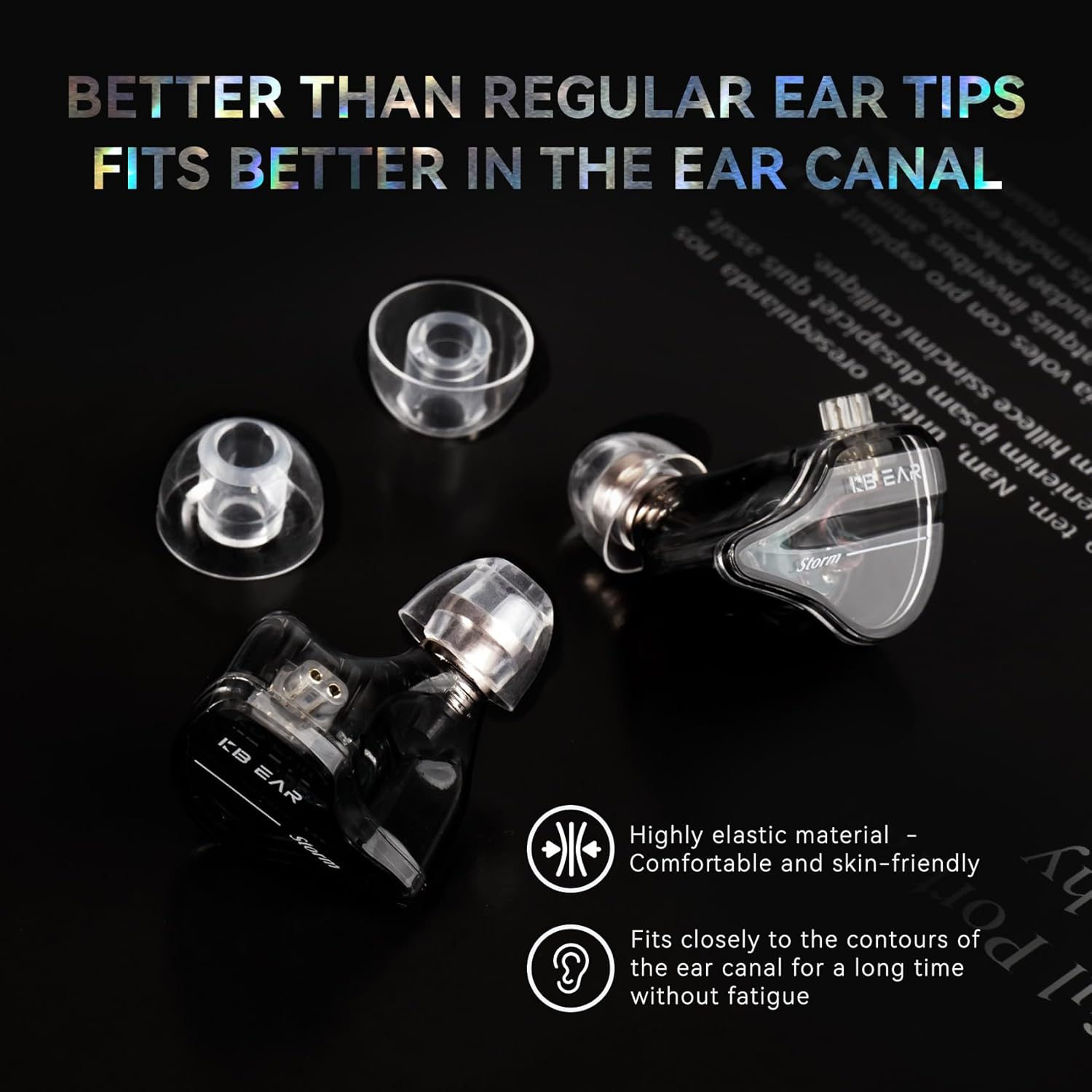
Image: KBEAR KT01 ear tips shown alongside an earphone, illustrating how they fit onto the earphone nozzle for a secure and comfortable fit.
Tip: If you experience difficulty achieving a good seal or comfort, try a different size. The goal is a snug fit that feels natural and blocks external sounds effectively.
Operating and Usage
Once installed, the KBEAR KT01 ear tips are ready for use. Their design focuses on providing an optimal listening experience through enhanced comfort and sound isolation.
- Achieving Optimal Seal: Gently insert the earphones into your ear canal. The liquid silicone material is designed to conform to your ear shape, creating an effective seal. This seal is crucial for experiencing the full bass response and the intended noise reduction capabilities of the ear tips.
- Comfort for Extended Listening: The soft, skin-friendly liquid silicone material minimizes pressure and irritation, allowing for comfortable wear during long listening sessions.
- Sound Enhancement: The design aims to increase vocal density and provide a cleaner soundstage. A proper seal ensures these acoustic benefits are fully realized.

Image: A diagram illustrating how the KBEAR KT01 ear tips contribute to clearer sound layers and a cleaner soundstage by increasing the diameter of the inner sound hole.

Image: A cross-section diagram of the KBEAR KT01 ear tip, highlighting its special design for good air tightness and a thickened tube wall for enhanced support, ensuring deep penetration into the ear canal without sound leakage.
Maintenance
To maintain hygiene and prolong the lifespan of your KBEAR KT01 ear tips, regular cleaning is recommended.
- Daily Cleaning: After each use, gently wipe the ear tips with a clean, dry, soft cloth to remove any earwax or debris.
- Deep Cleaning: If necessary, carefully remove the ear tips from your earphones. Wash them with mild soap and lukewarm water. Rinse thoroughly to remove all soap residue.
- Drying: Allow the ear tips to air dry completely before reattaching them to your earphones. Ensure no moisture remains inside the ear tips or on the earphone nozzle.
- Storage: When not in use, store the ear tips in a clean, dry place, preferably in their original case, to protect them from dust and damage.

Image: KBEAR KT01 liquid silicone ear tips displayed with their transparent storage case, emphasizing their skin-friendly material.
Troubleshooting
If you encounter issues with your KBEAR KT01 ear tips, consider the following common solutions:
| Problem | Possible Cause | Solution |
|---|---|---|
| Poor Sound Quality / Lack of Bass | Inadequate seal in the ear canal. |
|
| Ear Tips Keep Falling Out | Incorrect size or improper insertion. |
|
| Discomfort or Irritation | Incorrect size or prolonged use without breaks. |
|
Specifications

Image: A visual representation of the KBEAR KT01 ear tips specifications, including detailed dimensions for Small, Medium, and Large sizes.
| Feature | Detail |
|---|---|
| Brand | EZ EAR (KBEAR) |
| Model | KT01 |
| Material | Liquid Silicone |
| Sizes Included | Small (S), Medium (M), Large (L) |
| Color | White (also available in Black) |
| Product Dimensions (L x W x H) | 0.54 x 0.35 x 0.35 inches (approximate, for individual tip) |
| Item Weight | 0.353 ounces (total package) |
| Compatibility | Compatible with most wired and Bluetooth earphones. |
Warranty and Support
Specific warranty information for the KBEAR KT01 ear tips is not provided in this manual. For any product-related inquiries, support, or warranty claims, please contact the manufacturer or seller directly.
You may visit the EZ EAR Store on Amazon for more information or to contact their support.