
1. Introduction
Welcome to the Linsoul Kefine Klean In-Ear Monitors. These high-fidelity earphones are designed to provide a superior audio experience with their advanced 10mm DLC (Diamond-Like Carbon) diaphragm dynamic drivers. Featuring interchangeable nozzles for sound customization, a robust alloy housing, and a high-quality detachable silver-plated cable, the Kefine Klean offers exceptional sound clarity and comfort for audiophiles and gamers alike.
2. Package Contents
Please verify that all items listed below are included in your package:
- 1 x Kefine Klean Earphone (pair)
- 1 x Hard Carrying Case
- 1 x Pair of Interchangeable Nozzles (pre-installed or separate)
- 3 x Pairs of Black Eartips (sizes L/M/S)
- 1 x User Manual
- 1 x 0.78mm 2-Pin Detachable Silver-Plated Cable (3.5mm connector)
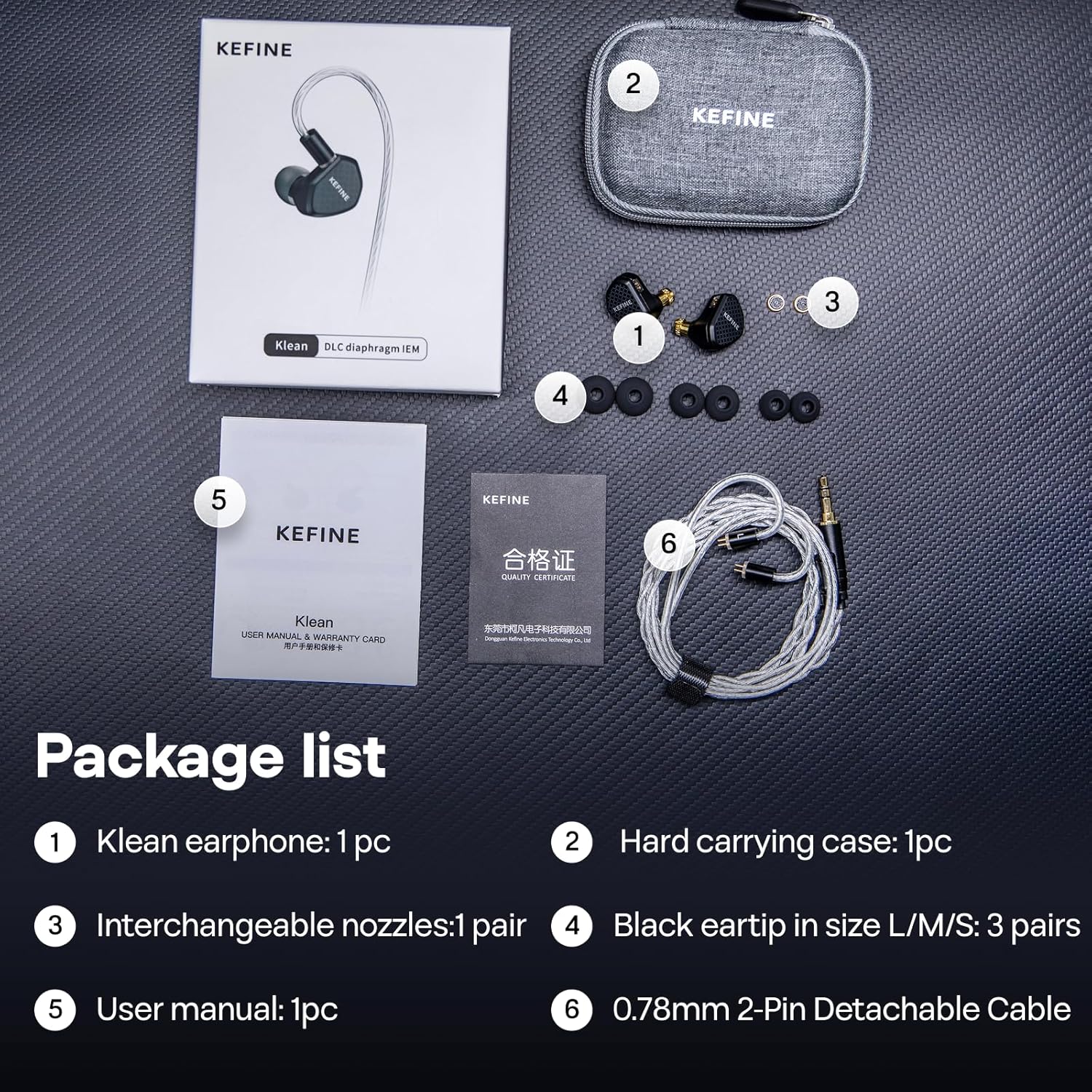
Image: Complete package contents of the Linsoul Kefine Klean In-Ear Monitors, showing the earphones, hard carrying case, detachable cable, various eartips, and user manual.
3. Setup
3.1 Attaching the Cable
- Identify the left (L) and right (R) earpieces and the corresponding connectors on the detachable cable. The cable connectors are typically marked with 'L' and 'R'.
- Align the 2-pin connector on the cable with the receptacle on the earpiece. Ensure the pins are correctly oriented.
- Gently push the cable connector into the earpiece until it is securely seated. Do not force it.
- Repeat for the other earpiece.

Image: The high-quality 0.78mm 2-pin detachable silver-plated copper cable, ready for connection to the earphones.
3.2 Selecting Ear Tips
The Kefine Klean comes with multiple sizes of silicone ear tips (L/M/S). Selecting the correct size is crucial for optimal sound quality and comfort.
- Experiment with different sizes to find the best fit for your ears. A good fit should create a seal that blocks out ambient noise and provides full bass response.
- To change an ear tip, gently pull the existing tip off the nozzle.
- Push the new ear tip onto the nozzle, ensuring it is fully seated and secure.
3.3 Interchanging Nozzles
The Kefine Klean features two interchangeable nozzles, allowing you to customize the sound signature:
- Silver Nozzle: Provides a warm, smooth sound profile.
- Black Nozzle: Delivers higher resolution with brighter, more transparent tones.
- To change a nozzle, gently unscrew the currently attached nozzle from the earpiece.
- Select your preferred nozzle (silver or black) and carefully screw it onto the earpiece until it is secure. Do not overtighten.

Image: The Linsoul Kefine Klean earphones showcasing the interchangeable silver and black nozzles, along with a graph illustrating their distinct frequency response curves.
4. Operating Instructions
4.1 Wearing the Earphones
The Kefine Klean earphones are designed for an ergonomic fit, contouring to the shape of your ear for comfort and stability.
- Insert the earpiece into your ear canal, ensuring a snug and comfortable fit.
- Route the cable over the top of your ear and down your back for a secure fit that minimizes microphonics (cable noise).

Image: A Linsoul Kefine Klean earphone properly seated in a human ear, highlighting its ergonomic design for comfortable and secure wearing.
4.2 Connecting to an Audio Source
Connect the 3.5mm audio jack of the cable to your desired audio source (e.g., smartphone, digital audio player, computer, gaming console).
4.3 Audio Playback
Once connected, begin audio playback from your device. Adjust the volume to a comfortable listening level. Avoid excessively high volumes to prevent hearing damage.
Video: An official Linsoul Audio video demonstrating the Kefine Klean In-Ear Monitors, showcasing their design and features.
5. Maintenance
5.1 Cleaning the Earphones
- Regularly clean the ear tips with a soft, damp cloth to remove earwax and debris. Ensure ear tips are completely dry before reattaching.
- Use a soft, dry cloth to wipe the earpiece housings. Avoid using harsh chemicals or abrasive materials.
- If the nozzles become clogged, gently clean them with a small brush or a specialized cleaning tool.
5.2 Cable Care
- Avoid sharp bends or excessive pulling on the cable to prevent internal damage.
- When not in use, coil the cable loosely and store it in the provided carrying case.
5.3 Storage
Store your Kefine Klean earphones in the provided hard carrying case when not in use to protect them from dust, moisture, and physical damage.
6. Troubleshooting
If you encounter any issues with your Linsoul Kefine Klean earphones, please refer to the following troubleshooting steps:
6.1 No Sound or Intermittent Sound
- Check Cable Connection: Ensure the 2-pin connectors on the earpieces and the 3.5mm jack are securely connected.
- Verify Audio Source: Confirm that your audio source is playing sound and its volume is turned up. Test with another audio device if possible.
- Inspect Cable: Check the cable for any visible damage or kinks. If the cable is damaged, consider replacing it with a compatible 0.78mm 2-pin cable.
- Clean Nozzles: Ensure the earphone nozzles are not blocked by earwax or debris. Clean them carefully if necessary.
6.2 Poor Sound Quality (e.g., lack of bass, muffled sound)
- Check Ear Tip Seal: Ensure you have a proper seal with the ear tips. Try different sizes to find the best fit. A poor seal can significantly impact bass response and overall sound quality.
- Nozzle Selection: Experiment with the silver and black interchangeable nozzles to see if a different sound profile improves your listening experience.
- Audio Source Quality: Ensure the audio files or streaming quality from your source device are high-resolution.
6.3 Uncomfortable Fit
- Try Different Ear Tips: Use the included ear tips in various sizes (L/M/S) to find the most comfortable and secure fit.
- Adjust Cable Over-Ear: Ensure the cable is correctly routed over your ear to provide stability and reduce pressure points.
7. Specifications
| Feature | Detail |
|---|---|
| Model Name | Kefine Klean |
| Brand | Linsoul |
| Driver Type | 10mm DLC Diaphragm Dynamic Driver |
| Connectivity Technology | Wired |
| Headphones Jack | 3.5 mm Jack |
| Impedance | 32 Ohms |
| Sensitivity | 107 dB |
| Noise Control | Passive Noise Cancellation |
| Special Features | Detachable Cable, Interchangeable Nozzles, Durable Construction, Ergonomic Design |
| Material | Plastic (housing is alloy casting) |
| Item Weight | 6.7 ounces (0.19 Kilograms) |
| Compatible Devices | Cellphones, Gaming, Laptops |
8. Warranty and Support
8.1 Warranty Information
Linsoul products are typically covered by a manufacturer's warranty against defects in materials and workmanship. Please refer to the warranty card included in your package or contact Linsoul customer support for specific warranty terms and conditions, including duration and coverage details.
8.2 Customer Support
For further assistance, technical support, or warranty claims, please contact Linsoul customer service through their official website or the retailer where you purchased the product. Have your product model and purchase date ready when contacting support.
You can visit the Linsoul Store for more information: Linsoul Official Store