
LIGE FV6-B
LIGE Smart Watch User Manual
Model: FV6-B
1. Introduction
Thank you for choosing the LIGE Smart Watch. This device is designed to enhance your daily life with its advanced features, including a 1.85-inch IPS touch screen, fitness tracking capabilities, flashlight, IP68 waterproof rating, and extensive sport modes. It offers 24/7 monitoring of sleep and heart rate, and is compatible with both Android and iOS devices. This manual provides essential information for setup, operation, and maintenance of your new smartwatch.
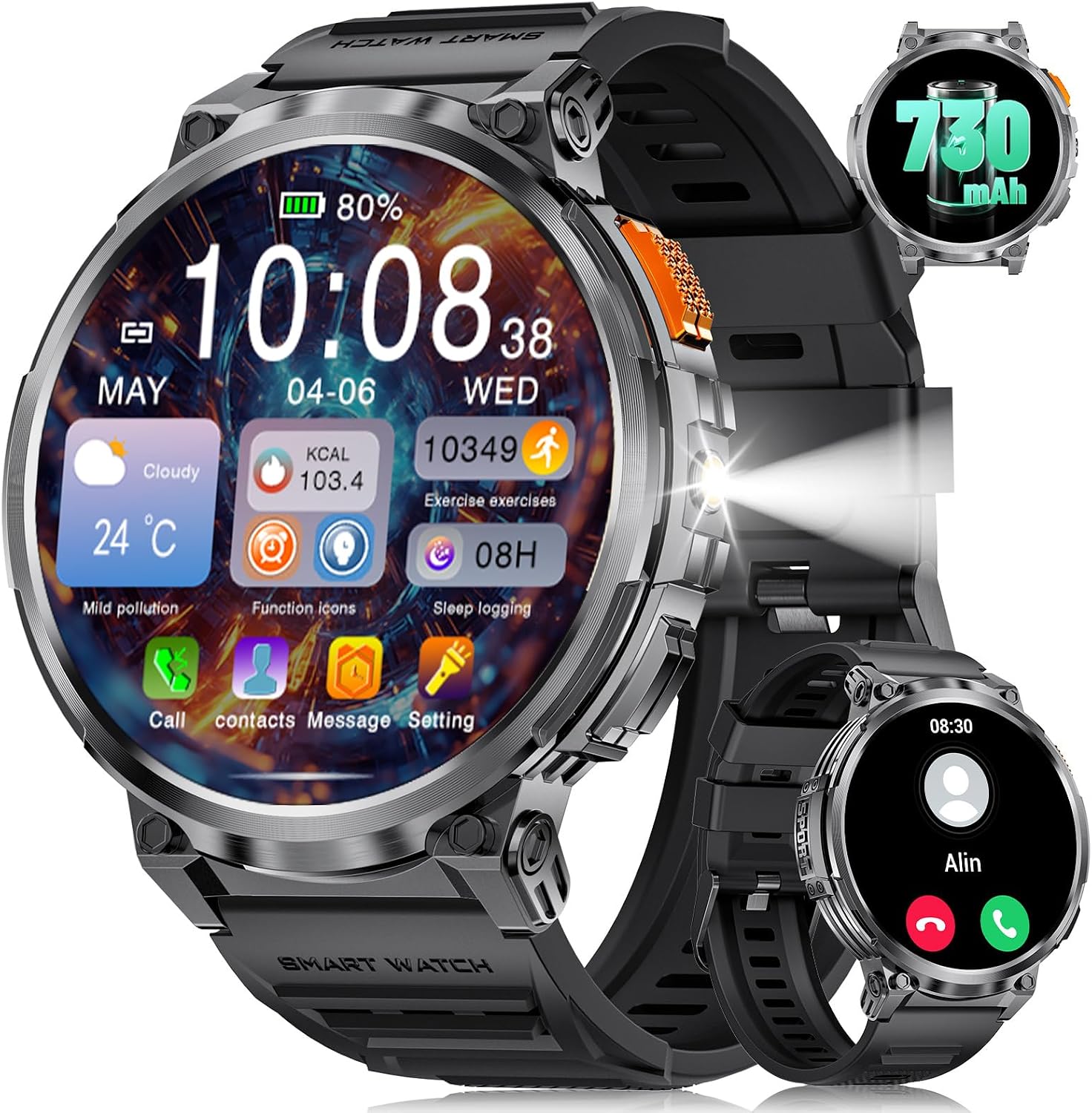
The LIGE Smart Watch, featuring a large 1.85-inch display, shows various health and activity metrics.
2. Setup
2.1 Charging the Device
Before first use, fully charge your LIGE Smart Watch.
- Connect the magnetic charging cable to the charging points on the back of the watch.
- Plug the USB end of the cable into a standard USB power adapter (e.g., 5V/1A) or a computer USB port.
- A full charge typically takes approximately 2 hours.
- Ensure the charging contacts are clean and dry before charging to prevent corrosion.
This video demonstrates the magnetic fast charging feature of the LIGE Smart Watch, which takes approximately 2 hours for a full charge.
2.2 App Installation and Pairing
To unlock the full potential of your LIGE Smart Watch, download and install the companion app, "FitCloudPro," on your smartphone.
- Scan the QR code in the watch's manual or search for "FitCloudPro" in your smartphone's app store (Google Play Store for Android, Apple App Store for iOS).
- Install the app and open it.
- Enable Bluetooth on your smartphone.
- In the FitCloudPro app, navigate to the "Device" or "My Device" section and select "Add Device."
- The app will scan for available devices. Select "FV6-B" or the corresponding device name for your LIGE Smart Watch.
- Confirm the pairing request on both your watch and smartphone.
- Once paired, ensure all necessary permissions are granted to the app for full functionality (e.g., notifications, location, health data).
3. Operating the Smart Watch
3.1 Basic Navigation
- Touch Screen: Swipe left/right, up/down to navigate through menus and features. Tap to select.
- Side Button: Press to wake the screen, return to the home screen, or access the app list. Long press for power options.
3.2 Key Features
Bluetooth Calling
Make and receive calls directly from your watch when connected to your smartphone via Bluetooth. The watch features a built-in microphone and speaker.

The watch supports Bluetooth calling, allowing you to dial numbers and receive calls directly from your wrist. It also displays message notifications from various apps.
LED Flashlight
Activate the integrated LED flashlight for convenience in low-light conditions.

The watch includes a strong LED flashlight, useful for various situations such as outdoor activities at night, during power outages, or when searching for items.
Sport Modes
The watch offers over 120 sport modes to track your workouts, including running, cycling, climbing, basketball, swimming, football, tennis, baseball, and rugby.

Track your performance across 120+ sport modes, including heart rate, distance, time, steps, and calories burned.
Health Monitoring
Monitor your vital health metrics in real-time.
- Heart Rate: Continuous heart rate monitoring.
- Blood Pressure: Provides blood pressure readings. Note: This feature is for reference only and should not be used for medical diagnosis.
- Blood Oxygen (SpO2): Measures blood oxygen saturation levels. Note: This feature is for reference only and should not be used for medical diagnosis.
- Sleep Tracking: Monitors your sleep patterns, including deep sleep, light sleep, and awake times.

The watch provides real-time monitoring of heart rate, blood oxygen, and blood pressure.

Real-time sleep monitoring tracks your sleep quality, recording deep and light sleep, and providing detailed data through the app.
Other Functions
The LIGE Smart Watch includes various other useful features:
- Music Control: Control music playback on your smartphone.
- Remote Camera Control: Use your watch as a remote shutter for your phone's camera.
- Weather Forecast: Get 7-day weather forecasts.
- Alarm Clock: Set alarms directly from your watch.
- Find Phone: Locate your misplaced phone by making it ring.
- Sedentary Reminder: Reminds you to move after periods of inactivity.
- Drink Water Reminder: Prompts you to stay hydrated.
- Customizable Dials: Choose from over 150 watch faces or create your own.

The watch offers a multifunctional interface with features such as weather updates, camera and music controls, alarm clock, and find phone.
4. Maintenance
4.1 Cleaning
Regularly clean your smartwatch to ensure optimal performance and hygiene.
- Wipe the screen and watch body with a soft, lint-free cloth.
- For stubborn smudges, slightly dampen the cloth with water. Avoid using harsh chemicals or abrasive materials.
- Clean the charging contacts and heart rate sensor regularly to ensure accurate readings and efficient charging.
4.2 Water Resistance (IP68)
The LIGE Smart Watch has an IP68 waterproof rating, meaning it is resistant to dust and can withstand immersion in water up to 1.5 meters for up to 30 minutes.
- It is suitable for daily use, such as hand washing, rain, and shallow swimming.
- Avoid hot water, saunas, or diving, as steam and high pressure can compromise the waterproof seals.
- Do not operate the watch buttons underwater.
- If the watch gets wet, wipe it dry before charging or operating.

The watch is IP68 waterproof, making it suitable for various activities including swimming.
5. Troubleshooting
If you encounter issues with your LIGE Smart Watch, refer to the following common solutions:
5.1 Watch Won't Turn On
- Charge the watch using the provided cable for at least 10 minutes.
- If it doesn’t turn on, press and hold the side button for 10 seconds to force a restart.
- Ensure it is fully charged for 2.5 hours.
5.2 Watch Stopped Working Suddenly
- Restart the watch by pressing and holding the side button for 10 seconds.
- Ensure the watch is charged sufficiently.
- If the problem continues, reset the watch via Settings > System > Reset.
5.3 App Connectivity Issues
- Ensure Bluetooth is enabled on your phone and the watch is within range.
- Restart both your phone and the watch.
- Check if the FitCloudPro app is updated to the latest version.
- If issues persist, try unpairing and re-pairing the watch through the app.
5.4 Inaccurate Health Readings
- Ensure the watch is worn snugly on your wrist, not too tight or too loose.
- Clean the sensor on the back of the watch.
- Avoid excessive movement during measurements.
- Remember that health monitoring features are for reference and not medical devices.
6. Specifications
| Feature | Detail |
|---|---|
| Model Number | FV6-B |
| Brand | LIGE |
| Screen Size | 1.85 Inches |
| Display Type | IPS LCD |
| Resolution | 360 x 360 |
| Battery Capacity | 730 mAh (Ultra-large battery) |
| Battery Life (Heavy Usage) | Up to 7 days |
| Battery Life (Daily Usage) | 14+ days |
| Battery Life (Low-battery Mode) | 100+ days |
| Charging Time | Approx. 2 hours (Magnetic Fast Charging) |
| Water Resistance | IP68 |
| Wireless Communication | Bluetooth |
| Compatible Devices | Smartphone (Android, iOS) |
| Band Material Type | Silicone |
| Item Weight | 7 ounces |
| Package Dimensions | 8.11 x 3.78 x 1.06 inches |
7. Warranty and Support
For warranty information and technical support, please refer to the documentation included with your product packaging or visit the official LIGE website. If you encounter persistent issues not covered in this manual, you may also contact the seller directly through the platform where you purchased the product.
Contact Information:
Please refer to your product packaging or the LIGE official website for the most up-to-date contact details for customer service.
Related documentsFV6-B


Ask a question about this manual
Ask about setup, troubleshooting, compatibility, parts, safety, or missing instructions. Manuals+ will review the question and use this page’s manual context to help answer it.