
1. Product Overview
The Moondrop Edge is a Hi-Fi portable wireless headphone featuring Active Noise Cancellation (ANC). It is designed for high-resolution audio transmission and comfortable wear, suitable for various listening environments.

Image 1.1: Moondrop Edge Hi-Fi Portable Wireless ANC Headphone (Grey).
Package Contents
Ensure all items are present in the package:
- Moondrop Edge Headphones
- Storage Bag
- Charging Cable (USB-C)
- User Manual (this document)
- Certificate
- After-sales Card
- APP QR Code Card

Image 1.2: Product Information and Packaging List.
2. Setup
2.1 Charging the Headphones
Before first use, fully charge the headphones. Use the provided USB-C charging cable.
- Connect the USB-C end of the cable to the charging port on the headphone.
- Connect the USB-A end to a compatible USB power source (e.g., computer, wall adapter).
- A full charge takes approximately 1.5 hours.
- A 5-minute charge can provide up to 4 hours of music playback.
- The headphones offer up to 48 hours of continuous music playback on a full charge.

Image 2.1: Battery life and fast charging capabilities.
2.2 Bluetooth Pairing
To connect your Moondrop Edge headphones to a device:
- Ensure the headphones are powered off.
- Press and hold the power button until the indicator light flashes, indicating pairing mode.
- On your device (smartphone, tablet, laptop), enable Bluetooth and search for available devices.
- Select "Moondrop Edge" from the list of found devices.
- Once connected, the indicator light will change to a steady blue or turn off, depending on the model.
The Moondrop Edge supports Bluetooth 5.4 and high-resolution audio codecs like LDAC and AAC for optimal sound quality with compatible devices.

Image 2.2: LDAC high-resolution audio support.
2.3 Dual Device Connection
The headphones support simultaneous connection to two devices:
- Pair the headphones with the first device as described above.
- Disconnect Bluetooth on the first device temporarily.
- Put the headphones back into pairing mode and pair with the second device.
- Reconnect Bluetooth on the first device. The headphones should now be connected to both devices, allowing seamless switching between audio sources.

Image 2.3: Dual device connection capability.
3. Operating Instructions
3.1 Controls Overview
The Moondrop Edge headphones feature touch controls and physical buttons for various functions. Refer to the diagram below for button locations.
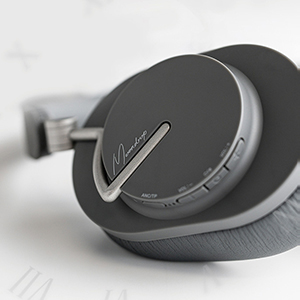
Image 3.1: Headphone control buttons.
3.2 Power On/Off
- Power On: Press and hold the power button until the indicator light illuminates.
- Power Off: Press and hold the power button until the indicator light turns off.
3.3 Active Noise Cancellation (ANC) and Transparency Mode
The headphones feature Hybrid ANC with four noise-canceling microphones for effective noise reduction. They also offer a transparent transmission mode.
- Switch Modes: Press the dedicated ANC button to cycle between ANC On, Transparency Mode, and ANC Off.
- Transparency Mode: Allows you to hear your surroundings without removing the headphones, useful for conversations or environmental awareness.
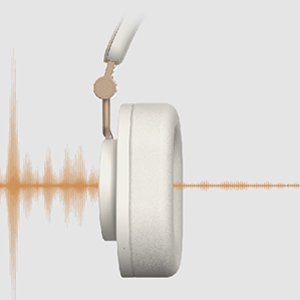
Image 3.2: Transparency transmission mode.
3.4 Music Playback and Call Management
Use the touch controls and buttons for audio and call functions:
- Play/Pause: Single tap the touch panel.
- Volume Up/Down: Use the volume buttons.
- Next Track: Double tap the touch panel.
- Previous Track: Triple tap the touch panel.
- Answer/End Call: Single tap the touch panel during an incoming call.
- Reject Call: Press and hold the touch panel during an incoming call.
The integrated beamforming ENC microphones enhance call clarity by reducing background noise.

Image 3.3: Beamforming ENC for crystal-clear calls.
3.5 Moondrop Link App
Download the Moondrop Link app for additional features and customization, including sound tuning presets and firmware updates. Refer to the APP QR Code Card in your package for download instructions.
4. Maintenance
4.1 Cleaning
- Wipe the headphones with a soft, dry, lint-free cloth.
- Do not use abrasive cleaners, alcohol, or chemical solvents.
- Keep moisture out of openings.
4.2 Storage
When not in use, store the headphones in the provided storage bag to protect them from dust and scratches. The foldable design allows for compact storage.
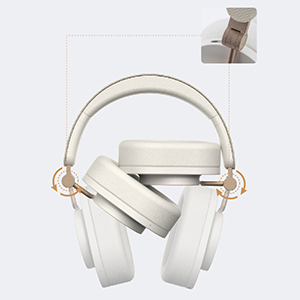
Image 4.1: Foldable design for portability and storage.
4.3 Battery Care
- Avoid fully discharging the battery frequently.
- Store the headphones with a partial charge if not used for extended periods.
- Avoid extreme temperatures, which can affect battery life.
4.4 Ear Pads
The ear pads are designed for comfort. Please note that they are not easily replaceable. Handle with care to ensure longevity.
5. Troubleshooting
If you encounter issues with your Moondrop Edge headphones, refer to the following common solutions:
- No Power: Ensure the headphones are fully charged.
- Cannot Pair: Ensure Bluetooth is enabled on your device and the headphones are in pairing mode. Try turning Bluetooth off and on again on your device.
- No Sound: Check the volume level on both the headphones and your connected device. Ensure the headphones are correctly paired.
- Poor Sound Quality: Ensure your device supports LDAC for high-resolution audio. Move closer to your device to avoid interference. Check for firmware updates via the Moondrop Link app.
- ANC Not Effective: Ensure the ear pads form a good seal around your ears. Cycle through ANC modes to ensure it is active.
- Call Quality Issues: Ensure the microphones are not obstructed. Check for firmware updates.
- Buttons Unresponsive: Restart the headphones.
For further assistance, consult the Moondrop Link app or the official Moondrop support channels.
6. Specifications
| Feature | Specification |
|---|---|
| Product Name | MOONDROP Edge High-Fidelity Portable Wireless ANC Headphone |
| Model Name | EDGE |
| Bluetooth Version | 5.4 |
| Connectivity Technology | Wireless (Bluetooth) |
| Wireless Communication Technology | Bluetooth, LDAC, AAC |
| Audio Driver Type | Dynamic Driver (40mm low-distortion with beryllium-plated dome) |
| Frequency Range | 20 Hz - 20,000 Hz |
| Noise Control | Hybrid Noise Cancellation |
| Microphones | Four highly sensitive noise-canceling microphones, Beamforming ENC |
| Battery Life | Up to 48 Hours (continuous music playback) |
| Charging Time | Approx. 1.5 Hours |
| Charging Port | USB-C |
| Fast Charge | 5 minutes charge for 4 hours playback |
| Working Distance | Over 10m (unobstructed open environment) |
| Control Method | Touch |
| Ear Placement | Over Ear |
| Form Factor | On Ear |
| Item Weight | 0.82 Kilograms (1.8 pounds) |
| Water Resistance Level | Not Water Resistant |
| Compatible Devices | Smartphones, Tablets, Laptops, Bluetooth-enabled Devices |
7. Warranty and Support
Moondrop products are covered by a limited warranty. For specific warranty terms, duration, and claim procedures, please refer to the After-sales Card included in your package or visit the official Moondrop website. Keep your proof of purchase for warranty service.
Customer Support
For technical support, product inquiries, or service requests, please contact Moondrop customer support through their official website or the contact information provided on the After-sales Card.
