
1. Important Safety Information
Please read all instructions carefully before using this appliance to ensure safe and effective operation. Keep this manual for future reference.
- Use with caution on sensitive skin. If irritation occurs, discontinue use.
- Keep the appliance out of reach of children.
- Do not use this appliance near water sources such as bathtubs, showers, or sinks.
- Follow all cleaning and maintenance instructions provided in this manual.
- This appliance is not intended for use by children or infants.
2. Product Overview
The Braun AIO7565 All-in-One 13-in-1 Trimmer Kit is designed for comprehensive grooming of the face, head, and body. It features a versatile set of tools for precise trimming and styling.
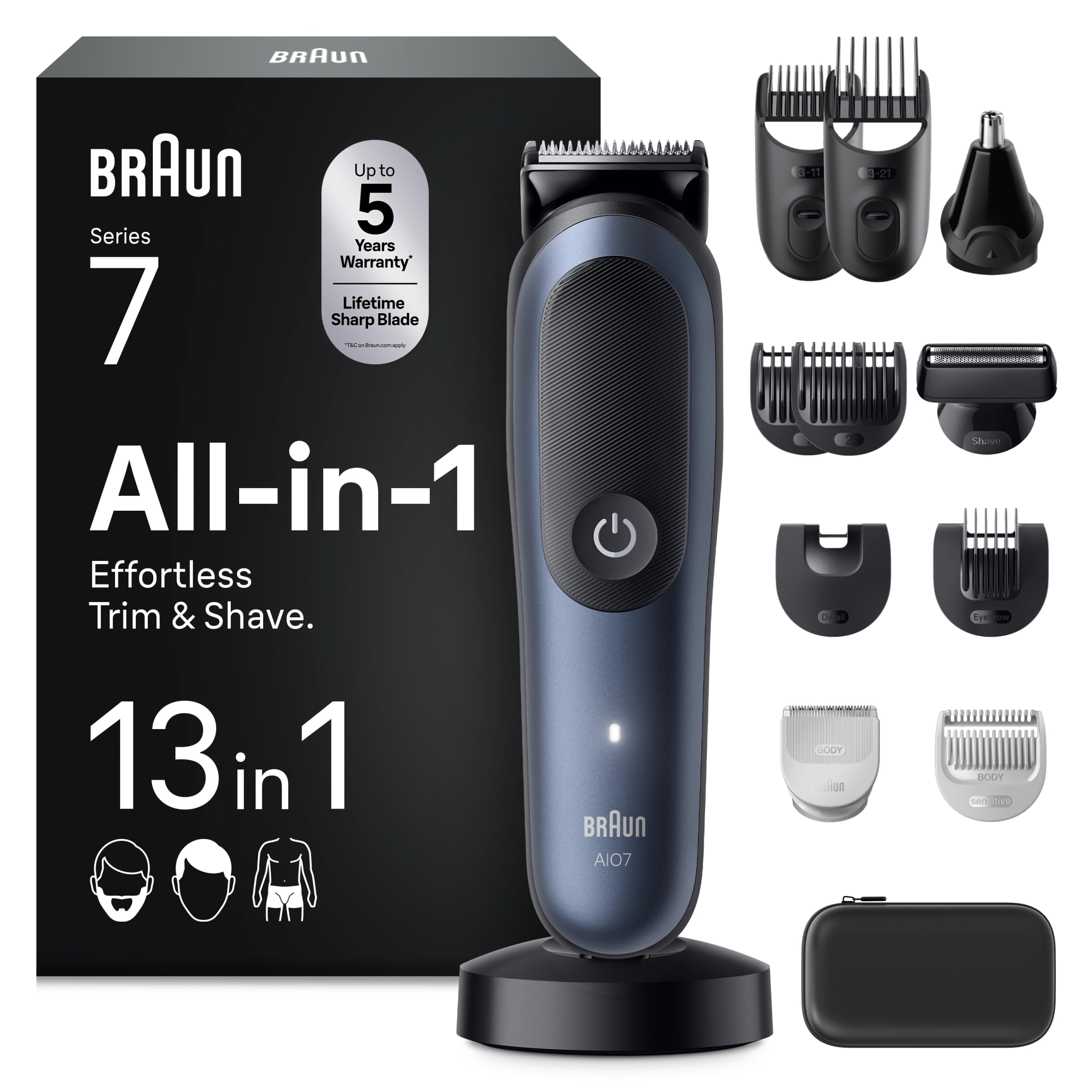
Image: The Braun AIO7565 All-in-One 13-in-1 Trimmer Kit with its various attachments.
Key Features:
- 13-in-1 Grooming System: Includes tools for beard, ear, nose, hair, and body grooming.
- ProBlade Ultra-Sharp Blade: Ensures precise and efficient trimming.
- AutoSense Technology: Adapts to beard density for consistent power.
- Precision Shaving Head: For clean shaves and defined contours.
- 14 Length Settings: Adjustable combs for lengths from 3 mm to 21 mm.
- SkinGuard Technology: Provides safety and comfort, especially for sensitive body areas.
- 100% Waterproof: Allows for use in the shower and easy cleaning with AquaGrip for control.
- Li-ion Battery: Offers up to 120 minutes of cordless runtime on a full charge.
Included Components:

Image: Visual representation of the 13 included attachments and their functions.
- 1 Trimmer Handle
- 7 Comb Attachments (various lengths)
- 1 Ear and Nose Trimmer Head
- 1 SkinGuard Trimmer Head
- 1 Precision Shaving Head
- 1 Charging Station
- 1 Cleaning Brush
- 1 Storage Pouch
3. Setup and Charging
Initial Charging:
- Before first use, fully charge the trimmer for approximately 1 hour. This provides up to 120 minutes of cordless trimming.
- Connect the charging cord to the trimmer and plug it into a power outlet.
- The charging indicator light will show the charging status. It will typically turn solid when fully charged.
Attaching and Removing Trimmer Heads/Combs:
- To attach a trimmer head, align it with the trimmer body and press firmly until it clicks into place.
- To remove a trimmer head, pull it upwards away from the trimmer body.
- To attach a comb attachment, slide it onto the desired trimmer head until it locks.
- To remove a comb attachment, gently slide it off the trimmer head.
4. Operating Instructions
The Braun AIO7565 offers various attachments for different grooming needs. Ensure the trimmer is charged before use.

Image: Demonstrates the versatility of the trimmer for beard, body, hair, and face.
4.1. Beard Trimming and Styling
- Attach the desired beard comb (3-21mm) to the main trimmer head.
- Select your preferred length setting.
- Trim your beard against the direction of hair growth for an even cut.
- For precise lines and edges, remove the comb and use the main trimmer head directly.

Image: A man using the precision shaving head to achieve a clean and precise shave on the neck area.
4.2. Body Grooming
- Attach the SkinGuard trimmer head or the sensitive comb attachment for body hair.
- Move the trimmer gently over the skin, ensuring even contact.
- The SkinGuard technology is designed for maximum safety and comfort on sensitive areas.

Image: A man using the sensitive comb attachment on his abdomen for gentle trimming.
4.3. Hair Clipping
- Attach the hair comb attachments (longer lengths) to the main trimmer head.
- Select the desired hair length.
- Guide the trimmer through your hair, working from the front to the back and sides.
4.4. Ear and Nose Trimming
- Attach the dedicated ear and nose trimmer head.
- Gently insert the trimmer tip into your nostril or ear canal.
- Move it in a circular motion to trim unwanted hair.

Image: A man using the ear and nose hair trimmer to trim nose hair.
5. Maintenance and Cleaning
Regular cleaning ensures optimal performance and extends the life of your trimmer.
Cleaning the Trimmer Heads and Combs:
- After each use, turn off the trimmer and detach the head and comb.
- Use the provided cleaning brush to remove any loose hairs from the blades and combs.
- Since the trimmer is 100% waterproof, you can rinse the trimmer head and combs under running water.
- Allow all parts to air dry completely before reattaching or storing.
Lubrication:
Periodically, apply a drop of light machine oil (not included) to the trimmer blades to maintain cutting performance.
Storage:
Store the trimmer and its accessories in the provided storage pouch in a dry place, away from direct sunlight and extreme temperatures.
6. Troubleshooting
| Problem | Possible Cause | Solution |
|---|---|---|
| Trimmer does not turn on. | Battery is depleted. | Charge the trimmer fully. |
| Poor trimming performance. | Blades are clogged with hair or not lubricated. | Clean the trimmer head and blades thoroughly. Apply a drop of oil to the blades. |
| Trimmer pulls hair. | Blades are dull or clogged. Trimmer is not fully charged. | Clean and lubricate blades. Ensure trimmer is fully charged. Replace head if blades are dull. |
| Trimmer makes unusual noise. | Foreign object in the head or motor issue. | Turn off and inspect the head for obstructions. If noise persists, contact customer support. |
7. Specifications
| Feature | Detail |
|---|---|
| Model Number | AIO7565 (7500435245005) |
| Power Source | Rechargeable Li-ion Battery |
| Runtime | Up to 120 minutes (cordless) |
| Charging Time | Approx. 1 hour for full charge |
| Dimensions (L x W x H) | 16 x 8 x 25.2 cm |
| Weight | 533 grams |
| Color | Blue |
| Blade Material | Stainless Steel (ProBlade) |
| Waterproof | Yes (100% waterproof) |
| Minimum Cutting Length | 3 mm |
| Maximum Cutting Length | 21 mm |
| Country of Origin | China |
8. Warranty and Support
For warranty information or technical support, please refer to the warranty card included with your product or contact Braun customer service.
Manufacturer Contact: Procter & Gamble UK, Weybridge, Surrey, KT13 0XP
You can also visit the official Braun website for more information and support resources.


