
Introduction
This manual provides detailed instructions for the setup, operation, and maintenance of your ZUMIMALL BK05 3MP Outdoor Wired PTZ Security Camera. This camera offers advanced features including 24/7 recording, AI motion detection, 2-way audio, and compatibility with Alexa and Google Assistant, ensuring comprehensive surveillance for your property.

Figure 1: ZUMIMALL BK05 5G Security Camera overview.
What's in the Box
Verify that all components are present in your package:
- Camera (2 units for 2-Pack)
- Power Cord (2 units for 2-Pack)
- Adapter (2 units for 2-Pack)
- Screw Set (2 sets for 2-Pack)
- Instruction Manual
- Warning Card (2 units for 2-Pack)
- Positioning Sticker (2 units for 2-Pack)
Video 1: Unboxing the ZUMIMALL BK05 camera and its accessories.
Setup Instructions
1. Powering On the Camera
- Connect the camera to the power cord and adapter. Ensure the waterproof plug is tightened securely.
- Plug the adapter into a power outlet.
- Wait for the camera to beep and the red indicator light to flash slowly, indicating it is ready for connection.
Video 2: Guide on how to connect the camera to Wi-Fi using the ZUMIMALL app.
2. App Download and Wi-Fi Connection
- Download the ZUMIMALL app from the App Store (iOS) or Google Play Store (Android).
- Open the app and create an account or log in.
- Click 'Add Device' and select 'Constant current camera' then 'BK05'.
- Follow the on-screen instructions to connect the camera to your 2.4GHz or 5GHz Wi-Fi network. Ensure you enter the correct Wi-Fi password.
- Scan the QR code displayed on your phone with the camera lens. A beep will confirm successful scanning.
- The camera will then connect to your Wi-Fi network.
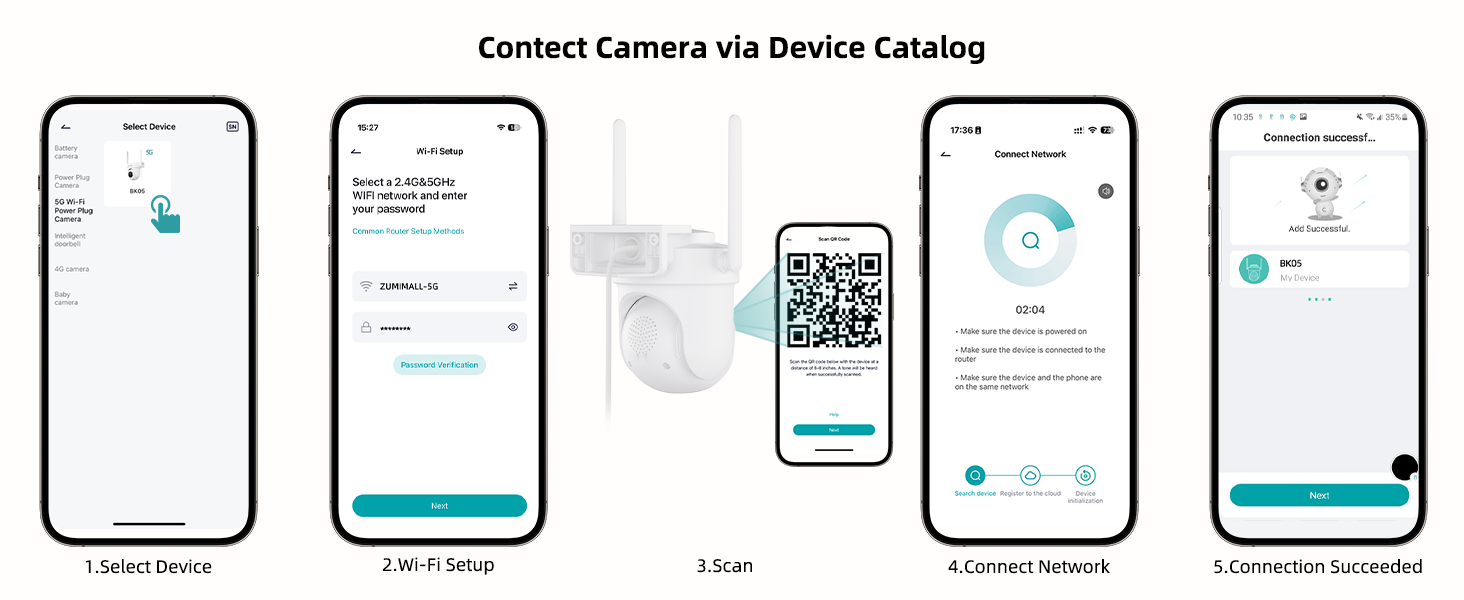
Figure 2: Steps to connect the camera to Wi-Fi using the ZUMIMALL app and QR code scanning.
3. Mounting the Camera
The ZUMIMALL BK05 camera supports both wall and ceiling mounting. Use the included sticker and screw set to mark the installation location.

Figure 3: Illustration of wall and ceiling mounting options for the camera.
Operating Instructions
1. PTZ and Auto-Tracking
The camera offers 90° vertical and 355° horizontal rotation, providing 360° blind-spot-free monitoring. It can automatically track moving targets, recording activity and sending real-time app alerts.

Figure 4: The camera's 360° auto-tracking capability.
2. Motion Detection and Alerts
The camera features AI motion detection, distinguishing between humans, pets, cars, and packages. Customize detection sensitivity and set specific alarm zones to reduce false notifications. Real-time alerts are sent to your app when motion is detected.

Figure 5: Intelligent AI detection capabilities of the camera.
3. 2K Color Night Vision
Equipped with a built-in floodlight, the camera provides 33ft color night vision in 3MP 2K resolution, ensuring clear and vivid images even in low-light conditions.

Figure 6: The camera's 2K color night vision in action.
4. Two-Way Audio
The built-in microphone and speaker enable real-time two-way communication, allowing you to interact with visitors or deter intruders.

Figure 7: Demonstrating the two-way audio functionality.
5. 24/7 Continuous Recording and Storage
Powered by a 3-meter plug-in cord, the camera supports 24/7 continuous recording. Footage can be stored on a Micro SD card (up to 128GB, not included) or via premium cloud storage options. Old footage is automatically overwritten when storage is full.

Figure 8: The camera's 24/7 continuous recording capability.
6. Alexa and Google Assistant Integration
The camera is compatible with Amazon Alexa and Google Assistant, allowing for voice control and seamless integration into your smart home ecosystem. Ensure the camera is added to the ZUMIMALL app first, then enable the 'Zumimall' skill in your Alexa app.

Figure 9: The camera's integration with voice assistants.
Maintenance
IP66 Weatherproof Rating
The camera is IP66-rated, making it suitable for all-weather use in temperatures ranging from -20°C to 50°C. The Type-C cable connector is also waterproof. For optimal waterproof performance and normal feed display, avoid installing the camera upside down.
Troubleshooting
Resetting the Camera
If you encounter issues, you may need to reset the camera. Ensure the device is powered on. Open the rubber stopper on the camera body to access the reset button. Press and hold the reset button until you hear a prompt, then release. The camera will reboot, and the indicator light will blink red for a successful reset.
Video 3: Instructions on how to reset the ZUMIMALL BK05 camera.
Wi-Fi Signal Stability
The camera supports both 2.4GHz and 5GHz Wi-Fi. For optimal performance, especially with 5GHz, check signal stability via the ZUMIMALL app before final installation. 5GHz offers faster speeds but 2.4GHz provides wider coverage and better penetration.

Figure 10: The camera supports both 2.4GHz and 5GHz Wi-Fi for flexible connectivity.
Specifications
| Feature | Detail |
|---|---|
| Model Name | BK05 |
| Resolution | 3 MP (2K) |
| Connectivity Technology | Plug-in Power, Wireless (2.4G/5G Wi-Fi) |
| Special Features | Built-in Light (14pcs LED), Night Vision, Noise & Motion Detection, Auto Tracking, PTZ Technology, Sound Triggered Recording |
| Indoor/Outdoor Usage | Indoor, Outdoor |
| Compatible Devices | Alexa, Smartphone, Voice Assistant, Google Assistant |
| Mount Type | Wall Mount, Ceiling Mount |
| Waterproof Rating | IP66 |
| Viewing Angle | 90 Degrees |
| Zoom Type | Digital Zoom (4x) |
| Night Vision Range | 10 Meters |
| Storage Options | Micro SD (up to 128 GB), Cloud Storage |
Warranty and Support
ZUMIMALL offers a 1-year warranty for this product. For any issues or support needs, please contact ZUMIMALL customer service. They are committed to providing assistance and ensuring customer satisfaction.
You can find contact information and further resources on the official ZUMIMALL website or through the ZUMIMALL app.


