
1. Product Overview
The KTC MegPad A32Q7 Pro is a versatile 32-inch 4K UHD portable smart monitor designed for various home environments, including the kitchen, living room, and bedroom. It combines the functionalities of a TV, tablet, and projector, offering a seamless entertainment and productivity experience.
Key Features:
- Android 13 with Google Certification: Enjoy fast access to popular apps like Netflix and YouTube with a high-performance octa-core CPU and 8GB RAM.
- Stunning 32-inch 4K Display: Experience vivid visuals with 120% sRGB coverage and anti-glare processing.
- 10-Point Multi-Touch & Remote Control: Intuitive operation via touch screen or the included Bluetooth remote.
- Flexible Stand: Adjustable for height, tilt, rotation, and pivot to suit any viewing angle.
- High Connectivity: Supports Wi-Fi 6, Bluetooth 5.2, HDMI 2.0, USB 3.0 for easy device integration and media playback.
- Portable & Cordless: Equipped with 5 silent casters and a 9500mAh battery for up to 5 hours of wireless use.
- Immersive Audio: Built-in dual 6W speakers deliver theater-quality sound.
- Eye-Friendly Technology: TÜV Rheinland certified low blue light and anti-glare screen for comfortable long-term use.
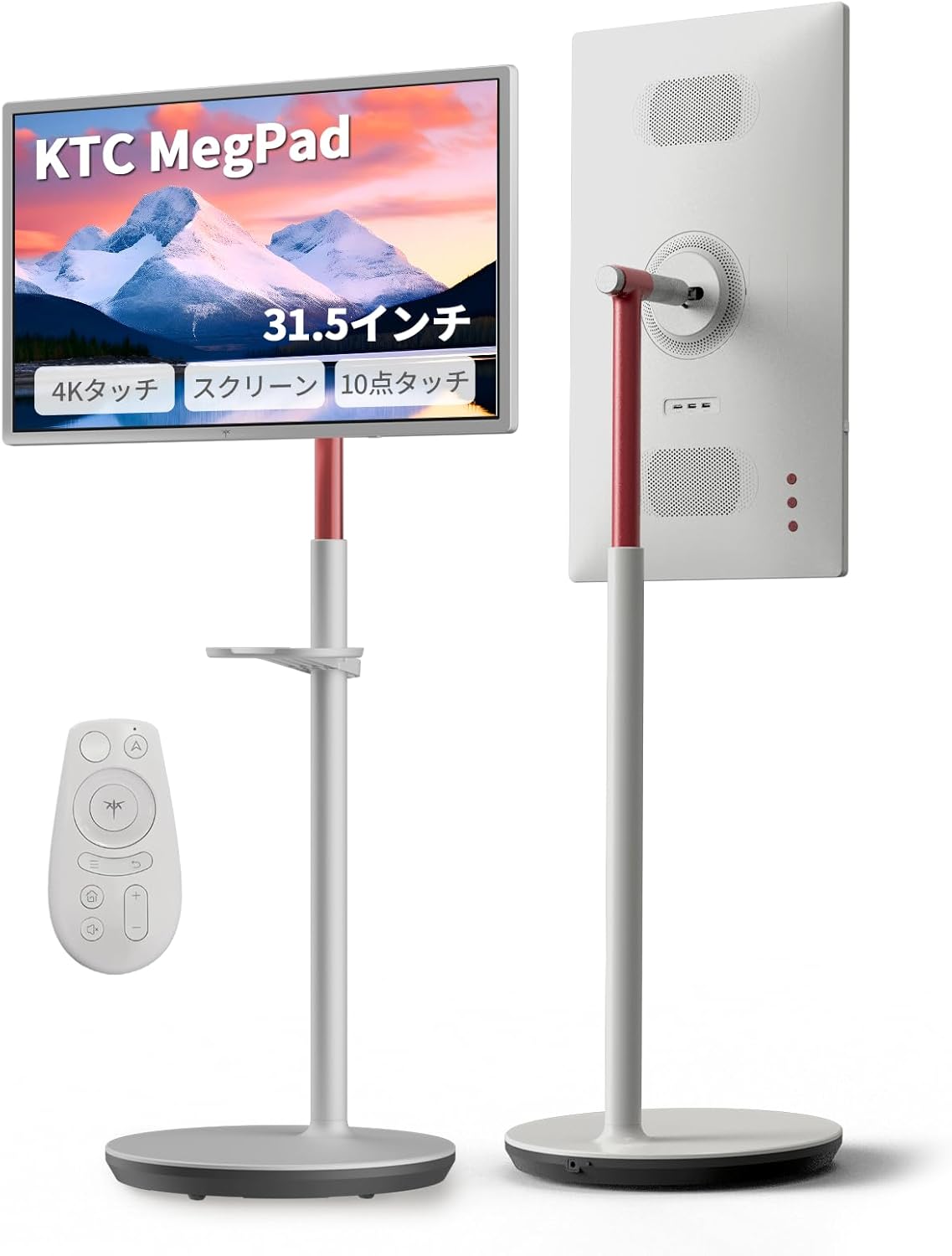
2. Package Contents
Please verify that all items listed below are included in your package:
- Monitor Body x 1
- Stand (Base and Pole) x 1
- Power Cord x 1
- Instruction Manual x 1
- Built-in Battery (9500mAh)
- Bluetooth Voice Remote Control x 1
- AAA Batteries x 2 (for remote)
- AA Battery x 1 (for wireless mouse)
- Tray x 1
- Wireless Mouse x 1
- Screwdriver and Screws (for assembly)

3. Safety Information
Please read all safety instructions carefully before using the product to ensure safe and proper operation.
Important Safety Notice for Telescopic Rod:
To prevent injuries from the telescopic rod extending unexpectedly, before attaching the rod, always push it down vertically as shown in the diagram to release the compression elasticity. Failure to follow this instruction may cause unexpected accidents or injuries. Please exercise extreme caution during assembly and use.

4. Setup
4.1 Assembly
- Carefully unpack all components from the box.
- Attach the monitor to the stand pole, ensuring it is securely fastened. Refer to the included instruction manual for detailed steps and screw placement.
- Connect the stand pole to the base. Ensure the base is stable on a flat surface.
- Insert the AAA batteries into the Bluetooth remote control and the AA battery into the wireless mouse.
4.2 Initial Power-On and Configuration
- Connect the power cord to the monitor and a power outlet. The monitor has a built-in 9500mAh battery, but it is recommended to charge it fully before first use.
- Press the power button to turn on the monitor.
- Follow the on-screen prompts to complete the initial setup, including language selection and connecting to a Wi-Fi network.
- Sign in with your Google account to access the full range of Android 13 features and download apps from the Google Play Store.

5. Operating Instructions
5.1 Basic Navigation
- Touch Screen: The 10-point multi-touch screen allows for intuitive interaction, similar to a smartphone or tablet. Tap, swipe, pinch, and zoom directly on the display.
- Remote Control: Use the included Bluetooth remote for convenient control from a distance, including volume adjustment, playback, and menu navigation.
- Wireless Mouse: The included wireless mouse provides an alternative input method for precise control.

5.2 App Usage and Entertainment
With Android 13 and Google certification, you can download and enjoy a wide range of applications from the Google Play Store, including streaming services like Netflix, Amazon Prime Video, YouTube, and Google TV.

5.3 Connectivity
- Wi-Fi 6 & Bluetooth 5.2: Connect wirelessly to your home network and Bluetooth devices such as headphones or speakers.
- HDMI 2.0: Connect external devices like gaming consoles (PS5, Switch) or Blu-ray players for a large-screen experience.
- USB 3.0 & USB 2.0: Play media files (photos, music, videos) directly from USB storage devices.
- Screen Casting: Supports Airplay, Miracast, Android DLNA, and Chromecast for mirroring content from your smartphone, tablet, or computer.

5.4 Stand Adjustments
The flexible stand allows for optimal viewing angles in any situation:
- Height Adjustment: Adjust the screen height within a 20cm range (113cm to 133cm).
- Tilt: Tilt the screen up or down by ±20 degrees.
- Swivel: Rotate the screen horizontally by ±45 degrees.
- Pivot: Rotate the screen vertically by ±90 degrees for portrait mode viewing.

5.5 Battery and Charging
The KTC MegPad is equipped with a 9500mAh built-in battery, providing up to 5 hours of cordless operation. It supports 90W fast charging. Use the dedicated fast adapter (90W or higher compatible) for astonishing charging speeds, reaching full charge in approximately 2.5 hours.

5.6 Eye Protection
The monitor features TÜV Rheinland certified low blue light technology and an anti-glare screen, reducing eye strain during long periods of use. This ensures a comfortable viewing experience for all family members.

6. Maintenance
6.1 Cleaning the Screen
- Always turn off the monitor and unplug the power cord before cleaning.
- Use a soft, lint-free cloth, slightly dampened with water or a screen-cleaning solution.
- Gently wipe the screen surface. Avoid applying excessive pressure.
- Do not use alcohol, ammonia, or abrasive cleaners, as they can damage the screen coating.
6.2 General Care
- Keep the monitor away from direct sunlight, heat sources, and excessive moisture.
- Ensure proper ventilation around the monitor to prevent overheating.
- Avoid placing heavy objects on the monitor or stand.
- When moving the monitor, use the casters and ensure the stand is stable. Avoid sudden impacts.
7. Troubleshooting
If you encounter any issues with your KTC MegPad monitor, please refer to the following common troubleshooting steps:
7.1 No Power / No Display
- Ensure the power cord is securely connected to both the monitor and a working power outlet.
- Check if the power button on the monitor is pressed.
- Verify that the battery is charged. If not, connect the power adapter and allow it to charge for a while.
- If using an external device via HDMI, ensure the HDMI cable is properly connected and the correct input source is selected on the monitor.
7.2 Touch Screen Not Responding
- Ensure the screen is clean and free of dirt or moisture.
- Restart the monitor.
- If the issue persists, try a factory reset (refer to the 'Settings' menu on the monitor).
7.3 Connectivity Issues (Wi-Fi / Bluetooth)
- Wi-Fi: Check your router and internet connection. Restart the monitor and try reconnecting to the Wi-Fi network. Ensure you are within range of the Wi-Fi signal.
- Bluetooth: Ensure the Bluetooth device is in pairing mode and within range. Try unpairing and re-pairing the device.
7.4 Remote Control Not Working
- Check and replace the AAA batteries in the remote control.
- Ensure there are no obstructions between the remote and the monitor.
- Re-pair the Bluetooth remote if necessary (refer to the monitor's settings for Bluetooth device management).
8. Specifications
| Feature | Specification |
|---|---|
| Brand | KTC |
| Model Series | A32Q7 Pro |
| Product Dimensions (W x D x H) | 73.4 x 42.6 x 113.1-133.1 cm |
| Item Weight | 23 kg |
| Color | White |
| Screen Size | 32 inches |
| Resolution | 3840 x 2160 pixels (4K UHD 2160p) |
| Aspect Ratio | 16:9 |
| Screen Surface | Non-glare |
| Operating System | Android 13 (Google Certified) |
| RAM | 8GB |
| Storage | 128GB |
| Touchscreen | 10-point Multi-Touch |
| Wi-Fi | Wi-Fi 6 |
| Bluetooth | Bluetooth 5.2 |
| HDMI Ports | 1 (HDMI 2.0) |
| USB 3.0 Ports | 1 |
| USB 2.0 Ports | 1 |
| Voltage | 19 Volts |
| Battery Type | Lithium Ion (Built-in) |
| Battery Capacity | 9500 mAh |
| Speakers | Dual 6W |
9. Warranty and Support
9.1 Manufacturer's Warranty
KTC provides a 1-year manufacturer's warranty for this product. In the unlikely event of a product defect, KTC promises a prompt response and free replacement. Please note that failures due to loss or customer negligence are not covered under warranty.
9.2 Customer Support
Our dedicated Japanese support team is available to assist you with any questions or concerns. We are committed to providing comprehensive support to ensure your satisfaction.
- Phone: 050-3606-8990
- Email: support@ktcplay.com


