
WEN DP1062V
WEN 10-Inch Benchtop Drill Press Instruction Manual
Model: DP1062V | Brand: WEN
1. Important Safety Instructions
Always observe basic safety precautions when using electrical tools to reduce the risk of fire, electric shock, and serious personal injury. Read and understand all instructions before operating this drill press.
- Eye Protection: Always wear ANSI Z87.1 approved safety goggles or safety glasses with side shields when operating this machine.
- Work Area: Keep the work area clean and well-lit. Cluttered or dark areas invite accidents.
- Electrical Safety: Do not expose power tools to rain or wet conditions. Do not abuse the cord. Keep cord away from heat, oil, sharp edges, or moving parts.
- Secure Workpiece: Always clamp or otherwise secure the workpiece to the drill press table. Never hold the workpiece by hand.
- Proper Attire: Do not wear loose clothing, gloves, neckties, rings, bracelets, or other jewelry which could get caught in moving parts. Wear non-slip footwear.
- Ventilation: Ensure adequate ventilation when working with materials that produce dust.
- Unplug Before Adjustments: Always unplug the drill press from the power source before making any adjustments, changing accessories, or storing the tool.
- Maintain Tool: Keep cutting tools sharp and clean. Properly maintained tools with sharp cutting edges are less likely to bind and are easier to control.
- Avoid Accidental Starting: Ensure the switch is in the OFF position before plugging in.
2. Product Overview
The WEN 10-Inch Benchtop Drill Press (Model DP1062V) is designed for precision drilling in various materials such as metal, wood, and plastic. It features a powerful 6.2-amp induction motor and a mechanical variable speed system for optimal performance.
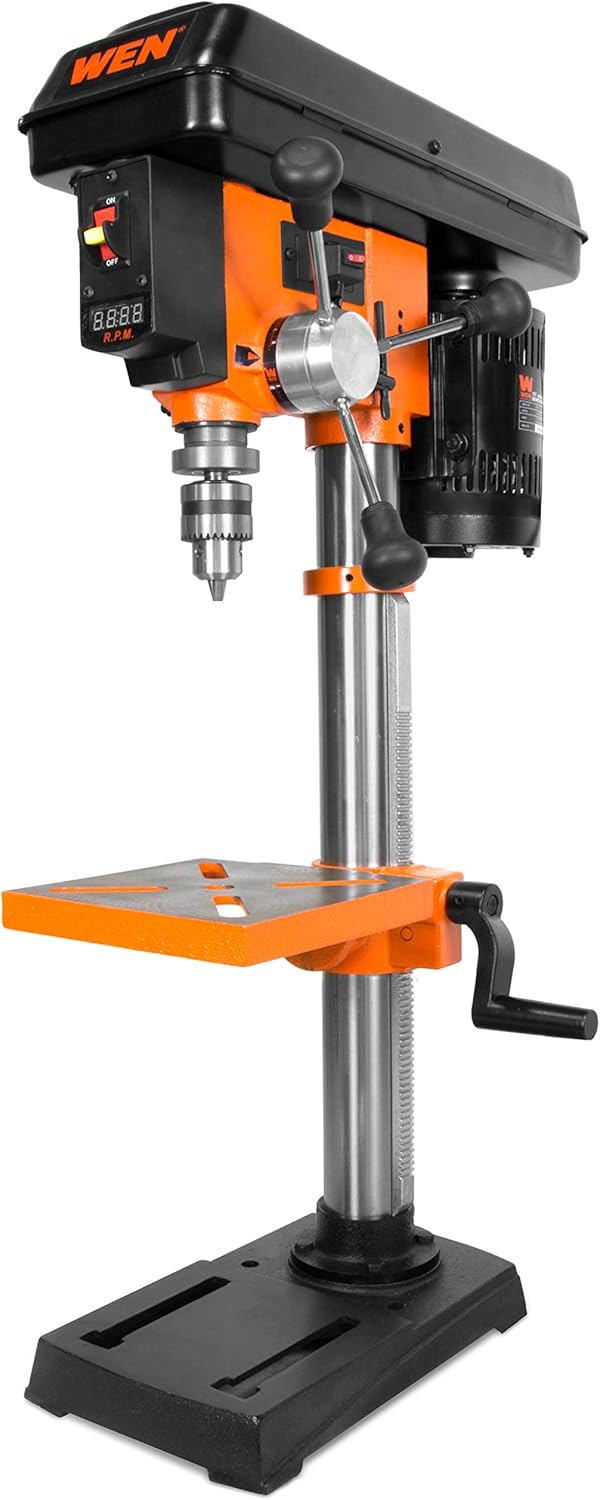


Key Features:
- 6.2-Amp Induction Motor: Provides ample power for drilling through various materials.
- 10-Inch Swing: Allows for drilling to the center of a 10-inch workpiece.
- Variable Speed (530 to 3100 RPM): Mechanical adjustment for precise speed control.
- Digital Speed Readout: Displays current RPM for accuracy.
- 1/2-Inch Keyed Chuck: Accommodates a wide range of drill bits, with JT33 spindle taper.
- 8 x 7.5-Inch Cast-Iron Worktable: Bevels 45° left and right for angled drilling.
- X-Pattern Laser: Projects crosshairs to indicate the drill bit's center point.
- Adjustable Depth Stop: For consistent drilling depth.
- On-board Chuck Key Storage: Conveniently keeps the chuck key accessible.
3. Assembly and Setup
This section outlines the steps required to assemble your WEN Benchtop Drill Press and prepare it for use. Ensure all components are present and undamaged before beginning assembly.
3.1 Unpacking and Inspection
Carefully remove all components from the packaging. Inspect for any shipping damage. If any parts are missing or damaged, contact WEN customer support immediately.
3.2 Assembly Steps
- Attach Column to Base: Secure the main column to the cast iron base using the provided bolts and washers. Ensure it is firmly tightened for stability.
- Install Drill Press Head: Carefully slide the drill press head assembly onto the top of the column. Align the head and secure it with the set screws.
- Mount Worktable: Slide the worktable assembly onto the column. The table height can be adjusted and locked into position using the table lock handle.
- Install Feed Handles: Thread the three feed handles into the hub on the drill press head.
- Install Chuck: Clean the tapered spindle and the inside of the chuck. Place the chuck onto the spindle and firmly tap it into place with a rubber mallet to ensure a secure fit.
- Mounting to Benchtop: The 8 by 12.5-inch cast iron base has predrilled holes for permanent mounting to a workbench or work surface. This is highly recommended for stability and safety during operation.
4. Operation
This section provides instructions for operating your WEN Benchtop Drill Press safely and effectively.
4.1 Powering On/Off
To turn the drill press ON, flip the power switch to the 'ON' position. To turn it OFF, flip the switch to the 'OFF' position. The switch is located on the front of the drill press head.

4.2 Adjusting Speed
The drill press features a mechanical variable speed system, allowing you to adjust the RPM from 530 to 3100. To change the speed, simply turn the speed adjustment lever located on the side of the drill press head. The digital LED readout will display the current RPM.

4.3 Using the Chuck and Drill Bits
The 1/2-inch keyed chuck accepts a wide range of drill bits. Insert the drill bit into the chuck jaws and tighten it securely using the provided chuck key. The chuck key can be stored in the on-board holder when not in use.
4.4 Adjusting the Worktable
The cast-iron worktable can be adjusted vertically along the column and can also bevel 45° left and right. Loosen the table lock handle to adjust height or angle, then tighten it firmly once the desired position is achieved.

4.5 Using the Laser Guide
The integrated X-pattern laser projects crosshairs onto your workpiece, indicating the exact point where the drill bit will make contact. This assists in precise hole placement. The laser requires 2 AA batteries (not included) and has its own power switch, typically located near the laser emitter.
4.6 Setting Drilling Depth
Use the adjustable depth stop to set a consistent drilling depth for repetitive tasks. Loosen the lock nut, adjust the depth stop to the desired measurement, and then tighten the lock nut.
5. Maintenance
Regular maintenance ensures the longevity and optimal performance of your WEN Benchtop Drill Press.
- Cleaning: After each use, clean the drill press to remove dust, chips, and debris. Use a brush or vacuum; never use compressed air as it can force debris into moving parts.
- Lubrication: Periodically apply a light coat of machine oil to the column and other moving parts to ensure smooth operation and prevent rust.
- Chuck Care: Keep the chuck jaws clean and free of debris. If the chuck becomes stiff, apply a small amount of light oil to the jaws.
- Laser Alignment: Periodically check the laser alignment. If it is off, consult the troubleshooting section or the full product manual for adjustment instructions.
- Power Cord Inspection: Regularly inspect the power cord for any signs of damage, cuts, or fraying. Replace immediately if damaged.
6. Troubleshooting
This section addresses common issues you might encounter with your drill press and provides potential solutions.
| Problem | Possible Cause | Solution |
|---|---|---|
| Drill press does not start. | No power supply; Power switch is OFF; Motor overload. | Check power outlet and circuit breaker; Ensure switch is ON; Allow motor to cool down, reduce load. |
| Excessive vibration or noise. | Loose components; Unbalanced drill bit; Worn bearings. | Check all bolts and screws for tightness; Ensure drill bit is properly seated and not bent; Contact customer support if bearings are suspected. |
| Drill bit not centered or wobbles. | Chuck not properly seated; Damaged drill bit; Spindle runout. | Re-seat the chuck firmly; Replace damaged drill bit; If spindle runout is excessive, contact customer support. |
| Laser guide not working. | Batteries dead or incorrectly installed; Laser switch OFF. | Replace AA batteries, ensure correct polarity; Turn laser switch ON. |
| Speed adjustment is stiff. | Lack of lubrication; Debris in mechanism. | Apply light machine oil to the speed adjustment mechanism; Clean any visible debris. |
7. Specifications
Technical specifications for the WEN 10-Inch Benchtop Drill Press (Model DP1062V).
| Feature | Specification |
|---|---|
| Brand | WEN |
| Model Number | DP1062V |
| Power Source | Corded Electric |
| Voltage | 120 Volts |
| Amperage | 6.2 Amps |
| Maximum Rotational Speed | 3100 RPM |
| Minimum Rotational Speed | 530 RPM |
| Drill Type | Benchtop Drill Press |
| Drilling Capacity (Wood) | 0.5 Inches |
| Drilling Capacity (Metal) | 0.5 Inches (through 1-inch thick cast iron) |
| Chuck Capacity | 1/2-inch |
| Spindle Taper | JT33 |
| Worktable Dimensions | 8 x 7.5 inches |
| Worktable Bevel | 45° Left and Right |
| Base Dimensions | 8 x 12.5 inches |
| Product Dimensions (L x W x H) | 13.19" x 19.29" x 33.86" |
| Item Weight | 65.9 pounds (29.94 Kilograms) |
| Laser Type | Class IIIA 2.5mW |
| UPC | 044459110620 |
8. Warranty and Customer Support
WEN products are designed for reliability and durability. This drill press comes with a comprehensive warranty and dedicated customer support.
8.1 Warranty Information
The WEN 10-Inch Benchtop Drill Press (Model DP1062V) is backed by a two-year warranty. This warranty covers defects in material and workmanship under normal use and service.
For detailed warranty terms and conditions, please refer to the official WEN product documentation or visit the WEN website.
8.2 Customer Support
Should you have any questions, require technical assistance, or need replacement parts, WEN offers a friendly customer support line. You can typically find contact information on the WEN official website or within the product packaging.
For the most up-to-date support information, please visit the official WEN website: www.wenproducts.com
Related documentsDP1062V


Ask a question about this manual
Ask about setup, troubleshooting, compatibility, parts, safety, or missing instructions. Manuals+ will review the question and use this page’s manual context to help answer it.