Introduction
This manual provides detailed instructions for the assembly, operation, and maintenance of your JARHETUN Night Stand Set. Please read these instructions carefully before assembly and use to ensure proper function and safety. Keep this manual for future reference.
Important Safety Information
- Ensure all components are present and undamaged before assembly.
- Do not overtighten screws during assembly to prevent damage to materials.
- Place the nightstand on a stable, level surface to prevent tipping.
- Do not overload drawers or shelves.
- Keep liquids away from the charging station outlets and USB ports.
- Unplug the power cord from the wall outlet before cleaning or moving the nightstand.
- Do not attempt to modify the electrical components. Contact qualified personnel for repairs.
Setup and Assembly
The JARHETUN Night Stand is designed for straightforward assembly. All necessary tools and numbered components are included. Please follow the step-by-step instructions provided in the packaging.
Assembly Steps Overview:
- Unpack all components and verify against the parts list.
- Assemble the metal frame structure using the provided screws and tools.
- Attach the top wooden panel, ensuring the charging station is correctly oriented.
- Insert the fabric drawers into their designated slots.
- Connect the LED light strip and charging station power cord.
- Adjust the leveling feet to ensure stability on uneven surfaces.
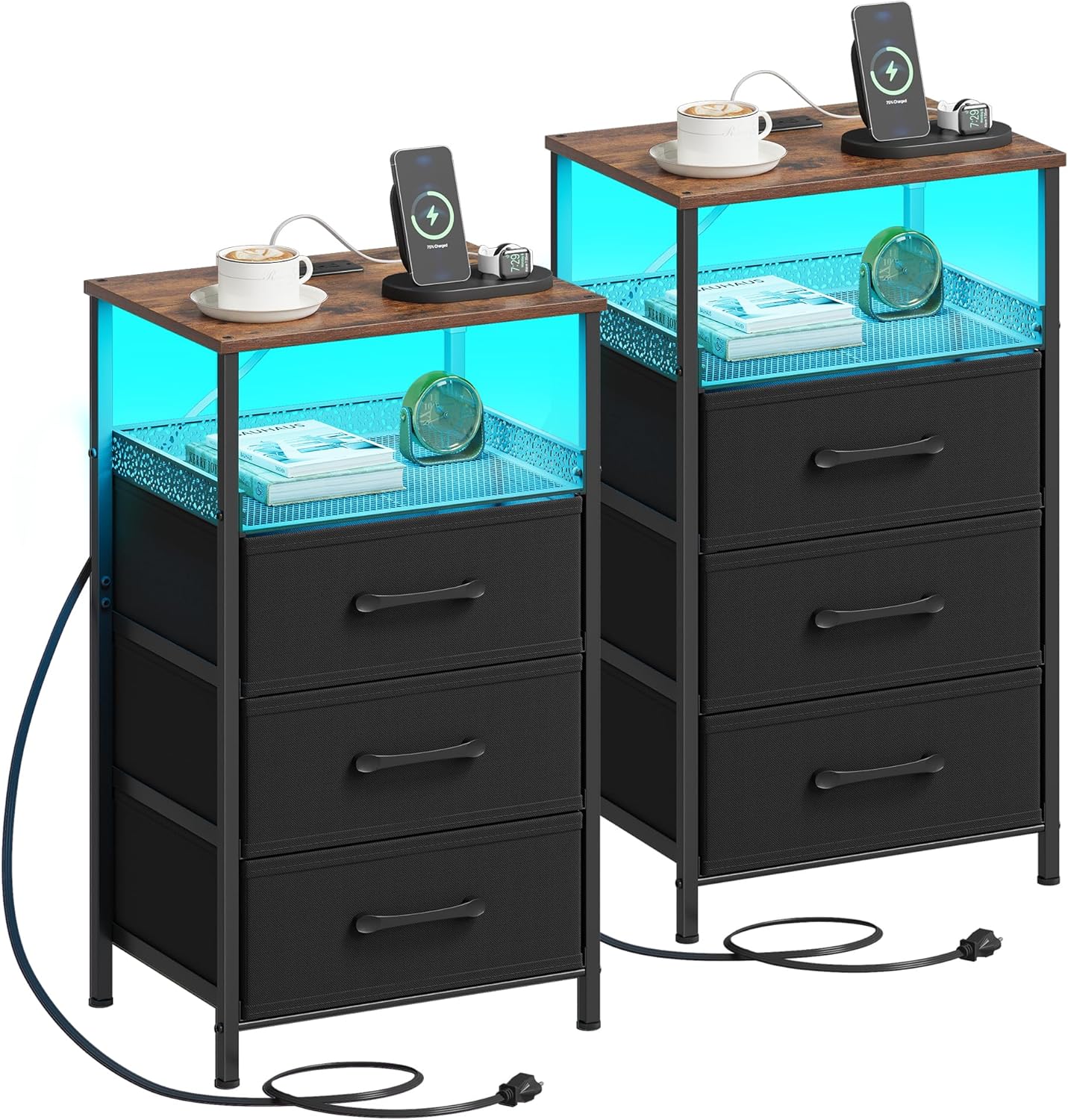
Figure 1: Assembled JARHETUN Night Stand Set.

Figure 2: Nightstand dimensions and drawer measurements.
Figure 3: Adjustable feet for stability.
Operating Instructions
1. Charging Station
The integrated charging station provides convenient power access for your electronic devices. It includes two standard AC outlets and two USB ports.
- AC Outlets: 125V / 12A. Suitable for lamps, alarm clocks, and other small appliances.
- USB Ports: 5V / 2A. Ideal for charging smartphones, tablets, and other USB-powered devices.
- To use, simply plug the nightstand's main power cord into a wall outlet.

Figure 4: Integrated charging station with AC outlets and USB ports.
2. RGB LED Lights
The nightstand features RGB LED lighting strips that can be controlled via a manual key or a dedicated mobile application.
- Manual Key Control: Use the physical switch to cycle through 10 preset colors, adjust brightness levels, and select various flashing modes.
- APP Control: Download the specified mobile application (refer to packaging for QR code or app name) to unlock advanced features:
- Access to 60,000 colors.
- Multiple dynamic modes.
- Adjustable speed and brightness settings.
- Music Sync Mode: LED lights will synchronize with music played through your device.
- Timing Mode: Schedule when the lights turn on or off.
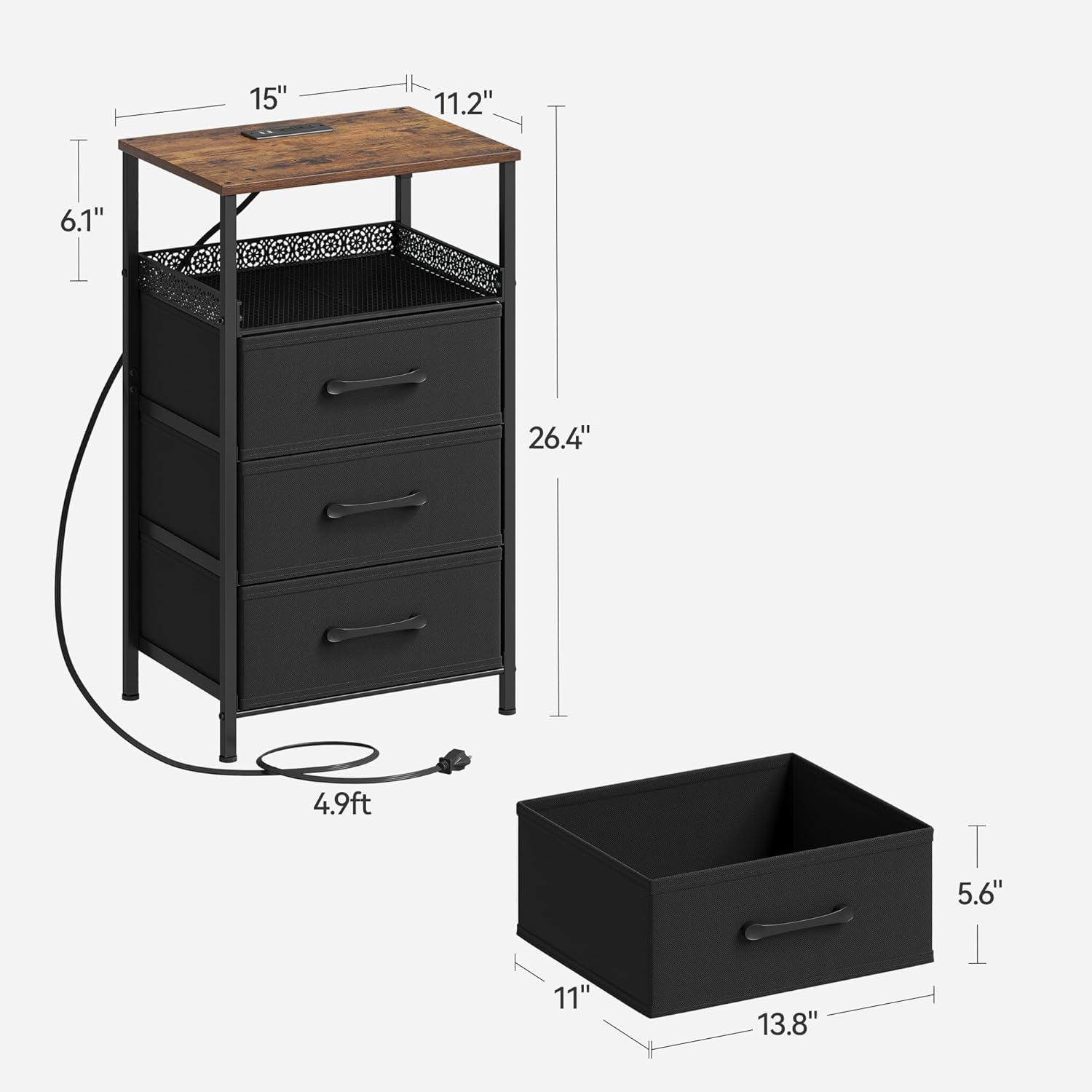
Figure 5: LED light control options (Key and App).
Storage Features
The nightstand offers ample storage with three fabric drawers and an open compartment.
- Fabric Drawers: Three drawers, each measuring approximately 11"D x 13.8"W x 5.6"H, provide enclosed storage for personal items.
- Open Compartment: Located above the drawers, this space is suitable for displaying decorative items, books, or frequently accessed essentials.
- 3-Sided Metal Mesh Fence: The open compartment features a decorative metal mesh fence on three sides to help secure items and prevent them from falling.

Figure 6: Open compartment with security fence.
Care and Maintenance
- Cleaning: Wipe surfaces with a soft, damp cloth. Avoid harsh chemicals or abrasive cleaners.
- Dusting: Regularly dust the nightstand to prevent buildup.
- Spills: Immediately wipe up any spills to prevent staining, especially on the wooden top.
- Electrical Components: Ensure the charging station and LED lights are unplugged before cleaning. Do not immerse electrical components in water.
- Drawer Care: The fabric drawers can be spot cleaned with a mild detergent and water. Allow to air dry completely.
Troubleshooting
| Problem | Possible Cause | Solution |
|---|---|---|
| Charging station not working. | Power cord not fully plugged in; wall outlet not active. | Ensure the power cord is securely plugged into both the nightstand and a functional wall outlet. Test the wall outlet with another device. |
| LED lights not turning on or flickering. | Loose connection; power issue; app synchronization error. | Check the connection of the LED strip to the power source. Ensure the nightstand is powered. If using the app, try restarting the app or re-pairing the device. |
| LED lights not syncing with each other (if using a set). | App synchronization issue. | Ensure both nightstands are connected to the same app instance. Try restarting the app and re-syncing the lights. |
| Nightstand is wobbly. | Uneven floor; adjustable feet not properly set. | Adjust the leveling feet at the bottom of the nightstand until it is stable. |
Product Specifications
- Brand: JARHETUN
- Model: B0DQ86NFTS
- Product Dimensions: 11.2"D x 15"W x 26.4"H
- Item Weight: 17.8 Pounds
- Color: Rustic Brown
- Material: Engineered Wood, Metal, Fabric
- Number of Drawers: 3
- Charging Station: 2 AC Outlets (125V/12A), 2 USB Ports (5V/2A)
- Power Cord Length: 4.9 feet
- LED Lights: RGB, Key and APP controlled
- Assembly: Requires assembly, tools included
Customer Support
If you have any questions regarding the assembly, operation, or maintenance of your JARHETUN Night Stand, please do not hesitate to contact our professional customer service team. We aim to respond to all inquiries within 24 hours.
Please refer to your purchase documentation or the product packaging for specific contact details.