
1. Product Overview
The URBN 20000mAh Power Bank is a high-capacity portable charger designed to keep your devices powered on the go. Featuring 22.5W Power Delivery (PD) and triple output ports, it offers fast and efficient charging for multiple devices simultaneously. Its compact design and advanced safety features make it a reliable companion for daily use and travel.
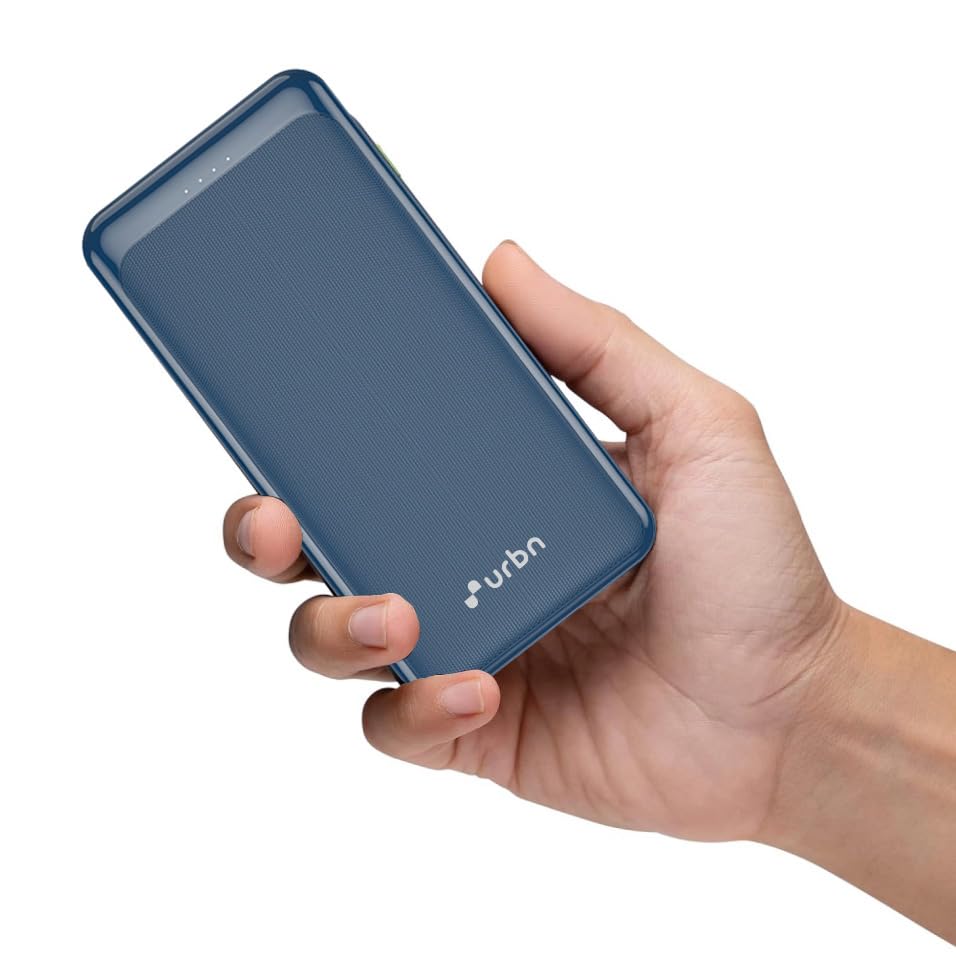
Image: The URBN 20000mAh Power Bank in blue, showcasing its compact size and textured finish, held in a hand.
Key Features:
- Massive 20000mAh Capacity: Provides multiple charges for smartphones, tablets, and other devices.
- 22.5W Super Fast Charging & Recharging: Supports Power Delivery (PD) for rapid charging of devices and quick recharging of the power bank itself.
- Triple Output Ports: Charge up to three devices simultaneously.
- USB Type-C Input & Output: Versatile connectivity for modern devices.
- 12 Layers of Circuit Protection: Ensures safe and reliable operation, protecting against overheating, short circuits, and overcharging.
- Compact and Portable Design: Easy to carry in a bag or pocket.

Image: An infographic highlighting the key features of the URBN Power Bank, including 22.5W ultra-fast charging, 12-layer circuit protection, universal compatibility, and triple output.
Video: A short preview demonstrating the compact design, 22.5W fast charging, and triple output capabilities of the URBN 20000mAh Power Bank.
2. Package Contents
Please check the package for the following items:
- URBN 20000mAh Power Bank (Model URBN211)
- USB-C Charging Cable
- Instruction Manual
3. Specifications
| Feature | Detail |
|---|---|
| Model Name | URBN211 |
| Capacity | 20000mAh / 3.7V (74Wh) |
| Input (USB-C) | DC 5V/3A, 9V/2.22A, 12V/1.67A (20W Max) |
| Output (USB-C) | DC 5V/3A, 9V/2.22A, 12V/1.67A (20W Max) |
| Output (USB-A1/A2) | DC 5V/3A, 9V/2A, 10V/2.25A, 12V/1.5A (22.5W Max) |
| Total Output | 22.5W Max |
| Dimensions | 14.8 x 9.1 x 3.4 cm |
| Weight | 405 g |
| Color | Blue |
| Special Features | Fast Charging, Over Charging Protection |
| Certifications | BIS Certified |

Image: Close-up view of the power bank highlighting the Type-C input/output port, its premium textured finish, and the BIS certification logo.
4. Setup and Initial Use
4.1 Charging the Power Bank
- Connect the provided USB-C charging cable to the USB-C port on the power bank.
- Connect the other end of the cable to a compatible wall adapter (20W+ PD adapter recommended for fastest charging, not included).
- The LED indicators on the power bank will illuminate to show the charging status. When all LEDs are solid, the power bank is fully charged.

Image: An infographic illustrating the faster recharge time of the URBN Power Bank, showing it can be fully recharged in 5 hours with a 20W+ adapter.
4.2 Checking Battery Level
Press the power button once to view the current battery level indicated by the LED lights. Typically, four LEDs represent a full charge, and fewer lit LEDs indicate a lower charge.
5. Operating Instructions
5.1 Charging Your Devices
- Connect your device's charging cable to one of the power bank's output ports (USB-A1, USB-A2, or USB-C).
- Connect the other end of the cable to your device.
- The power bank will automatically begin charging your device. If not, press the power button once to initiate charging.
- You can charge up to three devices simultaneously using the available output ports.

Image: An infographic demonstrating the charging capacity of the URBN Power Bank for various devices, highlighting its 'Power Packed Portability'.
5.2 Pass-Through Charging
The URBN Power Bank supports pass-through charging, allowing you to charge the power bank and a connected device simultaneously. When the power bank is connected to a wall adapter for charging, you can also connect your device to the power bank, and both will receive power.
6. Safety Information
The URBN Power Bank is equipped with 12 layers of advanced circuit protection to ensure the safety of both the power bank and your connected devices. These protections include:
- Output Overvoltage Protection
- Output Overcurrent Protection
- Input Overvoltage Protection
- Input Undervoltage Protection
- Input Surge Protection
- Battery Temperature Protection
- Output Short Circuit Protection
- Chip Thermal Shutdown Protection
- Electrostatic Protection
- Overdischarge Protection
- Electro-Magnetic Field Protection
- Battery Overcharge Overdischarge Protection

Image: A detailed infographic outlining the 12 layers of smart adaptive IC circuit protection integrated into the URBN Power Bank.
Always use original or certified cables for charging your devices and the power bank. Avoid exposing the power bank to extreme temperatures, direct sunlight, or water. Do not disassemble or attempt to repair the device.
7. Maintenance
- Keep the power bank clean and dry. Use a soft, dry cloth to wipe the surface.
- Store the power bank in a cool, dry place away from direct sunlight and corrosive materials.
- Avoid dropping or subjecting the power bank to strong impacts.
- For optimal battery life, fully charge the power bank at least once every three months if not in regular use.
8. Troubleshooting
8.1 Power Bank Not Charging
- Ensure the charging cable is securely connected to both the power bank and the wall adapter.
- Verify that the wall adapter is functioning correctly and providing sufficient power (20W+ PD recommended).
- Try using a different USB-C cable or wall adapter.
8.2 Device Not Charging from Power Bank
- Check if the power bank has sufficient charge.
- Ensure the charging cable is securely connected to both the power bank and your device.
- Try pressing the power button on the power bank to initiate charging.
- Test with a different charging cable or a different device to isolate the issue.
- Confirm your device is compatible with the power bank's output specifications.
8.3 Slow Charging
- Ensure both your device and the charging cable support fast charging protocols (e.g., Power Delivery, QC 3.0) for optimal speed.
- Using multiple output ports simultaneously may distribute power, potentially reducing individual port speeds.
- Check for any debris in the charging ports that might hinder proper connection.
9. Warranty and Support
The URBN 20000mAh Power Bank comes with a 6-month replacement warranty from the date of purchase. This warranty covers manufacturing defects and ensures hassle-free support in case of any issues.

Image: Visual confirmation of the 6-month replacement warranty, BIS approval, and 'Made in India' origin.
For warranty claims or technical support, please contact URBN customer service through the official URBN website or your retailer's support channels. Please retain your purchase receipt for warranty validation.


