
Karinear KNC-D596119-MB
Karinear 36-Inch 5-Burner Electric Ceramic Cooktop User Manual
Model: KNC-D596119-MB
Introduction
This manual provides comprehensive instructions for the safe and efficient operation, installation, and maintenance of your Karinear 36-inch 5-burner electric ceramic cooktop. Please read this manual thoroughly before using the appliance and retain it for future reference.

Image: Top-down view of the Karinear 36-inch electric ceramic cooktop, highlighting its five radiant heating elements and integrated touch control panel.
Safety Information
Always follow basic safety precautions when using electrical appliances to reduce the risk of fire, electric shock, burns, or injury. This appliance is intended for household use only.
- Ensure proper installation by a qualified technician.
- Do not touch hot surfaces. Use handles or knobs.
- Never leave the cooktop unattended during operation.
- Do not store items on the cooktop surface.
- Keep children away from the cooktop during and after use.
- Disconnect power before servicing.
Setup and Installation
Proper installation is crucial for the safe and efficient operation of your cooktop. It is recommended that installation be performed by a qualified electrician or installer.
Dimensions and Cutout
Ensure your countertop has the correct cutout dimensions for the cooktop. Refer to the diagram below for precise measurements.
- Stovetop Size: 35.43 inches (width) x 20.47 inches (depth)
- Cut-out Size: 33.86 inches (width) x 19.3 inches (depth) x 2.76 inches (height)
Electrical Connection
The cooktop requires a 220-240V, 60Hz, 40A electrical supply. The total installed power is 9600W. Follow the wiring diagram carefully for a secure and safe connection.

Image: Installation diagram illustrating the cooktop's physical dimensions (stovetop and cutout) and a detailed electrical wiring schematic for connecting to a home power supply.
Initial Cleaning
Before first use, wipe the ceramic glass surface with a damp cloth and mild detergent. Dry thoroughly. This removes any manufacturing residues.
Operating Instructions
Your Karinear electric cooktop features intuitive touch controls for precise cooking.
Control Panel Overview

Image: Detailed view of the cooktop's touch control panel, showing icons for various functions including timer, child safety lock, pause, expandable burner activation, residual heat indicator, and bridge/BBQ mode.
- Power On/Off: Touch the power symbol to turn the cooktop on or off.
- Burner Selection: Select the desired cooking zone by touching its corresponding control.
- Heat Level Adjustment: Use the '+' and '-' symbols to adjust the heat level from 1 (low) to 9 (high).
Burner Configuration and Power
The cooktop features five radiant burners with varying power outputs and sizes, including expandable and bridge functions for versatile cooking.

Image: Overhead diagram of the cooktop, detailing the power (Wattage) and diameter (inches) for each of the five radiant heating elements, including the bridge function.
- Left Front: 1600W / 6.5 inches
- Left Rear: 2300W / 7.28 inches
- Center: Triple Ring Expandable Burner (1050W/5.43in, 1950W/9in, 2700W/11.7in)
- Right Front: 1200W / 6.5 inches
- Right Rear: 1800W / 7.87 inches
Flexible Bridge Function
The left front and left rear burners can be combined using the Bridge Sync Function to create a larger cooking zone, ideal for griddles or larger cookware like BBQ pans.
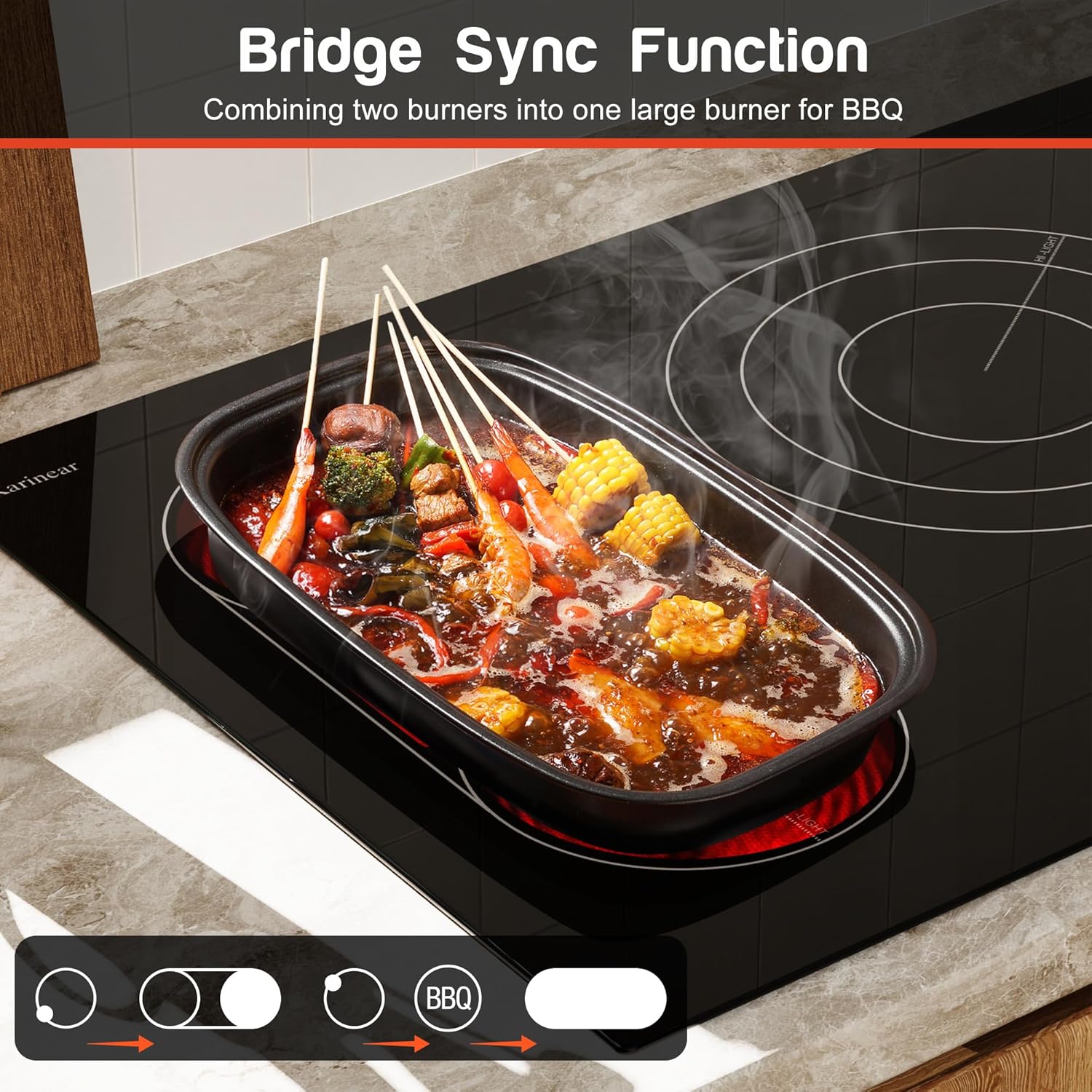
Image: The Karinear cooktop with the bridge sync function activated, showing two left burners combined to accommodate a large rectangular BBQ pan, illustrating its utility for larger cooking vessels.
- To activate: Select both left burners, then touch the Bridge/BBQ icon on the control panel.
- The combined power for the bridge function is 3900W.
Special Features
- 99-Minute Timer: Set a cooking timer for individual zones or for the entire cooktop. The cooktop will automatically turn off the selected zone(s) when the timer expires.
- Child Safety Lock: Activate the child lock to prevent accidental operation of the cooktop. Hold the lock icon for a few seconds to engage/disengage.
- Pause Function: Temporarily pause all cooking operations and resume with the same settings.
- Residual Heat Indicator ('H'): After a cooking zone is turned off, an 'H' will appear in the display if the surface is still hot, indicating caution.
Cookware Compatibility
Your ceramic cooktop is compatible with a wide range of cookware types. Ensure cookware has a flat, smooth bottom for optimal heat transfer.

Image: An infographic displaying different types of cookware suitable for use on the ceramic cooktop, including cast iron, stainless steel, concave base, enameled iron, aluminum, copper, ceramic, and glass cookware.
- Recommended: Cast iron, stainless steel, enameled iron, ceramic, glass cookware with flat bottoms.
- Acceptable: Aluminum, copper cookware with flat bottoms.
- Avoid: Cookware with rough or uneven bottoms that could scratch the ceramic surface.
Maintenance and Cleaning
Regular cleaning and maintenance will ensure the longevity and optimal performance of your cooktop.
Cleaning the Ceramic Glass Surface
- Allow the cooktop to cool completely before cleaning.
- For light soil: Wipe with a damp cloth and mild dish soap. Rinse and dry with a clean cloth.
- For stubborn stains or burnt-on food: Use a ceramic cooktop cleaner and a non-abrasive cleaning pad. Follow the cleaner manufacturer's instructions.
- Avoid abrasive cleaners, scouring pads, or harsh chemicals as they can scratch or damage the surface.
- Do not use a razor blade or sharp objects to remove spills, as this can damage the glass.
General Care
- Avoid dropping heavy objects on the cooktop surface.
- Do not slide cookware across the surface, as this may cause scratches.
- Ensure the cooktop is dry before use to prevent water stains.
Troubleshooting
If you encounter issues with your cooktop, refer to the following common problems and solutions before contacting customer service.
| Problem | Possible Cause | Solution |
|---|---|---|
| Cooktop does not turn on. | No power supply; Child lock engaged; Incorrect operation. | Check circuit breaker; Disengage child lock; Ensure correct power button press. |
| Burner not heating. | Incorrect heat setting; Cookware not suitable; Burner malfunction. | Increase heat setting; Use compatible cookware with flat bottom; Contact service if issue persists. |
| Display shows 'H'. | Residual heat indicator. | This is normal. The surface is still hot. Wait for it to cool down. |
| Cooktop makes unusual noises. | Expansion/contraction of materials; Fan operation. | Minor clicking or humming sounds are normal during heating/cooling. If loud or persistent, contact service. |
Specifications
| Brand | Karinear |
| Model Number | KNC-D596119-MB |
| Cut-out Dimensions | 49.02 x 86 x 7.01 cm (19.3 x 33.86 x 2.76 inches) |
| Item Weight | 14.97 kg (33 Pounds) |
| Power Source | Corded Electric |
| Heater Surface Material | Glass Ceramic |
| Material | Glass |
| Burner Type | Radiant |
| Ignition System Type | Electronic |
| Control Type | Touch |
| Installation Type | Drop-In |
| Voltage | 220 Volts |
| Wattage | 9600 watts |
Warranty and Support
For warranty information or technical support, please refer to the warranty card included with your product or contact Karinear customer service. Keep your purchase receipt as proof of purchase.
Customer Service Contact: [Please refer to your product packaging or Karinear's official website for current contact information.]
Related documentsKNC-D596119-MB


Ask a question about this manual
Ask about setup, troubleshooting, compatibility, parts, safety, or missing instructions. Manuals+ will review the question and use this page’s manual context to help answer it.