
1. Introduction
The BTMETER BT-5000Y is a high-precision portable digital hot wire anemometer designed for accurate measurement of wind speed, air temperature, and airflow (CMM/CFM). Its retractable sensor allows for convenient measurements in confined spaces, making it suitable for a wide range of applications including environmental monitoring, air conditioning system maintenance, and outdoor activities.

Figure 1.1: BTMETER BT-5000Y Anemometer with its main unit and flexible probe.

Figure 1.2: Common applications for the BT-5000Y anemometer, such as drone flight, marine activities, HVAC system checks, and outdoor sports.
2. Key Features
- Simultaneous Wind Speed and Temperature Measurement: Equipped with a thermometer for high-precision readings of both wind speed and air temperature.
- Accurate Airflow Detection: Utilizes an advanced hot-wire sensor for reliable measurements.
- Multiple Measurement Units: Supports 5 wind speed units (m/s, ft/min, Knots, km/h, Mph) and air volume units (CMM/CFM).
- Retractable Sensor: Designed for easy and convenient measurements, especially in narrow or hard-to-reach areas.
- Large Color LCD Display: Simultaneously displays current, maximum, and minimum wind speed, air temperature, and airflow data for clear readability.
- Intelligent Functions: Includes unit conversion, data hold, MAX/MIN/AVG functions, low battery indicator, and configurable automatic shutdown to extend battery life.
- Long-lasting Rechargeable Battery: Built-in 600mAh lithium battery with USB Type-C charging for extended operation.
- Durable Design: Features a waterproof and dustproof construction suitable for various environments.
3. Setup
3.1 Unboxing and Initial Inspection
Upon receiving your BTMETER BT-5000Y, carefully unpack all components. Verify that the package contains the main anemometer unit, the retractable hot-wire probe, a USB Type-C charging cable, and this user manual. Inspect the device for any visible damage.
3.2 Charging the Battery
Before first use, fully charge the internal 600mAh lithium battery. Connect the provided USB Type-C cable to the device's charging port and plug the other end into a standard USB power adapter (not included) or a computer USB port. The charging indicator on the display will show the charging status. A full charge typically takes a few hours.
3.3 Attaching the Probe
Gently connect the retractable hot-wire probe to the main unit's sensor port. Ensure a secure connection to prevent inaccurate readings. The probe can be extended or retracted as needed for different measurement scenarios.

Figure 3.1: Device diagram illustrating key components and controls.
4. Operating Instructions
4.1 Power On/Off
- Press the Power button (①) to turn the device on.
- Press and hold the Power button (①) for a few seconds to turn the device off.
- The device features a configurable automatic shutdown function to save power. Refer to the settings menu for adjustment.
4.2 Basic Measurement
Once powered on, the device will immediately begin measuring wind speed and temperature. Ensure the probe is positioned correctly in the airflow you wish to measure.
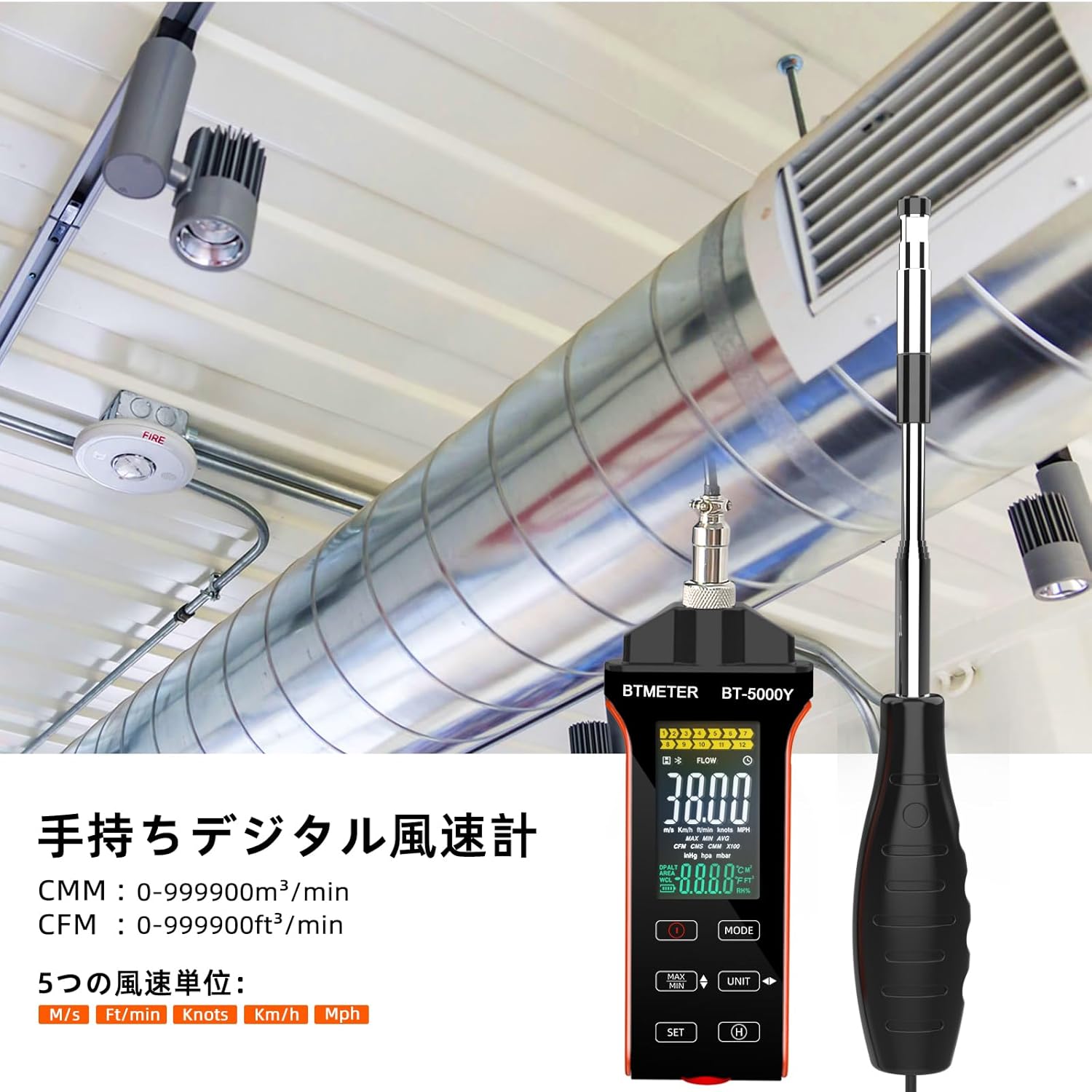
Figure 4.1: The BT-5000Y anemometer being used to measure airflow in a duct.
4.3 Unit Conversion
The BT-5000Y supports multiple units for wind speed and airflow. Use the UNIT button to cycle through available units.
- Wind Speed Units: m/s (meters/second), ft/min (feet/minute), Knots, km/h (kilometers/hour), Mph (miles/hour).
- Air Volume Units: CMM (cubic meters/minute), CFM (cubic feet/minute).
- Temperature Units: °C (Celsius), °F (Fahrenheit).

Figure 4.2: The display showing the five available wind speed units.
4.4 MAX/MIN/AVG Function
Press the MAX/MIN button to view the maximum, minimum, and average readings during a measurement session. Pressing it repeatedly will cycle through these values.
4.5 Data Hold Function
To freeze the current reading on the display, press the H (Hold) button. Press it again to release the hold and resume live measurement.
4.6 LCD Display Overview
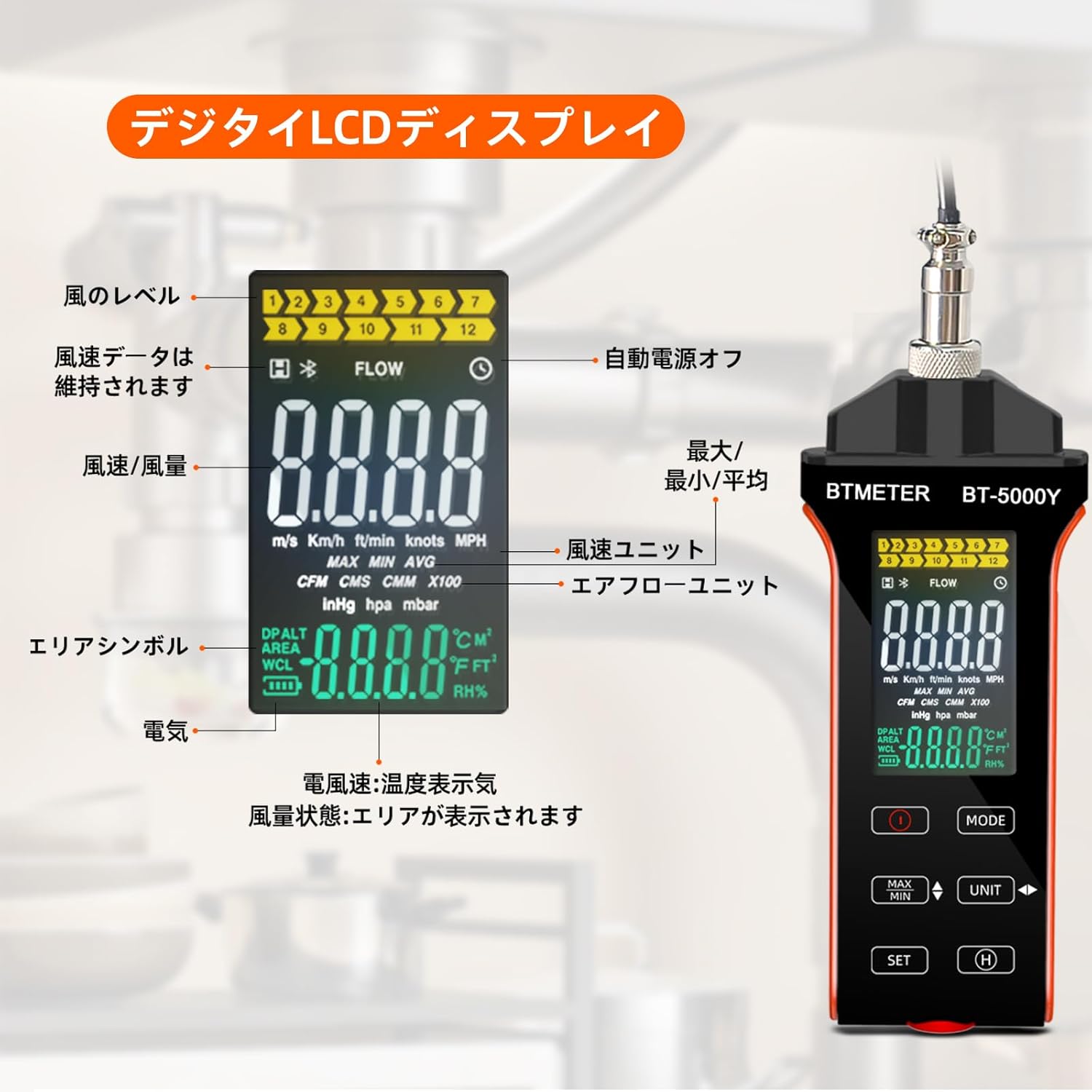
Figure 4.3: Detailed overview of the digital LCD display and its indicators.
The large color LCD display provides comprehensive information:
- Wind Level Indicator: Visual representation of wind strength.
- Data Hold Symbol: Indicates when the display is frozen.
- Auto Power Off Indicator: Shows if auto-shutdown is active.
- MAX/MIN/AVG Indicators: Displays the selected measurement mode.
- Wind Speed Units: Current unit (m/s, km/h, ft/min, knots, Mph).
- Airflow Units: Current unit (CMM, CFM).
- Area Symbol: Used for airflow calculations.
- Battery Indicator: Shows remaining battery life.
- Temperature Display: Shows air temperature in °C or °F.
5. Maintenance
5.1 Cleaning
Wipe the device and probe with a soft, dry cloth. Do not use abrasive cleaners or solvents. Ensure the hot-wire sensor is clean and free of dust or debris for accurate readings.
5.2 Storage
When not in use, retract the sensor probe and store the anemometer in a cool, dry place, away from direct sunlight and extreme temperatures. Use the provided carrying case (if applicable) to protect the device.
5.3 Battery Care
To prolong battery life, avoid fully discharging the battery frequently. Recharge the device when the low battery indicator appears. If storing for an extended period, charge the battery to approximately 50% every few months.
6. Troubleshooting
If you encounter issues with your BTMETER BT-5000Y, please refer to the following common problems and solutions:
- Device does not power on:
- Ensure the battery is sufficiently charged. Connect the device to a power source using the USB Type-C cable and allow it to charge for at least 30 minutes before attempting to power on again.
- Verify that the power button is pressed and held for the required duration.
- Inaccurate or erratic readings:
- Check if the hot-wire sensor is clean and free from dust, lint, or other obstructions. Gently clean it if necessary.
- Ensure the probe is fully extended and properly positioned in the airflow.
- Verify that the probe is securely connected to the main unit.
- Ensure the device is operating within its specified temperature and humidity ranges.
- Digital display is erratic or 'crazy':
- This could indicate a software glitch or a hardware issue. Try turning the device off and on again.
- If the problem persists, contact customer support for further assistance.
- Issues with CFM/CMM calculation or unit conversion (e.g., automatically switching units, incorrect conversions):
- Carefully review the manual's section on unit conversion and area input. Some devices may have specific input methods or default behaviors for area calculations.
- Ensure you are following the correct sequence for entering area values and selecting units.
- If the issue persists and appears to be a fundamental flaw in unit handling, contact customer support.
- Low battery indicator constantly on:
- Recharge the battery fully. If the issue persists after a full charge, the battery may need replacement.
For issues not covered here, please contact BTMETER customer support.
7. Specifications
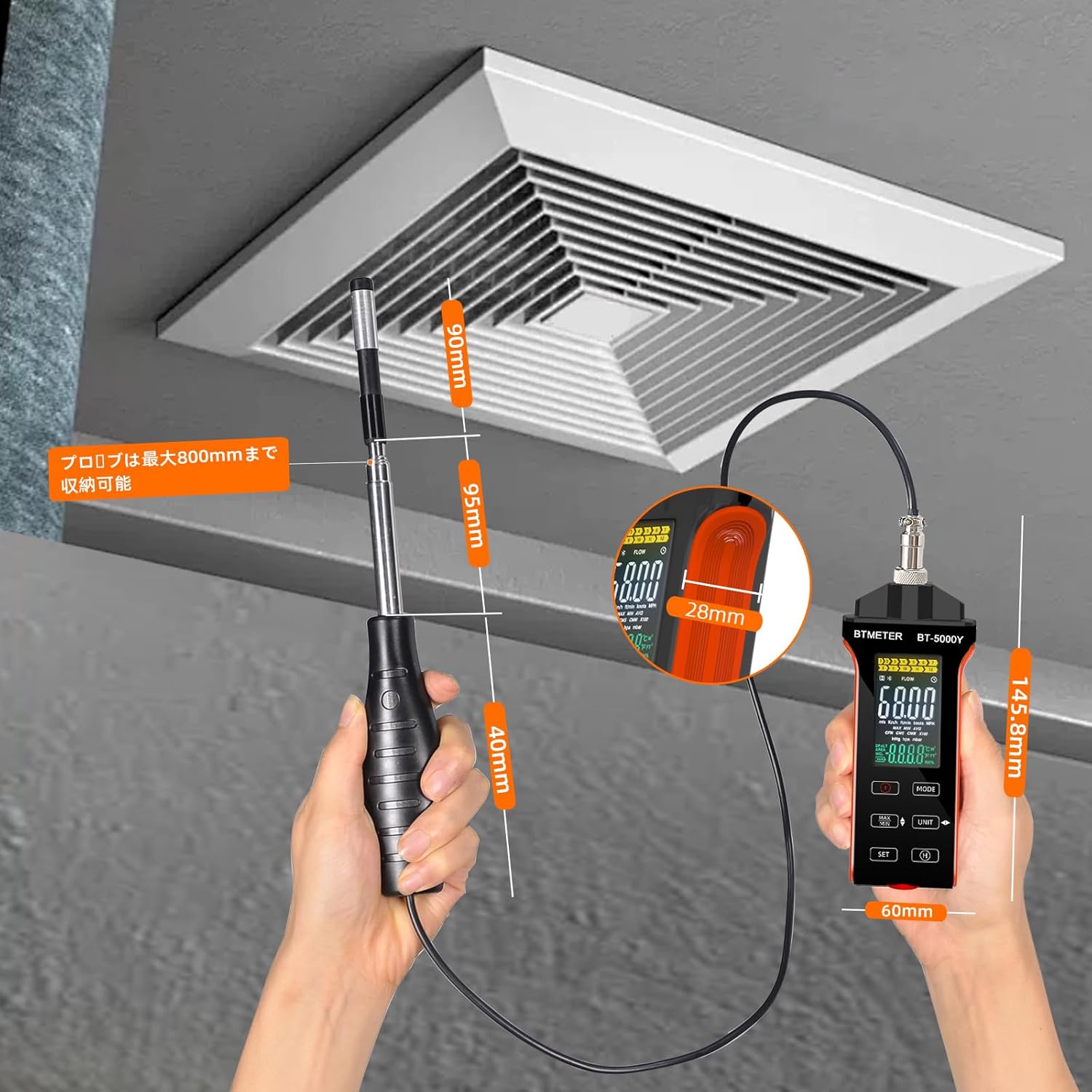
Figure 7.1: Dimensions of the BTMETER BT-5000Y anemometer.
| Parameter | Value |
|---|---|
| Model | BT-5000Y |
| Wind Speed Measurement Range | 0 - 30 m/s |
| Wind Speed Accuracy | ±5% ±0.1 dgt |
| Wind Speed Resolution | 0.1% |
| Air Temperature Measurement Range | 0.0 - 45.0 °C (32.0 - 113.0 °F) |
| Air Temperature Accuracy | ±1.0 °C (±1.8 °F) |
| Air Temperature Resolution | 0.1 |
| Air Volume Range (CMM) | 0 - 999900 m³/min |
| Air Volume Range (CFM) | 0 - 999900 ft³/min |
| Air Volume Resolution | 0.001 - 100 |
| Battery | Built-in 600mAh Lithium Battery |
| Charging Interface | USB Type-C |
| Item Weight | 250 g |
| Package Dimensions | 14.5 x 6 x 3 cm |
| Included Components | 1 * BTMETER BT-5000Y Anemometer |
8. Warranty and Support
BTMETER products are designed for reliability and performance. This product comes with a standard manufacturer's warranty. For specific warranty terms and conditions, please refer to the warranty card included with your product or visit the official BTMETER website.
If you require technical assistance, troubleshooting, or have questions about your BT-5000Y anemometer, please contact BTMETER customer support through their official channels. When contacting support, please have your product model (BT-5000Y) and purchase information ready.