
VGR V-001 & V-977
VGR Professional Hair Trimmer and Clipper Set User Manual
Models: V-001 & V-977
Introduction
This manual provides detailed instructions for the safe and effective use of your VGR Professional Hair Trimmer and Clipper Set. Please read this manual thoroughly before first use and retain it for future reference.
The set includes two main units: the VGR-001 Hair Clipper and the VGR-977 Hair Trimmer, along with various accessories designed for professional grooming.
Safety Information
Always follow basic safety precautions when using electrical appliances, especially when children are present. To reduce the risk of electric shock, burns, fire, or injury:
- Do not reach for an appliance that has fallen into water. Unplug immediately.
- Do not use while bathing or in a shower.
- Do not place or store appliance where it can fall or be pulled into a tub or sink.
- Except when charging, always unplug this appliance from the electrical outlet immediately after using.
- Unplug this appliance before cleaning.
- Close supervision is necessary when this appliance is used by, on, or near children or invalids.
- Use this appliance only for its intended household use as described in this manual. Do not use attachments not recommended by the manufacturer.
- Never operate this appliance if it has a damaged cord or plug, if it is not working properly, if it has been dropped or damaged, or dropped into water.
- Keep the cord away from heated surfaces.
- Never drop or insert any object into any opening.
- Do not use outdoors or operate where aerosol (spray) products are being used or where oxygen is being administered.
- Always attach plug to appliance first, then to outlet. To disconnect, turn all controls to OFF, then remove plug from outlet.
- This appliance is intended for household use only.
Product Overview
The VGR Professional Hair Trimmer and Clipper Set includes two distinct devices, each designed for specific grooming tasks. The VGR-001 is a professional hair clipper, while the VGR-977 is a precision hair trimmer.

Image: VGR-001 Hair Clipper (left) and VGR-977 Hair Trimmer (right) on their respective charging bases. Both units feature an LED display and a sleek black design.
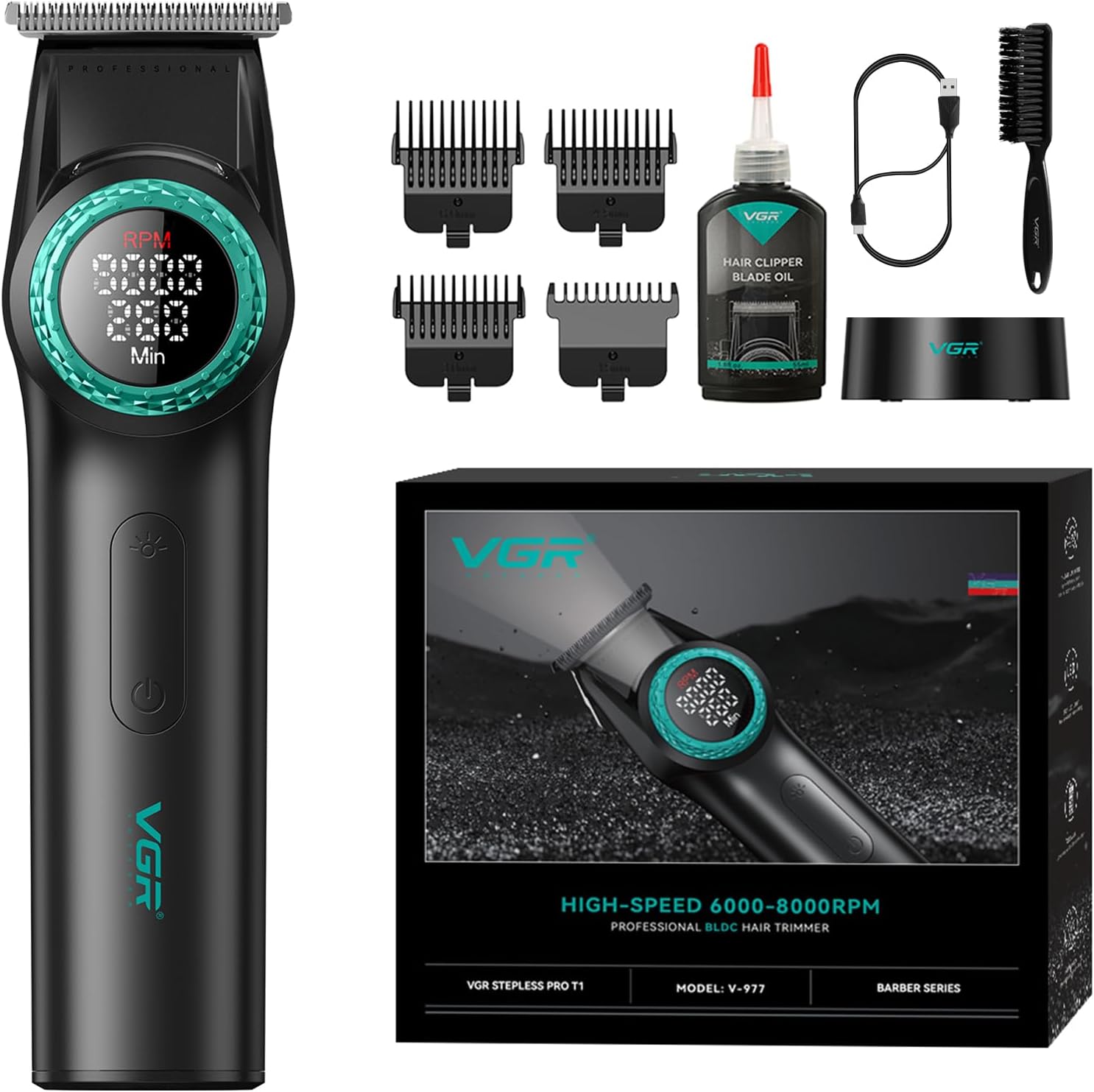
Image: The VGR-001 Hair Clipper shown with its full set of accessories, including multiple guide combs, a cleaning brush, blade oil, USB-C charging cable, charging base, and U.S. charging plug.

Image: The VGR-977 Hair Trimmer displayed with its accessories, which include various guide combs, a cleaning brush, blade oil, USB charging cable, and charging base.
Key Features:
- Professional Blades: High-density carbon steel blades with dual-layer overlap technology for precise cuts.
- Powerful Motors: VGR-001 (7,000-9,000 rpm) and VGR-977 (6,000-8,000 rpm) with 21-speed adjustments and Smart Clip technology.
- LED Display: Ultra-large intelligent digital display showing speed and remaining operating time.
- Integrated Lighting: Front lighting button for precise haircutting in low light conditions.
- Long-lasting Battery: VGR-001 with 4600mAh and VGR-977 with 2500mAh lithium-ion batteries, providing over 260 minutes of work time.
- Taper Lever (VGR-001): 5 stable horizontal locking adjustments for cutting lengths from 1.0mm to 3.0mm.
- Comprehensive Accessories: Multiple guide combs, cleaning brush, lubricant, charging cables, and charging bases.
Setup and Charging
Initial Charging:
Before first use, fully charge both the VGR-001 clipper and VGR-977 trimmer. This ensures optimal battery performance and longevity.
- Connect the USB-C charging cable to the charging base and then to a compatible USB power adapter (U.S. charging plug included).
- Place the clipper/trimmer onto its respective charging base, ensuring proper contact. The LED display will indicate charging status.
- For VGR-001, fast charging takes approximately 3 hours. Compatible slow charging (5V=1A) may take up to 6 hours.
- For VGR-977, charging time is approximately 3.5 hours.
- A full charge will show "260/300 Min" on the display for VGR-001 and indicate full charge for VGR-977.

Image: Visual guide for charging the VGR-001 clipper, detailing fast and slow charging times and how the display indicates remaining usage time.

Image: Illustration of the USB charging process for the VGR-977 trimmer, showing the charging cable connected to the base and the device.
Attaching Guide Combs:
Select the appropriate guide comb for your desired hair length. Ensure the comb is securely attached to the blade before operation.
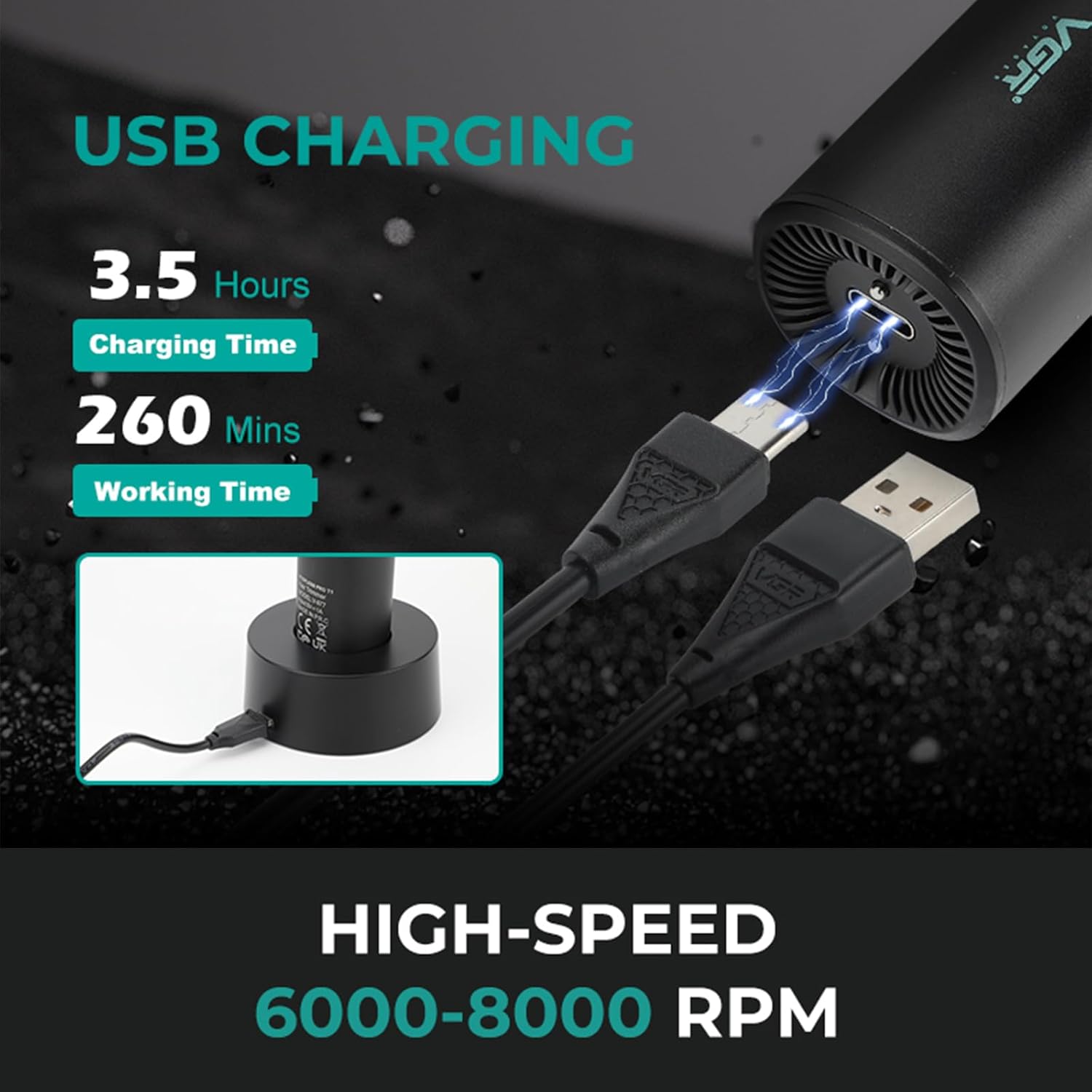
Image: Examples of guide combs for the VGR-977 trimmer, showing different lengths (1.5mm, 3mm, 4.5mm, 6mm) and how they attach to the blade.
Operating Instructions
Power On/Off:
Press the power button located on the front of the device to turn it on or off.

Image: Close-up of the VGR clipper showing the ON/OFF button and the front light button. Clicking the front light button activates the LED light above the blade.
Adjusting Speed (RPM):
Both models feature a rotary knob for speed adjustment. Turn the center knob to select your desired RPM. The LED display will show the current speed.
- VGR-001: Speeds from 7,000 rpm to 9,000 rpm (in 100 rpm increments).
- VGR-977: Speeds from 6,000 rpm to 8,000 rpm.
Smart Clip Technology: The device senses blade resistance and automatically adjusts motor speed for a smooth trim.

Image: Detailed view of the VGR-001 clipper's LED display showing RPM and remaining minutes, with arrows indicating the 21-level adjustment operation for speed.

Image: Close-up of the VGR-977 trimmer's LED display, highlighting its speed range of 6000-8000 RPM/min and the 21-level adjustment operation.
Using the Taper Lever (VGR-001 only):
The VGR-001 clipper features an adjustable taper lever on the side, allowing for fine-tuning of cutting lengths without changing guide combs. It provides 5 stable horizontal locking adjustments:
- 1.0 mm
- 1.5 mm
- 2.0 mm
- 2.5 mm
- 3.0 mm
Image: Diagram illustrating the taper lever on the VGR-001 clipper and its 5 settings for cutting length adjustment (1.0mm to 3.0mm).
LED Lighting Operation:
For enhanced visibility during use, especially in dimly lit areas, press the front light button. A light will illuminate directly above the blade.
- ON: Click the front light button. You will hear a beeping sound.
- OFF: Click the button again. Another beeping sound will confirm deactivation.
Image: Close-up of the VGR clipper showing the ON/OFF button and the front light button. Clicking the front light button activates the LED light above the blade.
Maintenance
Cleaning the Blades:
Regular cleaning ensures optimal performance and extends the lifespan of your clipper and trimmer.
- After each use, turn off the device and remove any attached guide combs.
- Use the provided cleaning brush to remove loose hairs from the blades and the cutting head area.
- For a more thorough cleaning, the blades can be rinsed under running water. Ensure the device is completely dry before reattaching the blades or storing. Do not submerge the entire unit in water.
Lubricating the Blades:
To maintain cutting efficiency and prevent blade wear, apply a small amount of the included lubricant oil to the blades regularly.
- Apply 1-2 drops of oil to the top of the blades while the device is running.
- Allow the device to run for a few seconds to distribute the oil evenly.
- Wipe off any excess oil with a clean, soft cloth.
Image: Close-up showing the DLC coating fix blade and ceramic moving blade, emphasizing the smooth cutting mechanism that benefits from lubrication.
Storage:
Store the clipper and trimmer in a cool, dry place, away from direct sunlight and moisture. Keep all accessories organized to prevent loss or damage.
Troubleshooting
| Problem | Possible Cause | Solution |
|---|---|---|
| Device does not turn on. | Battery is depleted. | Charge the device fully using the provided charging base and cable. |
| Blades pull hair or cut poorly. | Blades are dirty or not lubricated. Blades may be dull. | Clean the blades thoroughly and apply lubricant oil. If problem persists, blades may need replacement. |
| Device makes unusual noise. | Blades are not properly aligned or lubricated. | Ensure blades are clean and well-oiled. Check for any obstructions. |
| LED display is not working. | Device malfunction. | Ensure the device is charged. If the issue persists, contact customer support. |
Specifications
| Feature | VGR-001 Hair Clipper | VGR-977 Hair Trimmer |
|---|---|---|
| Blade Material | High-density Carbon Steel, DLC Coating, Ceramic Moving Blade | High-density Carbon Steel, T-Blade |
| Motor Speed | 7,000 - 9,000 RPM (21-speed adjustment) | 6,000 - 8,000 RPM (21-speed adjustment) |
| Battery Capacity | 4600mAh Lithium-ion | 2500mAh Lithium-ion |
| Working Time | > 260 minutes | > 260 minutes |
| Charging Time | 3 hours (fast charge), up to 6 hours (slow charge) | 3.5 hours |
| Power Source | Battery Powered | Battery Powered |
| Color | Black | Black |
| Hair Type | All | All |
Warranty and Support
Warranty Information:
This product comes with a 1-Year Warranty from the date of purchase. Please retain your proof of purchase for warranty claims. The warranty covers manufacturing defects and malfunctions under normal use. It does not cover damage caused by misuse, accidents, unauthorized repairs, or normal wear and tear.

Image: Graphic indicating "1 Year Warranty" and "24 H Support" for VGR products.
Customer Support:
For any questions, concerns, or technical assistance, please contact VGR customer support. We offer 24-hour support to assist you.
You can visit the official VGR store on Amazon for more information and contact options: VGR Official Store
Alternatively, refer to the contact information provided with your product packaging.
Related documentsV-001 & V-977


Ask a question about this manual
Ask about setup, troubleshooting, compatibility, parts, safety, or missing instructions. Manuals+ will review the question and use this page’s manual context to help answer it.