
BOBLOV M7, B4K6
BOBLOV M7 and B4K6 Body Camera User Manual
Comprehensive instructions for setup, operation, and maintenance.
1. Introduction
This manual provides detailed instructions for the BOBLOV M7 and B4K6 Body Cameras. Please read this manual thoroughly before using your device to ensure proper operation and to maximize its capabilities. Keep this manual for future reference.
The BOBLOV M7 features a 180° rotatable lens and a 4000mAh battery, while the BOBLOV B4K6 offers 4K resolution and comes with two 3000mAh batteries and a charging dock. Both models include GPS functionality for location tracking.
2. Package Contents
Verify that all items are present in your package. If any items are missing or damaged, contact customer support.
- BOBLOV M7 Body Camera (or B4K6 Body Camera)
- USB Charging Cable
- Power Adapter
- User Manual
- Mounting Clip
- For B4K6: Two 3000mAh Batteries and Charging Dock
- For M7: Built-in 4000mAh Battery
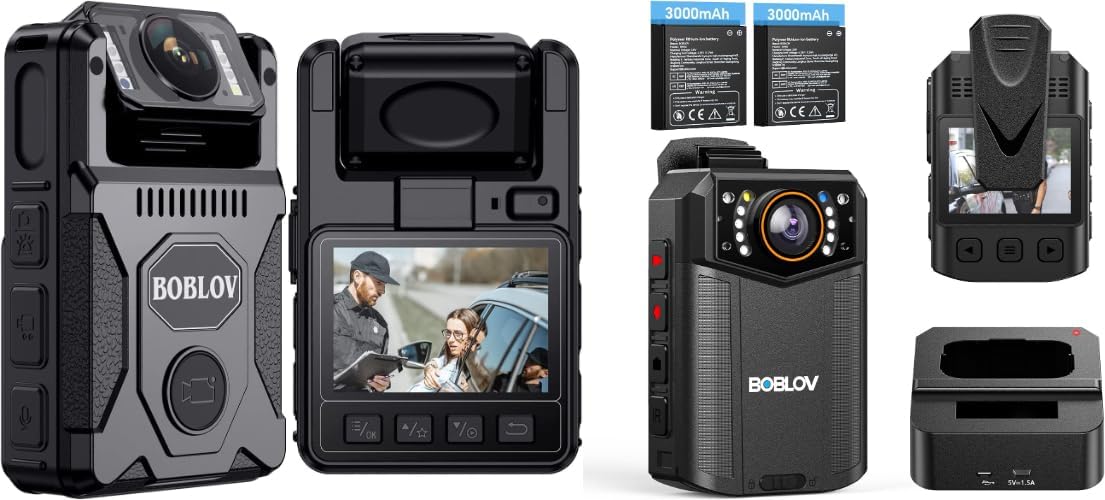
Image: Overview of BOBLOV M7 and B4K6 body cameras, showing the devices, additional batteries (for B4K6), and a charging dock (for B4K6).
3. Product Overview
3.1 BOBLOV M7 Key Features
- 180° Rotatable Lens: Allows flexible recording angles.
- 4000mAh Battery: Provides extended recording time.
- Built-in GPS: For accurate location tracking.
- 1080P HD Video Recording: Captures clear footage.

Image: The BOBLOV M7 body camera demonstrating its 180-degree rotatable lens, showing positions at 90 degrees, 0 degrees, and 180 degrees.
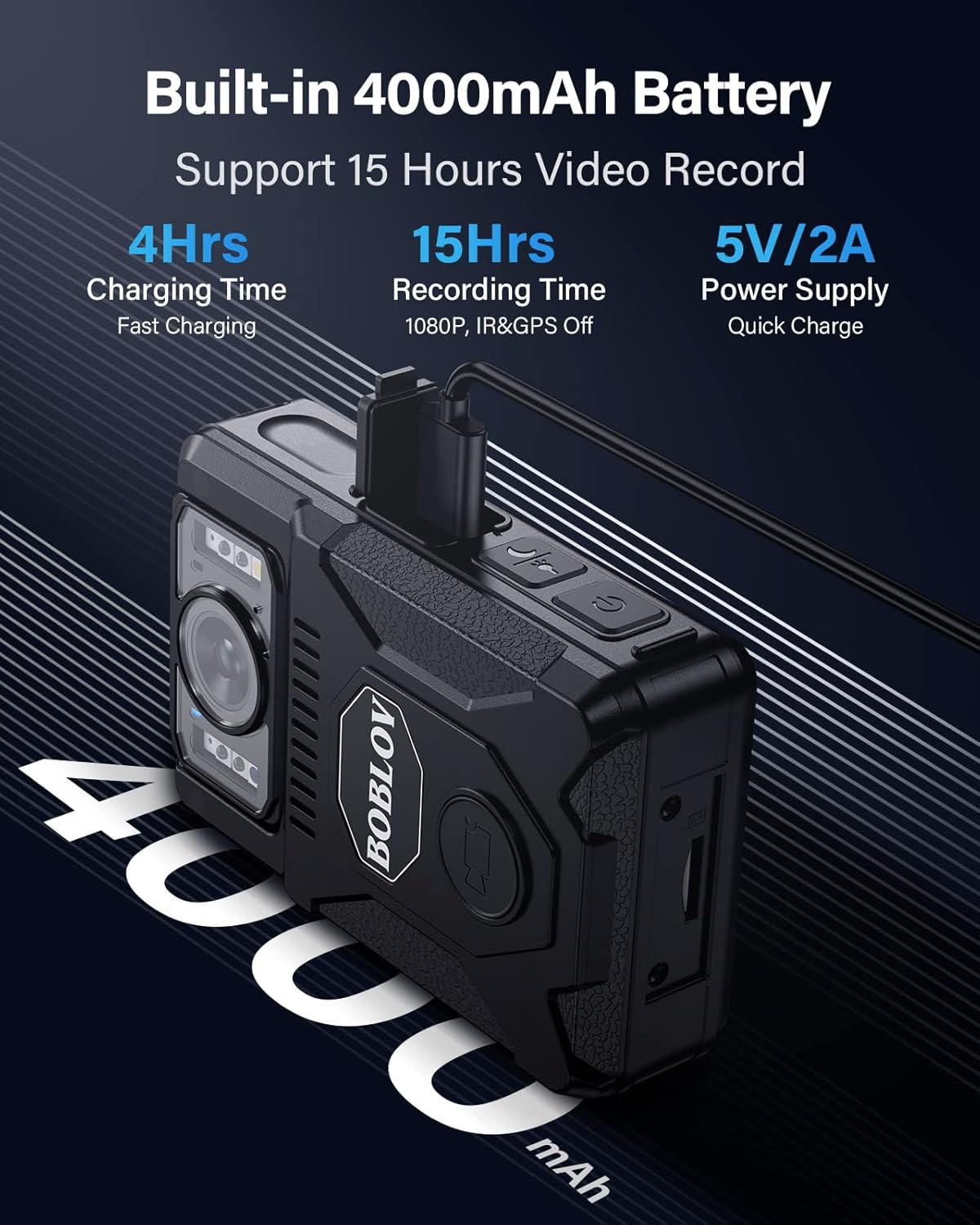
Image: The BOBLOV M7 body camera connected to a charging cable, highlighting its built-in 4000mAh battery, 4-hour charging time, 15-hour recording time, and 5V/2A power supply.
3.2 BOBLOV B4K6 Key Features
- 4K Video Quality: High-resolution video recording.
- Dual 3000mAh Batteries: Extended recording with swappable batteries.
- Charging Dock: Convenient charging solution.
- Built-in GPS: For accurate location tracking.

Image: A police officer wearing the BOBLOV B4K6 body camera, emphasizing its 4K resolution, 54MP photo capability, and 30fps recording.

Image: The BOBLOV B4K6 body camera with its charging dock and two 3000mAh batteries, illustrating extended recording times of 8 hours at 4K and 16 hours at 1080P with two batteries.

Image: A comparison showing the convenience of the BOBLOV B4K6 charging dock versus direct cable connection, highlighting hassle-free charging.
4. Setup
4.1 Initial Charging
Before first use, fully charge your body camera. Connect the camera to the power adapter using the provided USB cable. The charging indicator light will typically show red while charging and turn green when fully charged.
- M7: Built-in 4000mAh battery. Charging time is approximately 4 hours.
- B4K6: Use the charging dock for convenient charging of the camera and spare battery. Ensure batteries are correctly inserted into the dock.
4.2 Inserting/Replacing Batteries (B4K6 Only)
For the B4K6 model, ensure the camera is powered off. Open the battery compartment cover, insert a charged 3000mAh battery with the correct orientation, and close the cover securely.
4.3 Power On/Off
Press and hold the Power button for a few seconds to turn the camera on or off. The camera will typically vibrate or display a startup/shutdown screen.
4.4 Attaching the Mounting Clip
Attach the provided mounting clip to the back of the camera. Ensure it is securely fastened before attaching the camera to your uniform or clothing.
5. Operating Instructions
5.1 Video Recording
From standby mode, press the Video Record button to start recording. Press it again to stop. The camera will typically indicate recording status with a red light or on-screen icon.
- M7: Supports 1080P HD video.
- B4K6: Supports 4K video recording.
5.2 Photo Capture
From standby mode, press the Photo button to take a still image. The camera may briefly flash or make a shutter sound.
5.3 Using the 180° Rotatable Lens (M7 Only)
The M7 model features a lens that can be manually rotated 180 degrees. Adjust the lens to capture footage from various angles, including forward-facing, upward, or backward, as needed for your recording situation.
5.4 GPS Functionality
Both M7 and B4K6 models include built-in GPS. This feature automatically embeds location data into your video recordings. To view GPS data, you will need to download and use the dedicated GPS player software provided by BOBLOV on your computer.

Image: The BOBLOV M7 body camera connected to a laptop, displaying the GPS player software which shows the recorded route on a map alongside the video playback.

Image: The BOBLOV B4K6 body camera placed on a laptop, with the screen showing a map interface indicating GPS tracking of movements and locations.
5.5 Menu Navigation
Use the navigation buttons (e.g., Menu, Up, Down, OK) to access and adjust camera settings such as resolution, loop recording, date/time stamp, and other preferences. Refer to the on-screen prompts for specific menu options.
5.6 Using as a Dash Camera (M7)
The M7 model can be adapted for use as a dash camera. A dash cam mount set is not included and must be purchased separately. When mounted, the camera can record with a Field of View (FOV) of 127 degrees.

Image: The BOBLOV M7 body camera mounted on a car windshield with a suction cup mount, illustrating its expanded use as a dash camera with a 127-degree field of view.
6. Maintenance
6.1 Cleaning
Wipe the camera body with a soft, dry cloth. For the lens, use a specialized lens cleaning cloth and solution to avoid scratches. Do not use harsh chemicals or abrasive materials.
6.2 Storage
Store the camera in a cool, dry place away from direct sunlight and extreme temperatures. If storing for extended periods, ensure the battery is partially charged (around 50%) to prolong its lifespan.
6.3 Firmware Updates
Periodically check the BOBLOV official website for any available firmware updates. Updating firmware can improve performance, add new features, or fix bugs.
7. Troubleshooting
| Problem | Possible Cause | Solution |
|---|---|---|
| Camera does not power on. | Low battery; faulty battery (B4K6); power button issue. | Charge the camera fully. For B4K6, try a different battery. Ensure power button is pressed correctly. |
| Cannot record video/take photos. | Insufficient storage; camera in wrong mode; battery low. | Check available storage. Ensure camera is in video/photo mode. Charge the battery. |
| GPS data not showing. | Poor GPS signal; incorrect software used. | Ensure camera has clear view of sky. Use the official BOBLOV GPS player software. |
| Short battery life. | High resolution recording; continuous GPS; aging battery. | Reduce video resolution. Disable GPS if not needed. Consider replacing batteries (B4K6) or contacting support (M7). |
8. Specifications
BOBLOV M7
- Video Resolution: Up to 1080P HD
- Lens: 180° Rotatable
- Battery: Built-in 4000mAh
- Recording Time: Up to 12-15 hours (1080P, IR&GPS Off)
- Charging Time: Approx. 4 hours (5V/2A)
- GPS: Built-in for location tracking
- Storage: 128GB (internal, as per product title)
- Field of View (Dash Cam Mode): 127 degrees
BOBLOV B4K6
- Video Resolution: Up to 4K
- Photo Resolution: 54MP (as per image)
- Battery: 2 x 3000mAh rechargeable batteries
- Recording Time: Up to 8 hours (4K, 2 batteries), 16 hours (1080P, 2 batteries)
- Charging: Via charging dock
- GPS: Built-in for location tracking
- Storage: 128GB (internal, as per product title)
9. Warranty and Support
BOBLOV products typically come with a manufacturer's warranty. For specific warranty details, technical support, or service inquiries, please refer to the warranty card included with your product or visit the official BOBLOV website. You may also contact the seller directly for assistance.
BOBLOV Store: Visit the BOBLOV Store on Amazon
Related documentsM7, B4K6


Ask a question about this manual
Ask about setup, troubleshooting, compatibility, parts, safety, or missing instructions. Manuals+ will review the question and use this page’s manual context to help answer it.