
1. Important Safety Instructions
Please read and understand all instructions before beginning installation. Failure to follow these instructions may result in electric shock, fire, or personal injury.
- Ensure the power is turned off at the circuit breaker before installation or maintenance.
- All wiring must be in accordance with national and local electrical codes. If you are unfamiliar with wiring, consult a qualified electrician.
- The mounting structure must be capable of supporting the weight of the fan (approximately 10.5 pounds).
- Do not bend the blade holders during installation or cleaning.
- Keep hands clear of the fan blades when the fan is operating.
- This fan is designed for indoor use only.
2. Product Overview
The Fanbulous 42 Inch Farmhouse Ceiling Fan (Model LQ42) combines rustic design with modern functionality. It features a caged light fixture, reversible double-sided blades (black and wood grain), and a remote control for convenient operation. This fan is suitable for rooms up to 10 ft x 10 ft, providing quiet comfort with 6-speed settings and a reversible DC motor for year-round use.
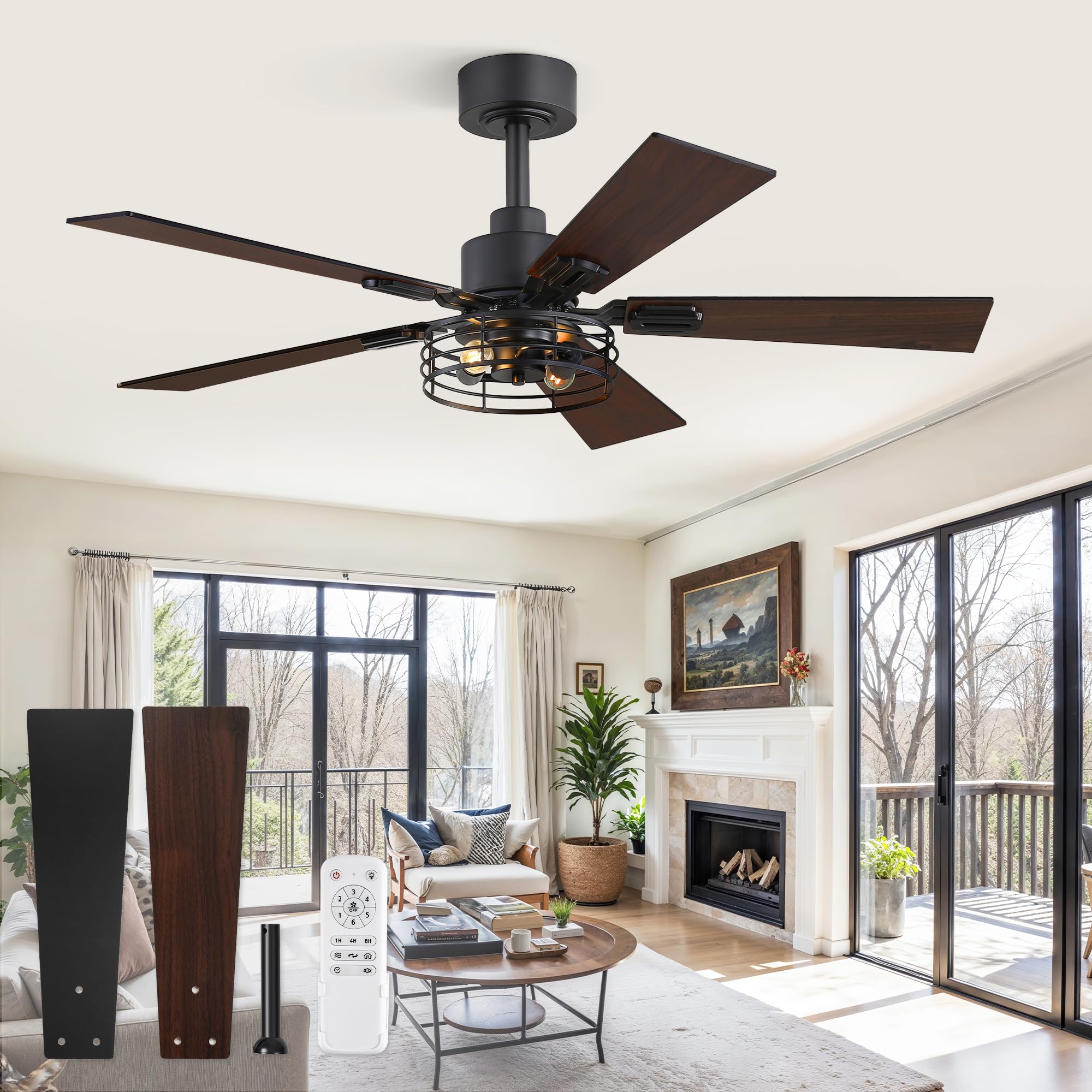
Figure 2.1: Fanbulous 42 Inch Farmhouse Ceiling Fan, Black finish.
3. Package Contents
Verify that all components are present before beginning installation. If any parts are missing or damaged, contact customer service.
- Fan Motor Assembly
- 5 Reversible Blades (Black/Wood Grain)
- Light Kit with Caged Design
- Remote Control with Wall Cradle
- 6-inch Downrod
- Mounting Hardware Kit
- Instruction Manual
Note: Two E12 socket bulbs are required and are not included in the package.

Figure 3.1: Exploded view of fan components.
4. Installation Guide
4.1 Pre-Installation
- Turn off power at the main circuit breaker.
- Ensure the electrical box is securely mounted and capable of supporting the fan's weight.
- Gather all necessary tools (screwdriver, wire strippers, ladder, etc.).
4.2 Mounting the Fan
- Attach the mounting bracket to the ceiling electrical box using the provided screws.
- Assemble the downrod to the fan motor, feeding the wires through the downrod.
- Carefully lift the fan assembly and hang it from the mounting bracket.
- Connect the electrical wires (live, neutral, ground) according to local codes and the fan's wiring diagram.
- Secure the canopy to the mounting bracket.
- Attach the fan blades to the motor housing. You can choose between the black or wood grain side.
- Install the light kit and the decorative cage.
- Insert two E12 base bulbs (not included) into the light sockets.
The fan can be mounted on sloped ceilings up to 15 degrees using the included 6-inch downrod.

Figure 4.1: Fan dimensions and bulb specifications.
5. Operating Instructions
The Fanbulous ceiling fan is operated using the included remote control. Ensure the remote has 2 AAA batteries installed (included).
5.1 Remote Control Functions
- Power Button: Turns the fan and light on/off.
- Fan Speed Buttons (1-6): Adjusts the fan speed from low (1) to high (6).
- Light On/Off Button: Controls the light independently.
- Timer Buttons (1H, 4H, 8H): Sets the fan to turn off automatically after 1, 4, or 8 hours.
- Reverse Function Button: Changes the direction of the fan blades. Use forward mode (downward airflow) for cooling in summer and reverse mode (upward airflow) for better air circulation in winter.
- Natural Wind Button: Simulates a natural breeze by varying fan speeds.

Figure 5.1: Remote control for Fanbulous Ceiling Fan.
Video 5.1: Product Detail Information - Demonstrates fan features and operation.
Video 5.2: Ceiling Fan with Light and Remote - Installed in Our New Home - Shows the fan in a home setting and remote control usage.
6. Maintenance
Regular maintenance ensures optimal performance and longevity of your ceiling fan.
- Cleaning: Dust the fan blades and motor housing periodically with a soft, damp cloth. Do not use abrasive cleaners or solvents.
- Tighten Screws: Check all screws and connections annually to ensure they are secure.
- Bulb Replacement: Replace E12 bulbs as needed. Ensure power is off before changing bulbs.
7. Troubleshooting
If you experience issues with your fan, refer to the following common problems and solutions:
| Problem | Possible Cause | Solution |
|---|---|---|
| Fan does not start | No power to the fan; Loose wire connections; Remote control battery low. | Check circuit breaker; Verify all wire connections are secure; Replace remote control batteries. |
| Light does not work | Bulbs are faulty or loose; Loose wire connections in light kit. | Ensure bulbs are tightened and functional; Check light kit wiring. |
| Fan wobbles | Loose blades or mounting hardware; Unbalanced blades. | Tighten all blade and mounting screws; Use a balancing kit (not included) if necessary. |
| Remote control not responding or controls multiple fans simultaneously | Remote not paired correctly; Interference. | Ensure remote is paired to the specific fan. If controlling multiple fans, ensure each fan has a unique pairing or consider separate circuits if possible to avoid interference. Consult customer support for advanced pairing instructions if issues persist. |
8. Product Specifications
| Feature | Specification |
|---|---|
| Brand | Fanbulous |
| Model Name | LQ42 |
| Size | 42 INCH |
| Color | Black |
| Number of Blades | 5 |
| Fan Speeds | 6 Levels |
| Control Method | Remote |
| Light Source Type | LED (Bulbs not included) |
| Bulb Base | E12 |
| Wattage | 40 watts (max for light kit) |
| Brightness | 450 lumen (with recommended bulbs) |
| Timer Settings | 1/4/8 Hours |
| Room Type | Living Room, Bedroom (Indoor) |
| Product Dimensions | 42 x 11.81 x 5.61 inches |
| Item Weight | 10.5 pounds |
| Batteries | 2 AAA batteries (included for remote) |
9. Warranty and Customer Support
Fanbulous is committed to providing quality products and excellent customer service.
- For any installation questions, operational issues, or after-sales inquiries, please contact our 24/7 customer support team.
- Our team is ready to assist you promptly and resolve any concerns you may have.
Please retain your purchase receipt for warranty purposes.


