
1. Safety Information
Read all instructions carefully before installation and use. Retain this manual for future reference.
- Ensure power is disconnected at the circuit breaker before installation or servicing.
- All wiring must be in accordance with national and local electrical codes.
- Consult a qualified electrician if you are unsure about wiring procedures.
- Mounting structure must be capable of supporting the fan's weight (approximately 22.5 lbs).
- Keep hands, clothing, and other objects clear of fan blades during operation.
- Do not operate the fan if any part is damaged.
- This fan is suitable for indoor or covered outdoor use. Do not expose to direct water spray.
2. Package Contents
Verify that all components are present before beginning installation.
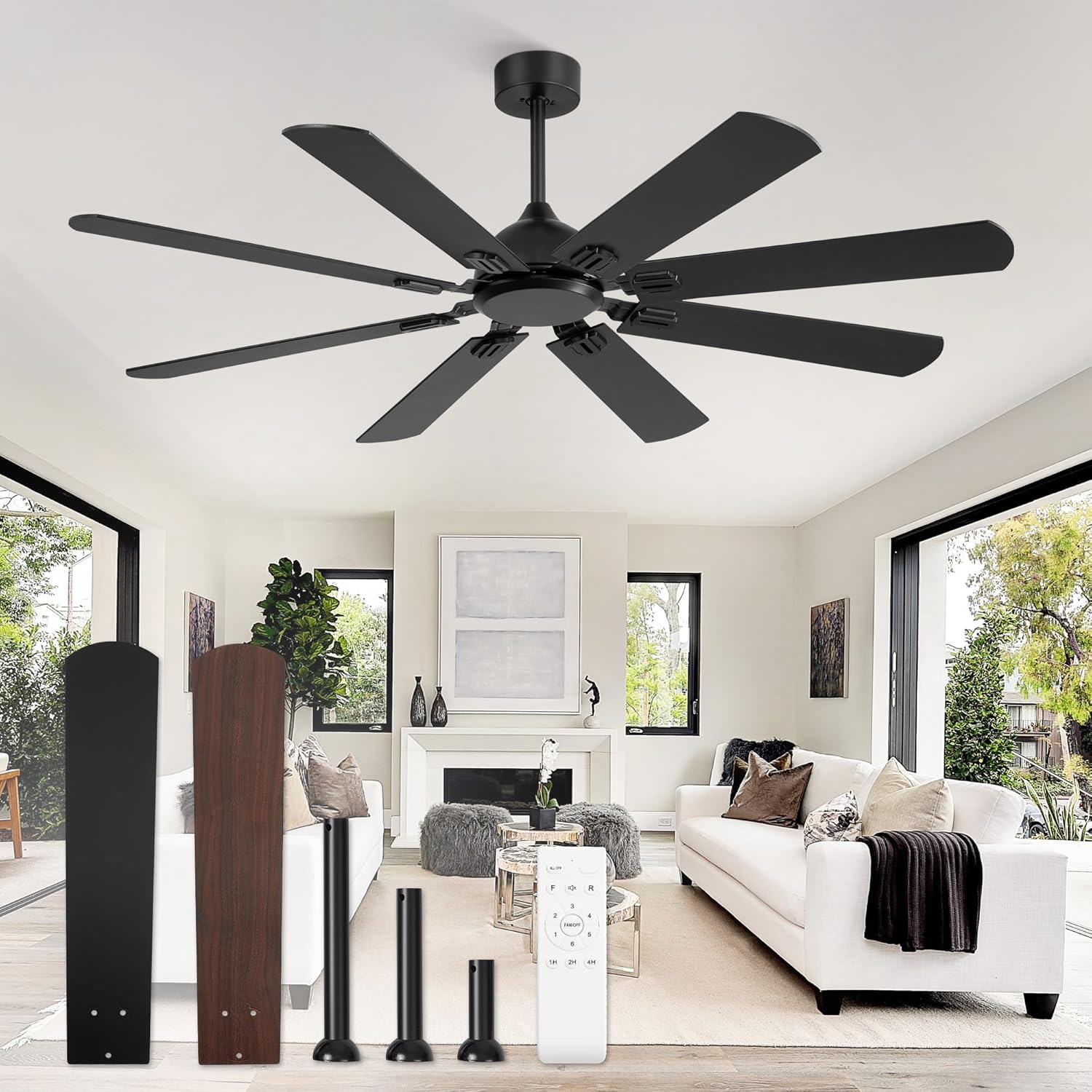
Image: Overview of the Fanbulous 62 Inch Ceiling Fan components. This includes the main motor housing, eight dual-finish fan blades (black and walnut), three different length downrods (5", 10", 15"), and the remote control with its wall mounting bracket.
List of Components:
- Motor Housing Assembly
- Fan Blades (8x, dual-finish: Black/Walnut)
- Downrods (3x: 5-inch, 10-inch, 15-inch)
- Mounting Bracket
- Canopy
- Remote Control
- Remote Control Wall Bracket
- Hardware Pack (screws, washers, wire nuts)
- Instruction Manual
3. Setup & Installation
Follow these steps for proper installation. Professional installation is recommended if you are not familiar with electrical wiring.
3.1 Choose Downrod Length
Select the appropriate downrod (5", 10", or 15") based on your ceiling height and desired fan clearance. The fan can also be installed on sloped ceilings up to 15 degrees.

Image: This diagram illustrates the use of three different downrod lengths (5", 10", 15") for various ceiling types: low ceilings, high ceilings, and slanted ceilings (up to 15 degrees). The image shows how the fan appears with each downrod option.
3.2 Mounting the Fan
- Turn off Power: Ensure the power supply to the installation location is completely off at the circuit breaker.
- Install Mounting Bracket: Secure the mounting bracket to the ceiling junction box. The junction box must be listed for fan support.
- Assemble Downrod: Feed the fan wires through the chosen downrod. Secure the downrod to the motor housing.
- Hang Fan: Carefully lift the fan assembly and hang it on the mounting bracket.
- Wire Connections: Connect the fan's electrical wires to the household wiring according to local codes. Use the provided wire nuts.
- Secure Canopy: Slide the canopy up to the ceiling and secure it to the mounting bracket, covering the wiring.
- Attach Blades: Attach the eight fan blades to the motor housing. Ensure they are securely fastened. Note the dual-finish blades (black and walnut) allow for aesthetic customization.

Image: A close-up view of one of the fan blades, highlighting its dual-sided design with a black finish on one side and a walnut finish on the other. This allows users to choose their preferred aesthetic during installation.
4. Operating Instructions
This ceiling fan is operated using the included remote control.
4.1 Remote Control Functions

Image: This image displays the remote control for the Fanbulous ceiling fan, with labels pointing to each button and describing its function. Functions include Fan ON/OFF, Reverse mode, Remote Controller Mute, Forward mode, Fan Stop, 1-6 Fan Speed settings, and 1/2/4 Hour Timer settings. The remote can also be mounted on a wall using the included bracket.
- Fan ON/OFF: Press to turn the fan on or off.
- Speed Control (1-6): Adjust fan speed from 1 (lowest) to 6 (highest).
- Reverse Mode: Changes the direction of blade rotation.
- Summer Forward Mode: Blades rotate counter-clockwise to push cool air down.
- Winter Reverse Mode: Blades rotate clockwise to pull warm air up, circulating it throughout the room.
- Timer (1H/2H/4H): Set the fan to automatically turn off after 1, 2, or 4 hours.
- Mute: Silences remote control beeps.

Image: This graphic demonstrates the reversible DC motor feature. It shows air flow patterns for "Summer Forward" mode (delivering cool air downwards) and "Winter Reverse" mode (circulating warm air upwards), with corresponding visual cues of snowflakes and flames.

Image: This image illustrates the fan's 6-speed settings and 1/2/4 hour timer options. It suggests optimal speed ranges for different activities: 1-2 speed for sleeping, 3-4 speed for working, and 5-6 speed for sports or higher air circulation needs.
5. Maintenance
Regular maintenance ensures optimal performance and extends the life of your ceiling fan.
- Cleaning: Periodically clean the fan blades and motor housing with a soft, damp cloth. Do not use abrasive cleaners or solvents.
- Blade Balance: If the fan wobbles, check that all blade screws are tight and that blades are not bent or damaged. A balancing kit (not included) may be used if necessary.
- Tighten Fasteners: Annually check all screws and fasteners for tightness.
- No Lubrication Required: The DC motor is permanently lubricated and does not require oiling.
6. Troubleshooting
Refer to this section for common issues and their solutions.
| Problem | Possible Cause | Solution |
|---|---|---|
| Fan does not start |
|
|
| Fan wobbles |
|
|
| Remote control not working |
|
|
| Fan makes excessive noise |
|
|
7. Specifications
| Feature | Detail |
|---|---|
| Brand | Fanbulous |
| Model Name | F-YW62BK-1D02 |
| Size | 62 Inch |
| Color | Black (Dual-finish blades: Black/Walnut) |
| Electric Fan Design | Ceiling Fan |
| Power Source | DC Motor |
| Voltage | 120 Volts (DC) |
| Control Method | Remote Control |
| Number of Power Levels | 6 Speeds |
| Special Feature | Reversible DC Motor, Timer (1/2/4H) |
| Indoor/Outdoor Usage | Indoor or Covered Outdoor |
| Item Weight | 22.5 pounds |
| Product Dimensions | 25.12"D x 11.7"W x 9.37"H (packaging dimensions, fan diameter is 62") |
| Sloped Ceiling Compatibility | Up to 15 degrees |
8. Warranty & Support
Fanbulous provides a 2-year after-sales support for this product.
For technical assistance, troubleshooting, or warranty claims, please contact Fanbulous customer support through the retailer where the product was purchased or visit the official Fanbulous store page:
Visit the Fanbulous Store on Amazon
Please have your model number (F-YW62BK-1D02) and purchase date available when contacting support.


