
1. Introduction
The VIHELM BLE-P-3 is a smart digital pH and temperature meter designed for accurate and convenient measurement of pH levels and temperature in various liquids. This device features Bluetooth connectivity, allowing for real-time data viewing, saving, and analysis via a dedicated smartphone application. It is suitable for a wide range of applications including drinking water quality testing, aquariums, fish tanks, swimming pools, laboratory use, and sewage treatment.

Image 1: The VIHELM BLE-P-3 pH meter surrounded by circular icons depicting various application scenarios: drinking water, aquarium, laboratory, sewage treatment, swimming pool, and fish tank, illustrating its versatility.
2. Safety Information
- Read this manual thoroughly before operating the device.
- Keep the device out of reach of children.
- Do not disassemble or modify the meter. Unauthorized modifications may void the warranty and pose safety risks.
- Handle the electrode with care. It is fragile and sensitive.
- Ensure the battery compartment is sealed properly to prevent water ingress.
- Dispose of batteries and the device according to local regulations.
3. Package Contents
Upon opening the package, please verify that all items are present and undamaged:
- VIHELM BLE-P-3 pH/Temp Meter (x1)
- User Manual (x1)
- Other standard accessories (e.g., buffer solutions, if included)
4. Product Overview
The VIHELM BLE-P-3 meter is designed for ease of use and durability. Familiarize yourself with its components:
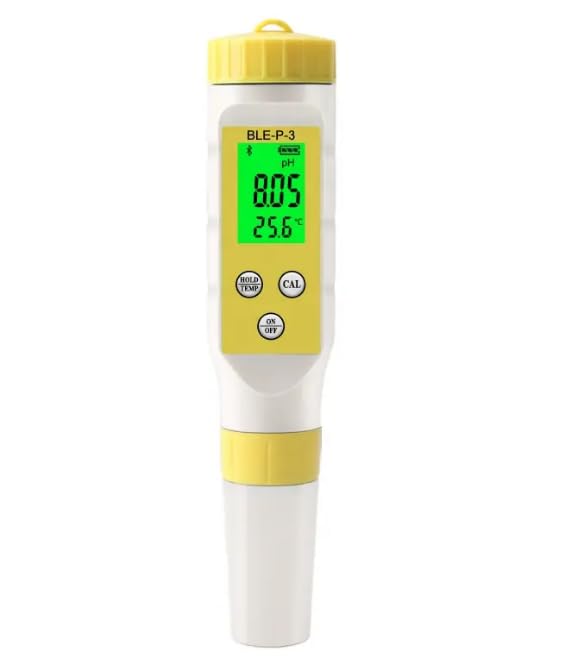
Image 2: A front view of the VIHELM BLE-P-3 Smart Digital pH/Temp Meter, showing its display with pH and temperature readings, and the 'HOLD/TEMP', 'CAL', and 'ON/OFF' buttons.
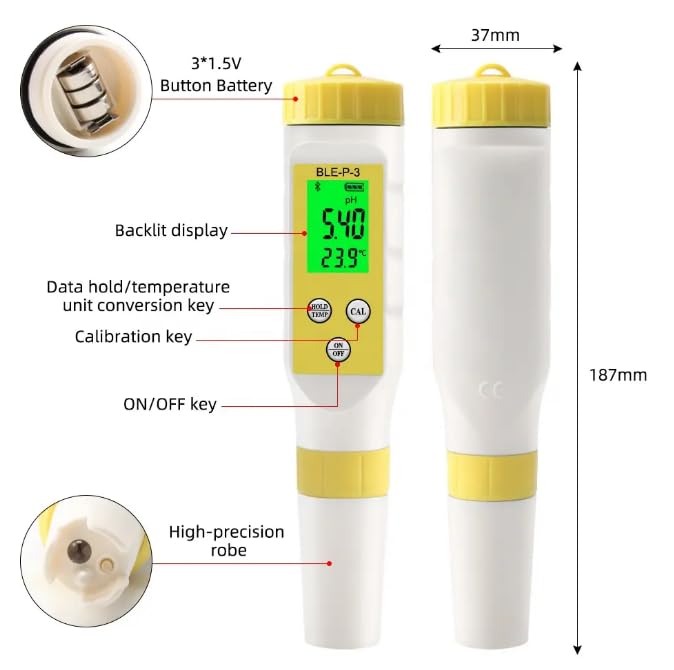
Image 3: A detailed diagram of the VIHELM BLE-P-3 pH Meter, highlighting its components: 3*1.5V button battery compartment, backlit display, data hold/temperature unit conversion key, calibration key, ON/OFF key, and high-precision probe. Dimensions are also provided: 187mm length and 37mm width.
Key Components:
- Display: Backlit LCD showing pH and temperature readings.
- HOLD/TEMP Button: Used to hold the current reading or switch between temperature units.
- CAL Button: Initiates the calibration process.
- ON/OFF Button: Powers the device on or off. Also used for Bluetooth activation.
- Electrode: High-precision probe for pH and temperature sensing.
- Battery Compartment: Located at the top, houses 3*1.5V (LR44) button batteries.
5. Setup
5.1 Battery Installation
- Unscrew the battery cap at the top of the meter.
- Insert three 1.5V LR44 button batteries, ensuring correct polarity.
- Securely screw the battery cap back on to maintain the waterproof seal.
5.2 App Download and Bluetooth Connection
- Scan the QR code provided in the packaging or search for the companion application in your smartphone's app store. Download and install the app.
- Turn on the meter by pressing the ON/OFF button.
- To activate Bluetooth, long press the ON/OFF button until the Bluetooth icon appears on the meter's display.
- Open the installed application on your smartphone. The app should automatically detect and connect to the meter.
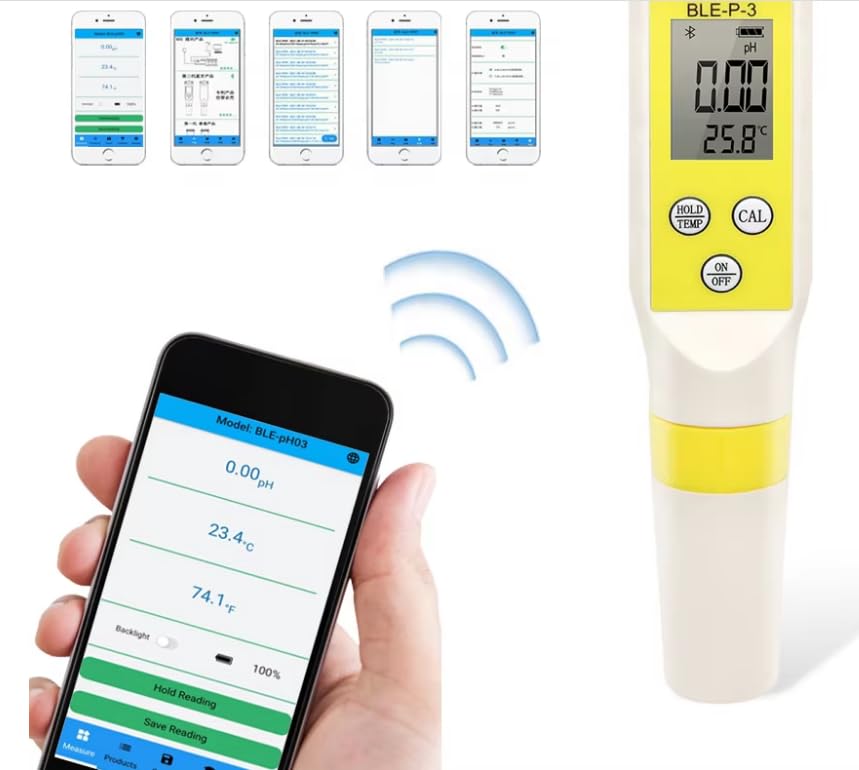
Image 4: The VIHELM BLE-P-3 pH meter displaying a pH reading of 0.00 and temperature of 25.8°C, with a smartphone showing the connected app. A Bluetooth signal graphic indicates wireless communication between the device and the app.
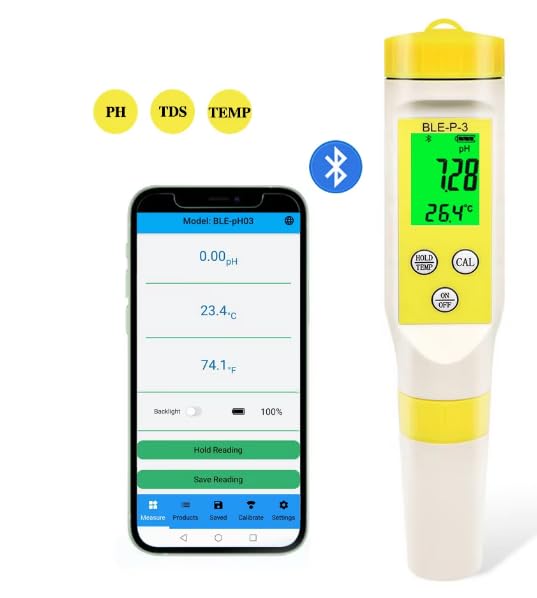
Image 5: The VIHELM BLE-P-3 pH meter displayed alongside a smartphone showing its companion application. The app displays pH and temperature readings, and options for backlight control, holding, and saving readings. Bluetooth icon indicates connectivity.
6. Operation
6.1 Basic Measurement
- Ensure the meter is clean and calibrated (see 6.3 Calibration).
- Turn on the meter by pressing the ON/OFF button.
- Immerse the electrode into the solution to be tested. Ensure the electrode tip is fully submerged.
- Wait for the reading on the display to stabilize. The pH and temperature values will be shown.
- To hold the reading, press the HOLD/TEMP button. Press again to release.
- To switch temperature units (Celsius/Fahrenheit), long press the HOLD/TEMP button.
6.2 Using the Smartphone Application
The app provides enhanced functionality for your BLE-P-3 meter:
- Real-time Data: View pH and temperature readings directly on your phone.
- Data Saving: Save measurement data, often with timestamps, for later review.
- Calibration Records: Access and review past calibration data.
- Settings: Adjust various meter settings, such as backlight brightness or auto-save intervals.

Image 6: An image detailing the operation steps for the VIHELM BLE-P-3 pH Meter: 1. Scan QR code and download app, 2. Long press ON/OFF for Bluetooth, 3. Put meter in solution and operate, 4. Save reading. Below are screenshots of the app showing pH and temperature readings, auto-save settings, and pH buffer calibration options.

Image 7: The VIHELM BLE-P-3 pH meter shown with multiple smartphone screens illustrating the app's capabilities: viewing all testing results, managing different products, automatically saving readings, checking calibration records, and accessing settings.
6.3 Calibration
Regular calibration is crucial for accurate pH measurements. The BLE-P-3 supports multiple calibration modes (e.g., 3-point calibration with 6.86/4.00/9.18 or 7.00/4.00/10.01 pH buffers).
- Prepare fresh pH buffer solutions (e.g., pH 6.86, pH 4.00, pH 9.18).
- Clean the electrode with distilled water and gently blot dry.
- Turn on the meter and ensure it's connected to the app.
- Immerse the electrode into the first buffer solution (e.g., pH 6.86).
- Press the CAL button on the meter or initiate calibration through the app. The meter will automatically recognize the buffer and calibrate.
- Rinse the electrode with distilled water and repeat the process for the second and third buffer solutions as required by your chosen calibration mode.
- Once calibration is complete, the meter will indicate success.
7. Maintenance
7.1 Electrode Care
- Always rinse the electrode with distilled water before and after each use.
- Do not wipe the electrode bulb, as this can cause static electricity and damage the sensitive glass membrane. Gently blot dry with a lint-free tissue.
- For long-term storage, keep the electrode cap filled with a storage solution (or pH 4 buffer if storage solution is unavailable) to prevent the electrode from drying out.
- If the electrode becomes sluggish or readings are unstable, try soaking it in electrode cleaning solution for 15-30 minutes.
7.2 Cleaning the Meter
- Wipe the body of the meter with a clean, damp cloth. Do not use abrasive cleaners or solvents.
- Ensure no liquid enters the battery compartment or other openings.
7.3 Battery Replacement
When the low battery indicator appears on the display, replace all three LR44 batteries following the instructions in Section 5.1.
8. Troubleshooting
- No Power: Check battery installation and ensure batteries are not depleted. Replace if necessary.
- Inaccurate Readings:
- Recalibrate the meter using fresh buffer solutions.
- Ensure the electrode is clean and properly hydrated.
- Check for air bubbles on the electrode tip during measurement.
- Bluetooth Connection Issues:
- Ensure Bluetooth is enabled on both the meter and your smartphone.
- Restart both the meter and the app.
- Ensure the meter is within the Bluetooth range of your smartphone.
- Slow Response Time: The electrode might be dirty or dry. Clean and rehydrate the electrode.
9. Specifications
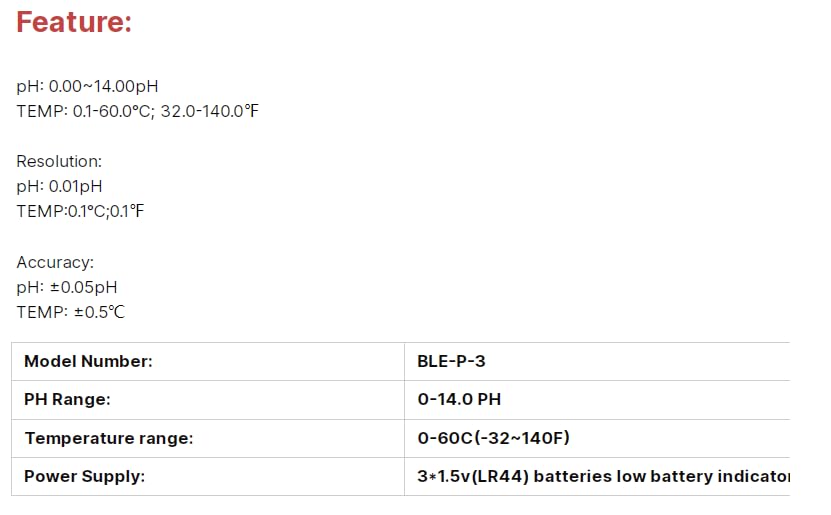
Image 8: A table detailing the features of the VIHELM BLE-P-3 pH Meter, including pH range, temperature range, resolution, and accuracy.
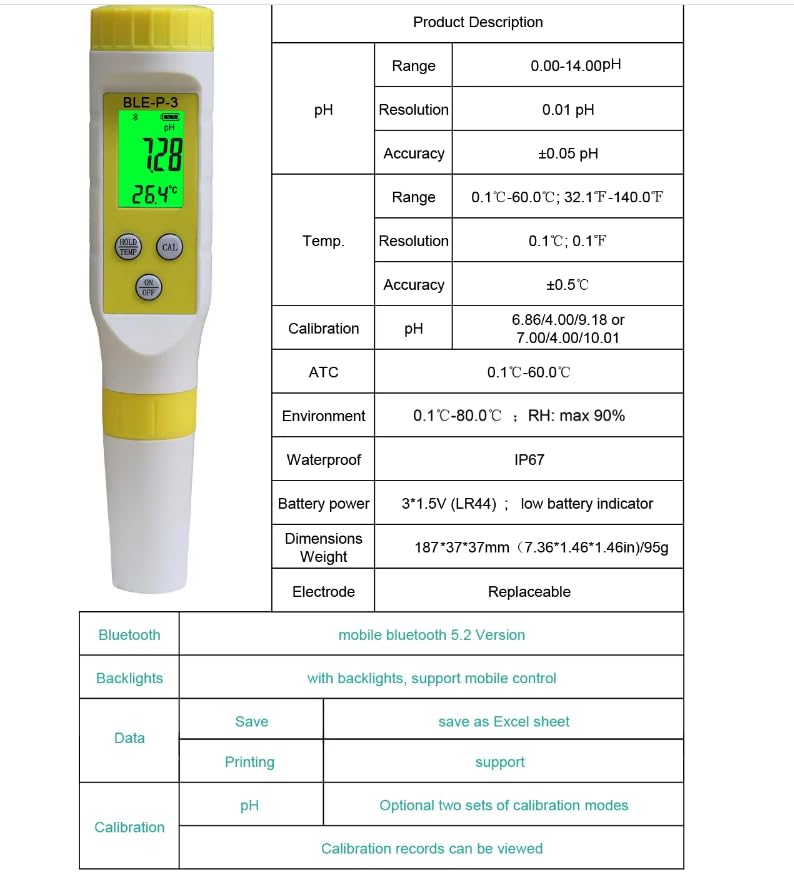
Image 9: A comprehensive table outlining the product description and specifications of the VIHELM BLE-P-3 pH Meter, including pH range, resolution, accuracy, temperature range, resolution, accuracy, calibration pH, ATC, environment, waterproof rating (IP67), battery power (3*1.5V LR44), dimensions, weight, electrode type, Bluetooth version (5.2), backlight support, data saving (Excel), printing support, and calibration features.
| Parameter | Specification |
|---|---|
| Model Number | BLE-P-3 |
| pH Range | 0.00 – 14.00 pH |
| pH Resolution | 0.01 pH |
| pH Accuracy | ±0.05 pH |
| Temperature Range | 0.1 – 60.0°C (32.0 – 140.0°F) |
| Temperature Resolution | 0.1°C / 0.1°F |
| Temperature Accuracy | ±0.5°C |
| Calibration pH | 6.86/4.00/9.18 or 7.00/4.00/10.01 |
| ATC (Automatic Temperature Compensation) | 0.1 – 60.0°C |
| Environment | 0.1 – 80.0°C; RH: max 90% |
| Waterproof Rating | IP67 |
| Battery Power | 3 * 1.5V (LR44) button batteries; low battery indicator |
| Dimensions | 187 * 37 * 37 mm (7.36 * 1.46 * 1.46 inches) |
| Weight | 95g |
| Electrode | Replaceable |
| Bluetooth | Mobile Bluetooth 5.2 Version |
| Backlights | Supported, with mobile control |
| Data Saving | Save as Excel sheet |
| Data Printing | Supported |
| Calibration Records | Can be viewed |
10. Warranty and Support
VIHELM products are manufactured to high-quality standards. For warranty information, please refer to the documentation provided with your purchase or contact your retailer. For technical support, troubleshooting assistance, or inquiries about replacement parts, please contact VIHELM customer service through the contact information provided on the official website or your purchase platform.