
Fanbulous F-LQ42BK-2D01
Fanbulous 42-Inch Ceiling Fan with Lights and Remote User Manual
Model: F-LQ42BK-2D01
Product Overview
The Fanbulous 42-inch Ceiling Fan with Lights and Remote is designed to provide efficient air circulation and customizable lighting for various indoor and covered outdoor spaces. This modern low-profile ceiling fan features a quiet DC motor, reversible blades for year-round use, and an integrated LED light with adjustable color temperature.

Image: Two Fanbulous 42-inch ceiling fans, one with black blades and one with walnut-colored blades, shown with the remote control. This package includes two fans.
Key Features:
- 42-Inch Design: Strong 5 blades for balanced and stable operation, suitable for living rooms, bedrooms, kitchens, and covered patios.
- Quiet DC Motor: Regulates airflow efficiently with minimal noise.
- Reversible Blades: Dual-sided blades with walnut and black finishes, allowing for aesthetic versatility and seasonal airflow adjustment (summer forward, winter reverse).
- Integrated LED Light: Dimmable with 3 color temperatures (3000K warm, 4000K white, 6000K cool).
- Remote Control: Offers 6 speed levels, 1/4/8-hour timer settings, and memory function to restore previous settings.
- Two-Pack Convenience: This product includes two ceiling fans, controllable by a single remote.
Setup and Installation
Installation of the Fanbulous ceiling fan is designed to be straightforward. Most major components are pre-assembled. Please ensure power is disconnected before beginning installation.
Pre-Installation Checklist:
- Verify all parts are present according to the packing list.
- Ensure the mounting location can support the fan's weight and is suitable for ceiling fan installation (e.g., a reinforced electrical box).
- Turn off power at the circuit breaker before starting any electrical work.
Mounting Options:
This fan supports both downrod installation and mounting at a maximum slope angle of 15 degrees. It is recommended for rooms approximately 10ft x 10ft or smaller.
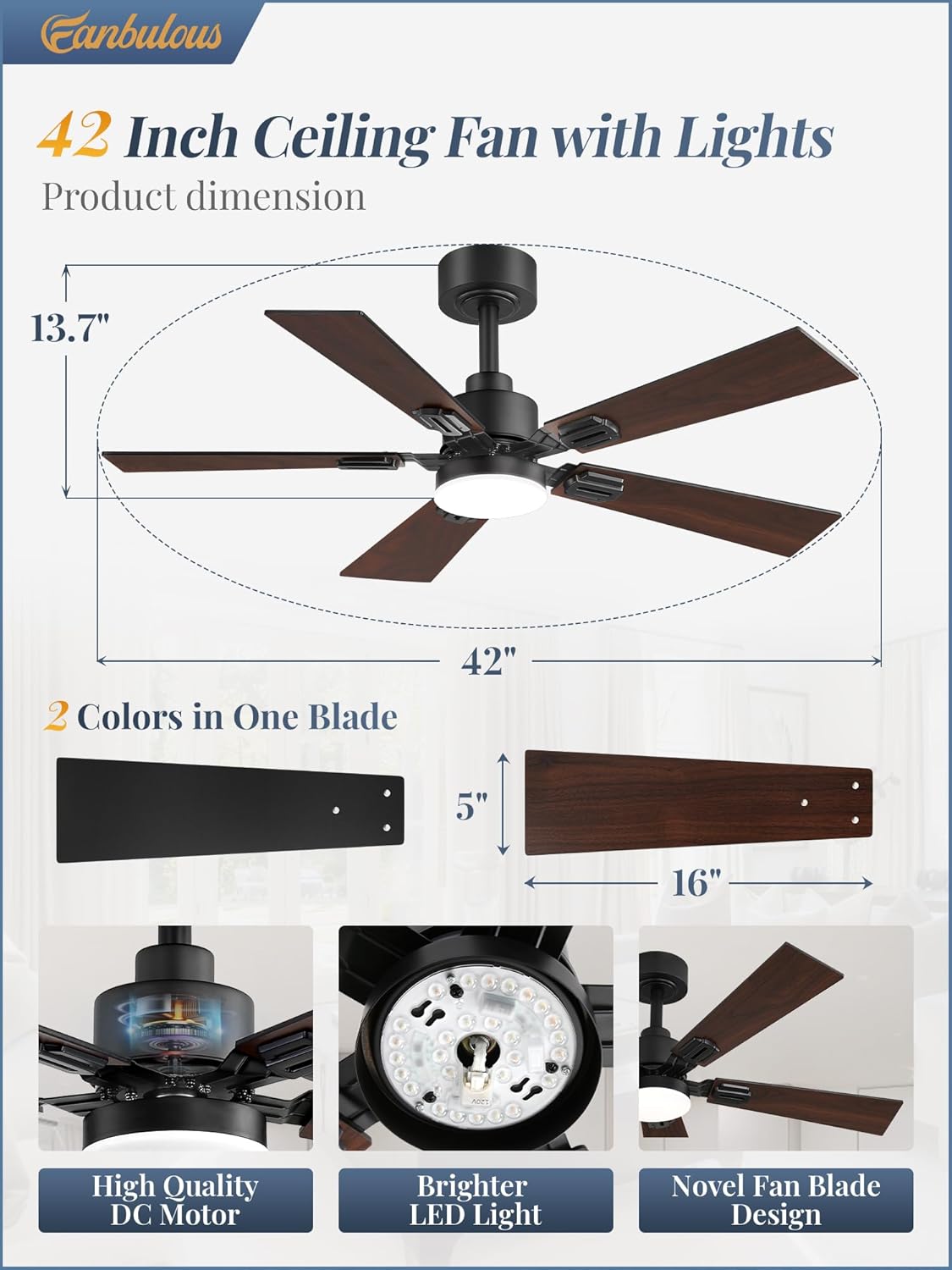
Image: Detailed diagram illustrating the dimensions of the 42-inch ceiling fan, including blade length and overall height, along with close-ups of the high-quality DC motor, brighter LED light, and novel fan blade design.
Assembly Steps (General Guidance):
- Secure the mounting bracket to the ceiling electrical box.
- Attach the downrod (if applicable) to the motor housing.
- Hang the fan assembly onto the mounting bracket.
- Connect the electrical wiring according to local codes and the provided wiring diagram.
- Attach the fan blades to the motor. Note that blades are reversible with black and walnut finishes.
- Install the light kit and light cover.
- Ensure all connections are secure and covers are properly installed before restoring power.

Image: Illustration of the fan's reversible blades, highlighting the black side for a modern style and the dark walnut side for a farmhouse style, offering versatile decoration options.
Operating Instructions
The Fanbulous ceiling fan is operated primarily using the included remote control. Ensure the remote has fresh batteries installed.

Image: A visual guide to the remote control, detailing each button's function, including fan speed adjustment, light control, timer settings, and airflow direction. A wall cradle for the remote is also shown.
Remote Control Functions:
- Power On/Off: Press the "All Off" button to turn off both fan and light. Separate buttons for "Light On/Off" and "Fan On/Off" are available.
- Fan Speed Adjustment: Select from 6 speed levels using the dedicated speed buttons (1-6).
- Timer Setting: Set the fan to turn off automatically after 1, 4, or 8 hours.
- Light Color Temperature (CCT): Cycle through 3000K (warm), 4000K (white), and 6000K (cool) light settings. The light is also dimmable.
- Reversible Motor: Use the "Airflow Direction" button to switch between summer (downward airflow for cooling) and winter (upward airflow for warm air circulation) modes.
- Memory Function: The fan automatically restores the previously adjusted mode upon restart.

Image: Visual representation of the 6-speed reversible motor, demonstrating how it provides cool air in summer (forward rotation) and warm air circulation in winter (reverse rotation).
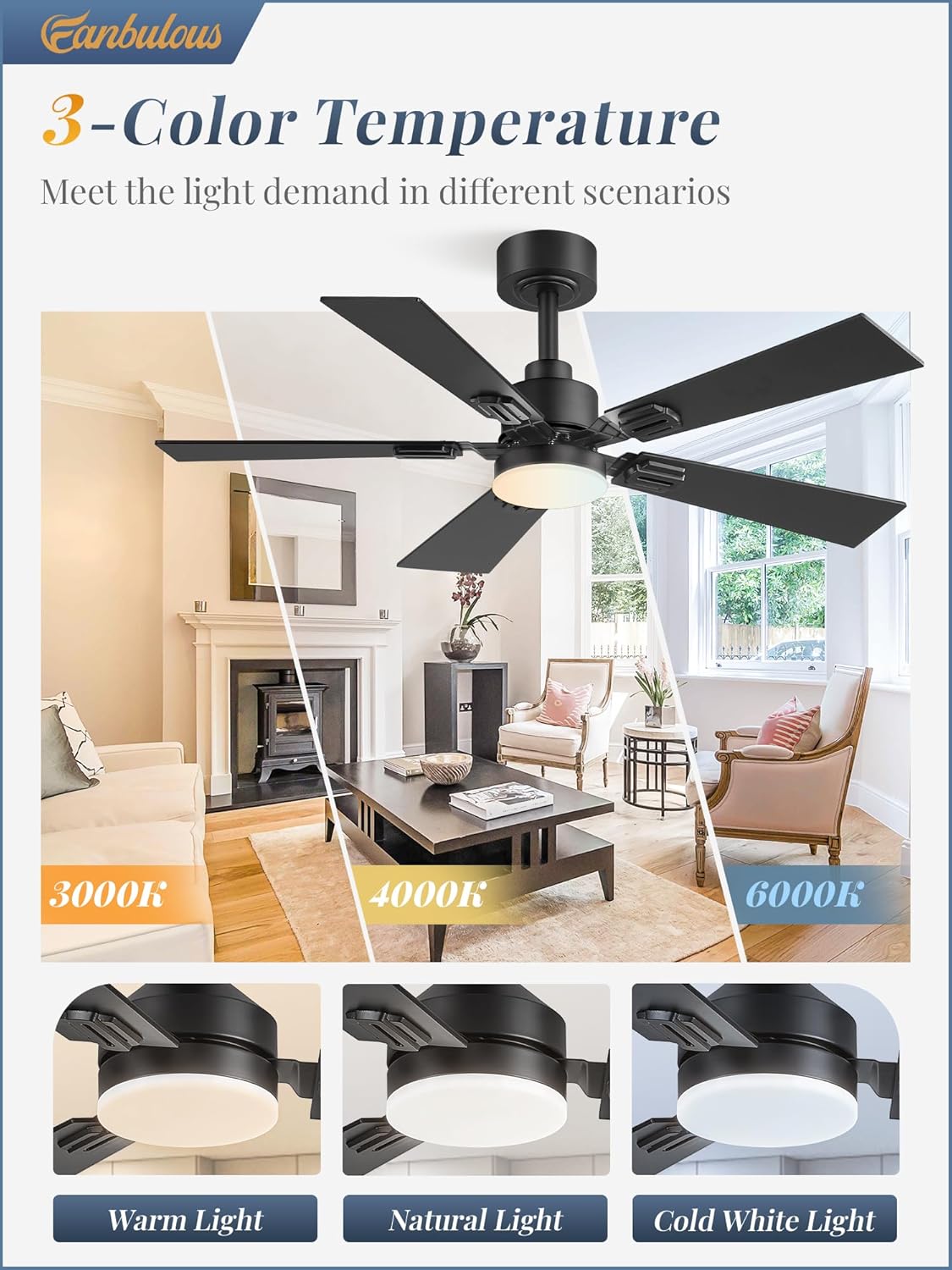
Image: Examples of the fan's 3-color temperature light settings, showing the visual difference between 3000K (warm), 4000K (natural), and 6000K (cold) light, meeting various lighting demands.
Maintenance
Regular maintenance ensures the longevity and optimal performance of your Fanbulous ceiling fan.
- Cleaning: Dust the fan blades and motor housing periodically with a soft, damp cloth. Avoid using harsh chemicals or abrasive cleaners, as they may damage the finish.
- Blade Balance: If the fan wobbles, check that all blade screws are tightened. Ensure blades are clean and free of debris that could cause imbalance.
- Light Source: The integrated LED light is designed for long-lasting performance. If replacement is ever needed, consult a qualified electrician or contact customer support.
- Motor: The DC motor is designed to be maintenance-free and does not require lubrication.
Warning: Always turn off power at the circuit breaker before cleaning or performing any maintenance on the fan.
Troubleshooting
If you encounter issues with your Fanbulous ceiling fan, refer to the following common troubleshooting steps:
| Problem | Possible Cause | Solution |
|---|---|---|
| Fan does not start | No power; Loose wiring; Remote control issues. | Check circuit breaker. Ensure all wiring connections are secure. Replace remote batteries. Re-pair remote if necessary (refer to specific pairing instructions in full manual). |
| Light does not work | Loose wiring; LED module issue. | Check light kit wiring. If LED is integrated and not working, contact customer support. |
| Fan wobbles | Loose blades; Unbalanced blades; Loose mounting. | Tighten all blade screws. Ensure blades are clean and free of debris. Check mounting bracket screws. |
| Remote control not working | Dead batteries; Remote not paired; Signal interference. | Replace batteries. Follow pairing instructions (usually involves pressing a button on the remote within a certain time after turning on power to the fan). Ensure no obstructions between remote and fan receiver. |
| Fan makes unusual noise | Loose screws; Motor issue; Blade rubbing. | Check and tighten all screws. Ensure no wires are rubbing against the motor housing. If noise persists, contact customer support. |
Specifications
| Attribute | Detail |
|---|---|
| Brand | Fanbulous |
| Model Name | F-LQ42BK-2D01 |
| Product Dimensions | 11.8"D x 42"W x 42"H |
| Color | Black (with reversible black/walnut blades) |
| Electric Fan Design | Ceiling Fan |
| Power Source | DC |
| Wattage | 40 watts |
| Voltage | 120 Volts |
| Item Weight | 8.3 Pounds |
| Indoor/Outdoor Usage | Indoor, Covered Outdoor |
| Control Method | Remote |
| Number of Power Levels | 6 |
| Special Features | Color Changing, Dimmable, LED Light, Timer, Reversible Motor |
| Recommended Room Size | 10ft x 10ft or smaller |
Warranty and Support
Fanbulous is committed to providing high-quality products and excellent customer service. While specific warranty details are typically provided with the product packaging, general support is available.
Customer Support:
For technical assistance, troubleshooting beyond this manual, or warranty inquiries, please contact Fanbulous customer service. Enjoy online tech support for a seamless experience.
Please refer to the contact information provided in your product packaging or visit the official Fanbulous website for the most up-to-date support details.


Image: Icons representing Fanbulous's commitment to exceptional customer service, elevated functionality, and versatile design.
Related documentsF-LQ42BK-2D01


Ask a question about this manual
Ask about setup, troubleshooting, compatibility, parts, safety, or missing instructions. Manuals+ will review the question and use this page’s manual context to help answer it.