
Tribesigns IE-J02140
Tribesigns IE-J02140 Modern Executive Desk User Manual
Model: IE-J02140 | Brand: Tribesigns
Introduction
This manual provides detailed instructions for the assembly, operation, and maintenance of your Tribesigns IE-J02140 Modern Executive Desk. Please read this manual thoroughly before assembly and use to ensure proper setup and safe operation. Keep this manual for future reference.
Important Safety Information
- Assembly: Always assemble the desk according to the provided instructions.
- Stability: Ensure the desk is properly anchored to the floor to prevent tipping.
- Weight Limit: Do not exceed the maximum weight recommendation of 250 pounds on the tabletop to maintain stability and prevent damage.
- Placement: Place the desk on a level surface. Adjustable foot pads are included to help stabilize the desk on uneven floors.
- Children: Keep small parts and packaging materials away from children during assembly.
Package Contents
Before beginning assembly, verify that all components listed below are present and undamaged. If any parts are missing or damaged, please contact customer support.
- Desk Top Panel
- Desk Base Panels (2)
- Assembly Guide
- Hardware Kits (screws, bolts, adjustable foot pads, etc.)
Note: The specific number and type of hardware components will be detailed in the included assembly guide.
Setup and Assembly
Assembly typically takes approximately 30 minutes. It is recommended that two adults perform the assembly due to the size and weight of some components. All necessary tools and hardware are included.
Required Tools (Included):
- Hex Key
- Screwdriver
Assembly Steps:
- Unpack Components: Carefully remove all parts from the packaging. Lay them out on a clean, soft surface (e.g., a blanket or carpet) to prevent scratches. Verify all parts against the package contents list.
- Attach Base Panels: Secure the two desk base panels to the underside of the desk top panel using the provided hardware. Ensure all screws are tightened firmly but do not overtighten.
- Install Adjustable Foot Pads: Screw the adjustable foot pads into the bottom of the base panels. These can be adjusted later to level the desk on uneven floors.
- Final Inspection: Once assembled, gently lift and place the desk in its desired location. Check all connections to ensure they are secure.
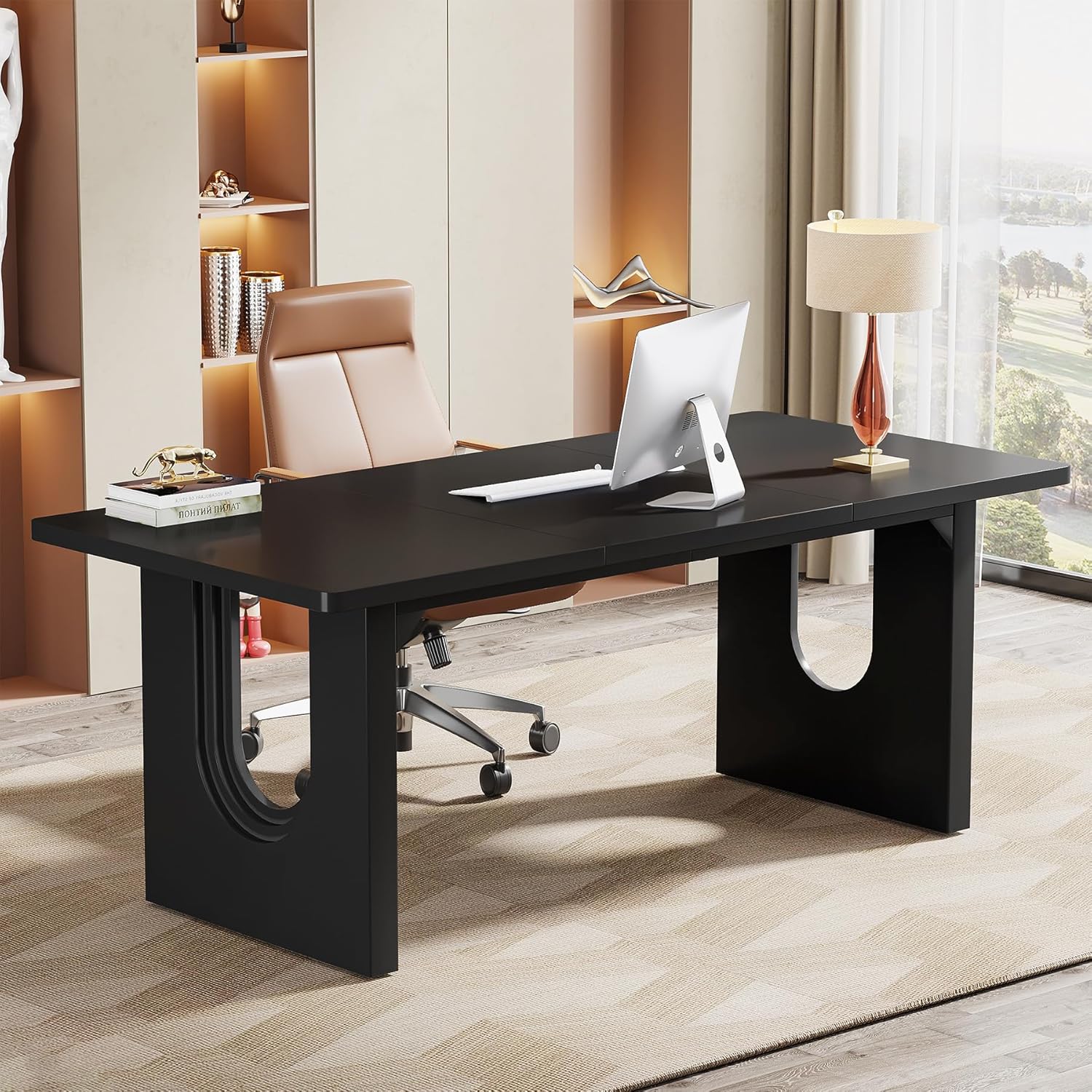
Figure 1: Fully assembled Tribesigns Modern Executive Desk in a home office environment, showcasing its sleek black finish and modern design. A computer monitor and keyboard are visible on the desk surface.

Figure 2: Detailed dimensions of the Tribesigns Modern Executive Desk, including length (70.9 inches), width (31.5 inches), and height (29.53 inches). The diagram also shows the height of the leg opening (20.08 inches) and the width of the base (8.27 inches).
Operating Instructions
The Tribesigns IE-J02140 desk is designed for use as a workstation, computer desk, or conference table. Its spacious surface provides ample room for various tasks.
- Weight Distribution: Distribute weight evenly across the desk surface. Avoid placing heavy items on the edges or corners to prevent imbalance.
- Leveling: If the desk feels wobbly, adjust the foot pads located at the bottom of the base panels until the desk is stable on your floor.
- Surface Protection: While the desk surface is durable, using coasters for drinks and pads for hot items is recommended to prevent potential damage.
Care and Maintenance
- Cleaning: Wipe the desk surface with a dry, soft cloth. For stubborn marks, a slightly damp cloth with mild soap can be used, followed immediately by drying with a clean, dry cloth. Avoid harsh chemicals or abrasive cleaners.
- Spills: Clean up spills immediately to prevent staining or damage to the engineered wood surface.
- Sunlight: Avoid prolonged exposure to direct sunlight to prevent fading or discoloration of the finish.
- Heat: Do not place hot items directly on the desk surface. Use protective pads.
Troubleshooting
| Problem | Possible Cause | Solution |
|---|---|---|
| Desk is wobbly or uneven. | Uneven floor surface; loose connections. | Adjust the foot pads at the bottom of the desk legs until stable. Check and tighten all assembly screws. |
| Parts do not align during assembly. | Incorrect orientation of parts; screws not fully loosened. | Review the assembly guide to ensure correct part orientation. Loosen screws slightly, align parts, then retighten. |
| Scratches or damage to the surface. | Sharp objects; abrasive cleaning. | Use protective mats for sharp objects. Clean with a soft, dry cloth. Contact customer support for repair options if damage is significant. |
Product Specifications
| Model Number | IE-J02140 |
| Brand | Tribesigns |
| Product Dimensions (D x W x H) | 30.5"D x 70.89"W x 29.53"H |
| Color | Black |
| Material | Engineered Wood |
| Item Weight | 111 Pounds |
| Maximum Weight Recommendation | 250 Pounds |
| Assembly Required | Yes (Recommended 2 people) |
| Care Instructions | Wipe with Dry Cloth |
Warranty Information
This Tribesigns product comes with a limited warranty. For specific details regarding coverage and duration, please refer to the warranty documentation included with your purchase or visit the official Tribesigns website. The warranty typically covers manufacturing defects under normal use.
Customer Support
If you have any questions, concerns, or require assistance with your Tribesigns IE-J02140 Modern Executive Desk, please contact Tribesigns customer service. Contact information can typically be found on the product packaging, the official Tribesigns website, or through your retailer.
Tribesigns offers 24-hour customer service to assist with any inquiries.
Related documentsIE-J02140


Ask a question about this manual
Ask about setup, troubleshooting, compatibility, parts, safety, or missing instructions. Manuals+ will review the question and use this page’s manual context to help answer it.