
1. Introduction
The FNIRSI 2C53T is a versatile 3-in-1 handheld device designed for electronic testing and measurement. It integrates the functionalities of a digital oscilloscope, a true RMS multimeter, and a signal generator into a single, portable unit. This manual provides detailed instructions for the safe and effective use of your device.

Figure 1.1: The FNIRSI 2C53T handheld device, showcasing its compact design and integrated display.
2. Product Overview
The FNIRSI 2C53T combines three essential tools for electrical and electronic work:
- Digital Oscilloscope: 2 channels, 50MHz bandwidth, 250MS/s real-time sample rate.
- True RMS Multimeter: 4.5 digits, 19999 counts, capable of measuring voltage, current, resistance, capacitance, diode, continuity, and temperature.
- Signal Generator: Outputs 13 types of waveforms with adjustable frequency (0-50KHz), amplitude (0-3V), and duty cycle (0-100%).
The device features a robust hardware architecture (ARM + FPGA + ADC) for enhanced performance and flexibility. It also includes a 2.8-inch wide-angle display for clear readability.

Figure 2.1: Front view of the FNIRSI 2C53T, showing the display, control buttons, and input terminals.
Included Components:
- FNIRSI 2C53T Main Unit
- P6100 High Voltage Probe (x2)
- Alligator Clip (x1)
- Test Probe (x1)
- Type-C Charging Cable (x1)
- Storage Bag (x1)
- Instruction Manual (x1)
- Packing Box (x1)
3. Setup
3.1 Charging the Device
The 2C53T has a built-in rechargeable lithium polymer battery. Before first use, fully charge the device using the provided Type-C charging cable and a compatible USB power adapter (not included). The charging port is located on the side of the device.
- Connect the Type-C cable to the device's charging port.
- Connect the other end of the cable to a USB power source.
- The battery indicator on the screen will show charging status.
- A full charge provides approximately 6 hours of standby time.
3.2 Powering On/Off
Press and hold the power button (usually marked with a power symbol) to turn the device on or off.
3.3 Connecting Probes
Depending on the function you intend to use (oscilloscope or multimeter), connect the appropriate probes to the designated input terminals on the device. Ensure connections are secure.

Figure 3.1: Illustrations of the Type-C charging port, internal battery, and the integrated stand for convenient placement.
4. Operating Instructions
The FNIRSI 2C53T offers three primary operating modes: Oscilloscope, Multimeter, and Signal Generator. Please note that these three functions cannot be used simultaneously.
4.1 Oscilloscope Function
The oscilloscope mode allows for the visualization and analysis of electrical signals.
- Channels: The device features 2 input channels.
- Bandwidth: 50MHz.
- Sample Rate: 250MS/s real-time.
- Trigger Modes: Select from Auto, Normal, or Single trigger modes to stabilize waveforms.
- Vertical Sensitivity: Adjustable from 200mv/div to 10v/div.
- Maximum Input Voltage: 400V.
- Display Modes: Choose between Y-T (standard time-domain display), Roll (for slow-changing signals), and X-Y (for Lissajous figures).
- Advanced Features: Includes mathematical operations, cursor measurement, FFT spectrum analysis, and persistence display for detailed waveform analysis.

Figure 4.1: Examples of oscilloscope display features, including mathematical operations, cursor measurements, persistence display, and X-Y mode for Lissajous figures.
4.2 Multimeter Function
The multimeter mode provides precise digital measurements of various electrical parameters.
- Display: 4.5 digits with 19999 counts.
- True RMS: Provides accurate readings for non-sinusoidal waveforms.
- Measurement Capabilities: DC/AC Voltage, DC/AC Current, Resistance, Capacitance, Diode, Continuity Check, and Temperature.
- Maximum Measurements: AC 750V, DC 1000V.
- Auto-Ranging: Automatically selects the appropriate measurement range; simply press the AUTO button.

Figure 4.2: The multimeter interface displaying various measurement options such as voltage, current, resistance, and capacitance.
4.3 Signal Generator Function
The signal generator mode allows you to output various waveforms for testing circuits.
- Waveform Types: Outputs 13 types of parameter-variable waveforms, including Sine, Square, Pulse, Ramp, Noise, and DC.
- Output Frequency: Adjustable from 0 to 50KHz.
- Output Amplitude: Adjustable from 0 to 3V.
- Output Duty Cycle: Adjustable from 0% to 100%.
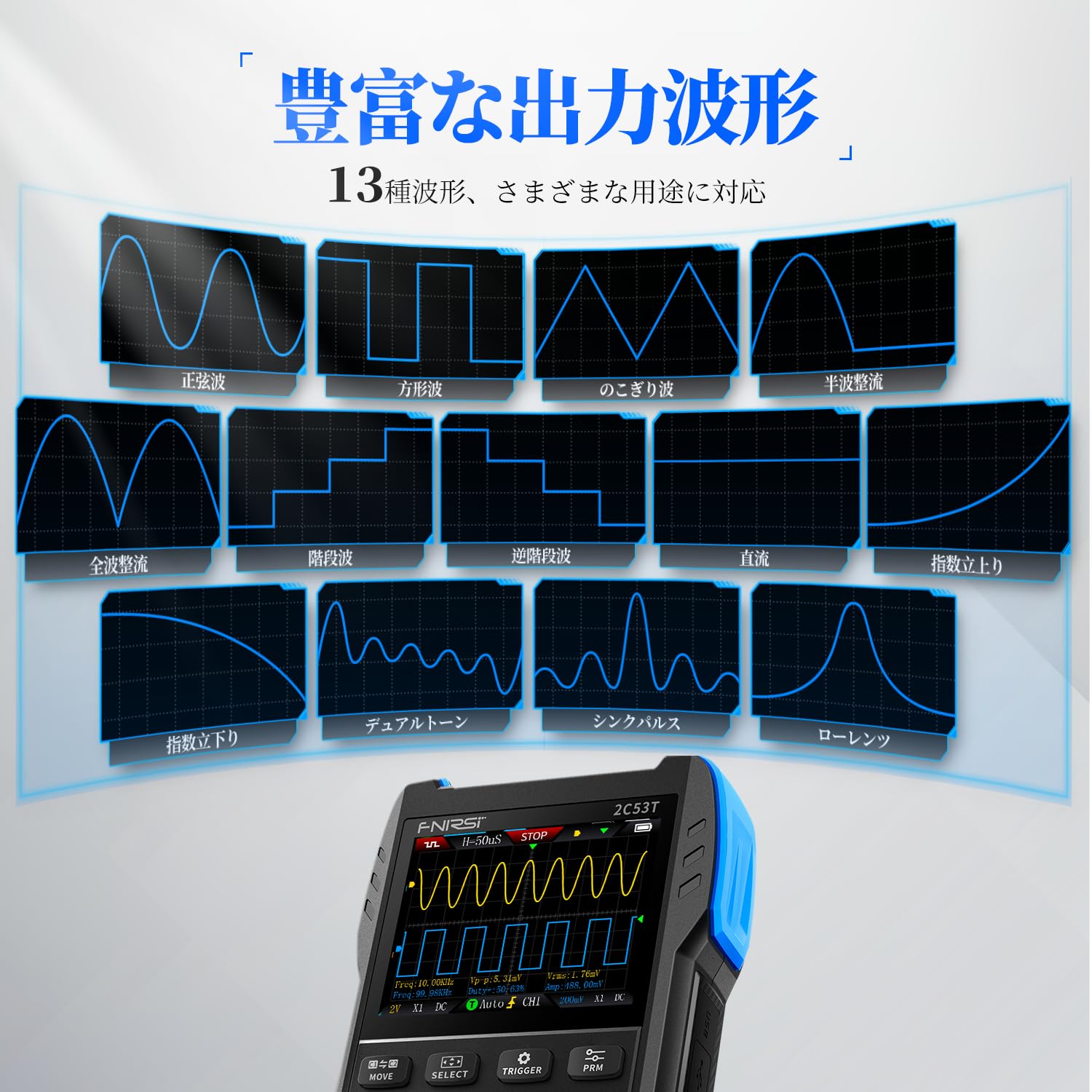
Figure 4.3: The signal generator interface showing examples of different output waveforms such as sine, square, and pulse waves.
5. Maintenance
Proper maintenance ensures the longevity and accuracy of your FNIRSI 2C53T.
- Cleaning: Use a soft, dry cloth to clean the device. Do not use abrasive cleaners or solvents. Ensure no liquids enter the device.
- Battery Care: To prolong battery life, avoid fully discharging the device frequently. If storing for extended periods, charge the battery to approximately 50% and recharge every few months.
- Storage: Store the device in a cool, dry place away from direct sunlight, extreme temperatures, and high humidity. Use the provided storage bag to protect it from dust and physical damage.
- Probe Care: Inspect probes and cables regularly for any signs of wear or damage. Replace damaged components immediately to ensure safety and accurate measurements.

Figure 5.1: An exploded view illustrating the internal components and the durable ABS+silicon construction of the FNIRSI 2C53T, designed for stable performance and protection.
6. Troubleshooting
If you encounter issues with your FNIRSI 2C53T, refer to the following common troubleshooting steps:
- Device Not Powering On: Ensure the battery is sufficiently charged. Connect the device to a power source using the Type-C cable and try again.
- Incorrect Readings: Verify that probes are correctly connected and not damaged. Ensure the correct measurement mode is selected for the task. Check probe compensation for oscilloscope measurements.
- Unstable Waveform: Adjust the trigger settings (level, mode) in oscilloscope mode. Ensure the input signal is within the device's specifications.
- Functions Not Working Simultaneously: Remember that the oscilloscope, multimeter, and signal generator functions cannot be used at the same time. Switch between modes as needed.
- PC Connection Issues: Ensure the Type-C cable is properly connected. Check your computer's device manager to see if the device is recognized.
For persistent issues or problems not covered here, please contact customer support.
7. Specifications
| Feature | Specification |
|---|---|
| Manufacturer | FNIRSI |
| Model Number | 2C53T |
| Item Weight | 300 g |
| Product Dimensions (L x W x H) | 8.9 x 3.5 x 16.7 cm |
| Battery Type | 1 Lithium Polymer battery (included) |
| Measurement Accuracy | +/-5% |
| Oscilloscope Bandwidth | 50MHz |
| Oscilloscope Sample Rate | 250MS/s |
| Multimeter Counts | 19999 |
| Signal Generator Frequency Range | 0-50KHz |
| Date First Available | 2024/11/28 |
8. Warranty and Support
FNIRSI Technology Co., Ltd. is committed to providing high-quality measuring instruments. For any inquiries, technical assistance, or warranty claims, please contact our support team.
- Customer Support Email: support@fnirsi.com
- Online Resources: A PDF user manual may be available for download on the product's detail page or the official FNIRSI website.
- Brand Store: Visit the official FNIRSI store for more products and information: FNIRSI Amazon Store


