
1. Introduction & Overview
The BLUETTI Elite 200 V2 Portable Power Station, bundled with Charger 1, offers a robust and reliable power solution for various needs, from outdoor adventures to home emergency backup. With a substantial 2073.6Wh capacity and a powerful 2600W (5200W peak) AC output, it can energize up to 9 devices simultaneously. This unit features automotive-grade LFP batteries designed for an extended 17-year lifespan with over 6000+ cycles, ensuring long-term durability and safe operation across diverse temperatures. Charger 1 significantly enhances charging speed, providing up to 560W input for a 6X faster charge than traditional car chargers, fully charging the power station in approximately 4.2 hours via car. The upgraded app provides intuitive control and real-time power insights for efficient energy management. The Elite 200 V2 is engineered for minimal power consumption and offers an Uninterruptible Power Supply (UPS) mode with a switching time of less than 15ms for seamless power transitions.

Figure 1: BLUETTI Elite 200 V2 Portable Power Station with multiple output ports.

Figure 2: The Elite 200 V2 provides 2073.6Wh capacity and 2600W output, capable of powering various devices for extended periods.
2. Setup & Installation
The BLUETTI Elite 200 V2 and Charger 1 are designed for straightforward installation. Follow these steps to set up your system:
2.1 Unboxing and Component Check
Upon receiving your product, ensure all components are present and undamaged. The package includes:
- BLUETTI Elite 200 V2 portable power station
- Charger 1 (DC-DC charger)
- 6AWG DC input cable
- Installation accessories
- AC charging cable
- Solar charging cable
- Grounding screw
- User manual
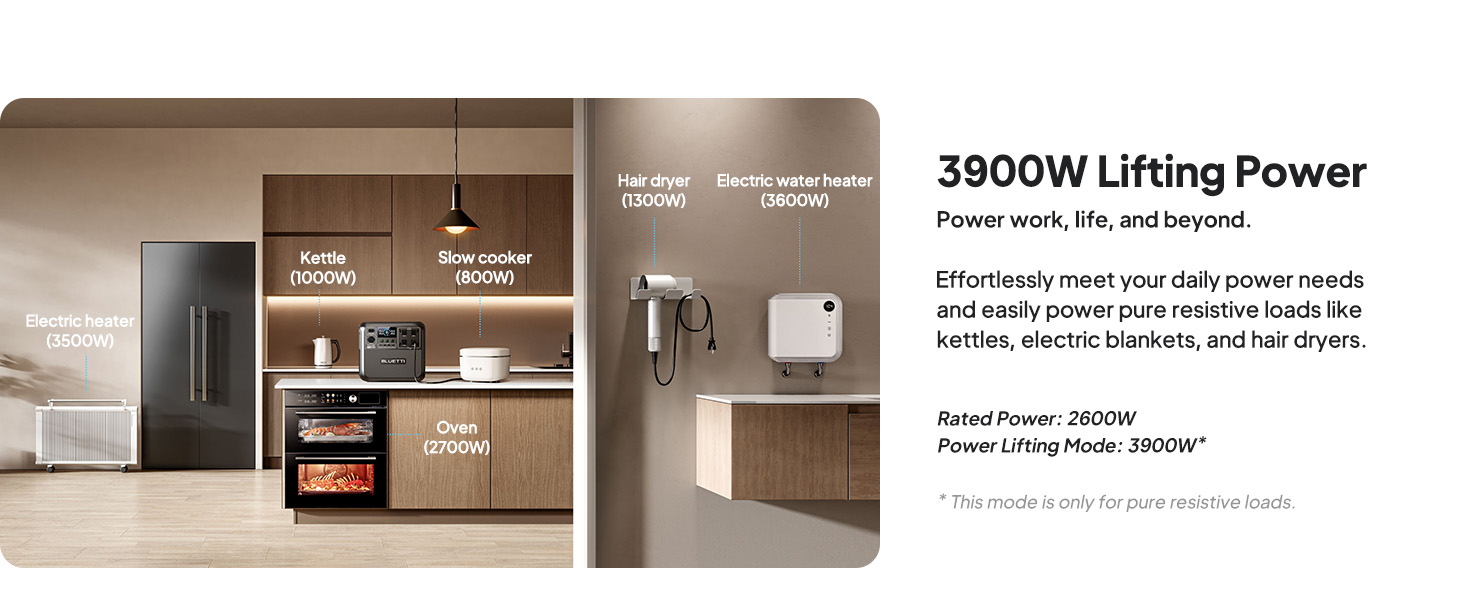
Figure 3: Ensure all components, including the 6AWG DC input cable and solar charging cable, are ready for installation.
2.2 Connecting Charger 1
Charger 1 facilitates rapid charging from your vehicle's alternator. It is compatible with various BLUETTI power stations and 95% of third-party power stations.
- Switch off the circuit breaker on the 6AWG DC input cable.
- Connect the 6AWG input cable and the MC4 output cable to the Charger 1.
- Connect the output cable to your power station via a solar charging cable.

Figure 4: Connect the 6AWG input cable and MC4 output cable to Charger 1, then connect to the power station.
2.3 Connecting to Car Battery
Charger 1 is designed to intelligently monitor your alternator status and prevent your car battery from draining.
- Run the input cable through your car to the car battery.
- Attach the cable to the car battery terminals: red to the positive, black to the negative.

Figure 5: Connect the Charger 1 input cable directly to your vehicle's battery terminals.
2.4 Starting the Charge
- Switch on the circuit breaker. Set the proper voltage before turning on the Charger 1 on the BLUETTI app.
- Find a place to secure the Charger 1 properly.

Figure 6: Activate the circuit breaker and set voltage via the app to begin charging.
Video 1: Demonstrates the BLUETTI Charger 1 in action, highlighting its fast charging capabilities and ease of use for on-the-go power.
3. Operating Instructions
3.1 Charging the Power Station
The Elite 200 V2 offers multiple charging options:
- AC Charging: 0-80% in 1 hour (1800W input).
- Car Socket Charging: 12V/24V, 8A.
- Solar Charging: 0-80% in 2.4 hours (1000W input).
- Dual Charging: 0-80% in 50 minutes (2400W input).

Figure 7: Overview of AC, Car Socket, and Solar Charging methods for the Elite 200 V2.
3.2 Powering Your Devices
The Elite 200 V2 is equipped with a variety of output ports to power all your devices:
- 1 x Car Port (120W)
- 2 x USB-C (100W)
- 2 x USB-A (15W)
- 4 x AC Outputs (2600W)

Figure 8: Detailed view of all available output ports on the BLUETTI Elite 200 V2.
3.3 Usage Scenarios
The power station is versatile for various applications:
- Outdoor Camping: Power phones (63.5 times), drones (21.8 times), mini-fridges (26.4 hours), and ice makers (2.6 hours).
- Off-Grid Living: Run lights (79.3 hours), projectors (7.6 hours), coffee makers (1.6 hours), and hair dryers (1.2 hours).
- Home Backup: Keep Wi-Fi routers (72.1 hours), refrigerators (14.4 hours), dishwashers (1 hour), and ovens (0.7 hours) operational during outages.

Figure 9: The Elite 200 V2 provides ample power for essential devices during outdoor camping.

Figure 10: Enjoy home-like comforts in the wild with the Elite 200 V2.

Figure 11: The Elite 200 V2 ensures your essential home appliances remain powered during outages.
3.4 App Control & UPS Mode
The upgraded BLUETTI app allows for intuitive control and real-time power insights, including energy usage patterns and savings. The UPS mode provides an uninterrupted power supply with a switching time of less than 15ms, ensuring seamless transitions during power fluctuations.

Figure 12: The BLUETTI app provides real-time status, energy statistics, and working mode controls.

Figure 13: The UPS mode ensures uninterrupted power supply with a fast switching time.
Video 2: An overview of the BLUETTI Portable Power Station Elite 200 V2, showcasing its features and applications.
4. Maintenance
To ensure the longevity and optimal performance of your BLUETTI Elite 200 V2, regular maintenance is recommended.
- Battery Lifespan: The automotive-grade LFP batteries are designed for 6000+ cycles, providing a 12x longer lifespan than the industry average. This translates to approximately 17 years of use before capacity reduces to 80%.
- Storage: Store the unit in a cool, dry place away from direct sunlight and extreme temperatures.
- Charging Cycles: For optimal battery health, avoid consistently discharging the battery to 0% or charging to 100% if not immediately needed. Refer to the user manual for recommended charging and discharging practices.
- Cleaning: Keep the unit clean and free from dust. Use a dry, soft cloth for cleaning. Ensure ventilation ports are unobstructed.

Figure 14: The Elite 200 V2 features automotive-grade LiFePO4 batteries with 6000+ cycles for extended durability.
5. Troubleshooting
If you encounter any issues with your BLUETTI Elite 200 V2, consider the following:
- No Power Output: Ensure the AC/DC output buttons are activated. Check the battery level on the display or app. Verify that the connected devices are within the power station's wattage limits.
- Charging Issues: Confirm that the charging cable is securely connected. For solar charging, ensure panels are in direct sunlight and correctly oriented. Check the input wattage displayed on the screen or app.
- App Connectivity: Ensure your power station's Wi-Fi or Bluetooth is enabled and your mobile device is within range. Restart the app and the power station if connection issues persist.
- Overload Protection: If the unit shuts down due to overload, disconnect some devices and restart the power station. The 3900W Lifting Power mode is designed for pure resistive loads.
- Temperature Protection: The built-in fan actively cools the unit. If the unit overheats, it may temporarily stop charging or discharging. Allow it to cool down in a well-ventilated area.
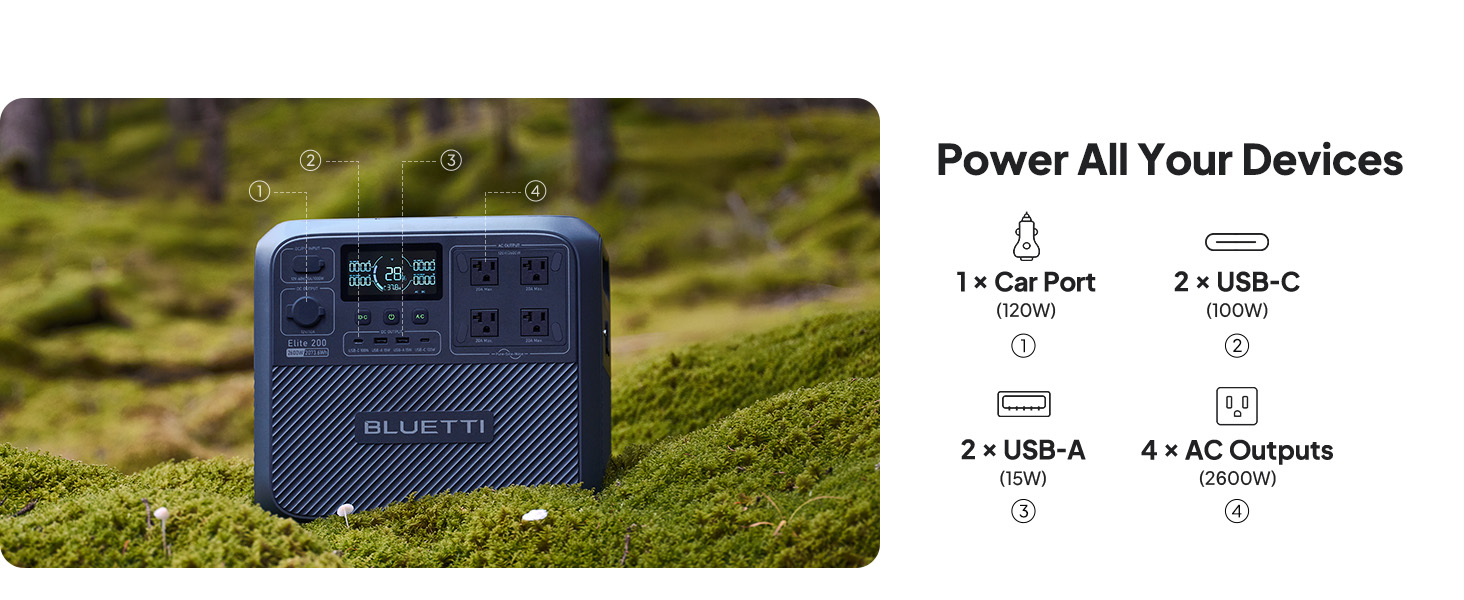
Figure 15: The Elite 200 V2 features comprehensive protection mechanisms including automatic alternator detection, adjustable voltage, and a built-in fan.
6. Specifications
| Feature | Specification |
|---|---|
| Brand | BLUETTI |
| Model Name | Elite 200 V2 |
| Capacity | 2073.6Wh |
| AC Output | 2600W (5200W Peak) |
| Battery Type | LFP (LiFePO4) |
| Lifespan | 6000+ Cycles to 80% capacity |
| Car Charging Input (Charger 1) | Max 560W |
| AC Charging Input | 1800W |
| Solar Charging Input | 1000W |
| UPS Switching Time | <15ms |
| Item Weight | 53.4 Pounds |
| Product Dimensions | 13.8"L x 9.8"W x 12.7"H |
| Total Power Outlets | 4 AC Outlets + USB-A + USB-C + Car Port |
7. Warranty & Support
BLUETTI is committed to providing excellent customer service and product support.
- Included Components: The package includes the BLUETTI Elite 200 V2 portable power station, Charger 1 (DC-DC charger) with 6AWG DC input cable, installation accessories, AC charging cable, solar charging cable, grounding screw, and user manual.
- Protection Plans: Additional protection plans are available, including a 4-Year Protection Plan and Complete Protect options.
- After-Sale Service: BLUETTI offers widespread sales and after-service networks. Feel free to contact customer support for any questions or assistance.

Figure 16: BLUETTI provides comprehensive after-sale service and support.
Video 3: Highlights the features and benefits of the BLUETTI Charger 1, a 560W alternator charger for power stations.


