
1. Product Overview
The LIKCUT S501 is a smart, compact vinyl cutter machine designed for a wide range of vinyl and paper crafts. It functions as a portable plotter and sticker maker, suitable for various DIY projects, party supplies, and general crafting needs.
Key Features
- Stable, Reliable Connectivity: Features Bluetooth 5.0 and USB 2.0 options for quick and uninterrupted connection.
- Fast Cuts to Long Runs: Capable of cutting at speeds up to 3.2 inches per second. The durable blade can cut over 4,610 meters of material.
- Built-in Front Cover Storage: The front cover doubles as a convenient storage space for tools and materials, helping to keep your workspace organized.
- Extensive Library of Designs: Access over 1 million designs and more than 1,200 fonts through the Likcut Design Store, offering limitless creative possibilities.
- Cutting & Drawing: Supports both cutting and drawing functions with dual modes and adjustable pressure settings. Compatible with over 50 material types.
2. What's in the Box
Please ensure all the following components are included in your package:
- 1 LIKCUT S501 Cutting Machine
- 1 Power Adapter
- 1 USB C Cable
- Vinyl Bundle (starter materials)
3. Setup
Unpacking
Carefully remove all components from the packaging. Verify that all items listed in the "What's in the Box" section are present and undamaged.
Connecting the Machine
- Connect the power adapter to the machine's power port and then to a standard electrical outlet.
- Connect the machine to your device (computer or mobile) using either the provided USB C cable or via Bluetooth 5.0. The machine typically establishes a connection within 3 seconds.
- Download and install the official LIKCUT Design Store application on your computer or mobile device (available for iOS and Android).

Image: A LIKCUT S501 machine connected via Bluetooth to a smartphone displaying the design app, highlighting the wireless connectivity and design interface.
Initial Blade Installation
The cutting blade is either pre-installed or needs to be inserted into the cutting carriage. Ensure the blade is securely seated for accurate cuts.

Image: A close-up of the LIKCUT S501 cutting machine's interior, showing the cutting carriage with the blade installed. The blade is a small, pointed tool used for precise material cutting.
4. Operation
Loading Materials
The LIKCUT S501 is compatible with a variety of materials, including vinyl, paper, and cardstock.
For Matless Cutting (Vinyl)
- Ensure the vinyl material is properly aligned and inserted into the machine's feed slot.
- The machine can cut extra-long vinyl up to 6.5 feet without a cutting mat.

Image: A LIKCUT S501 machine actively cutting a long roll of white vinyl, demonstrating its matless cutting capability for extended projects.
For Mat-Based Cutting (Paper, Cardstock)
- Place your material onto the standard grip cutting mat (4.5" x 6.5").
- Align the mat with the machine's feed guides and insert it into the machine.

Image: A LIKCUT S501 machine with a green cutting mat inserted, holding a piece of material ready for cutting. This illustrates mat-based cutting for various craft materials.
Using the Likcut Design Store App
The companion app provides access to a vast library of designs and fonts to enhance your projects.
- Open the Likcut Design Store app on your connected device.
- Select or create your desired design within the app interface.
- Adjust settings such as material type, cutting pressure, and size to match your project requirements.
- Send the design to the machine for cutting or drawing.
Cutting and Drawing Functions
The S501 supports both precise cutting and detailed drawing. To switch between functions, replace the cutting blade with the watercolor pen in the cutting carriage.

Image: A split image showing the LIKCUT S501 in two modes: on the left, cutting vinyl with the blade, and on the right, drawing on paper with a pen, demonstrating its dual functionality.
Product Video: Bespoke Vinyl Cutter Applications
Video: This official seller video demonstrates various creative applications of the LIKCUT S501 vinyl cutter, including making personalized wedding invitations, place cards, and custom fabric bags. It showcases the machine's precision cutting and drawing capabilities for diverse crafting projects.
5. Maintenance
Cleaning the Machine
Regularly clean the cutting carriage, rollers, and surrounding areas to ensure optimal performance and prevent material jams. Use a soft, dry, lint-free cloth. Avoid using abrasive cleaners or solvents.
Blade Replacement
Replace the cutting blade when you notice a decrease in cut quality, such as ragged edges or incomplete cuts. New blades are available from authorized LIKCUT retailers.
Storage
Utilize the built-in front cover storage compartment to keep your tools and accessories neatly organized and protected when the machine is not in use.
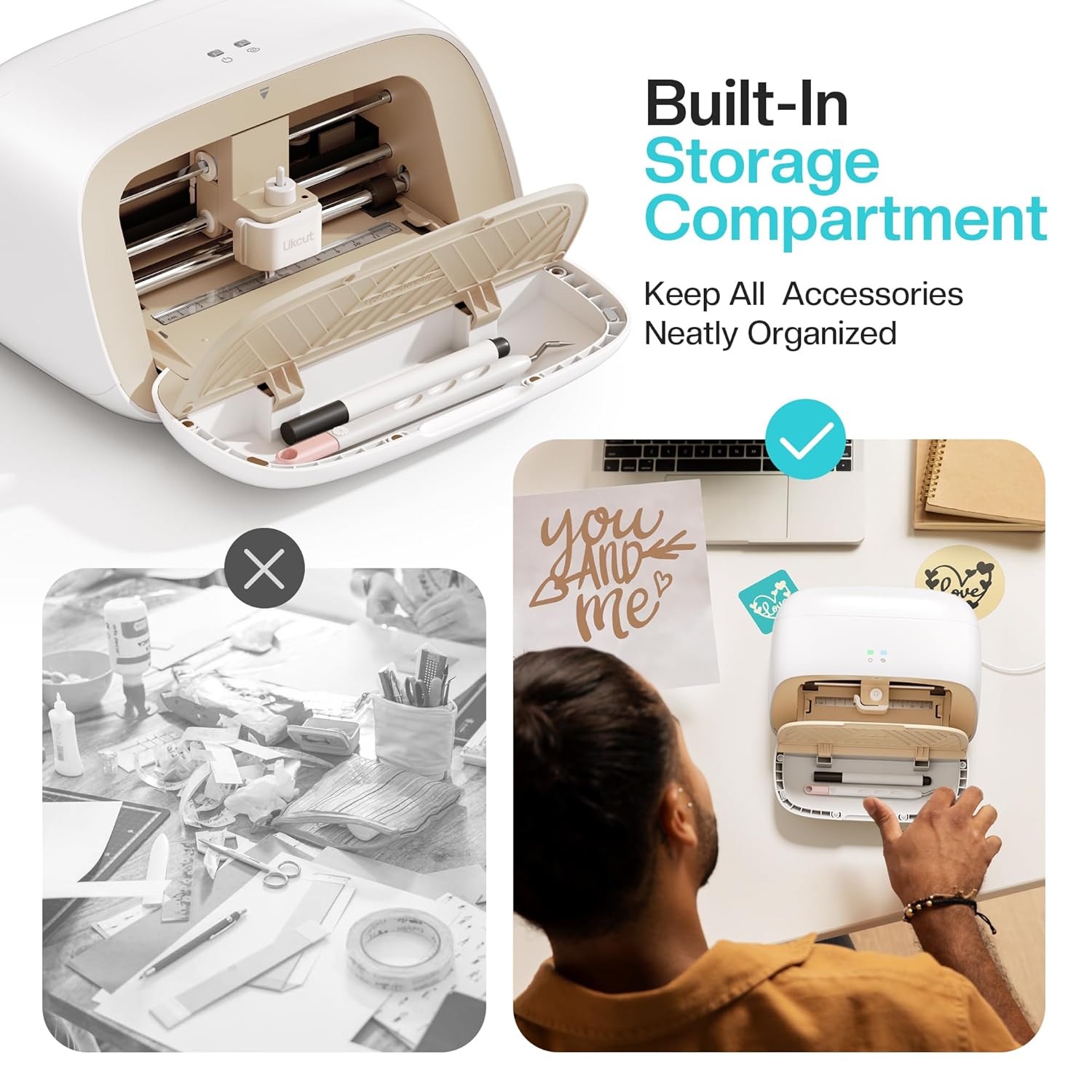
Image: A close-up of the LIKCUT S501 machine with its front cover open, revealing a built-in storage compartment for tools and accessories, emphasizing its organizational feature.
6. Troubleshooting
Common Issues and Solutions
- Machine not connecting: Ensure Bluetooth is enabled on your device or the USB cable is securely connected. Restart both the machine and your device.
- Poor cut quality: Check if the blade is dull and needs replacement. Verify that the correct material settings (pressure, speed) are selected in the app. Ensure the material is properly loaded and flat on the mat (if using one).
- Material jamming: Make sure the material is not wrinkled or bent before loading. Ensure the cutting mat is clean and has appropriate grip.
- App issues: Update the Likcut Design Store app to the latest version. Restart the app or reinstall if problems persist.
For further assistance, refer to the online support resources or contact LIKCUT customer service.
7. Specifications
| Feature | Detail |
|---|---|
| Brand | LIKCUT |
| Model | S501 |
| Material | Plastic |
| Color | Beige |
| Active Surface Area | 180 square inches |
| Operation Mode | Manual (controlled via app) |
| Connectivity | Bluetooth 5.0, USB 2.0 |
| Cutting Speed | Up to 3.2 inches per second |
| Max Cutting Length (Matless) | Up to 6.5 feet (with compatible vinyl) |
| Included Components | 1 Cutting Machine, 1 Adapter, 1 USB C Cable, Vinyl Bundle |
| Item Height | 16 centimeters |
| Item Weight | 2.65 Kilograms |
| Print Media Compatibility | Card stock, Glossy film, Labels, Vinyl |
8. Warranty and Support
Warranty Information
The LIKCUT S501 Vinyl Cutter Machine comes with a standard manufacturer's warranty. Please refer to the warranty card included in your product packaging for specific terms and conditions regarding coverage duration and claims procedures.
Customer Support
For technical support, product inquiries, or warranty claims, please visit the official LIKCUT website or contact their customer service department. Online resources and frequently asked questions (FAQs) are also available to assist with common questions and operational guidance.


