
1. Introduction
This manual provides detailed instructions for the safe and efficient operation and maintenance of the Signal fire AI-30 Fusion Splicer. The AI-30 is a fourth-generation optical fiber fusion splicer designed for high-precision core alignment, featuring a visible fiber core display, integrated one-step fiber cleaver, and built-in VFL (Visual Fault Locator) and OPM (Optical Power Meter) functions. Please read this manual thoroughly before using the device.
2. Safety Information
Always observe the following safety precautions to prevent injury and damage to the device:
- Do not operate the splicer in wet conditions or near flammable gases.
- Ensure proper ventilation during operation.
- Avoid direct eye exposure to the arc discharge and VFL laser.
- Handle optical fibers with care; they are fragile and can cause splinters.
- Keep the device clean and free from dust and debris.
- Use only approved accessories and replacement parts.
3. Product Overview and Components
The Signal fire AI-30 Fusion Splicer is a highly integrated tool for fiber optic work. Key features include six motors for precise core alignment, a built-in optical power meter (OPM), a visual fault locator (VFL), fast splicing and heating times, and an automatic delayed return electric one-step fiber cleaver.
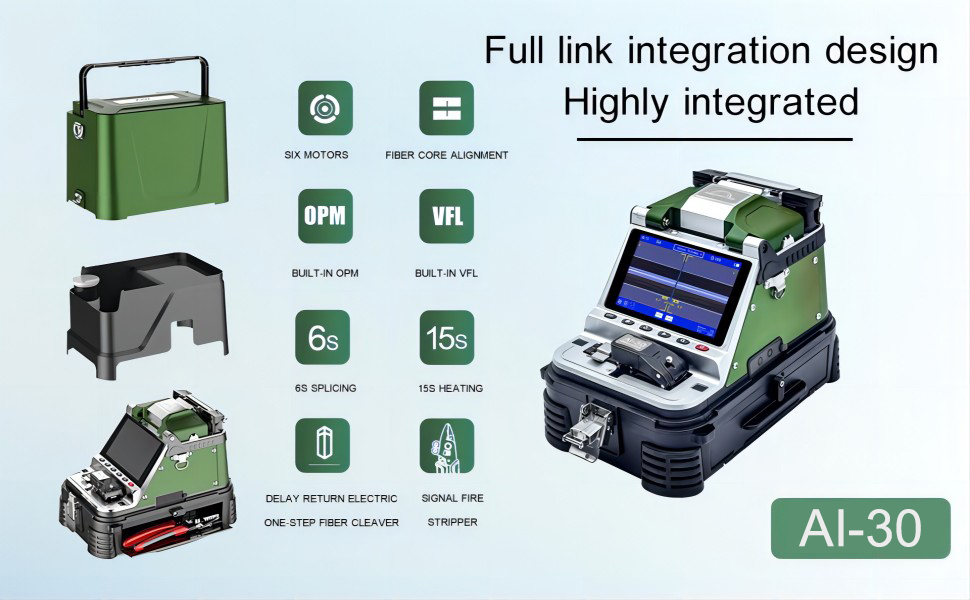
Figure 3.1: Signal fire AI-30 Fusion Splicer with integrated features.
The device also features a 5-inch high-resolution LCD screen for clear fiber core visibility and a 3-in-1 fiber holder for various fiber types.


Figure 3.2: The 3-in-1 fiber holder and the built-in one-step fiber cleaver.
4. Setup and Initial Use
4.1 Unboxing and Inspection
Carefully remove all components from the packaging. Verify that all items listed in the packing list are present and undamaged. Report any discrepancies or damage to your supplier immediately.
4.2 Battery Installation and Charging
The AI-30 is equipped with a 7800 mAh high-capacity lithium battery. To install or remove the battery, press the release button as shown in Figure 4.1. Fully charge the battery before first use. Charging time is approximately 3.5 hours.
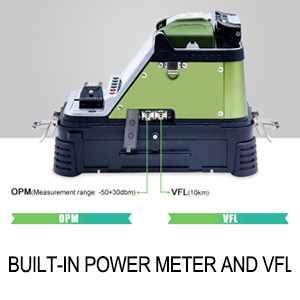
Figure 4.1: Pressing the button to release the battery.
4.3 Powering On/Off
Press and hold the power button to turn the splicer on or off. The 5-inch high-resolution LCD screen will display the startup sequence.
4.4 Mobile App Connection (Intelligent Interaction)
The AI-30 can connect to a mobile app via Bluetooth for intelligent interaction. This allows for data checking, downloading, outputting, and storage of splicing records. The app also supports ten different languages.
5. Operating Instructions
5.1 Fiber Preparation
Before splicing, the optical fiber must be properly prepared. This involves stripping the fiber jacket, cleaning the fiber, and cleaving it to achieve a precise, clean end face.
- Stripping: Use the provided fiber stripper to remove the outer jacket and coating from the fiber.
- Cleaning: Clean the stripped fiber with alcohol wipes to remove any residue.
- Cleaving: Place the cleaned fiber into the integrated one-step fiber cleaver. Ensure the fiber passes the far right of the cutter. Close the lid to automatically cut the fiber. The cleaver features an automatic delayed return to prevent scratching the fiber end face.
Video 5.1: Demonstration of fiber stripping using a Signal fire 9-in-1 fiber optic stripper tool. This tool is useful for preparing fibers before cleaving and splicing.
Video 5.2: Demonstration of the QIIRUN AI-20 Electric Fiber Cleaver, showing the automatic cutting process. This illustrates the functionality of the integrated cleaver in the AI-30.
5.2 Splicing Process
The AI-30 uses core alignment technology for precise splicing.
- Place Fiber: Open the splicer lid and carefully place the prepared fibers into the V-grooves of the fiber holders. Ensure the fiber ends are positioned correctly for alignment. The 3-in-1 fiber holder supports various fiber types including FTTH drop cable, bare fiber, 0.9 fiber cable, and 3.0mm jump cable.
- Close Lid: Close the dust cover. The splicer will automatically begin the alignment and splicing process.
- Monitor Splicing: Observe the splicing process on the 5-inch LCD screen. The screen provides 320x magnification for X/Y axis display, allowing for precise monitoring of fiber alignment and splice quality. The splicing time is approximately 6 seconds.
- Heat Shrink: Once splicing is complete, move the heat shrink tube over the splice joint and place it in the heating oven. The heating time is approximately 15 seconds.
Video 5.3: A comprehensive overview of the Signal fire AI-20/AI-30 Fiber Fusion Splicer, demonstrating its features and the splicing process.
Video 5.4: Komshine FX39 fusion splicer use guidance, illustrating the general steps for fiber preparation, splicing, and heat shrinking. While a different model, the core process is similar.
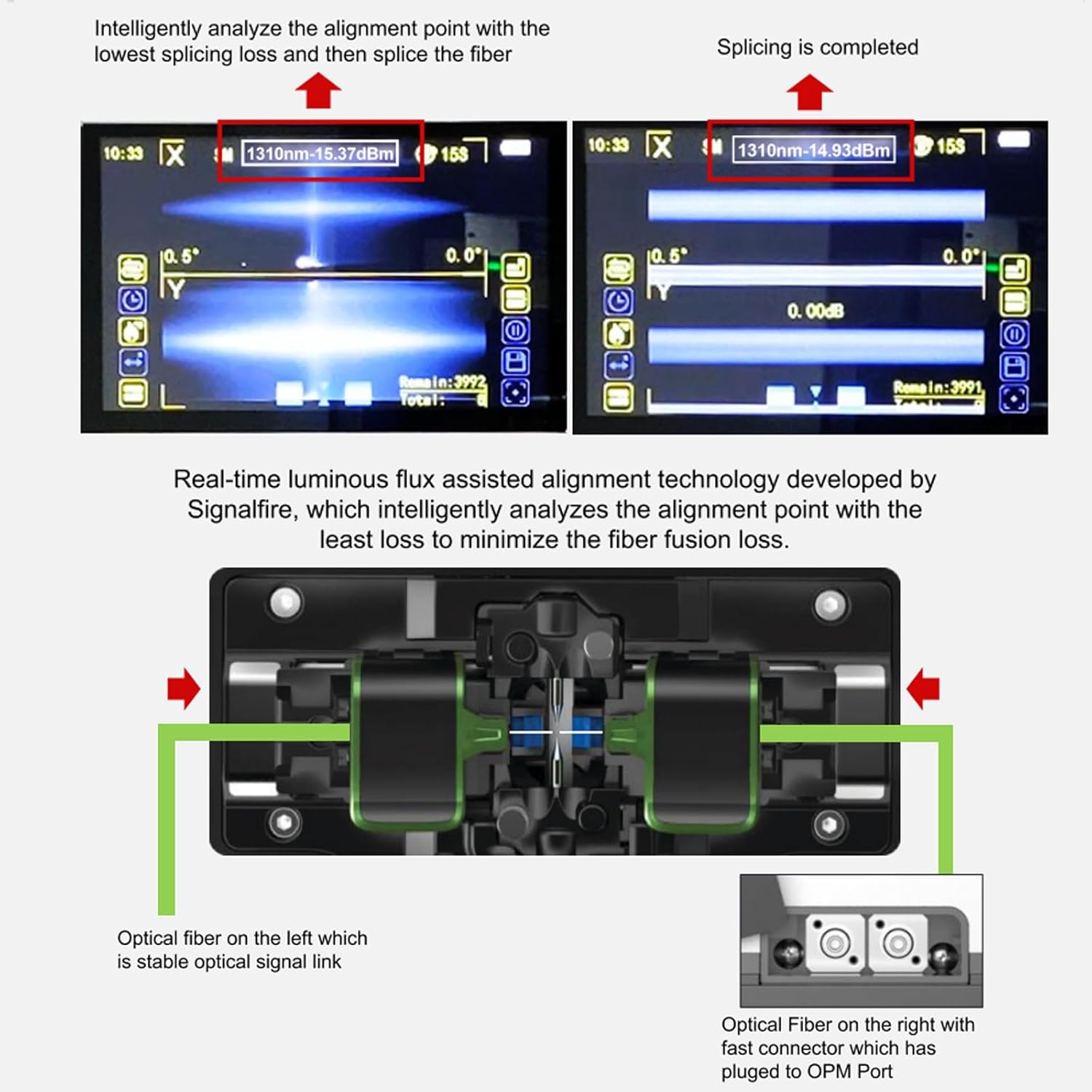
Figure 5.1: Real-time luminous flux assisted alignment technology on the splicer screen, showing fiber alignment and estimated loss.
5.3 Using Built-in VFL and OPM
The AI-30 includes integrated VFL and OPM functions for fiber testing.
- OPM (Optical Power Meter): Use the OPM to measure connection losses and evaluate fiber link transmission quality. It supports wavelengths of 850nm, 1300nm, 1310nm, 1490nm, 1550nm, 1625nm, 980nm, 1270nm, 1577nm, and 1650nm.
- VFL (Visual Fault Locator): The VFL helps verify continuity and locate faults in the fiber. It can be switched between three power states: 15mW, 2Hz flashing, and steady on mode.

Figure 5.2: Location of the built-in OPM and VFL ports on the splicer.
6. Maintenance
Regular maintenance ensures the longevity and accuracy of your AI-30 Fusion Splicer.
6.1 Cleaver Maintenance
Keep the cleaver clean to maintain accuracy. The cleaver blades surface automatically changes when the current cutting point has been used more than 1000 times or after three unqualified cutting results. Manual blade changes are also possible.

Figure 6.1: Cleaver blade adjustment and automatic delayed return mechanism.
Video 6.1: Signal fire Optical Fiber Cleaver S09 maintenance, demonstrating how to adjust and maintain the cleaver blade for optimal performance.
6.2 General Cleaning
Regularly clean the fiber holders, electrodes, and screen with a soft, lint-free cloth and appropriate cleaning solutions (e.g., isopropyl alcohol). Avoid abrasive materials that could scratch surfaces.
7. Troubleshooting
If you encounter issues with your AI-30 Fusion Splicer, refer to the following common problems and solutions:
| Problem | Possible Cause | Solution |
|---|---|---|
| High Splice Loss | Dirty fiber ends, poor cleave, worn electrodes, incorrect splicing parameters. | Clean fiber ends thoroughly. Inspect cleaver blade and replace if dull. Replace electrodes. Adjust splicing parameters. |
| Fiber Not Aligning | Dirty V-grooves, damaged fiber holders, fiber not seated correctly. | Clean V-grooves. Ensure fibers are correctly placed in holders. Check for physical damage. |
| Battery Not Charging | Faulty charger, damaged battery, poor connection. | Check charger and cable. Ensure battery is properly inserted. Contact support if issue persists. |
| Cleaver Not Cutting Cleanly | Dirty cleaver, worn blade, incorrect fiber placement. | Clean the cleaver. Rotate or replace the cleaver blade. Ensure fiber is positioned correctly. |
For further assistance, utilize the mobile app's diagnostic features or contact customer support.
8. Specifications
| Feature | Specification |
|---|---|
| Fiber Alignment | Core/Cladding; Real-time luminous flux assisted alignment |
| Motor Number | 6 motors |
| Splicing Time | 6s |
| Heating Time | 15s (can be customized) |
| Fiber Type | Single-mode fiber (SMF G.652), BIF G.657, Multi-mode, Bare fiber, Drop cable, Jumper, Invisible optical fiber |
| Cladding Diameter | 80-150μm |
| Display Type | 5-inch TFT color display screen |
| Battery Capacity | 7800 mAh lithium battery (approx. 240 splices/heats) |
| Product Dimensions | 5.51 x 5.51 x 9.45 inches |
| Item Weight | 11.84 pounds |
| Wireless Communication | Bluetooth 4.2 protocol standard, 2.4GHz working band |
| Protection | Dustproof, waterproof and fall proof |
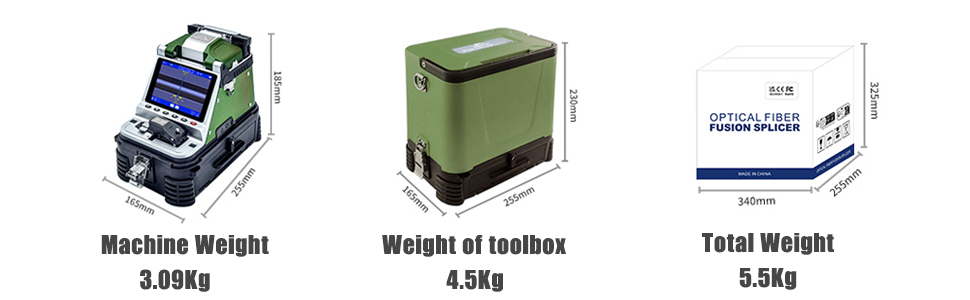
Figure 8.1: Detailed basic parameters of the Signal fire AI-30 Fusion Splicer.
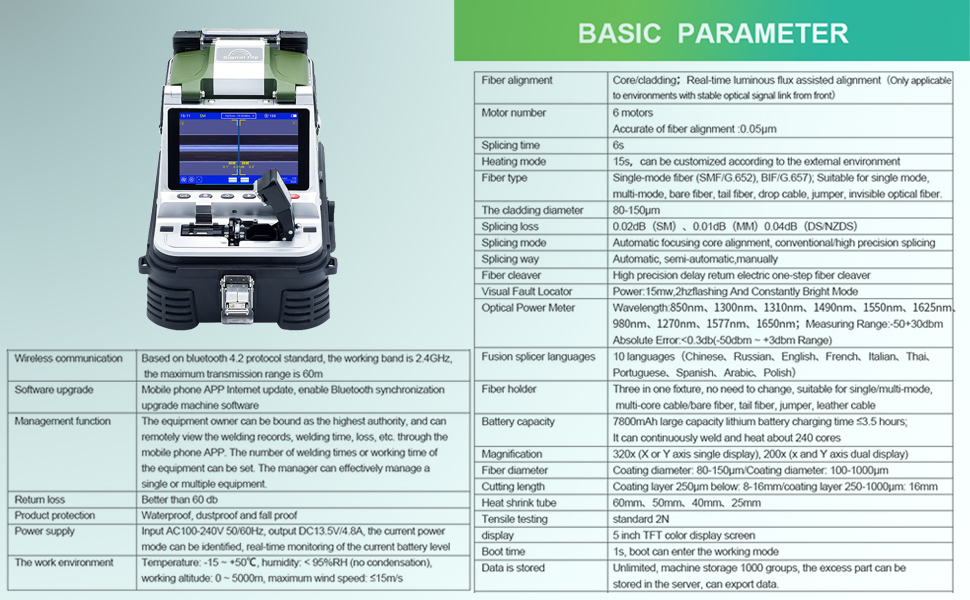
Figure 8.2: Physical dimensions and weights of the splicer and its toolbox.
9. Warranty and Support
The Signal fire AI-30 Fusion Splicer comes with a standard manufacturer's warranty. Please refer to the warranty card included with your product for specific terms and conditions. For technical support, service, or inquiries, please contact your authorized Signal fire dealer or visit the official Signal fire website.


