
SCHLAGE BE459WBCAM619
Schlage Arrive WiFi Deadbolt Smart Lock
Model: BE459WBCAM619
Satin Nickel Camelot Trim
Introduction
The Schlage Arrive™ Smart WiFi Deadbolt offers a blend of robust security and modern convenience. This keyless entry system features a push-button keypad and integrates seamlessly with your home's WiFi network, eliminating the need for additional hubs. It allows for remote control, monitoring, and management of access codes through the Schlage Home app. Compatibility with Alexa and Google Home enables voice control and smart home automation. Designed for durability and ease of use, this deadbolt provides reliable security and peace of mind.

Image: Front and back view of the Schlage Arrive WiFi Deadbolt Smart Lock in Satin Nickel Camelot finish.
Key Features
- Built-in WiFi: Connects directly to your home WiFi network for remote control and monitoring via the Schlage Home app, no additional hub required.
- App Management: Lock/unlock from anywhere, manage up to 250 access codes, view lock history, and receive customizable notifications.
- Smart Home Ready: Compatible with Alexa and Google Home for voice control and integration into automated routines.
- Push-Button Keypad: Durable, all-weather silicone buttons are backlit for visibility in low light, ensuring easy access code entry.
- Trusted Security: Backed by Schlage's security expertise, featuring a fingerprint-resistant keypad and certified highest residential Security, Durability, and Finish (AAA) rating by BHMA.
- Easy Installation: Installs in minutes with a screwdriver; no hardwiring needed. Interactive digital instructions are available.
- Auto-Lock Function: Conveniently relocks the door automatically with customizable time delay options. One-touch locking from the exterior keypad.

Image: Visual summary of the Schlage Arrive Smart WiFi Deadbolt's key features, including push-button keypad, app control, built-in WiFi, remote access, smart home readiness, voice control, 250 schedule codes, battery operation, and no hardwiring.
What's in the Box
Your Schlage Arrive WiFi Deadbolt package includes all necessary components for installation and operation:
- Exterior Keypad Assembly
- Interior Thumbturn Assembly
- Deadbolt Latch
- Strike Plate
- Mounting Screws
- 4 AA Batteries
- Keys (for manual override)
- Installation Hardware
- Installation Instructions

Image: An exploded view diagram displaying all parts included in the Schlage Arrive Smart WiFi Deadbolt package, such as the exterior keypad, interior assembly, deadbolt, strike plate, screws, batteries, and keys.
Setup and Installation
The Schlage Arrive WiFi Deadbolt is designed for quick and easy installation, typically requiring only a screwdriver. Follow the interactive digital instructions provided by the Schlage Home app for a step-by-step guide.
Door Preparation
Ensure your door meets the following specifications for proper fit:
- Door Thickness: 1-3/8 inches to 1-3/4 inches (35mm to 44mm)
- Backset: 2-3/8 inches (60mm) or 2-3/4 inches (70mm)
- Cross Bore Hole Diameter: 2-1/8 inches (54mm)
- Latch Bore Diameter: 1 inch (25mm)
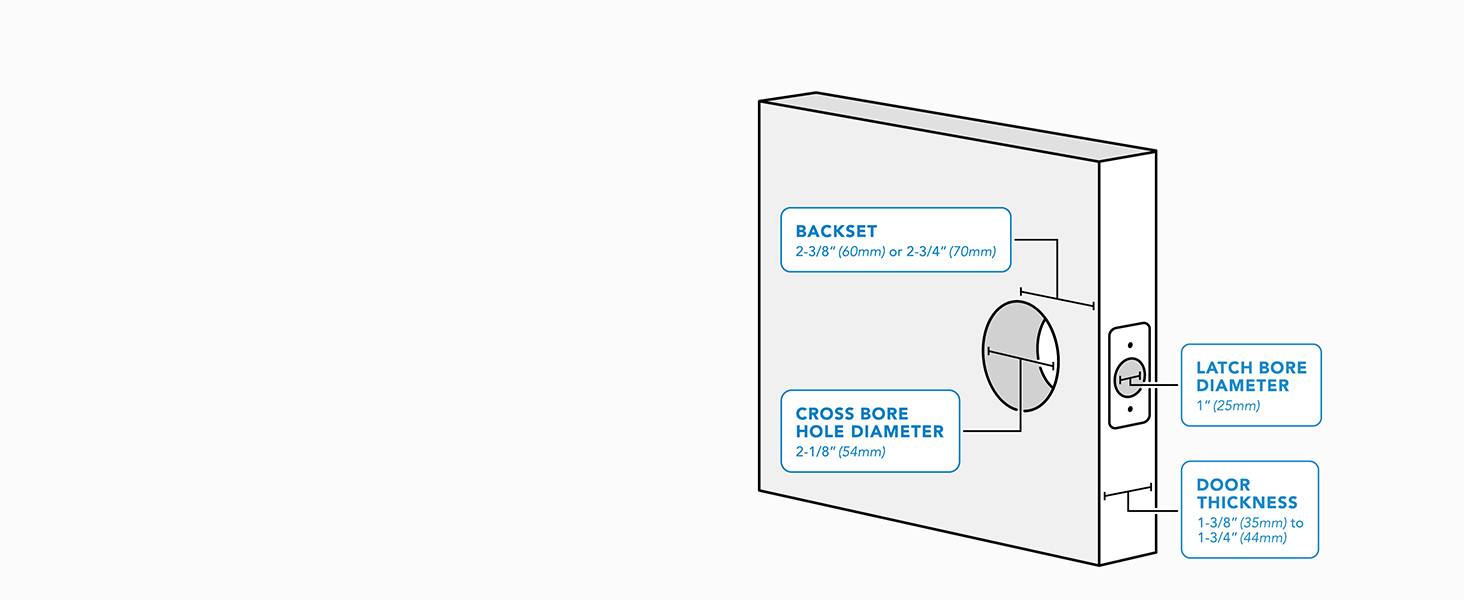
Image: A diagram illustrating the required door dimensions, including backset, cross bore hole diameter, latch bore diameter, and door thickness, for installing the deadbolt.
Installation Steps (Overview)
- Install the deadbolt latch into the door edge.
- Mount the exterior keypad assembly.
- Install the interior thumbturn assembly, connecting the cable from the exterior unit.
- Secure the lock with the provided screws.
- Insert the 4 AA batteries.
- Pair the lock with the Schlage Home app and connect to your home WiFi network.

Image: A person using a screwdriver to install the interior component of the Schlage Arrive Smart WiFi Deadbolt onto a door, demonstrating the ease of installation.
Operating Instructions
Using the Keypad
To unlock the door using the keypad, enter your valid access code (typically 4-8 digits) followed by the Schlage button (bottom right). The keypad buttons are backlit for easy visibility in low light conditions.

Image: A close-up view of the Schlage Arrive Smart WiFi Deadbolt's keypad, showing the illuminated numbers and function buttons.
To lock the door from the exterior, simply press the Schlage button on the keypad. This activates the one-touch locking feature.
Schlage Home App Control
The Schlage Home app provides comprehensive control and monitoring capabilities:
- Remote Lock/Unlock: Control your deadbolt from anywhere with an internet connection.
- Access Code Management: Create, modify, or delete up to 250 unique access codes for family, friends, or service providers. You can also set schedules for codes to be active only during specific times.
- Activity History: View a detailed log of lock and unlock events, providing insight into who accessed your home and when.
- Notifications: Receive push notifications for lock activity, such as when the door is locked or unlocked, or when battery levels are low.

Image: A hand holding a smartphone displaying the Schlage Home app, showing the lock/unlock status and options for managing access codes and viewing history.
Smart Home Integration
The Schlage Arrive deadbolt can be linked with Amazon Alexa and Google Home for voice control and integration into smart home routines. This allows you to lock or check the status of your door using voice commands or automate actions with other smart devices.

Image: A smart speaker (e.g., Amazon Echo Dot) on a kitchen counter, symbolizing the lock's compatibility with smart home ecosystems like Alexa and Google Home.
Maintenance
Battery Replacement
The Schlage Arrive deadbolt is powered by 4 AA batteries. The Schlage Home app will provide a low battery indicator, giving you ample notice before replacement is needed. To replace batteries:
- Remove the cover from the interior thumbturn assembly.
- Carefully remove the old batteries.
- Insert 4 new AA alkaline batteries, ensuring correct polarity.
- Replace the cover.

Image: Hands demonstrating the process of replacing the batteries in the interior unit of the Schlage Arrive Smart WiFi Deadbolt.
Cleaning
Clean the lock's exterior surfaces with a soft, damp cloth. Avoid using abrasive cleaners or solvents, as these can damage the finish or electronic components.
Troubleshooting
If you encounter issues with your Schlage Arrive WiFi Deadbolt, consider the following common solutions:
- Lock Not Responding: Check the battery level in the Schlage Home app or replace the batteries. Ensure the interior thumbturn is fully engaged.
- Keypad Not Lighting Up: This usually indicates low batteries. Replace all 4 AA batteries.
- Remote Access Issues: Verify your home WiFi network is active and the lock is connected. Ensure your smartphone has an active internet connection.
- Power or WiFi Outage: The lock is battery-powered, and all codes and schedules remain active during power or WiFi outages. You can still operate the lock manually with a key or via Bluetooth within range using the Schlage Home app.
- Difficulty Entering Codes: Ensure you are pressing the buttons firmly and that the keypad is clean. The all-weather silicone buttons are designed for tactile feedback.
For more detailed troubleshooting or persistent issues, refer to the full digital instructions within the Schlage Home app or contact Schlage customer support.
Specifications
| Feature | Detail |
|---|---|
| Brand | SCHLAGE |
| Model Name | Arrive Camelot WiFi Deadbolt Smart Lock |
| Model Number | BE459WBCAM619 |
| Color | Satin Nickel |
| Style | Camelot |
| Material | Zinc |
| Dimensions (L x W x H) | 0.83 x 2.5 x 4.49 inches |
| Item Weight | 2.4 Pounds |
| Lock Type | Keypad |
| Control Method | Touch |
| Connectivity Protocol | Bluetooth, Wi-Fi |
| Special Feature | Back-Lit Keypad, Battery Indicator |
| Power Source | 4 AA Batteries (included) |
| BHMA Rating | AAA (Security, Durability, Finish) |
| UPC | 194555187177 |

Image: A diagram illustrating the physical dimensions of both the exterior keypad and interior thumbturn components of the Schlage Arrive Smart WiFi Deadbolt.

Image: A chart displaying the BHMA (Builders Hardware Manufacturers Association) ratings for Security, Durability, and Finish, indicating the Schlage Arrive deadbolt has achieved the highest 'A' rating in all categories.
Warranty and Support
Schlage stands by the quality and security of its products, backed by over 100 years of expertise in the security industry. The Schlage Arrive WiFi Deadbolt is designed for long-lasting performance and reliability.
For detailed warranty information, product registration, or technical support, please visit the official Schlage website or their brand store on Amazon:
Related documentsBE459WBCAM619


Ask a question about this manual
Ask about setup, troubleshooting, compatibility, parts, safety, or missing instructions. Manuals+ will review the question and use this page’s manual context to help answer it.