
1. Introduction
This manual provides detailed instructions for the installation, operation, and maintenance of your Redragon RGMS-1200W PRO 80+ Gold 1200 Watt Power Supply. Please read this manual thoroughly before installation and use to ensure proper function and safety.
The Redragon RGMS-1200W PRO is a high-performance power supply unit designed for modern computing systems, featuring 80 Plus Gold efficiency, ATX 3.1 and PCIe 5.1 compatibility, and a fully modular design for optimized cable management.
2. Safety Information
WARNING: Improper installation or use can lead to equipment damage, electric shock, or serious injury. Always follow these safety guidelines.
- Ensure the power supply is disconnected from the AC power outlet before installation or handling.
- Do not open the power supply unit. High voltages are present inside, even when disconnected.
- Install the power supply in a well-ventilated area.
- Use only the modular cables provided with this power supply. Using incompatible cables may damage the PSU and connected components.
- Avoid exposing the power supply to moisture or extreme temperatures.
- If the power supply is damaged or not functioning correctly, discontinue use immediately and contact Redragon support.
3. Key Features
- 80 Plus Gold Certification: Ensures high energy efficiency, reducing heat generation and operating costs.
- ATX 3.1 & PCIe 5.1 Ready: Designed for compatibility with the latest high-performance GPUs, including NVIDIA RTX 40/50 Super and AMD GPUs, supporting 200% total power excursion and 300% GPU power excursion.
- 100% Japanese Capacitors: Provides enhanced reliability and durability for stable power delivery.
- Zero RPM Mode Fan: The fan operates only when the internal temperature reaches 60°C, ensuring silent operation under low to moderate loads.
- Compact 150mm Size: Offers broad chassis compatibility and facilitates easier cable management.
- Fully Modular Flat Cables: Reduces cable clutter, improves airflow, and optimizes thermal performance.
- Advanced Protections: Includes OVP (Over Voltage Protection), OCP (Over Current Protection), OPP (Over Power Protection), OTP (Over Temperature Protection), UVP (Under Voltage Protection), and SCP (Short Circuit Protection).
- 2000 RPM FDB Fan: Fluid Dynamic Bearing fan boosts cooling while maintaining an average noise level of 36dB.

Image: Front view of the Redragon RGMS-1200W PRO 1200W Power Supply, showcasing its white casing and fan grille.

Image: Angled view of the power supply with icons highlighting 80 Plus Gold certification, FDB Low-Noise, 1200W Power Supply, and Japanese Capacitors.
4. Installation Guide
4.1 Package Contents
Before proceeding, ensure all components are present:
- Redragon RGMS-1200W PRO Power Supply Unit
- Modular Cable Set (including 12VHPWR cable)
- Mounting Screws
- AC Power Cord
- User Manual (this document)
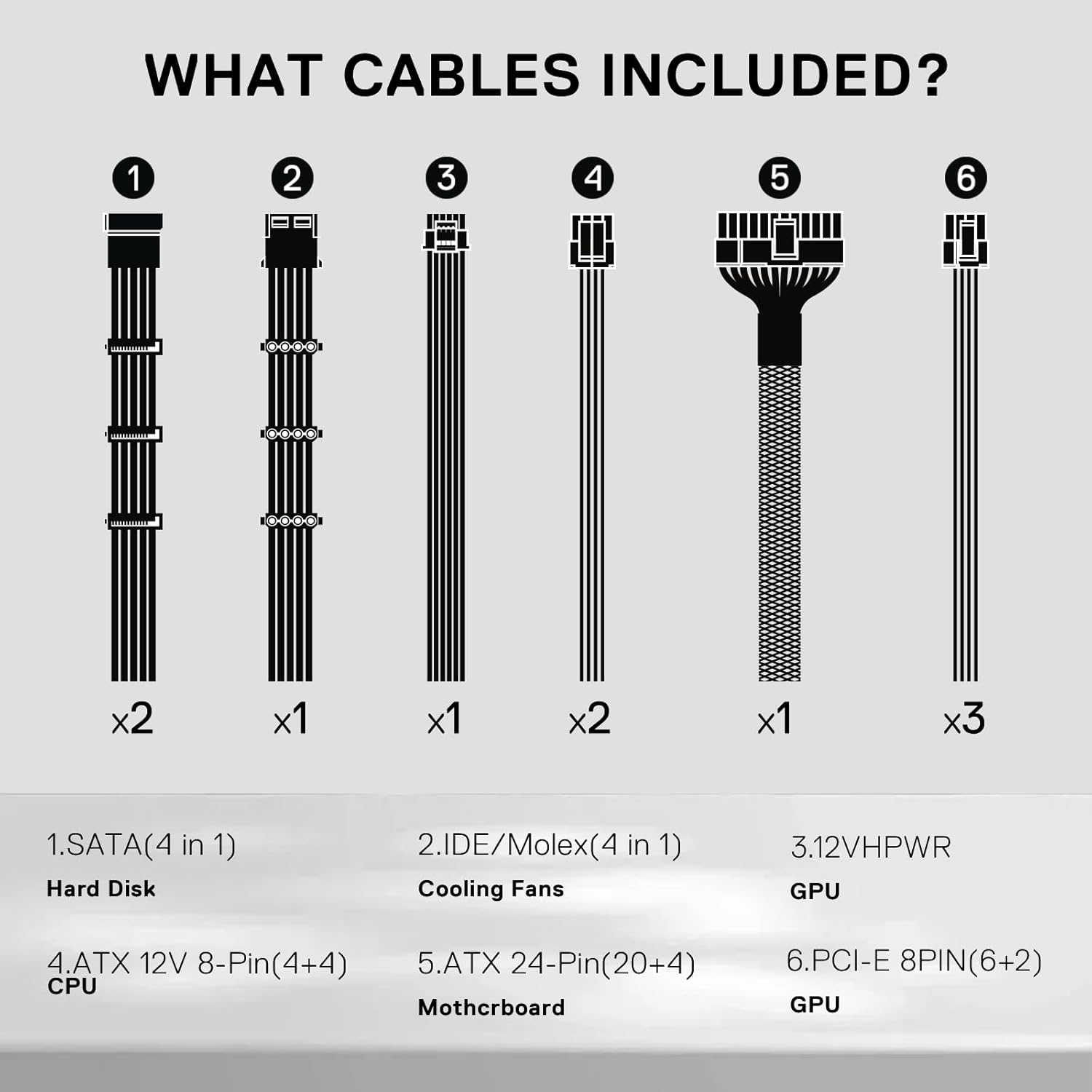
Image: A diagram illustrating the types and quantities of modular cables included: SATA (x2), IDE/Molex (x1), 12VHPWR (x1), ATX 12V 8-Pin (4+4) (x2), ATX 24-Pin (20+4) (x1), and PCI-E 8PIN (6+2) (x3).
4.2 Physical Installation
- Prepare Your System: Ensure your computer is completely powered off and unplugged from the wall outlet.
- Remove Old PSU (if applicable): Disconnect all cables from your old power supply and remove it from the chassis.
- Mount the New PSU: Carefully place the Redragon RGMS-1200W PRO into the power supply bay of your computer case. Secure it with the provided mounting screws.
- Connect Main Power Cables:
- Connect the 24-pin ATX cable to your motherboard.
- Connect the 8-pin (4+4) ATX 12V CPU power cable(s) to your motherboard.
- Connect GPU Power Cables:
- For modern GPUs requiring PCIe 5.1, connect the 12VHPWR cable directly to your graphics card.
- For other GPUs, use the appropriate 8-pin (6+2) PCIe cables.
IMPORTANT: When bending the 12VHPWR cable, ensure a minimum distance of 35mm from the connector before bending to prevent damage. Do not bend horizontally or over-bend the cable.

Image: Illustration demonstrating the correct method for bending the 12VHPWR cable, emphasizing a 35mm clearance from the connector, and showing incorrect bending angles.
- Connect Peripheral Cables: Connect SATA power cables to your storage drives (HDDs, SSDs) and optical drives. Use Molex cables for other peripherals if needed.
- Cable Management: Utilize the fully modular design and flat cables to route and secure cables neatly within your chassis for optimal airflow.
- Final Check: Double-check all connections to ensure they are secure and correctly seated.
5. Operation
5.1 Powering On
- After completing the installation and verifying all connections, connect the AC power cord to the power supply and then to a wall outlet.
- Flip the power switch on the back of the PSU to the "ON" position (usually marked with "I").
- Power on your computer.
5.2 Zero RPM Fan Mode
The Redragon RGMS-1200W PRO features a Zero RPM fan mode. The fan will remain off under low loads to provide silent operation. It will automatically activate when the internal temperature of the PSU reaches approximately 60°C to ensure optimal cooling. This is normal operation and not an indication of a fault.
5.3 RGB Lighting Control (if applicable)
Some models may include RGB lighting. If present, a button on the back of the PSU allows you to cycle through various lighting effects. To turn off the LED lighting, press and hold the RGB button for a few seconds.
6. Maintenance
To ensure the longevity and optimal performance of your power supply, follow these maintenance guidelines:
- Cleaning: Periodically clean the exterior of the power supply and its fan grille to prevent dust buildup. Use compressed air to gently clear dust from the fan and vents. Ensure the PSU is unplugged before cleaning.
- Environment: Operate the power supply in a clean, dry, and well-ventilated environment.
- Cable Integrity: Regularly check that all modular cables are securely connected and free from damage.
7. Troubleshooting
| Problem | Possible Cause | Solution |
|---|---|---|
| Computer does not power on. |
|
|
| PSU fan is not spinning. |
|
|
| System instability or crashes. |
|
|
8. Specifications
| Feature | Detail |
|---|---|
| Model Name | RGMS-1200W PRO |
| Wattage | 1200 Watts |
| 80 PLUS Certification | Gold |
| Form Factor | ATX12V |
| Connector Type | ATX 3.1, PCIe 5.1 |
| Capacitors | 100% Japanese Capacitors |
| Fan Type | 120mm FDB (Fluid Dynamic Bearing) Silent Fan |
| Fan Features | Zero RPM Mode, 2000 RPM Max, 87 CFM Max Air Flow |
| Modularity | Fully Modular |
| Input Voltage | 100-240 Vac |
| Protections | OVP, OCP, OPP, OTP, UVP, SCP |
| Dimensions (L x W x H) | 150mm (L) x 140mm (W) x 87mm (H) (Approximate, based on compact size and image) |
| Item Weight | 6.93 pounds |

Image: Graphs illustrating the power supply's efficiency curve across different loads and its noise levels (dBA) relative to load percentage.

Image: A visual representation of the power supply's compact dimensions, highlighting its 150mm length, 140mm width, and 87mm height.
9. Warranty & Support
Redragon products are designed for reliability and performance. This product comes with a manufacturer's warranty. Please refer to the official Redragon website or your purchase documentation for specific warranty terms and conditions.
For technical support, troubleshooting assistance, or warranty claims, please contact Redragon customer service through their official website or the contact information provided with your purchase.
Online Resources: Visit the official Redragon website for updated drivers, FAQs, and additional product information: www.redragonusa.com

Image: Customer support representatives wearing headsets, with a "5 Year Warranty" badge visible, symbolizing Redragon's commitment to support.


