
1. Safety Instructions
Please read and understand all safety instructions before using the AQQA LED Aquarium Light. Failure to follow these instructions may result in electric shock, fire, or serious injury.
- Electrical Safety: Ensure the power supply is disconnected before performing any maintenance or installation. Do not operate the light with a damaged cord or plug. Do not immerse the power adapter in water.
- Water Resistance: The LED light bar is IP68 waterproof, meaning it is protected against continuous immersion in water. However, the controller and power adapter are not waterproof and must be kept dry.
- Placement: Position the light securely on the aquarium. Ensure the power cord is routed safely to prevent tripping hazards or damage.
- Children and Pets: Keep the product out of reach of children and pets to prevent accidental damage or injury.
- Intended Use: This product is designed for aquarium lighting only. Do not use it for any other purpose.
2. Package Contents
Verify that all components are present upon unpacking:
- AQQA LED Aquarium Light (with integrated gooseneck and clip mount)
- Inline Controller
- Power Adapter
3. Product Features
- High Quality Aquarium Light: Features a widened and thickened aluminum alloy shell for durability and efficient heat dissipation. Equipped with premium 5050 and 2835 LEDs, providing a full spectrum of light essential for plant growth.
- DIY Mode: Offers customizable settings for brightness, color, and timer. Choose from 5 brightness levels, 3 lighting timer options (6H/10H/12H), and 7 light colors plus full spectrum and an auto color cycle.
- 24/7 Default Mode: Simulates natural light cycles, transitioning from warm orange light at sunrise to 100% bright full-spectrum light at noon, and then to starry blue light at night. The default on/off time is 6 AM to 10:58 PM, which can be adjusted.
- Flexible Adjustable Light: Includes a 7-inch 360° flexible gooseneck tube for easy adjustment of light angle and direction. The light bar also supports free left and right movement. The aluminum alloy clip securely attaches to framed or frameless aquariums up to 0.9 inches thick.
- Memory Function: Retains previous settings (color, brightness, lighting time) in the event of a power outage or disconnection. The light will resume its last set mode once power is restored.
4. Setup
- Attach the Light to the Aquarium:
Position the clip mount on the edge of your aquarium. Use the integrated screws to tighten the clip securely. Ensure the aquarium glass or frame thickness does not exceed 0.9 inches for proper fit. For rimmed tanks, ensure the clip can sit flush and stable. If your tank has a thick rim, this clip-on design may not be suitable.
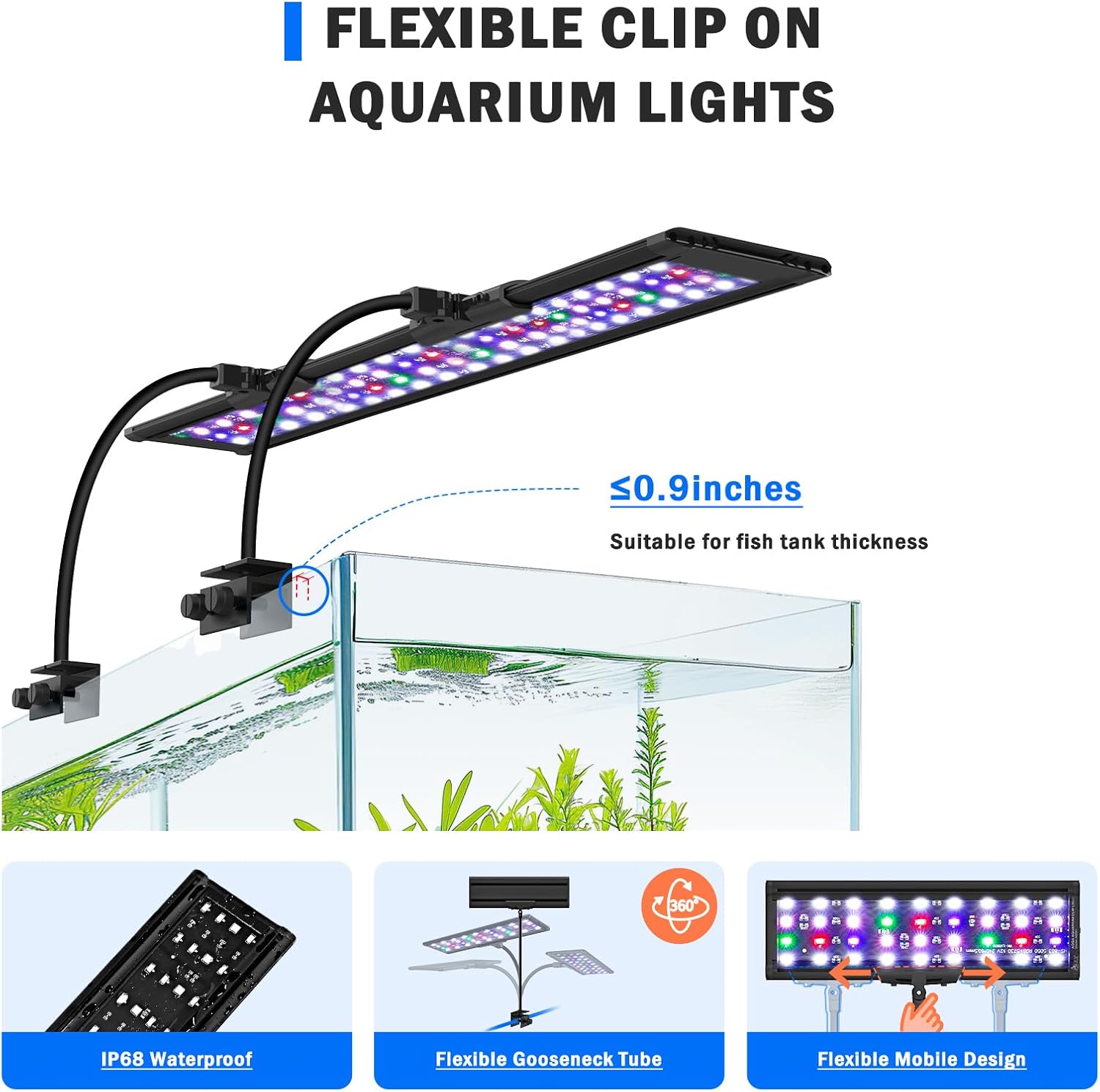
Image: The clip mount securely attaches to the aquarium edge.

Image: Diagram illustrating the maximum tank thickness of 0.9 inches for the clip.
- Adjust Light Position:
Utilize the 360° flexible gooseneck to adjust the height and angle of the light bar over your aquarium. The light bar can also slide left and right on its mount to center it as desired.

Image: The flexible gooseneck allows for precise positioning of the light.

Image: The light bar can be slid horizontally for optimal coverage.
- Connect Power:
Connect the inline controller to the LED light bar, then connect the power adapter to the controller. Plug the power adapter into a suitable electrical outlet. Ensure all connections are secure.

Image: A self-adhesive clip is provided for neat cable management.
5. Operating Instructions
The AQQA LED Aquarium Light is controlled via an inline controller with several buttons:
- TIMER: Sets the lighting duration (6H, 10H, 12H).
- ON/OFF/M (Mode): Turns the light on/off and cycles through color modes in DIY mode.
- Brightness Up/Down: Adjusts light intensity (5 levels).
- 24/7: Activates the natural light cycle mode.
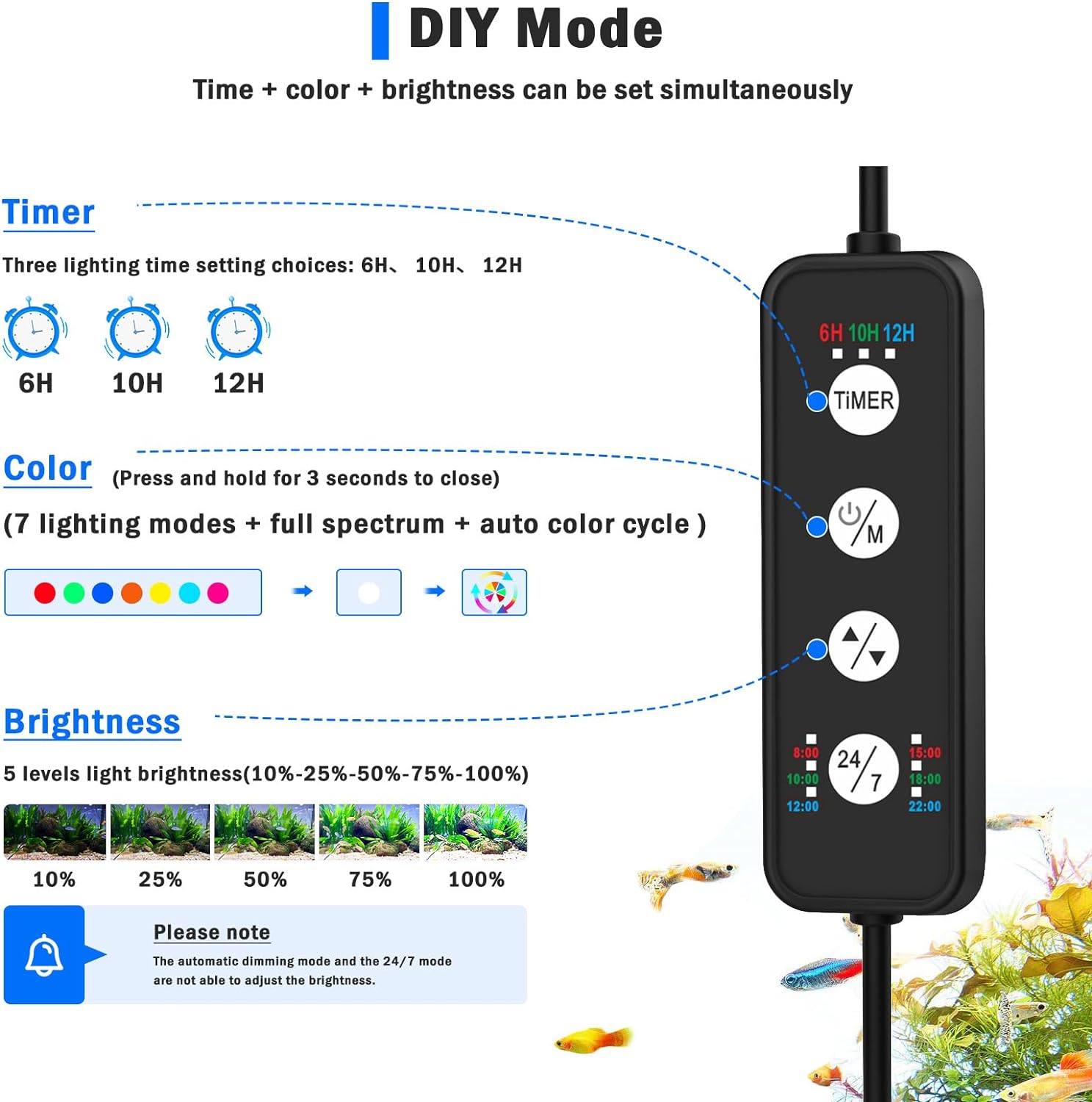
Image: Overview of the inline controller buttons and their functions.
5.1. 24/7 Default Mode
This mode simulates a natural 24-hour light cycle, mimicking sunrise, midday, and moonlight conditions. The default cycle starts at 6 AM and ends at 10:58 PM.
- Press the 24/7 button on the controller to activate this mode.
- The light will automatically transition through warm orange (sunrise), bright full-spectrum (noon), and starry blue (moonlight).
- The automatic on/off time can be postponed or advanced by adjusting the initial activation time.
- Note: When 24/7 mode is active, other buttons (Timer, Brightness, Color) cannot be operated temporarily.

Image: Visual representation of the 24/7 default light cycle.

Image: The 24/7 mode button on the inline controller.
5.2. DIY Mode
In DIY mode, you can manually set the timer, brightness, and color of the light.
- Timer Setting: Press the TIMER button to cycle through 6H, 10H, or 12H. The light will turn on at the set time each day for the selected duration.
- Brightness Adjustment: Use the Brightness Up/Down buttons to select from 5 levels of light intensity (10%, 25%, 50%, 75%, 100%).
- Color Selection: Press the ON/OFF/M button to cycle through 7 individual colors (Red, Green, Blue, Orange, Yellow, Cyan Blue, Purple), full spectrum white light, and an auto color cycle mode. Press and hold the ON/OFF/M button for 3 seconds to turn off the light.

Image: The TIMER button allows selection of 6, 10, or 12-hour cycles.

Image: Brightness adjustment buttons on the controller.

Image: Various color and spectrum options available.

Image: The ON/OFF/M button for cycling through color modes.
5.3. Memory Function
The light is equipped with a memory function. In case of a power outage or if the light is unplugged, it will retain its last active mode (24/7 or DIY settings) and resume operation with those settings once power is restored.
6. Product Demonstration Video
Watch this video for a visual guide on the AQQA LED Aquarium Light's features and operation:
Video: AQQA LED 24/7 Mode Clip on Aquarium Light Fish Tank Light. This video demonstrates the light's features, including its clip-on design, flexible gooseneck, and various lighting modes.
7. Maintenance
- Cleaning: Regularly wipe the LED light bar with a soft, damp cloth to remove dust and water spots. Ensure the light is unplugged before cleaning. Do not use abrasive cleaners or solvents.
- Controller and Adapter: Keep the inline controller and power adapter dry and clean. Avoid exposing them to water or high humidity.
- Inspection: Periodically inspect the power cord, plug, and light housing for any signs of damage. If any damage is found, discontinue use and contact customer support.
8. Troubleshooting
- Light not turning on:
- Check if the power adapter is securely plugged into the outlet and the controller.
- Ensure the ON/OFF/M button on the controller has been pressed to turn the light on.
- Verify that the electrical outlet is functioning correctly.
- Timer or 24/7 mode not working as expected:
- Ensure only one mode (24/7 or DIY timer) is active at a time.
- For DIY timer, remember the timer starts from when you first activate it.
- For 24/7 mode, ensure no other settings are being manually adjusted.
- Light is unstable on a rimmed tank:
- The clip mount is designed for tanks up to 0.9 inches thick. Thick or unusually shaped rims may prevent a secure fit.
- Consider alternative mounting solutions or a different light model if the clip cannot be securely fastened.
9. Specifications
| Feature | Specification |
|---|---|
| Model Number | AQ061 |
| Wattage | 35 Watts |
| Voltage | 12 Volts |
| Material | Aluminum |
| Finish Type | Polished |
| Light Source Type | Light Emitting Diode (LED) |
| Mounting Type | Clip Mount (for tanks up to 0.9 inches thick) |
| Bulb Features | Adjustable Brightness, Color Changing, Timer, Memory Function, Natural Light Cycle Simulation |
| IP Rating | IP68 (light bar only) |
| Product Dimensions | 1"L x 1"W x 1"H (Note: This appears to be a generic placeholder, actual light bar length varies by wattage/tank size) |
| Item Weight | 3.59 pounds |
10. Warranty and Support
For warranty information, technical support, or any inquiries regarding your AQQA LED Aquarium Light, please refer to the product packaging or contact AQQA customer service directly.
You can also visit the official AQQA store for more information: AQQA Store on Amazon


