
1. Introduction
This manual provides essential instructions for the safe and efficient operation of your Hepway Alpha 2000 Portable Power Station. Please read this manual thoroughly before using the product and retain it for future reference. The Hepway Alpha 2000 is designed for standalone use and does not support external extension batteries.

Image 1.1: Hepway Alpha 2000 Portable Power Station. This image displays the main unit of the power station, showcasing its compact design and front panel with display and ports.
2. Safety Instructions
To ensure safe operation, always follow these basic precautions:
- Do not disassemble, repair, or modify the unit.
- Do not place the unit near heat sources or in direct sunlight.
- Do not operate the unit in wet conditions or immerse it in water.
- Use only approved accessories and chargers.
- Keep the unit away from children and pets.
- Ensure proper ventilation during use to prevent overheating.
- Avoid dropping or subjecting the unit to strong impacts.
- In case of fire, use a dry powder fire extinguisher.
- This product is for standalone use only and does not support connection to external extension batteries.
3. Package Contents
Verify that all items are included in your package:
- Hepway Alpha 2000 Portable Power Station
- AC Charging Cable
- Car Charger to XT60 Cable
- MC4 to XT60 Cable (for solar charging)
- User Manual (this document)
4. Product Features and Components
The Hepway Alpha 2000 is equipped with various ports and features for versatile power delivery.

Image 4.1: Detailed Port Diagram. This diagram labels the various input and output ports on the Hepway Alpha 2000, including AC input, XT60 solar input, car charging input, AC outlets, USB-A ports, USB-C ports, wireless charging pads, and car power output. It also indicates the charging speed switch, overload protection switch, LED light, and reset button.
4.1 Key Features:
- E-Stream Fast Charging: Recharges the unit in approximately 1.3 hours via AC or 2.5 hours via 800W solar input.
- Smart App Control: Monitor and manage the power station via Wi-Fi or Bluetooth using the Cozylife app.
- 13 Versatile Outputs: Includes 4 AC outlets, 4 USB-A ports, 2 100W USB-C ports, 2 wireless charging pads, and 1 car power output.
- LiFePO4 Battery: Offers over 3000 charge cycles for extended lifespan.
- UPS Functionality: Provides uninterruptible power to connected appliances within 30ms during grid failures.
5. Setup
5.1 Initial Charge
Before first use, fully charge the Hepway Alpha 2000. Connect the AC charging cable to the AC Input Port on the unit and then to a standard wall outlet. The display will indicate charging status. A full charge takes approximately 1.3 hours.

Image 5.1: AC Fast Charging. This image demonstrates the power station being charged via an AC wall outlet, highlighting the rapid charging capability.
5.2 App Installation (Optional)
For remote monitoring and control, download the Cozylife app from your smartphone's app store. Follow the in-app instructions to connect your Hepway Alpha 2000 via Wi-Fi or Bluetooth.

Image 5.2: App Control Interface. This image shows the Hepway Alpha 2000 next to a smartphone displaying the Cozylife app interface, illustrating remote monitoring and control capabilities.
6. Operating Instructions
6.1 Powering On/Off
- To power on, press and hold the main power button until the display illuminates.
- To power off, press and hold the main power button until the display turns off.
6.2 Charging the Power Station
The Alpha 2000 can be recharged using three methods:
- AC Recharging: Connect the AC charging cable to the AC Input Port and a wall outlet. Max 1800W.
- Solar Recharging: Connect compatible solar panels (10V-100V, 8A, 800W Max) to the XT60 Input Port using the MC4 to XT60 cable.
- Car Recharging: Connect the car charger to XT60 cable to the XT60 Input Port and your vehicle's 12V/24V car outlet.
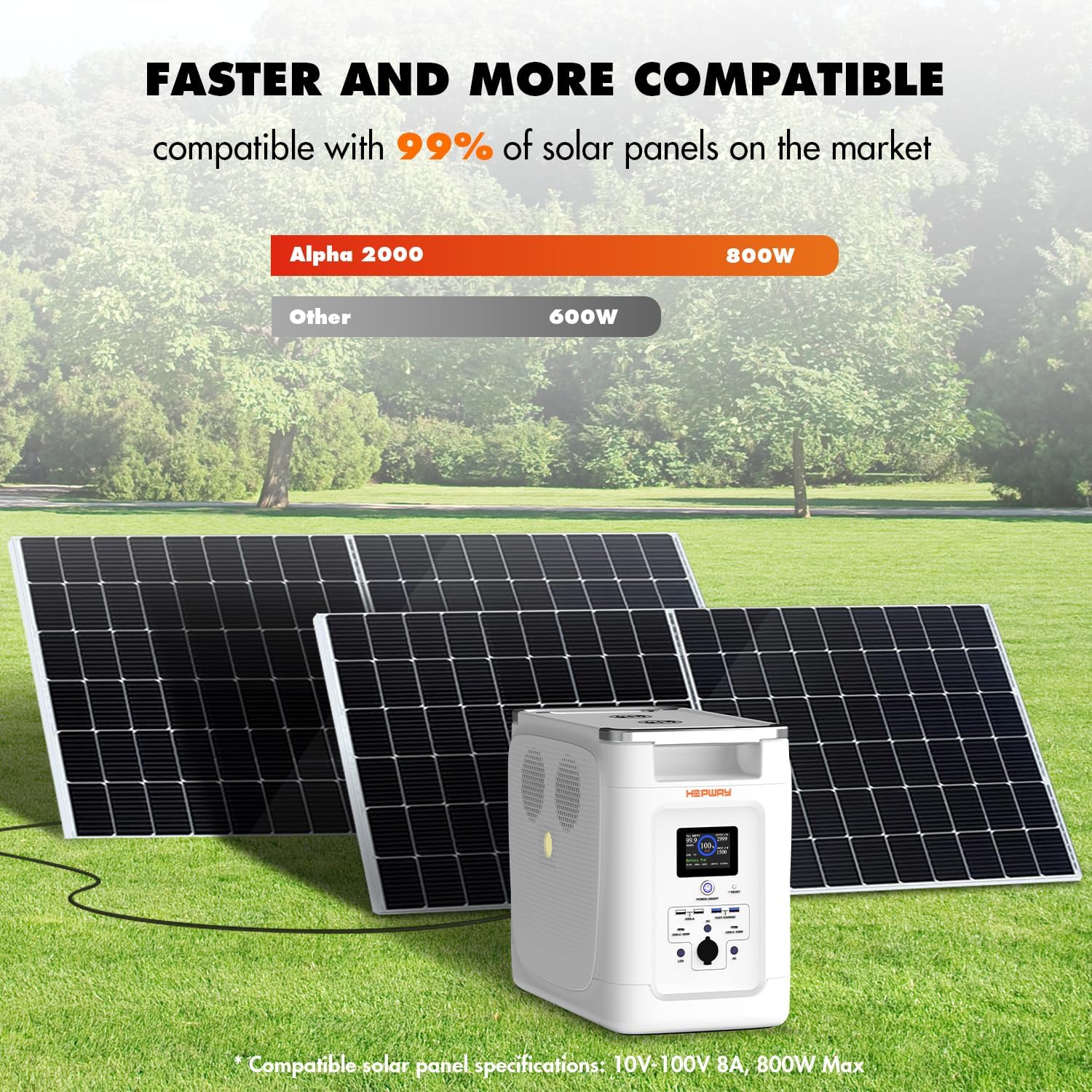
Image 6.1: Solar Panel Charging Setup. This image illustrates the Hepway Alpha 2000 connected to solar panels for recharging, demonstrating its compatibility with various solar inputs.
6.3 Using the Outputs
- AC Outlets: Press the AC power button to enable the 120V AC outlets. Connect your devices.
- USB Ports: USB-A and USB-C ports are typically active when the unit is on. Connect your USB-powered devices.
- Wireless Charging: Place compatible devices on the wireless charging pads.
- Car Power Output: Connect 12V devices to the car power output port.

Image 6.2: Powering Various Appliances. This image illustrates the Hepway Alpha 2000 powering common household appliances like a microwave, coffee maker, and refrigerator, demonstrating its capacity for daily use.
6.4 Uninterruptible Power Supply (UPS) Function
When the Alpha 2000 is connected to an AC wall outlet and has devices plugged into its AC outputs, it can function as an Uninterruptible Power Supply. In the event of a power outage, the unit will automatically switch to battery power within 30 milliseconds, providing continuous power to connected devices.

Image 6.3: UPS Functionality. This image depicts the power station connected to a wall outlet and powering a refrigerator and an aquarium, illustrating its role in providing backup power during an outage.
7. Maintenance
- Storage: Store the unit in a cool, dry place, away from direct sunlight and extreme temperatures.
- Charging Frequency: For optimal battery health, fully charge the unit every 3-6 months if not in regular use.
- Cleaning: Use a dry, soft cloth to clean the exterior of the unit. Do not use abrasive cleaners or solvents.
- Battery Lifespan: The integrated LiFePO4 battery is designed for over 3000 charge cycles, providing a long operational life.

Image 7.1: LiFePO4 Battery Structure. This image provides an exploded view of the power station, highlighting the internal LiFePO4 battery components and emphasizing its durability and long lifespan.
8. Troubleshooting
| Problem | Possible Cause | Solution |
|---|---|---|
| Unit does not power on | Battery is depleted; Power button not pressed correctly | Charge the unit; Press and hold the power button for 3 seconds |
| AC outlets not working | AC output not enabled; Overload protection activated | Press the AC power button; Reduce load, then press the reset button |
| Slow charging | Charging speed switch set to low; Incompatible solar panel | Adjust charging speed switch; Ensure solar panel meets specifications (10V-100V, 8A, 800W Max) |
| App connection issues | Bluetooth/Wi-Fi off; Unit too far from device | Ensure Bluetooth/Wi-Fi is enabled; Move closer to the unit; Restart app and unit |
9. Specifications
| Feature | Detail |
|---|---|
| Model Name | Alpha 2000 |
| Battery Type | LiFePO4 |
| Capacity | 2048Wh |
| AC Output | 2000W (Rated), 4500W (Peak), 120V, 60Hz |
| USB-A Output | 4 ports, 5V/2.4A/12W (standard), 5V/9V/12V/2.4A/18W (fast charge) |
| USB-C Output | 2 ports, 5V/9V/12V/15V/20V, 5A Max, 100W |
| Wireless Charging | 2 pads |
| Car Power Output | 12.6V, 10A, 120W |
| AC Input | 100-120V, 1500W/1800W Max |
| Solar Input (XT60) | 10-100V, 8A, 800W Max |
| Car Charging Input | 12V/24V, 8A |
| Dimensions (L x W x H) | 17.8" x 10.31" x 14.65" |
| Weight | 56.4 Pounds |
| Special Features | Short Circuit Protection, Overload Protection, BMS |
10. Warranty and Support
The Hepway Alpha 2000 Portable Power Station comes with a 2-year manufacturer's warranty. For warranty claims, technical support, or any inquiries, please contact Hepway customer service through the official website or your purchase platform.
Please have your model number (Alpha 2000) and proof of purchase ready when contacting support.