1. Introduction
Thank you for choosing the Xtreme Magnetic Wireless Charger. This device provides a convenient and efficient way to wirelessly charge your compatible smartphones. Its magnetic design ensures optimal alignment for fast and reliable power delivery. Please read this manual thoroughly before using the product to ensure safe and proper operation.
2. Safety Information
To prevent injury or damage to your device, please observe the following safety precautions:
- Do not expose the charger to water, moisture, or extreme temperatures.
- Do not disassemble, modify, or repair the charger yourself.
- Keep the charger away from strong magnetic fields to avoid interference with other electronic devices.
- Use only compatible power adapters (not included) that meet the specified input voltage and current requirements.
- Avoid placing metal objects or foreign materials between the charger and your device during charging.
- If the charger becomes excessively hot, disconnect it immediately from the power source.
3. Package Contents
The package includes:
- 1 x Xtreme Magnetic Wireless Charger with integrated USB-C cable

Image: The Xtreme Magnetic Wireless Charger shown in its retail packaging, highlighting its 10W charging capability and magnetic positioning feature.
4. Setup
Follow these steps to set up your Xtreme Magnetic Wireless Charger:
- Connect to Power: Plug the USB-C connector of the wireless charger into a compatible USB power adapter (not included). For optimal 10W fast charging, use a power adapter that supports Power Delivery (PD) or Quick Charge (QC) 3.0 with an output of at least 9V/2A or 12V/1.5A.
- Power On: Plug the power adapter into a wall outlet. The charger is now ready for use.

Image: The Xtreme Magnetic Wireless Charger with its integrated 38-inch USB-C cable, illustrating its magnetic positioning and wireless charging capabilities.
5. Operating Instructions
Using the Xtreme Magnetic Wireless Charger is simple:
- Place Your Device: Place your wireless charging compatible smartphone onto the center of the Xtreme Magnetic Wireless Charger.
- Magnetic Alignment: For iPhone 12 series and newer, the charger will magnetically snap into perfect alignment with your device, ensuring efficient charging. For other compatible devices, align the device centrally on the charger.
- Charging Indication: Your phone's screen will typically indicate that charging has begun. The charger itself does not have an LED indicator.
- Remove Device: Once your device is fully charged or you wish to stop charging, simply lift it off the charger.
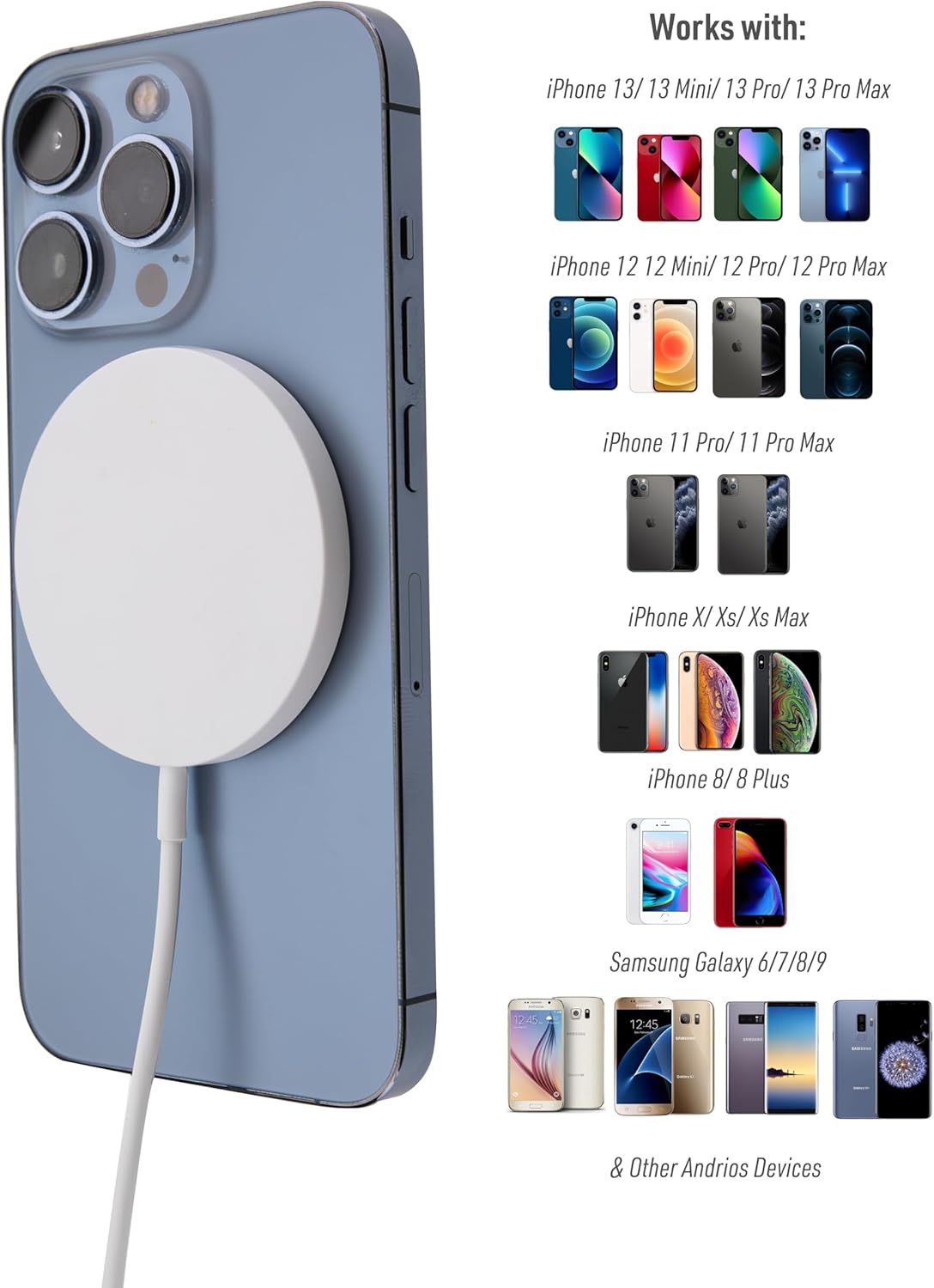
Image: The Xtreme Magnetic Wireless Charger attached to the back of an iPhone, demonstrating its magnetic connection and compatibility with various iPhone and Android models.

Image: A side view of the Xtreme Magnetic Wireless Charger magnetically attached to a smartphone, showing its slim profile and secure connection.
6. Maintenance
Proper care will extend the life of your charger:
- Cleaning: Disconnect the charger from the power source before cleaning. Use a soft, dry cloth to wipe the surface. Do not use liquid cleaners or aerosols.
- Storage: Store the charger in a cool, dry place away from direct sunlight and extreme temperatures.
- Cable Care: Avoid bending or crimping the cable excessively, as this can damage the internal wires.
7. Troubleshooting
If you encounter issues with your charger, refer to the following common problems and solutions:
| Problem | Possible Cause | Solution |
|---|---|---|
| Device not charging. |
|
|
| Slow charging. |
|
|
| Charger getting hot. |
|
|
8. Specifications
| Feature | Detail |
|---|---|
| Product Name | Xtreme Magnetic Wireless Charger |
| Model | B0DNNT3X6H (ASIN) |
| Input Voltage | 5 Volts (Requires compatible adapter for higher wattage) |
| Output Power | Up to 10W (Fast Wireless Charging) |
| Output Current | 2 Amps (Max) |
| Connectivity Technology | USB Type C (integrated cable) |
| Cable Length | 38 inches |
| Special Feature | Magnetic Alignment |
| Compatible Devices | iPhone 12/13/14/15/16 Series, Most Galaxy Phones, Other Android Devices with Wireless Charging |
| Item Weight | 3.2 ounces |
| Package Dimensions | 3 x 2 x 1 inches |
9. Warranty and Support
The Xtreme Magnetic Wireless Charger comes with a standard manufacturer's warranty. For specific warranty terms and conditions, please refer to the documentation provided with your purchase or contact XTREME DIGITAL LIFESTYLE ACCESSORIES directly.
If you require technical support or have questions about your product, please visit the official XTREME DIGITAL LIFESTYLE ACCESSORIES website or contact their customer service department. Contact information can typically be found on the product packaging or the brand's official online presence.
For more information, you can visit the XTREME DIGITAL LIFESTYLE ACCESSORIES Store on Amazon.


