
GDSAFS Hy-T26 Pro
Hy-T26 Pro Wireless Bluetooth Translation Earbuds User Manual
Model: Hy-T26 Pro | Brand: GDSAFS
1. Introduction
The GDSAFS Hy-T26 Pro Wireless Bluetooth Translation Earbuds are designed to facilitate seamless communication across language barriers. These advanced earbuds offer real-time translation in up to 75 languages, combined with high-fidelity audio for music and calls. Featuring intelligent noise reduction and AI smart functions, the Hy-T26 Pro provides a versatile and portable solution for daily use, travel, business, and more.
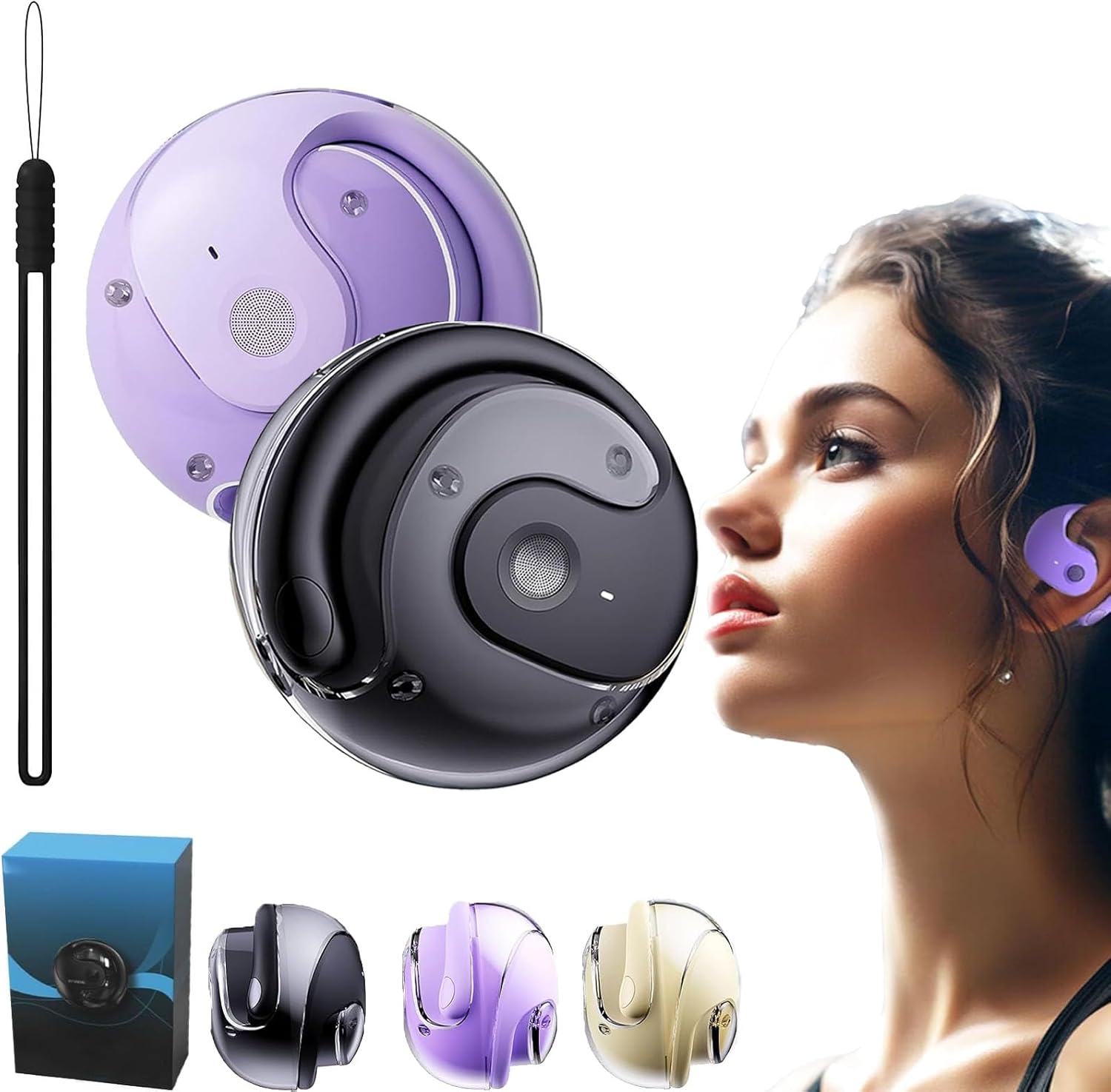
Image 1.1: The Hy-T26 Pro Wireless Bluetooth Translation Earbuds, showcasing the earbuds and their compact charging case.
2. Setup Guide
2.1. Unboxing and Initial Inspection
Carefully remove all components from the packaging. Verify that the earbuds, charging case, and Type-C charging cable are present. Inspect for any visible damage.
2.2. Charging the Earbuds and Case
Before first use, fully charge the earbuds and the charging case. Connect the provided Type-C charging cable to the charging port on the case and plug the other end into a compatible USB power source. The charging compartment has a capacity of 300mAh. Indicators on the case will show charging status. A full charge provides approximately 15 hours of playtime with the charging case, 2 hours charging time, and 4.5 hours of use time for the earbuds.

Image 2.1: Visual representation of the Hy-T26 Pro's battery life, indicating 15 hours with the charging case, 2 hours charging time, and 4.5 hours of earbud use time.
2.3. Bluetooth Pairing
- Ensure the earbuds are charged and placed in the charging case.
- Open the charging case lid. The earbuds will automatically enter pairing mode.
- On your smartphone or tablet, navigate to the Bluetooth settings.
- Search for available devices and select "Hy-T26 Pro" from the list.
- Once connected, a confirmation sound will play, and the device will show "Connected". The earbuds utilize Bluetooth version 5.4 for quick and stable connections up to 10 meters.
2.4. App Installation
To utilize the full translation and AI features, download the dedicated Hy-T26 Pro application from your device's app store (e.g., Apple App Store or Google Play Store). Follow the on-screen instructions to complete the app setup and link it with your earbuds.
3. Operating Instructions
3.1. Real-Time Translation
The Hy-T26 Pro earbuds support online real-time translation with an accuracy rate of up to 98%. This function covers most countries and regions worldwide. To use:
- Open the Hy-T26 Pro application on your paired device.
- Select the desired source and target languages within the app.
- Follow the app's instructions for initiating translation (e.g., pressing a button on the earbud or speaking into the phone's microphone).
- The translated audio will be played through the earbuds, and text will appear on your device's screen.

Image 3.1: The Hy-T26 Pro earbuds facilitating efficient communication, showing a phone screen with translated text.

Image 3.2: A user engaging in cross-language communication, with the Hy-T26 Pro earbuds serving as an auxiliary interpreter during a video call on a laptop.
3.2. AI Smart Functions
The powerful AI applications integrated with the Hy-T26 Pro offer various functions:
- Recording: Capture audio recordings directly through the earbuds.
- Writing: Convert spoken words into written text.
- AI Chat: Engage in conversational AI interactions.
- Picture Generation: Utilize AI to generate images based on prompts.
- Simple Music Generation: Experiment with AI-assisted music creation.
Access these features through the dedicated Hy-T26 Pro application.

Image 3.3: A user interacting with the AI voice conversation feature of the Hy-T26 Pro earbuds, displaying a chat interface on a smartphone.
3.3. Audio Playback and Calls
The earbuds feature a built-in 16mm dynamic speaker, providing 360° high-fidelity stereo sound. Enjoy music playback and make/receive calls with clear audio. The earbuds support HD calling for enhanced voice clarity.

Image 3.4: Various usage scenarios for the Hy-T26 Pro earbuds, including daily commuting, office work, making HD calls, and during sports activities.
4. Maintenance
4.1. Cleaning
Regularly clean the earbuds and charging case with a soft, dry, lint-free cloth. Do not use abrasive cleaners, alcohol, or chemical solvents. Avoid getting moisture in any openings.
4.2. Storage
When not in use, store the earbuds in their charging case to protect them and keep them charged. Store in a cool, dry place away from direct sunlight and extreme temperatures.
4.3. Water Resistance
The Hy-T26 Pro earbuds have an IPX5 waterproof rating, meaning they are resistant to splashes and light rain. They are not designed for submersion in water or for use during swimming. Ensure the charging port is dry before charging.
5. Troubleshooting
- Earbuds not pairing: Ensure earbuds are charged. Turn Bluetooth off and on again on your device. Forget the device in Bluetooth settings and try pairing again.
- No sound: Check volume levels on both earbuds and your connected device. Ensure earbuds are properly connected. Try playing different audio sources.
- Translation not working: Verify internet connection on your device. Ensure the Hy-T26 Pro app is open and updated. Check language settings in the app.
- Poor sound quality: Ensure earbuds are clean and free of debris. Check for interference from other wireless devices.
- Charging issues: Ensure the Type-C cable is securely connected to both the case and the power source. Try a different charging cable or power adapter.
If issues persist, refer to the support section or contact customer service.
6. Specifications
| Feature | Detail |
|---|---|
| Product Name | Hy-T26 Pro Wireless Bluetooth Translation Earbuds |
| Bluetooth Version | 5.4 |
| Transmission Distance | 10 meters |
| Waterproof Level | IPX5 |
| Usage Type | Ear-hanging type |
| Charging Interface | Type-C |
| Charging Compartment Capacity | 300mAh |
| Earbud Listening Time | Approximately 3 hours |
| Earbud Standby Time | 480 hours |
| Speaker Size | 16mm Dynamic Speaker |
| Translation Languages Supported | Up to 75 languages |
| Translation Accuracy | Up to 98% |
| AI Functions | Recording, Writing, Translation, Listening, Speaking, AI Chat, Picture Generation, Simple Music Generation |
7. Warranty and Support
For warranty information, please refer to the documentation included with your purchase or contact the manufacturer directly. For technical support, troubleshooting assistance, or inquiries regarding your Hy-T26 Pro earbuds, please visit the official GDSAFS store on Amazon or contact their customer service department. Keep your purchase receipt as proof of purchase.
GDSAFS Store Link: Visit GDSAFS Store on Amazon
Related documentsHy-T26 Pro

Ask a question about this manual
Ask about setup, troubleshooting, compatibility, parts, safety, or missing instructions. Manuals+ will review the question and use this page’s manual context to help answer it.