
Introduction
This manual provides comprehensive instructions for the installation, operation, and maintenance of your Richmat HJH55 Remote Control and HJC18 Control Box combination, designed for adjustable bed bases. Please read this manual thoroughly before use to ensure proper function and longevity of your product.
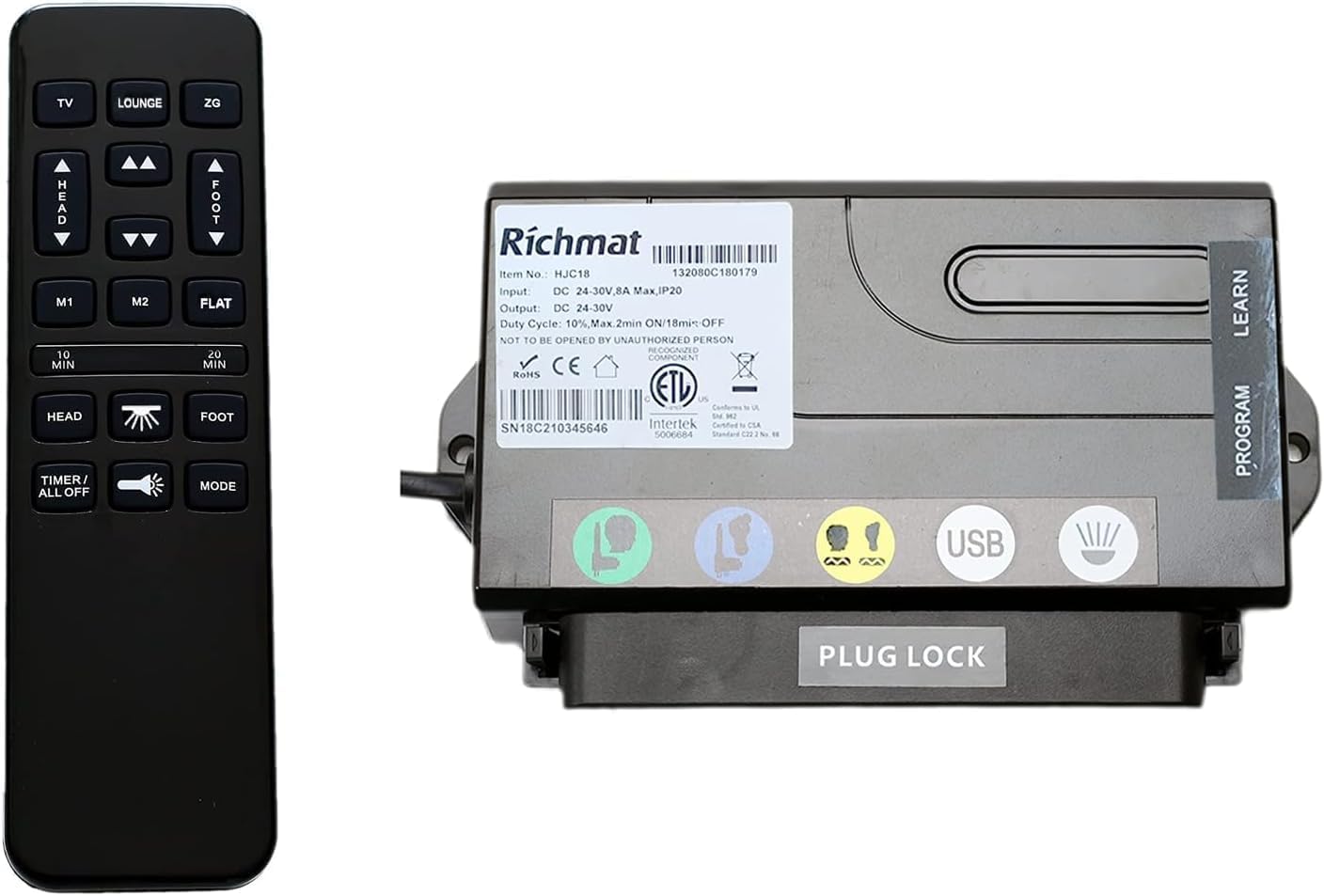
Image: The Richmat HJH55 Remote Control and HJC18 Control Box, presented as a combined unit for adjustable bed bases.
Setup
1. Compatibility Check
Before installation, verify that the HJC18 Control Box and HJH55 Remote Control are compatible with your existing adjustable bed base. Compare the ports on the new control box with your previous one. This product is specifically Model A. Refer to the comparison images to ensure you have the correct model.

Image: A visual comparison between Richmat HJC18 Control Box Model A and Model B, highlighting differences for compatibility verification.
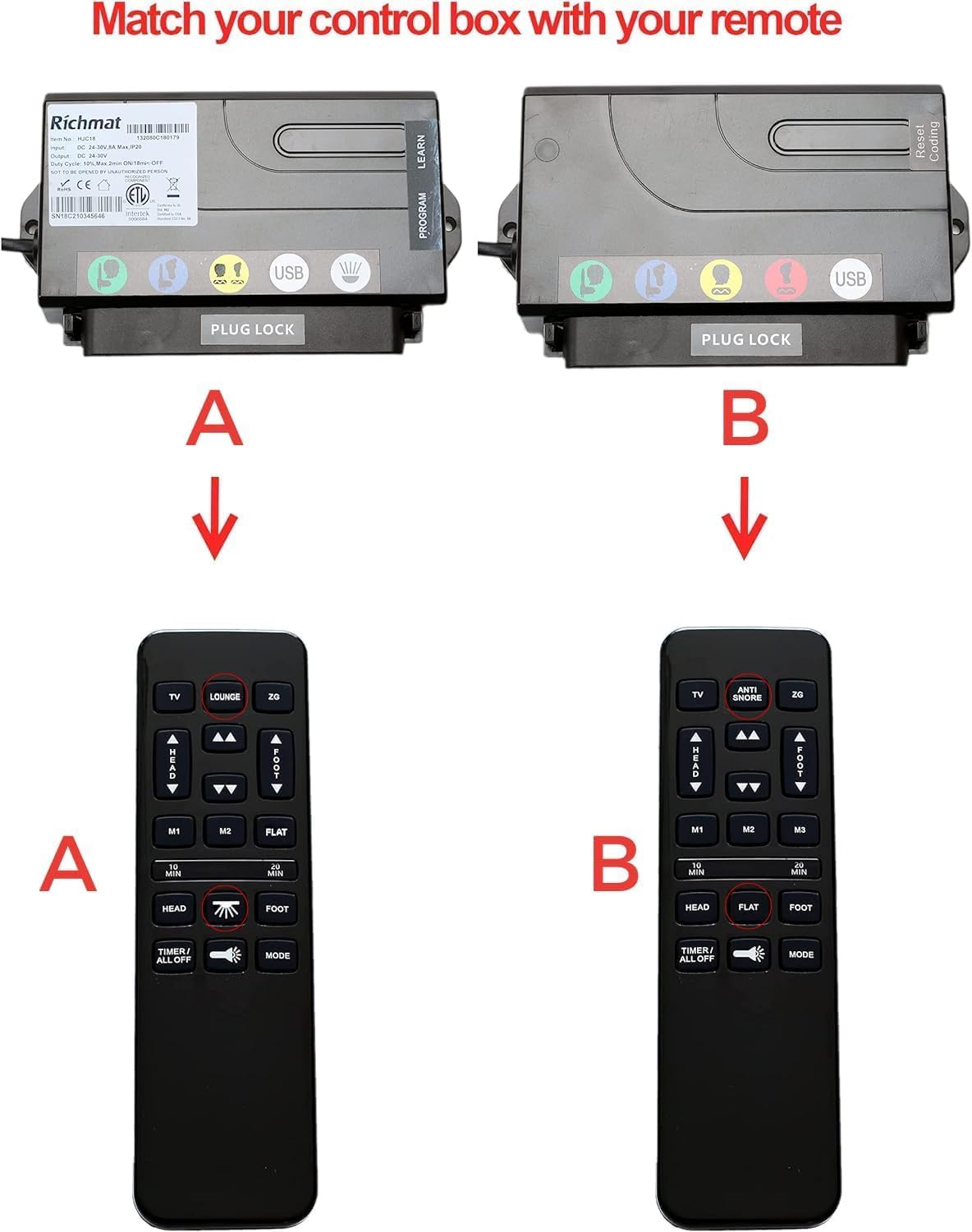
Image: A visual comparison of Richmat HJC18 Control Box Model A and Model B, each shown with its corresponding remote control for proper identification.
2. Control Box Installation (HJC18)
- Disconnect your adjustable bed base from the main power supply.
- Carefully remove your previous control box and its associated cables.
- Connect all necessary cables from your bed base (e.g., motor cables, power cable) to the corresponding ports on the new Richmat HJC18 Control Box. Ensure a secure connection for each cable.
- Secure the HJC18 Control Box in its designated location on the bed base.

Image: Top view of the Richmat HJC18 Control Box, showing its identification label and general layout.
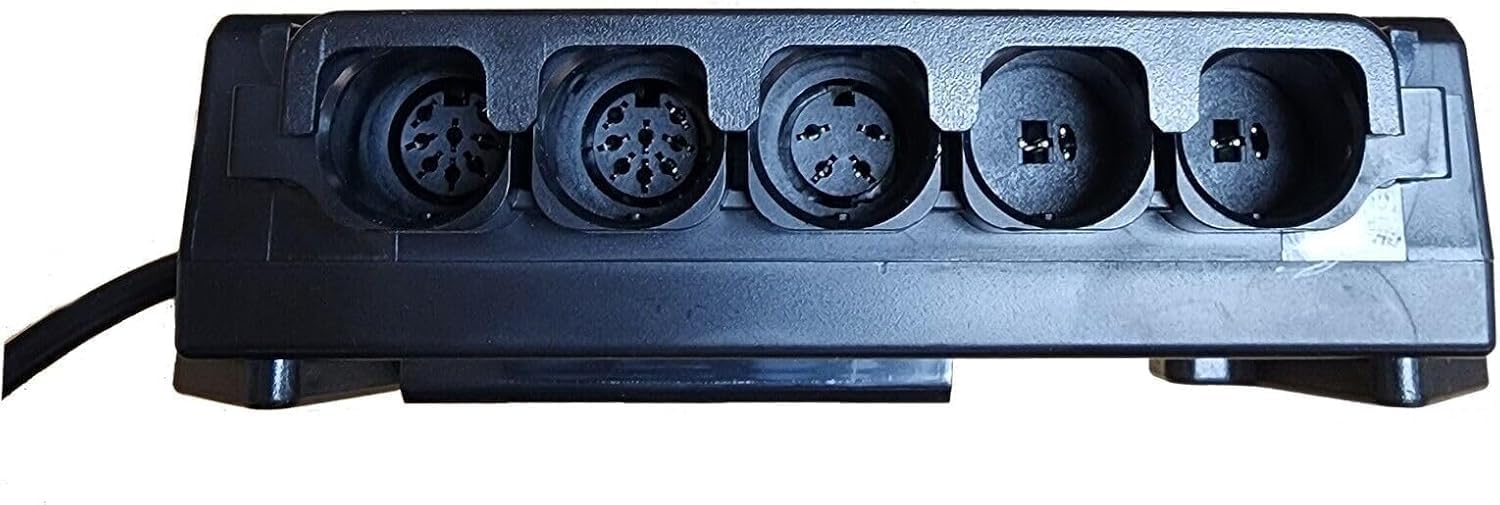
Image: View of the Richmat HJC18 Control Box, displaying its various connection ports for bed base components.
3. Remote Control Battery Installation (HJH55)
The HJH55 remote control requires 2x AAA batteries (not included). Open the battery compartment on the back of the remote and insert the batteries, observing the correct polarity (+/-). Close the compartment securely.

Image: Front view of the Richmat HJH55 Remote Control, showing its buttons and layout.
4. Pairing the Remote Control and Control Box
The remote control and control box may not be pre-paired. Follow these steps to establish a connection:
- Ensure the control box is connected to power.
- Locate the 'LEARN' or 'PROGRAM' button on the HJC18 Control Box. This button is typically on the side or top of the box.
- Press and hold the 'LEARN' or 'PROGRAM' button on the control box for approximately 3-5 seconds until an indicator light on the control box begins to flash.
- Immediately after the light starts flashing, press any button on the HJH55 Remote Control.
- The indicator light on the control box should stop flashing and remain solid, or turn off, indicating successful pairing.
- Test the remote control by pressing various function buttons to ensure the bed base responds correctly.
Operating Instructions
The HJH55 remote control provides various functions for adjusting your bed base. Familiarize yourself with the button layout:
Image: Front view of the Richmat HJH55 Remote Control, illustrating the function of each button.
- TV: Adjusts the bed to a comfortable TV viewing position.
- LOUNGE: Sets the bed to a relaxed lounge position.
- ZG (Zero Gravity): Positions the bed to a zero-gravity setting, which can relieve pressure.
- HEAD UP/DOWN Arrows: Adjusts the head section of the bed upwards or downwards.
- FOOT UP/DOWN Arrows: Adjusts the foot section of the bed upwards or downwards.
- M1 / M2: Memory preset buttons. Press and hold to save a custom position; press briefly to recall a saved position.
- FLAT: Returns the bed to a completely flat position.
- 10 MIN / 20 MIN: Timer functions for massage or other features (if applicable to your bed base).
- HEAD / FOOT (Massage): Activates or adjusts massage functions for the head or foot sections (if applicable).
- TIMER / ALL OFF: Controls timer functions or turns off all active features.
- LIGHT: Activates or deactivates under-bed lighting or other integrated lights (if applicable).
- MODE: Cycles through different massage modes or other operational modes (if applicable).
Maintenance
General Care
- Keep the remote control and control box clean and dry. Avoid exposure to liquids.
- Clean surfaces with a soft, dry cloth. Do not use abrasive cleaners or solvents.
- Avoid dropping the remote control or subjecting it to strong impacts.
Battery Replacement
When the remote control's range decreases or buttons become unresponsive, replace the AAA batteries. Always replace both batteries simultaneously with new ones, ensuring correct polarity.
Troubleshooting
| Problem | Possible Cause | Solution |
|---|---|---|
| Bed does not respond to remote control. | Remote not paired. Batteries are dead or incorrectly inserted. Control box not powered. Incorrect control box model. | Perform pairing procedure (see Setup section). Replace batteries; check polarity. Ensure control box is plugged into a working power outlet. Verify you have Model A. |
| Intermittent response from remote. | Low batteries. Obstruction between remote and control box. Interference. | Replace batteries. Ensure a clear line of sight. Move away from other electronic devices that may cause interference. |
| Bed moves in wrong direction or unexpectedly. | Motor cables incorrectly connected. | Disconnect power, then re-check and securely reconnect all motor cables to the control box. |
Specifications
- Product Name: Richmat HJH55 Remote and HJC18 Control Box
- Model: A
- Manufacturer: Richmat
- Compatible Devices: Adjustable Bed Base
- Connectivity Technology: Infrared
- Controller Type: Button Control
- Maximum Range: 12 Meters
- Remote Battery Type: 2x AAA (not included)
- Control Box Input: DC 24-30V, 8A Max (as per image label)
- Control Box Output: DC 24-30V (as per image label)
Warranty
This Richmat product comes with a 2 Year Limited Warranty. This warranty covers manufacturing defects under normal use. It does not cover damage resulting from misuse, accidents, unauthorized modifications, or improper installation. Please retain your proof of purchase for warranty claims.
Support
If you require assistance with setup, troubleshooting, or have general inquiries regarding your Richmat HJH55 Remote and HJC18 Control Box, please contact your product retailer or the manufacturer's customer support. Provide your product model (Model A) and a detailed description of the issue for efficient support.


