
Introduction
The Donner EMBARK 04 Chorus Guitar Pedal is an analog effect pedal designed to add a deep and spacious stereo chorus effect to your electric guitar tone. It features a durable aluminum alloy shell and user-friendly controls for adjusting the chorus effect. This pedal also offers a DIY shell for personalization.

Figure 1: Donner EMBARK 04 Chorus Guitar Pedal overview, highlighting its diverse chorus effect and analog circuit.
Package Contents
- Donner EMBARK 04 Chorus Guitar Pedal
- User Manual
- Stickers for DIY shell customization
Note: A 9V DC power adapter is NOT included and must be purchased separately.
Setup
Follow these steps to connect your Donner EMBARK 04 Chorus Guitar Pedal:
- Ensure your guitar amplifier and other audio equipment are turned off.
- Connect your electric guitar to the Input Port of the pedal using a 1/4-inch instrument cable.
- Connect the Output Port of the pedal to your amplifier's input using another 1/4-inch instrument cable.
- Connect a 9V DC power adapter (not included) to the DC 9V Power Input jack.
- Turn on your amplifier and other audio equipment.
- Press the footswitch to activate the pedal. The LED indicator will illuminate when the effect is active.
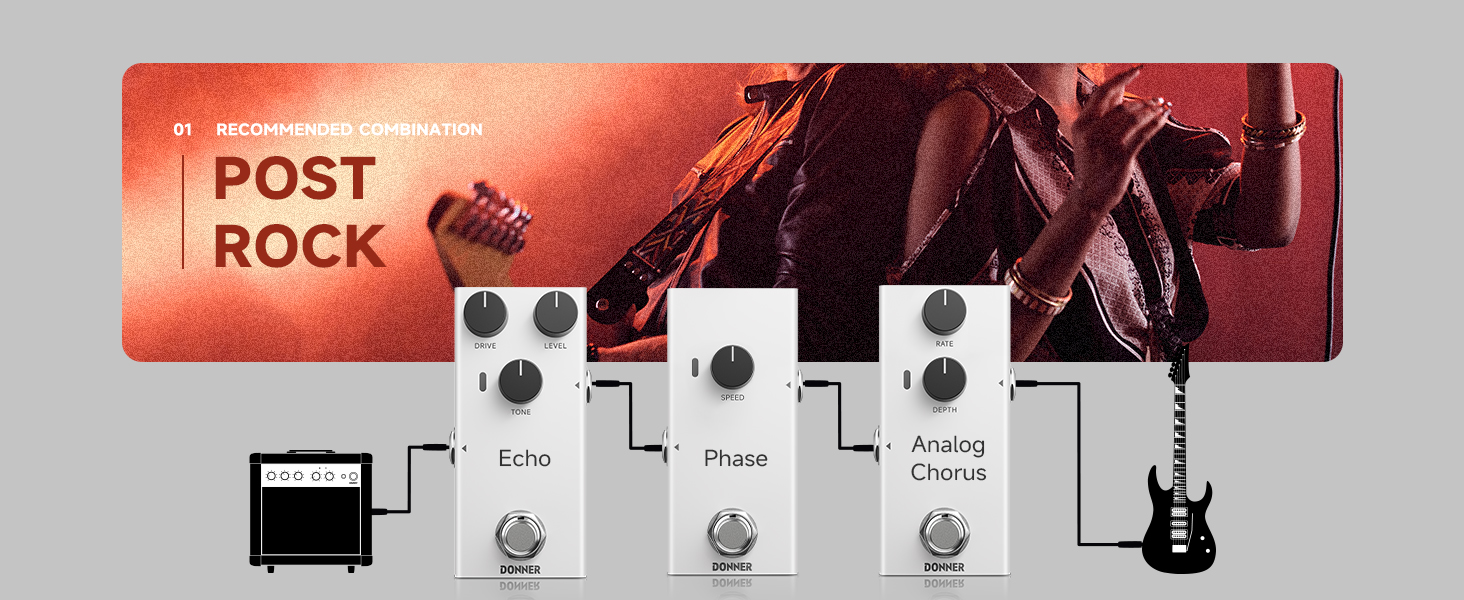
Figure 2: Recommended connection method for the guitar pedal.
Video 1: Overview and demonstration of the Donner EMBARK 04 Chorus Guitar Pedal, including its DIY shell feature.
Operating the Pedal
The EMBARK 04 Chorus Pedal features two control knobs and a footswitch for easy operation.

Figure 3: Control layout of the Donner EMBARK 04 Chorus Guitar Pedal.
- Rate Control Knob: Adjusts the speed of the chorus effect. Turning it clockwise increases the speed, while turning it counter-clockwise decreases it.
- Depth Control Knob: Adjusts the intensity or depth of the chorus effect. Turning it clockwise increases the effect's prominence, making it more pronounced.
- Footswitch: Toggles the chorus effect on or off. When the effect is active, the LED indicator will light up.
- LED Indicator: Illuminates when the chorus effect is engaged.

Figure 4: Adjusting the Rate and Depth controls for desired chorus effect.
DIY Shell Customization
The EMBARK 04 pedal features a DIY shell, allowing you to personalize its appearance. The package includes stickers for this purpose. You can also use your own decorations to customize the pedal to your preference.

Figure 5: Included stickers for DIY shell customization.

Figure 6: The pedal's durable aluminum alloy shell, designed for customization.
Analog Circuitry
The EMBARK 04 pedal utilizes a high-quality analog circuit to preserve the original transparency and layering of your guitar's sound while applying the chorus effect.

Figure 7: Illustration of the pedal's analog circuit preserving sound quality.
Maintenance
To ensure the longevity and optimal performance of your Donner EMBARK 04 Chorus Guitar Pedal, follow these maintenance guidelines:
- Keep the pedal clean by wiping it with a soft, dry cloth. Avoid using abrasive cleaners or solvents.
- Store the pedal in a dry environment, away from extreme temperatures and humidity.
- Disconnect the power adapter when the pedal is not in use for extended periods.
- Avoid dropping the pedal or subjecting it to strong impacts, as this may damage the internal components or the aluminum alloy shell.
Troubleshooting
If you encounter any issues with your Donner EMBARK 04 Chorus Guitar Pedal, consider the following common troubleshooting steps:
- No Sound:
- Check all cable connections (guitar to input, output to amplifier).
- Ensure the 9V DC power adapter is correctly connected and functioning.
- Verify that your guitar and amplifier are working correctly.
- Confirm the pedal's footswitch is engaged (LED indicator should be on).
- Weak or Distorted Sound:
- Check the battery (if applicable, though this model is corded electric) or power supply for sufficient voltage.
- Ensure instrument cables are not faulty.
- Adjust the Rate and Depth knobs to see if the effect returns to normal.
- Unwanted Noise:
- Ensure you are using a regulated 9V DC power supply specifically designed for guitar pedals.
- Try isolating the pedal from other electronic devices that might cause interference.
- Check for faulty cables.
If the problem persists after attempting these steps, please contact Donner customer support for further assistance.
Specifications
| Feature | Specification |
|---|---|
| Brand | Donner |
| Model Name | EC7101 |
| Style | Chorus |
| Dimensions | 92*49*46mm |
| Weight | 160g (0.23 kg) |
| Input Impedance | 1MΩ |
| Output Impedance | 1KΩ |
| Working Voltage | DC 9V |
| Rated Current Consumption | 9mA |
| Audio Output Effects | Chorus |
| Controls Type | Knob |
| Power Source | Corded Electric |
| Hardware Interface | 1/4-inch Audio |
| Signal Format | Analog |
Warranty and Support
The Donner EMBARK 04 Chorus Guitar Pedal comes with a 2-year manufacturer's warranty.
For technical support, warranty claims, or any other inquiries, please visit the official Donner website or contact their customer service department. Refer to the product packaging or the Donner website for the most up-to-date contact information.