
Introduction
The CLEANmaxx Upholstery & Carpet Cleaner Pro Steam is a versatile 3-in-1 device designed for deep and thorough cleaning of upholstery, carpets, and various surfaces. It functions as an upholstery cleaner, spot cleaner, and wash vacuum cleaner, utilizing hot water and steam technology to effectively remove stains and disinfect. This manual provides essential information for the safe and efficient operation and maintenance of your device.

Image: The CLEANmaxx Upholstery & Carpet Cleaner Pro Steam, showcasing its compact design and the voice guide feature.
Key Features
- Powerful Cleaning: 2000 W power and 13 kPa suction for deep cleaning of carpets, upholstery, and stairs.
- 3-in-1 Functionality: Sprays, brushes, and vacuums in one go for efficient cleaning.
- Hot Water & Steam Technology: Provides thorough cleaning and disinfection, reducing odors.
- Versatile Application: Suitable for various surfaces including carpets, upholstery, car interiors, and pet accessories.
- Intuitive Touch Display: Easy selection of 4 cleaning modes with voice output for guidance.
- Dual Tank System: Separate tanks for fresh water (1.5 L) and dirty water (0.8 L) ensure hygienic operation.
- Self-Cleaning Function: Simplifies maintenance and cares for the vacuum cleaner automatically.
- Flexible Design: Features a 5m cable and 1.6m hose for extended reach and maneuverability.

Image: Key performance indicators of the CLEANmaxx cleaner, including suction power, noise level, and water/steam temperatures.
Setup
- Unpacking: Carefully remove all components from the packaging. Retain packaging for future storage or transport.
- Component Assembly: Attach the nozzle and brush attachment securely to the hose. Ensure all connections are firm.
- Filling the Fresh Water Tank:
- Locate the fresh water tank (larger tank, typically clear or blue).
- Remove the tank and fill it with clean water. For hot water cleaning, use warm water. For steam cleaning, the device will heat the water. Do not exceed the maximum fill line (1.5 L).
- Optionally, add a suitable, low-foaming cleaning solution designed for carpet/upholstery cleaners, following the solution's instructions.
- Securely re-attach the fresh water tank to the main unit.
- Emptying the Dirty Water Tank: Ensure the dirty water tank (smaller tank, 0.8 L) is empty before starting operation.
- Power Connection: Plug the 5m power cable into a suitable electrical outlet.

Image: Illustration of the dual tank system, indicating the 1.5 L fresh water capacity and 0.8 L dirty water capacity.
Operating Instructions
The CLEANmaxx Pro Steam offers four distinct cleaning modes, selectable via the intuitive touch display. The integrated voice guide will assist you through the process.
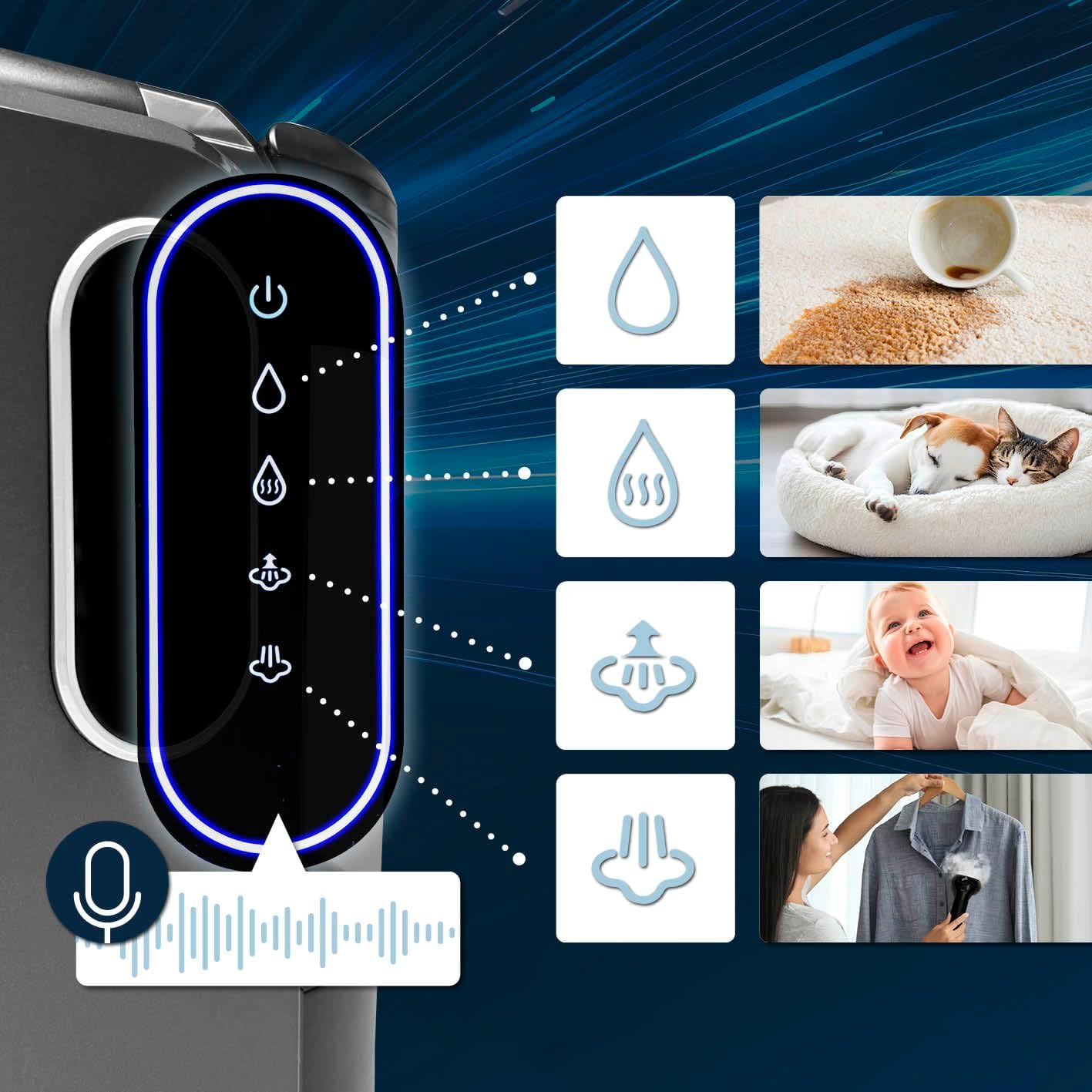
Image: The touchscreen control panel of the CLEANmaxx cleaner, showing icons for various cleaning modes and the voice guide indicator.
- Power On: Press the power button on the touch display to turn on the device.
- Select Cleaning Mode: Use the touch display to choose one of the following modes:
- 1. Cold Water + Vacuum: Ideal for light cleaning and quick spills. The device sprays cold water and immediately vacuums it up.
- 2. Hot Water + Vacuum: For more stubborn stains. The device heats the water (up to 60°C) before spraying and vacuuming.
- 3. Steam Mode: For disinfection and deep cleaning without vacuuming. Produces steam (up to 98°C) to sanitize surfaces. Use for delicate fabrics or when only steam is required.
- 4. Steam Mode + Vacuum: Combines steam cleaning with immediate vacuuming for maximum cleaning and drying efficiency.
- Application:
- Hold the nozzle firmly against the surface to be cleaned.
- Press the spray trigger to release water/steam.
- Move the nozzle slowly over the area, allowing the brush to agitate the dirt.
- Release the spray trigger and continue moving the nozzle over the wet area to vacuum up the dirty water.
- Repeat as necessary until the area is clean.
- Voice Guide: Pay attention to the voice prompts for program status, heating, and mode changes.
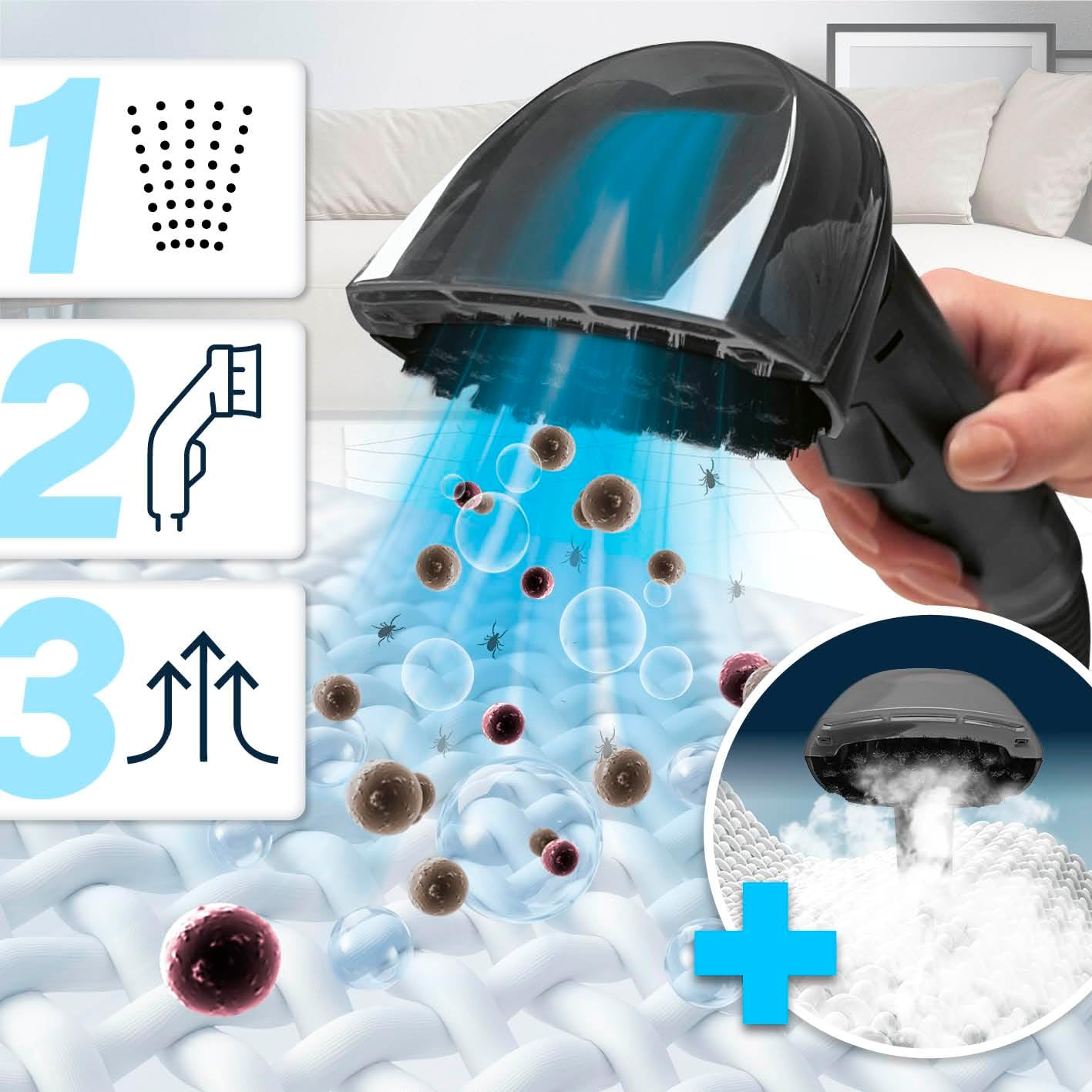
Image: Visual representation of the 3-step cleaning process: spraying cleaning solution, brushing the surface, and vacuuming up the dirty liquid.
Maintenance
Regular maintenance ensures the longevity and optimal performance of your CLEANmaxx cleaner.
- Emptying Dirty Water Tank: After each use, or when the dirty water tank is full, remove it and dispose of the dirty water. Rinse the tank thoroughly with clean water.
- Rinsing Fresh Water Tank: If using cleaning solutions, rinse the fresh water tank after each use to prevent residue buildup.
- Self-Cleaning Function: Utilize the integrated self-cleaning function regularly. This feature automatically flushes the internal components, saving time and ensuring hygiene. Refer to the voice guide or display for activation.
- Nozzle and Hose Cleaning: Detach the nozzle and hose. Rinse them under running water to remove any debris or residue. Ensure the brush attachment is clean.
- Exterior Cleaning: Wipe the exterior of the unit with a damp cloth. Do not use abrasive cleaners or immerse the main unit in water.
- Storage: Store the cleaner in a dry, cool place, away from direct sunlight and extreme temperatures. Ensure all tanks are empty and dry before storage.

Image: The self-cleaning feature of the hose, illustrating its ability to flush out contaminants and contribute to disinfection.
Troubleshooting
This section addresses common issues you might encounter with your CLEANmaxx Upholstery & Carpet Cleaner Pro Steam.
| Problem | Possible Cause | Solution |
|---|---|---|
| No Power | Power cable not plugged in; power outlet faulty; device not switched on. | Ensure the power cable is securely plugged into a working outlet. Press the power button on the display. |
| No Suction | Dirty water tank full; hose/nozzle clogged; tank not properly seated. | Empty and rinse the dirty water tank. Check hose and nozzle for blockages and clear them. Ensure tanks are correctly installed. |
| No Water/Steam Spray | Fresh water tank empty; spray nozzle clogged; pump issue. | Refill the fresh water tank. Clean the spray nozzle. If the problem persists, contact customer support. |
| Device Leaking | Tanks not properly sealed; hose connection loose; damaged seal. | Ensure both fresh and dirty water tanks are securely closed and correctly seated. Check all hose connections. If a seal is damaged, contact customer support. |
| Voice Guide Not Working | Volume too low; temporary software glitch. | Check volume settings on the display. Try restarting the device. |
Specifications
| Attribute | Value |
|---|---|
| Brand | CLEANmaxx |
| Model Number | 15078 |
| Color | grey/black |
| Product Dimensions (L x W x H) | 39.5 x 30 x 47.5 cm |
| Item Weight | 6 Kilograms |
| Power Source | Corded Electric |
| Power | 2000 W |
| Suction Power | 13 kPa |
| Fresh Water Tank Capacity | 1.5 L |
| Dirty Water Tank Capacity | 0.8 L |
| Cable Length | 5 m |
| Hose Length | 1.6 m |
| Manufacturer | DS Produkte GmbH |

Image: Physical dimensions and key specifications like cable length and weight of the CLEANmaxx cleaner.
Warranty and Support
Your CLEANmaxx Upholstery & Carpet Cleaner Pro Steam comes with a standard manufacturer's warranty. Please refer to the warranty card included in your product packaging for specific terms and conditions, including warranty period and coverage details.
For technical support, troubleshooting assistance, or warranty claims, please contact CLEANmaxx customer service. Contact information can typically be found on the manufacturer's website or on the product packaging.
Manufacturer: DS Produkte GmbH
For the most up-to-date support information, please visit the official CLEANmaxx website.

