
1. Introduction
The ANKROYU DO9100 is a portable digital dissolved oxygen meter designed for accurate measurement of dissolved oxygen concentration (mg/L), dissolved oxygen saturation (%), and temperature in various water environments. It features a built-in microcomputer processor for precise data calculation and compensation, a clear digital display with backlight, and a detachable probe for ease of use and maintenance. This instrument is suitable for applications in aquariums, swimming pools, freshwater aquaculture, marine aquaculture, school experiments, laboratory settings, and scientific research.
Key features include:
- High accuracy for dissolved oxygen measurement.
- Advanced polarographic sensor probe with integrated thermistor for temperature.
- Clear digital display for easy data reading.
- Automatic temperature compensation (0-40℃).
- Automatic shutdown after approximately 15 minutes of inactivity to conserve battery.
2. Safety Information
Please read and understand all safety instructions before operating the device. Failure to follow these instructions may result in injury or damage to the instrument.
- Do not attempt to disassemble or modify the instrument. Repairs should only be performed by qualified personnel.
- Keep the instrument away from strong electromagnetic fields, which may affect measurement accuracy.
- Ensure the battery compartment is sealed properly to prevent water ingress.
- Handle the dissolved oxygen electrode with care. Avoid dropping or subjecting it to strong impacts.
- Dispose of batteries and electrode membranes according to local environmental regulations.
- Do not immerse the main unit in water. Only the probe is designed for immersion.
3. Package Contents and Product Overview
Verify that all items are present in the package:
- 1 x ANKROYU DO9100 Host (main unit)
- 1 x Dissolved Oxygen Electrode (probe)
- 6 x Dissolved Oxygen Membrane Group (replacement membranes)
- 1 x User Manual
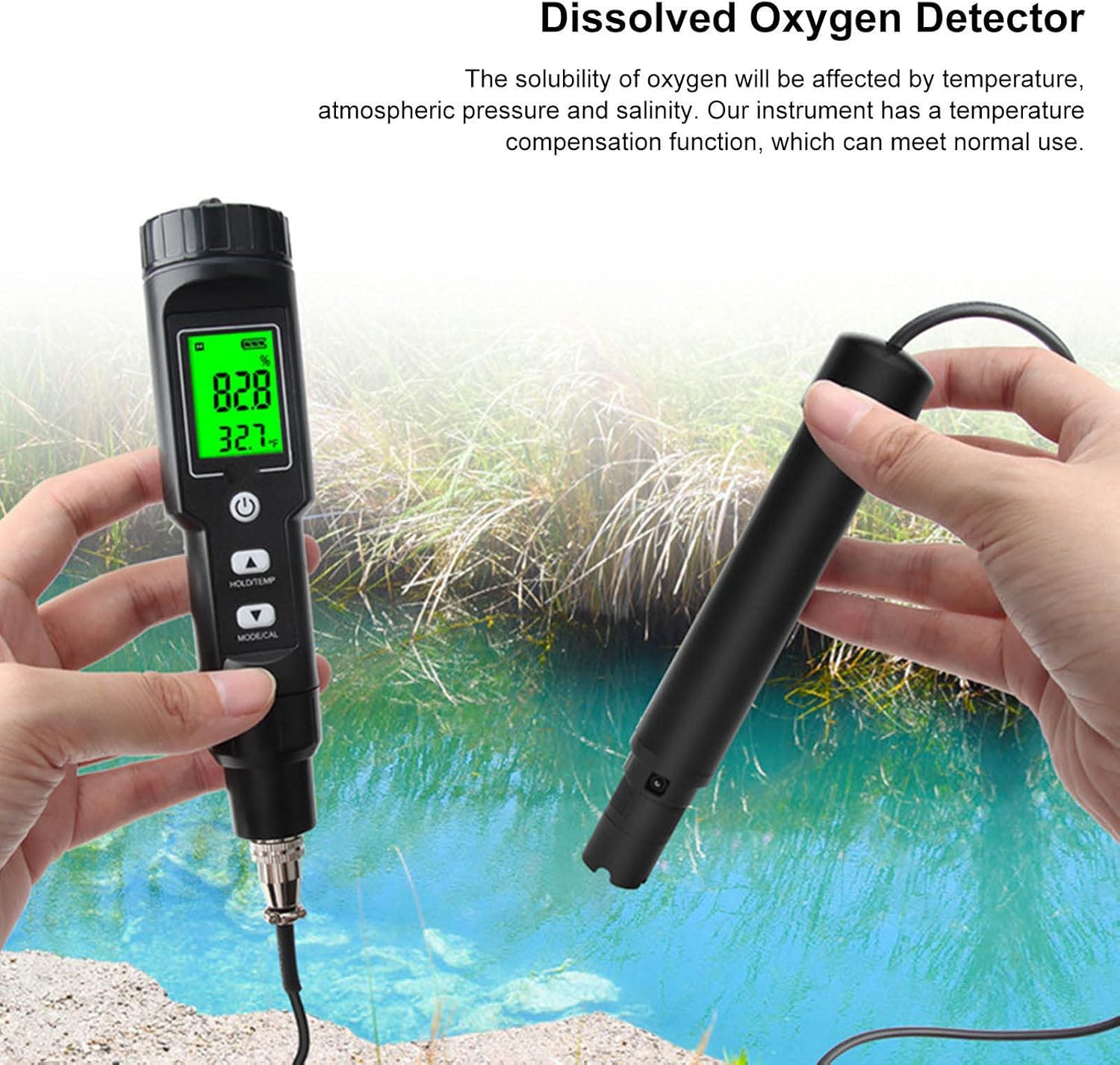
Product Diagram

The main unit features a digital display, power button, HOLD/TEMP button, and MODE/CAL button. The detachable probe connects to the bottom of the main unit.

4. Setup
4.1 Battery Installation
The ANKROYU DO9100 requires batteries (not included). To install:
- Locate the battery compartment cover on the back of the main unit.
- Open the cover.
- Insert the required batteries, ensuring correct polarity (+/-).
- Close the battery compartment cover securely to prevent water damage.
4.2 Electrode Connection
Connect the dissolved oxygen electrode to the main unit:
- Remove the protective cap from the electrode connector on the main unit.
- Align the electrode cable connector with the port on the main unit.
- Gently push and twist to secure the connection. Ensure it is firmly attached to prevent signal loss.

4.3 Membrane Group Installation (Initial Setup/Replacement)
The dissolved oxygen electrode uses a membrane group. Ensure it is properly installed before use.
- Unscrew the outer cap of the dissolved oxygen electrode.
- Carefully place a new membrane group onto the electrode tip, ensuring it is flat and free of air bubbles.
- Screw the outer cap back onto the electrode, tightening it gently until snug. Avoid overtightening.
5. Operating Instructions
5.1 Powering On/Off
- To power on: Press the Power button (⏻) once. The display will light up.
- To power off: Press and hold the Power button (⏻) for a few seconds until the display turns off. The device will also automatically shut down after approximately 15 minutes of inactivity.
5.2 Measurement Procedure
Before taking measurements, ensure the electrode is properly connected and a membrane group is installed.
- Power on the meter.
- Immerse the dissolved oxygen electrode into the water sample you wish to test. Ensure the membrane tip is fully submerged and free of air bubbles.
- Allow a few moments for the reading to stabilize. The display will show the dissolved oxygen concentration (mg/L), dissolved oxygen saturation (%), and temperature (℃/℉).
- For best accuracy, gently stir the probe in the water sample to ensure fresh water flows past the membrane.


5.3 HOLD/TEMP Button
- Press the HOLD/TEMP button once to hold the current reading on the display. Press it again to release the hold and resume live measurement.
- Press and hold the HOLD/TEMP button to switch between Celsius (℃) and Fahrenheit (℉) temperature units.
5.4 MODE/CAL Button (Calibration)
The MODE/CAL button is used for calibration. Refer to the detailed calibration procedure in the full manual for precise instructions. Regular calibration ensures measurement accuracy.

6. Maintenance
6.1 Electrode Care and Cleaning
- After each use, rinse the electrode tip with distilled or deionized water to remove any residue.
- Do not use abrasive materials or strong solvents to clean the electrode.
- If the membrane appears dirty or damaged, replace it.
6.2 Membrane Replacement
The dissolved oxygen membrane group is a consumable part and needs periodic replacement to maintain accuracy. Replace the membrane if readings become unstable, inaccurate, or if the membrane is visibly damaged.
- Unscrew the outer cap of the dissolved oxygen electrode.
- Carefully remove the old membrane group.
- Install a new membrane group as described in Section 4.3.
- After replacing the membrane, it is recommended to recalibrate the meter.
6.3 Storage
- When not in use, ensure the electrode has its protective cap on and is stored in a clean, dry place.
- Remove batteries if the instrument will not be used for an extended period to prevent leakage.
- Store the meter within the specified environmental conditions (0.1-40.0℃, RH maximum 90%).
7. Troubleshooting
| Problem | Possible Cause | Solution |
|---|---|---|
| Meter does not power on | Dead or incorrectly installed batteries | Check battery polarity, replace batteries. |
| Inaccurate or unstable readings |
|
|
| Low battery warning displayed | Batteries are low | Replace batteries immediately. |
| No temperature reading | Faulty thermistor or connection | Ensure probe is securely connected. If problem persists, contact support. |
8. Specifications
| Parameter | Value |
|---|---|
| Model | DO9100 |
| Measuring Range (Oxygen concentration) | 0.0-40.0 mg/L |
| Measuring Range (Dissolved Oxygen Saturation) | 0.0-300.0% |
| Measuring Range (Temperature) | 0.0-40.0℃ (32.0-104.0℉) |
| Resolution (Oxygen concentration) | 0.1 mg/L |
| Resolution (Dissolved Oxygen Saturation) | 0.10% |
| Resolution (Temperature) | 0.1℃ / 0.1℉ |
| Accuracy (Oxygen concentration) | ±1.5% F.S |
| Accuracy (Dissolved Oxygen Saturation) | ±1.5% F.S |
| Accuracy (Temperature) | ±0.5℃ |
| Response Time | 45 seconds (at 20℃) |
| Temperature Compensation Range | Automatic (0-40℃) |
| Height Compensation | Without |
| Battery Power | Low battery warning |
| Automatic Shut Down | Approximately 15 minutes |
| Use Environment | 0.1-40.0℃, RH maximum 90% |
| Material | ABS |
| Package Dimensions | 7.87 x 7.09 x 1.97 inches |
| Item Weight | 11.25 ounces |
9. Warranty & Support
This ANKROYU product is covered by a standard manufacturer's warranty. Please refer to the specific warranty terms provided at the time of purchase or contact your retailer for details regarding warranty coverage and duration.
For technical support, troubleshooting assistance, or inquiries about replacement parts, please contact the seller or manufacturer directly. Keep your purchase receipt or order information handy when seeking support.