
1. Important Safety Instructions
Read all safety warnings, instructions, illustrations, and specifications provided with this power tool. Failure to follow all instructions listed below may result in electric shock, fire, and/or serious injury. Save all warnings and instructions for future reference.
- Work Area Safety: Keep your work area clean and well-lit. Cluttered or dark areas invite accidents.
- Electrical Safety: Power tool plugs must match the outlet. Never modify the plug in any way. Do not abuse the cord. Keep cord away from heat, oil, sharp edges, or moving parts.
- Personal Safety: Always wear eye protection. Use appropriate dust masks when operating in dusty conditions. Stay alert, watch what you are doing, and use common sense when operating a power tool.
- Tool Use and Care: Do not force the power tool. Use the correct power tool for your application. Disconnect the plug from the power source before making any adjustments, changing accessories, or storing power tools.
2. Product Overview
The Total TB2086 is a versatile 800W electric tool designed for both blowing and vacuuming tasks. It is ideal for clearing dust, debris, and leaves from various surfaces.
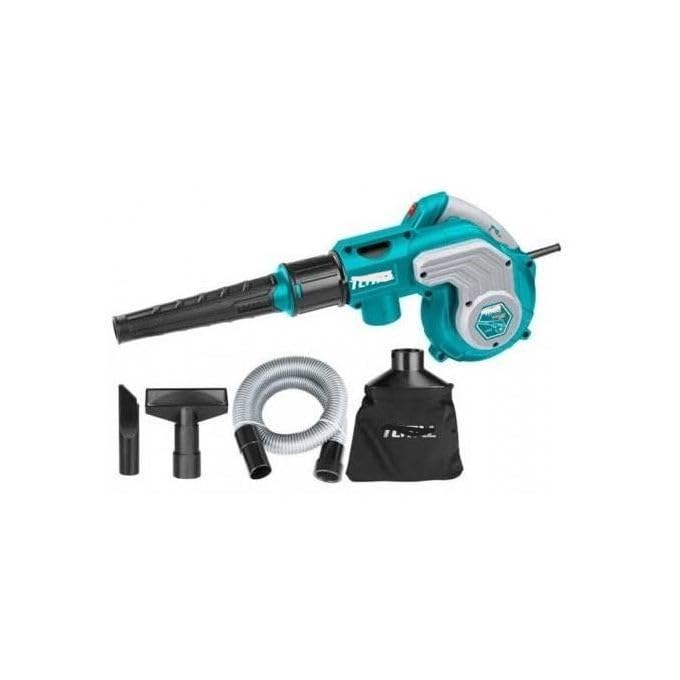
Figure 2.1: Total TB2086 Electric Blower and Vacuum Cleaner shown with its main components and accessories, including the main unit, blowing nozzle, vacuum hose, and dust collection bag.
Components:
- Main Unit (Motor Housing and Handle)
- Blowing Nozzle
- Vacuum Hose
- Dust Collection Bag
- Power Cord
3. Setup
Before operating the tool, ensure all components are correctly assembled.
3.1 Attaching the Blowing Nozzle
- Ensure the tool is unplugged from the power source.
- Align the blowing nozzle with the air outlet port on the front of the main unit.
- Push and twist the nozzle until it locks securely into place.
3.2 Attaching for Vacuuming (Dust Collection)
- Ensure the tool is unplugged from the power source.
- Attach the vacuum hose to the air inlet port (usually on the side or bottom of the main unit). Secure it firmly.
- Attach the dust collection bag to the air outlet port (where the blowing nozzle would attach). Ensure it is securely fastened to prevent dust leakage.

Figure 3.1: Close-up view of the main unit's handle, showing the trigger switch and the red lock-on button for continuous operation.
4. Operating Instructions
Always wear appropriate personal protective equipment (PPE) such as safety glasses and a dust mask during operation.
4.1 Blower Mode
- Ensure the blowing nozzle is securely attached.
- Plug the power cord into a suitable electrical outlet.
- Hold the tool firmly by the handle.
- Press the trigger switch to start the motor. For continuous operation, press the lock-on button while the trigger is pressed, then release the trigger.
- Direct the nozzle towards the area to be cleared. Move the blower in a sweeping motion to effectively clear debris.
- To stop, release the trigger switch. If locked on, press the trigger again to release the lock-on button, then release the trigger.
4.2 Vacuum Mode (Dust Collector)
- Ensure the vacuum hose and dust collection bag are securely attached.
- Plug the power cord into a suitable electrical outlet.
- Hold the tool firmly by the handle.
- Press the trigger switch to start the motor.
- Direct the end of the vacuum hose towards the debris to be collected. The tool will draw air and debris into the dust collection bag.
- Monitor the dust bag and empty it when it is approximately two-thirds full to maintain optimal suction.
- To stop, release the trigger switch.
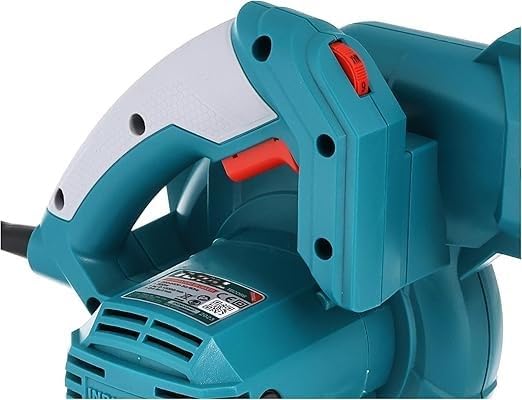
Figure 4.1: Side view of the Total TB2086, illustrating the air intake area for vacuuming operations.
5. Maintenance
Regular maintenance ensures the longevity and optimal performance of your tool. Always unplug the tool before performing any maintenance.
5.1 Cleaning
- Wipe the exterior of the tool with a soft, damp cloth. Do not use harsh chemicals or abrasive cleaners.
- Periodically clean the air vents to prevent overheating. Use a soft brush or compressed air.
- Empty and clean the dust collection bag regularly. Wash if necessary and ensure it is completely dry before reattaching.
5.2 Storage
- Store the tool in a clean, dry place, out of reach of children.
- Avoid storing in direct sunlight or areas with extreme temperatures.
- Coil the power cord neatly to prevent damage.
6. Troubleshooting
If you encounter issues with your Total TB2086, refer to the following common problems and solutions:
| Problem | Possible Cause | Solution |
|---|---|---|
| Tool does not start | No power supply Faulty power cord/plug Internal fault | Check power outlet and circuit breaker Inspect cord for damage; replace if necessary Contact customer support |
| Low blowing/suction power | Blocked nozzle/hose Full dust bag Air vents blocked | Clear any obstructions Empty and clean dust bag Clean air vents |
| Excessive vibration/noise | Loose components Debris in fan/motor | Check all attachments are secure Unplug and carefully inspect for debris; remove if safe to do so. If problem persists, contact support. |
| Overheating | Blocked air vents Prolonged heavy use | Clean air vents Allow tool to cool down; reduce load or operating time |
7. Specifications
Detailed technical specifications for the Total TB2086 Electric Blower and Vacuum Cleaner:
- Model Number: TB2086
- Brand: Total
- Power: 800W
- Air Volume: 0-4.5 m³/min
- Power Source: Corded Electric
- Form Factor: Handheld
- Item Weight: 300 g
- Product Dimensions: 25 x 17 x 10 cm
- Special Features: Switchable nozzle connection
- Batteries Required: No
- Date First Available: November 18, 2024
8. Warranty and Support
For warranty information or technical support, please refer to the documentation included with your purchase or contact Total customer service. Keep your proof of purchase for any warranty claims.


