Introduction
The Roborock Qrevo Edge S5A is an advanced robot vacuum and mop designed to provide comprehensive floor cleaning. Featuring powerful 17,000Pa HyperForce suction, zero-tangling DuoDivide Main Brush and FlexiArm Side Brush, and a Multifunctional Dock 3.0 with hot water mop washing and self-cleaning, this device offers a highly automated and efficient cleaning experience. Its intelligent navigation and app control capabilities ensure thorough coverage and convenient operation.

The Roborock Qrevo Edge S5A robot vacuum and its multifunctional dock.
What's in the Box
Ensure all components are present before beginning setup:
- Robot Vacuum (1)
- Multifunctional Dock 3.0 (1)
- Mop Cloths (2)
- Mop Cloth Mounts (2)
- Disposable Dust Bag (1)
- Power Cable (1)
- User Manual (1)

All parts included with your Roborock Qrevo Edge S5A.
Setup
1. Initial Dock Placement
Place the Multifunctional Dock 3.0 on a hard, level surface against a wall. Ensure there is at least 0.5 meters (1.6 feet) of clear space on both sides and 1.5 meters (4.9 feet) in front of the dock for optimal robot navigation and return. Connect the power cable to the dock and plug it into a wall outlet.
2. App Connection
Download the Roborock app from your device's app store. Open the app and follow the on-screen instructions to add your Roborock Qrevo Edge S5A. Ensure your Wi-Fi network is 2.4GHz, as the device only supports this frequency.
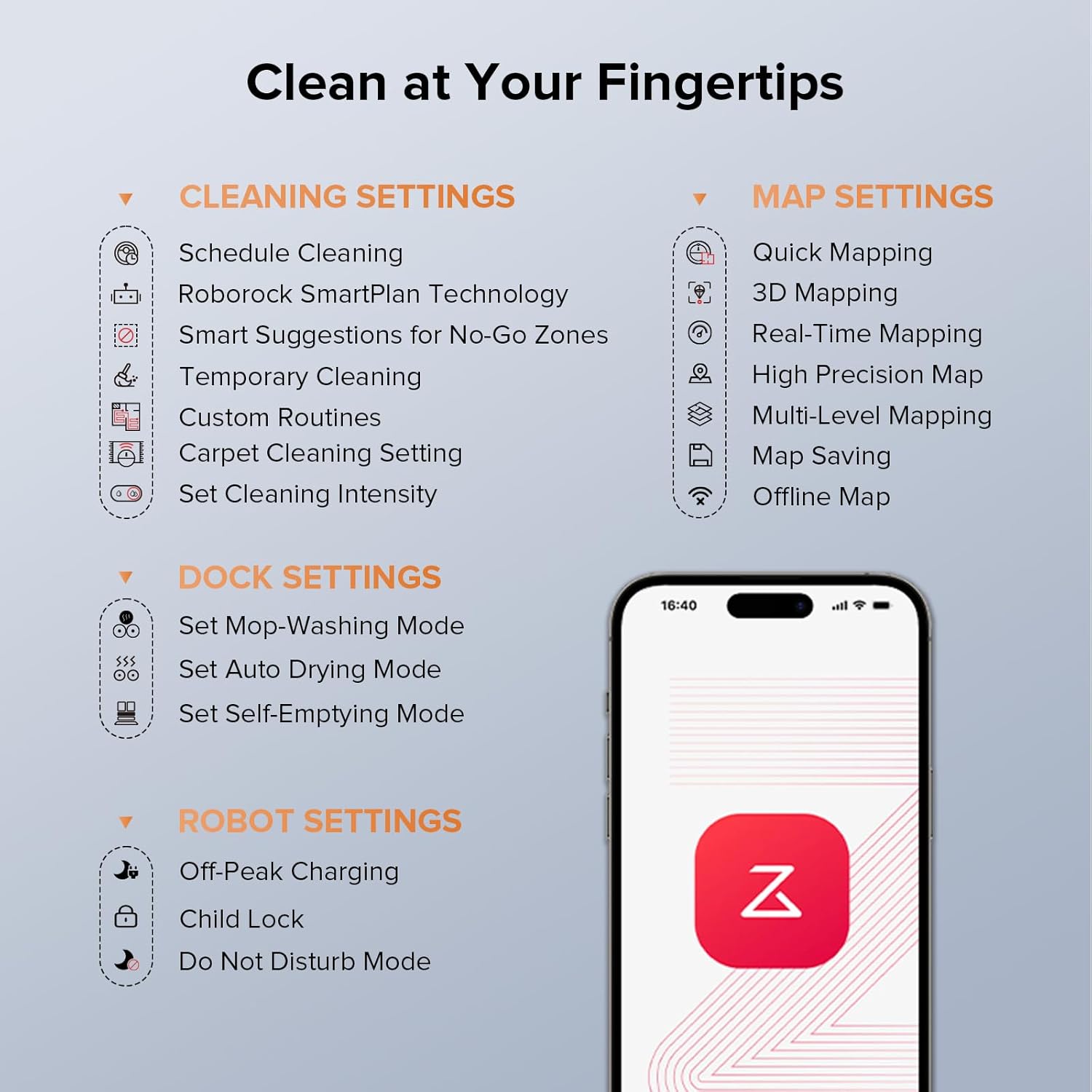
The Roborock app provides comprehensive control over your device.
Operating Instructions
Cleaning Modes
The Roborock Qrevo Edge S5A supports various cleaning modes accessible via the Roborock app:
- Vacuum Only: For dry debris and dust.
- Mop Only: For wet cleaning and stain removal.
- Vacuum & Mop: Simultaneous vacuuming and mopping for comprehensive cleaning.
Smart Features
Leverage the robot's advanced intelligence for optimal cleaning:
- Reactive Tech Obstacle Avoidance: The robot intelligently recognizes and avoids obstacles in its path, ensuring smooth operation.
- PreciSense LiDAR Navigation: Creates real-time maps of your home for efficient and precise cleaning paths.
- Roborock App Control: Manage cleaning schedules, set no-go zones, customize routines, adjust suction power and water flow levels (30 levels available), and view map details.

Reactive Tech Obstacle Avoidance ensures the robot navigates around household items.
Carpet Cleaning Strategies
The robot is equipped with intelligent carpet detection:
- Auto Mop Lifting: Dual mops can lift automatically by up to 10mm when detecting carpets, preventing wetting.
- Carpet Boost: Suction power is automatically boosted on carpets for deeper cleaning.
- Vacuum Carpet First: Prioritizes vacuuming carpeted areas before mopping to avoid wetting.
Voice Control
Activate voice commands by saying "Hello Rocky" followed by your desired action. Examples include: "Start cleaning", "Clean the kitchen", "Pause", "Go back to dock".
Official Product Videos
This video provides a detailed overview of the Roborock app and its various features for controlling the Qrevo Edge and Edge S5A models.
Maintenance
Regular maintenance ensures optimal performance and longevity of your Roborock Qrevo Edge S5A.
1. Robot Components
- DuoDivide Main Brush & FlexiArm Side Brush: These brushes are designed for zero-tangling. Regularly check and clean any accumulated hair or debris.
- Dustbin & Filter: The robot features auto dust emptying into the dock's 2.7L disposable dust bag (supports over 60 days). The filter is washable; clean it periodically as per the app's maintenance reminders.
- Mop Pads: The dual spinning mops are automatically washed and dried by the dock. Replace mop pads when worn.

The Multifunctional Dock 3.0 handles many maintenance tasks automatically.
2. Multifunctional Dock 3.0
- Hot Water Mop Washing: The dock washes the mop pads with hot water (up to 167°F / 75°C) to remove stubborn stains.
- Dock Self-Cleaning: The detachable base can be automatically cleaned with hot water or removed for manual washing.
- Warm Air Drying: Mop pads are dried with warm air to prevent odors and mildew.
- Auto Tank Refilling: The dock automatically refills the robot's water tank from its 4L clean water tank.
Official Product Videos
This video demonstrates the process of cleaning the Roborock robot vacuum, including its various components and the dock.
Troubleshooting
If you encounter issues with your Roborock Qrevo Edge S5A, refer to the following common solutions:
- Robot not charging: Ensure the robot is correctly docked and the power cable is securely plugged in. Check the charging contacts on both the robot and the dock for any obstructions.
- Robot stuck or lost: Clear any obstacles from the robot's path. If the robot is lost, use the app to locate it or send it back to the dock.
- Poor cleaning performance: Clean the main brush, side brush, and filters. Ensure water tanks are filled and mop pads are clean.
- App connectivity issues: Verify your Wi-Fi network is 2.4GHz and the signal is strong. Restart your router and the robot.
- Excessive hair tangling: The DuoDivide Main Brush and FlexiArm Arc Side Brush are designed to minimize tangling. Regularly remove any hair that does accumulate.
Specifications
| Feature | Detail |
|---|---|
| Brand | roborock |
| Model Name | Roborock Qrevo Edge Series |
| Suction Power | 17,000Pa HyperForce |
| Battery Life | 180 minutes |
| Product Dimensions | 13.86"L x 19.17"W x 15.94"H |
| Item Weight | 38.8 pounds |
| Control Method | App |
| Filter Type | Washable Filter |
| Connectivity | 2.4GHz WiFi only |
Warranty and Support
For detailed warranty information, troubleshooting guides, and customer support, please refer to the official user manual.
You can download the full User Manual (PDF) here.


