
AQQA AQ125
AQQA LED Aquarium Light User Manual
Model: AQ125
Introduction
This manual provides detailed instructions for the installation, operation, and maintenance of your AQQA LED Aquarium Light, Model AQ125. This light is designed to provide optimal illumination for freshwater aquariums, supporting the growth of aquatic plants and enhancing the visual appeal of your fish tank. Key features include 24/7 natural light cycle simulation, a customizable DIY mode, adjustable brightness and timer settings, and an IP68 waterproof rating.

Image: The AQQA LED Aquarium Light, Model AQ125, shown installed on an aquarium, illuminating aquatic plants and fish.
Safety Information
- Ensure the power adapter and controller are kept dry and away from water. Only the light fixture itself is IP68 waterproof and can be submerged.
- Before performing any maintenance or cleaning, always unplug the light from the power source.
- Do not attempt to disassemble or modify the light fixture or power adapter. This may void the warranty and pose a safety risk.
- Keep out of reach of children.
- Verify that your aquarium tank thickness is within the specified limits for the bracket (up to 0.78 inches).
Package Contents
Please check the package for the following items:
- 1 x AQQA LED Aquarium Light (Model AQ125)
- 1 x Adjustable Mounting Bracket with Clamp
- Screws for bracket assembly
- 1 x Power Adapter with Controller
Setup
Follow these steps to install your AQQA LED Aquarium Light:
- Assemble the Bracket: Connect the two bracket plate components properly using the provided screws. For the 24W model, an extension plate may be included; install it if necessary.
- Install the Clamp: Attach the clamp to the assembled bracket.
- Mount to Aquarium: Securely fix the clamp onto the edge of your fish tank. Ensure the tank thickness is no more than 0.78 inches. Tighten the screws to ensure stability.
- Attach Light Fixture: Slide the aquarium light fixture onto the bracket. The bracket is flexible and adjustable, allowing you to position the light according to your tank's dimensions and desired illumination angle.
- Connect Power: Plug the power adapter into the light fixture, then plug the adapter into a suitable power outlet.

Image: Step-by-step guide for installing the aquarium light, including bracket assembly and tank attachment.

Image: Illustration of the flexible and adjustable bracket, demonstrating how it can be positioned on the aquarium.
Operating Instructions
The AQQA LED Aquarium Light features a wired controller for easy operation. Familiarize yourself with the control panel:

Image: The light's controller, showing buttons for power, color, brightness, and timer settings.
DIY Mode
The DIY mode allows for manual customization of light settings.
- ON/OFF & Lighting Options Button:
- Press once to turn the light ON.
- Press and hold for 3 seconds to turn the light OFF.
- Double-press to enter the auto color cycle mode, which cycles through all available colors. - Color Selection: The light offers 9 color choices: Red, Green, Blue, Orange, Cyan, Yellow, Purple, Color Gradient, and Full Spectrum Light. Cycle through these options using the lighting options button.

Image: Visual representation of the 9 available color choices for the aquarium light.
- Brightness Options Button: Adjust the light intensity with 10 levels of brightness, ranging from 10% to 100%. Note: Brightness cannot be adjusted when in 24/7 mode.

Image: Examples of the 10 adjustable brightness levels.
- Timer Button: Select from three preset lighting durations: 6 hours, 10 hours, or 12 hours. Once set, the light will automatically turn on and off daily according to the chosen duration.
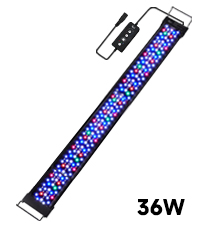
Image: Icons illustrating the 6H, 10H, and 12H timer settings.
24/7 Lighting Mode
This mode simulates a natural 24-hour sunrise and sunset pattern, promoting a healthy environment for aquatic life and plants. The light automatically adjusts color and brightness throughout the day.
- The cycle begins with warm orange light at sunrise, transitions to 100% brighter full-spectrum light at noon, and concludes with a starry blue light at night.
- The default setting automatically turns the light on at 6:00 AM and off at 11:00 PM (23:00).
- The automatic on/off time can be adjusted by postponing or advancing the overall default time period.

Image: Diagram showing the 24/7 natural light cycle simulation.
Memory Function
The AQQA LED Aquarium Light is equipped with a memory function. In the event of a power outage or if the light is manually turned off, it will retain its previous settings (color, brightness, and lighting time). Once power is restored, the light will resume operation with the last-used settings without requiring a reset.
Product Features
- Advanced LED Configuration: Features 6 rows of premium 5050 and 2835 LEDs, providing bright and full-spectrum illumination suitable for various aquatic plants and fish.
- Durable Construction: Built with a widened and thickened aluminum alloy shell, ensuring durability and efficient heat dissipation to prolong the lifespan of the LEDs.

Image: Details on the IP68 waterproof design, aluminum alloy heat dissipation, and LED types.
- IP68 Waterproof Rating: The light fixture is fully submersible, allowing for direct placement in water for use, ensuring safety and versatility.
- Flexible and Adjustable Bracket: The included bracket allows for flexible adjustment of width and height, accommodating various aquarium sizes and configurations. It is designed for secure attachment to framed or frameless aquariums up to 0.78 inches thick.
Maintenance
Regular maintenance ensures optimal performance and longevity of your aquarium light.
- Cleaning the Light Fixture: Periodically wipe the light fixture with a soft, damp cloth to remove any algae or mineral buildup. Ensure the light is unplugged before cleaning. Do not use abrasive cleaners.
- Cleaning the Bracket: Clean the mounting bracket and clamp as needed to prevent corrosion or buildup.
- Cable Inspection: Regularly inspect the power cable and controller for any signs of damage. If damage is found, discontinue use immediately and contact customer support.
Troubleshooting
If you encounter issues with your AQQA LED Aquarium Light, refer to the following common solutions:
- Light Does Not Turn On:
- Check if the power adapter is securely plugged into both the light fixture and the wall outlet.
- Ensure the wall outlet is functioning correctly by testing it with another device.
- Verify that the ON/OFF button on the controller has been pressed. - 24/7 Mode Does Not Complete Cycle / Stays On:
- Ensure the light is properly set to 24/7 mode. Sometimes a power interruption can affect the cycle. Try resetting the 24/7 mode.
- If the issue persists, contact customer support for further assistance. - Bracket Screws Are Too Short / Difficult to Assemble:
- Ensure you are using the correct screws for each part of the bracket assembly.
- If screws appear to be too short or do not fit, double-check the assembly instructions. If parts are genuinely missing or incorrect, contact customer support for replacement parts. - Light Not Bright Enough:
- In DIY mode, adjust the brightness using the brightness options button to a higher level.
- Note that brightness cannot be adjusted in 24/7 mode. If you require constant maximum brightness, use DIY mode.
- Ensure the light wattage (e.g., 18W) is appropriate for your tank size. Refer to the specifications table.
Specifications
| Feature | Detail |
|---|---|
| Brand | AQQA |
| Model Number | AQ125 |
| Color | Black |
| Shape | Rectangular |
| Material | Aluminum, Metal |
| Light Source Type | LED (5050 and 2835) |
| Power Source | Corded Electric |
| Voltage | 100 Volts |
| Light Source Wattage | 14 Watts (for 12-18 inch tanks), 18 Watts (for 18-24 inch tanks), 24 Watts (for 24-32 inch tanks) |
| Mounting Type | Bracket Mount (for tanks up to 0.78 inches thick) |
| Bulb Features | DIY Mode, 24/7 Lighting Mode with Sunrise/Sunset Simulation, 9 Colors, 10 Brightness Levels, 3 Timer Choices |
| Number of Light Sources | 6 Rows of LEDs |
| Product Dimensions | 10"L x 6"W x 2.5"H (for 14W model) |
| Item Weight | 1.76 pounds (0.8 Kilograms) |
| Waterproof Rating | IP68 |

Image: Detailed product specifications for different wattage models.
Warranty and Support
For warranty information, technical support, or any questions regarding your AQQA LED Aquarium Light, please contact AQQA customer service. Refer to the product packaging or the official AQQA website for contact details.
Related documentsAQ125


Ask a question about this manual
Ask about setup, troubleshooting, compatibility, parts, safety, or missing instructions. Manuals+ will review the question and use this page’s manual context to help answer it.