
JMMO T215
JMMO T215 IPX4 Waterproof TWS Earbuds User Manual
Model: T215
Introduction
Thank you for choosing the JMMO T215 IPX4 Waterproof TWS Earbuds. These earbuds are designed to provide a premium audio experience with the convenience of true wireless technology and IPX4 water resistance. This manual will guide you through the setup, operation, and maintenance of your new earbuds.
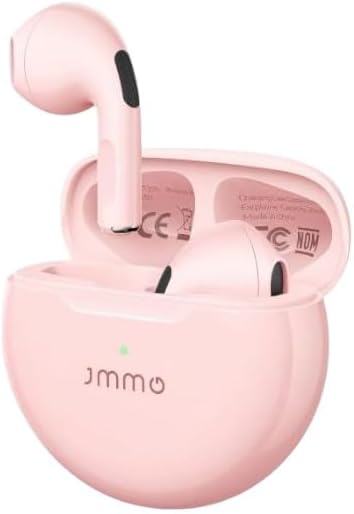
Image: The JMMO T215 TWS Earbuds in their pink charging case, with one earbud partially removed, showcasing the compact design.
Package Contents
- JMMO T215 TWS Earbuds (Left and Right)
- Charging Case
- USB Charging Cable
- User Manual
Specifications
| Model Name | T215 |
| Connectivity Technology | Wireless (Bluetooth) |
| Waterproof Rating | IPX4 (Resistant to sweat and splashes) |
| Transmission Distance | Up to 10 meters |
| Playtime (Earbuds) | Approximately 4 hours |
| Total Playtime (with Charging Case) | Approximately 14 hours |
| Speaker Size | 13mm composite diaphragm dynamic speaker |
| Control Type | Button Control (Touch Controls) |
| Material | Acrylonitrile Butadiene Styrene (ABS) |
| Color | Pink |
Note: Battery life may vary based on usage and volume levels.
Setup
1. Initial Charging
Before first use, fully charge the earbuds and the charging case. Connect the USB charging cable to the charging port on the case and a power source. The indicator light on the case will show charging status.

Image: An illustration showing the JMMO T215 earbuds and charging case, highlighting the 4 hours playtime for earbuds and 14 hours total with the charging case.
2. Pairing with a Device
- Open the charging case. The earbuds will automatically power on and enter pairing mode.
- On your device (e.g., smartphone), enable Bluetooth.
- Search for available Bluetooth devices and select "JMMO T215" from the list.
- Once connected, you will hear a confirmation tone, and the indicator light on the earbuds may change.
Note: The earbuds will automatically reconnect to the last paired device when taken out of the case, if Bluetooth is enabled on the device.
Operating Instructions
Power On/Off
- Power On: Open the charging case, or long press the touch control area for 2 seconds if earbuds are out of case.
- Power Off: Place the earbuds back into the charging case and close the lid, or long press the touch control area for 5 seconds.
Touch Controls
The JMMO T215 earbuds feature intuitive touch controls for easy management of music and calls.

Image: A visual guide demonstrating the touch control functions on the JMMO T215 earbuds, including single click, double click, triple click, and long press actions for various commands.
- Play/Pause: Single click on either earbud.
- Next Track: Double click on the right earbud.
- Previous Track: Double click on the left earbud.
- Answer/End Call: Single click on either earbud.
- Reject Call: Long press on either earbud for 2 seconds.
- Activate Voice Assistant: Triple click on either earbud.
Note: Some functions may vary depending on your connected device and operating system.
Wearing the Earbuds
Insert the earbuds gently into your ears. Adjust them for a comfortable and secure fit to ensure optimal sound quality and noise isolation.

Image: A woman wearing the JMMO T215 pink earbuds, demonstrating their compact, lightweight, and ergonomic design for comfortable wear.
Maintenance and Care
- Clean the earbuds and charging case regularly with a soft, dry cloth.
- Avoid using abrasive cleaners or solvents.
- Do not expose the earbuds or case to extreme temperatures or direct sunlight for extended periods.
- While IPX4 rated, avoid submerging the earbuds in water. They are resistant to splashes and sweat, not full immersion.
- Store the earbuds in their charging case when not in use to protect them and keep them charged.
Troubleshooting
| Problem | Possible Solution |
|---|---|
| Earbuds not pairing |
|
| No sound from one earbud |
|
| Earbuds not charging |
|
| Poor sound quality |
|
Warranty Information
The JMMO T215 Earbuds come with a manufacturer's warranty of 6 Months from the date of purchase. This warranty covers manufacturing defects. It does not cover damage caused by misuse, accidents, unauthorized modifications, or normal wear and tear.
Please retain your proof of purchase for warranty claims.
Support
For further assistance or technical support, please refer to the contact information provided with your purchase or visit the official JMMO support website.
Note: Spare part information is not available or provided by the manufacturer.
Related documentsT215


Ask a question about this manual
Ask about setup, troubleshooting, compatibility, parts, safety, or missing instructions. Manuals+ will review the question and use this page’s manual context to help answer it.