
1. Product Overview
The Onforu 32W 2 Head Motion Sensor Outdoor Light is a hardwired LED security light designed for outdoor use. It features high-efficiency lighting with 3200 lumens and 6500K cool white light, advanced motion detection, and a Dusk to Dawn function. The unit is IP65 weatherproof, ensuring durability in various outdoor conditions.

Image: Onforu 32W 2 Head Motion Sensor Outdoor Light highlighting 3200LM, 19-72ft sensing distance, 180° detection angle, 1/3/10 mins lighting duration, IP65 waterproof, and hardwired installation.
2. What's in the Box
- Motion Sensor Flood Light (1 unit)
3. Safety Information
Please read all instructions carefully before installation and use. Failure to follow these instructions may result in electric shock, fire, or other hazards that could cause injury or property damage.
- Electrical Safety: This product requires hardwired installation. Ensure power is turned off at the circuit breaker before installation. All wiring must comply with local electrical codes. If you are unsure about wiring, consult a qualified electrician.
- Mounting: Mount the fixture securely to a stable surface. Do not install on unstable or vibrating surfaces.
- Operating Temperature: Do not operate this fixture outside its specified temperature range.
- Cleaning: Disconnect power before cleaning. Use a soft, damp cloth. Do not use abrasive cleaners or solvents.
- No User Serviceable Parts: Do not attempt to open or repair the fixture. There are no user-serviceable parts inside.
4. Product Features
- High-Efficiency Lighting: Delivers 3200LM brightness with 32W power and 6500K cool white light.
- Advanced Motion Detection: Features a 180° detection angle and a range of 19-72ft, covering up to 1150 sq.ft.
- Adjustable Lighting Time: Motion-activated lighting duration can be set to 1 minute, 3 minutes, or 10 minutes.
- Dusk to Dawn Mode: Automatically turns off during the day. Operates at 30% brightness at night and brightens to 100% when motion is detected.
- IP65 Weatherproof: Designed to withstand harsh weather conditions, including high temperatures and freezing cold.
- Adjustable Heads: Dual light heads are adjustable for flexible light direction. The motion detector can only be adjusted up/down.
5. Setup and Installation
This light is designed for hardwired installation. Ensure you have the necessary tools and safety equipment before beginning.
5.1 Wiring Diagram

Image: Detailed dimensions of the light fixture (8.77"L x 5.27"W x 4.96"H) and a wiring diagram showing Live Wire (L), Neutral Wire (N), and Ground Wire (G).
5.2 Installation Steps
- Turn Off Power: Before starting any electrical work, ensure the power supply to the installation area is turned off at the circuit breaker.
- Prepare Wiring: Identify the Live (black), Neutral (white), and Ground (green/bare copper) wires from your electrical box.
- Connect Wires: Connect the corresponding wires from the fixture to your household wiring using wire nuts (not included). Ensure a secure connection for each wire:
- Fixture Live (black) to Household Live (black)
- Fixture Neutral (white) to Household Neutral (white)
- Fixture Ground (green) to Household Ground (green/bare copper)
- Mount Fixture: Securely attach the light fixture to the wall or soffit using appropriate mounting hardware. The base is a universal size (112mm*112mm*46mm), suitable for most junction boxes (within 120mm diameter).
- Adjust Light Heads: Adjust the two light heads to your desired illumination angle. The motion sensor can be adjusted up/down.
- Restore Power: Once installation is complete and all connections are secure, restore power at the circuit breaker.

Image: Illustration of the hardwired installation process, showing the light fixture connected to household wiring on an exterior wall.
5.3 Mounting Options

Image: Depicts the light fixture installed in both soffit-mounted and wall-mounted configurations.
6. Operating Instructions
6.1 Mode Selection
The motion sensor light features three adjustable dials for MODE, TIME, and DISTANCE. These dials are located on the underside of the motion sensor unit.
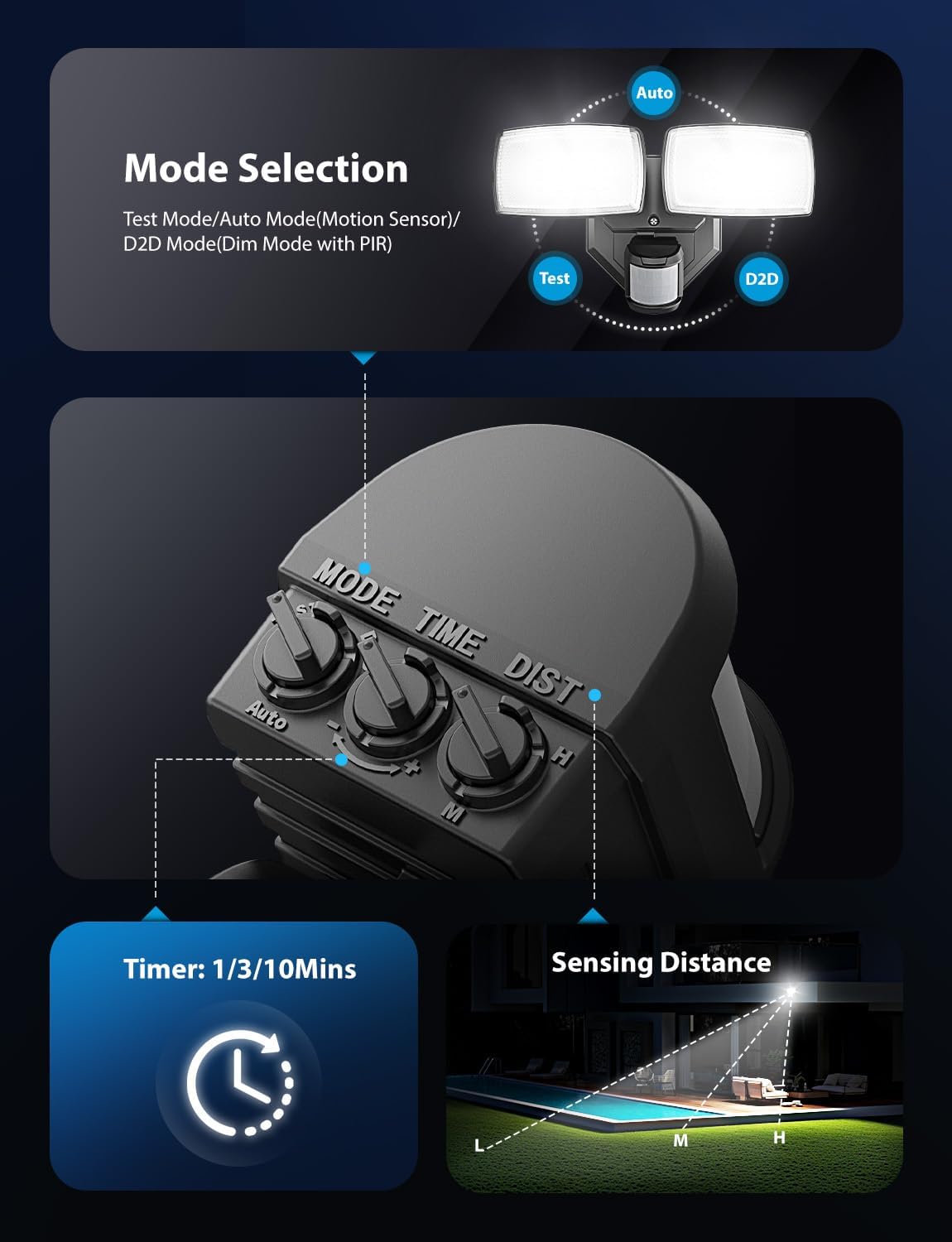
Image: Close-up of the motion sensor unit showing the 'MODE', 'TIME', and 'DIST' adjustment dials.
- MODE Dial: Selects the operating mode.
- Test Mode: The floodlight turns on for 5 seconds when it detects a person, regardless of day or night. Useful for testing sensor functionality and coverage.
- Auto Mode (Motion Sensor): The light activates to 100% brightness when motion is detected at night. After the set time, it turns off.
- D2D Mode (Dusk to Dawn with PIR): The light stays on at 30% brightness all night. When motion is detected, it brightens to 100% for the set duration, then returns to 30% brightness.
- TIME Dial: Adjusts the duration the light stays on after motion detection (in Auto or D2D mode). Options are 1 minute, 3 minutes, or 10 minutes.
- DIST (Distance) Dial: Adjusts the motion detection range from 19 feet (L) to 72 feet (H).
6.2 Motion Sensor Operation
In Auto Mode, the light will turn on at 100% brightness when it detects motion at night. It will remain on for the duration set by the TIME dial (1, 3, or 10 minutes) and then turn off if no further motion is detected.

Image: Illustrates the 180° detection angle and 1150 sq.ft. coverage area of the motion sensor.
6.3 Dusk to Dawn Mode Operation
When the MODE dial is set to D2D, the light will automatically turn off during the day. At dusk, it will turn on at 30% brightness and remain at this level throughout the night. When motion is detected, the light will instantly brighten to 100% for the set duration, then return to 30% brightness.

Image: Comparison showing the light off during the day and on at 30% brightness at night in Dusk to Dawn mode.
6.4 Official Product Video
Video: An official product video from Onforu demonstrating the features and operation of the 2 Head Motion Sensor Outdoor Lights, including motion detection and Dusk to Dawn functionality.
7. Maintenance
Regular maintenance ensures optimal performance and longevity of your outdoor light.
- Cleaning: Periodically clean the light fixture and motion sensor lens with a soft, damp cloth to remove dirt, dust, or debris. Ensure power is off before cleaning. Do not use harsh chemicals or abrasive materials.
- Inspection: Regularly inspect the wiring and mounting for any signs of damage, corrosion, or loosening. Address any issues promptly.
- Weather Resistance: The IP65 rating ensures protection against dust and water jets. However, avoid directing high-pressure water streams directly at the fixture.

Image: Illustrates the IP65 waterproof rating, indicating resistance to heat, frost, wind, and snow.
8. Troubleshooting
If you encounter issues with your Onforu motion sensor light, refer to the following common problems and solutions:
| Problem | Possible Cause | Solution |
|---|---|---|
| Light does not turn on. | No power; Incorrect wiring; Sensor obstructed; Ambient light too high (in Auto/D2D mode). | Check circuit breaker; Verify wiring connections; Clear obstructions from sensor; Test in darker conditions or use Test Mode. |
| Light stays on continuously. | Continuous motion detected; Wiring error; Sensor malfunction. | Ensure no constant motion in detection area; Recheck wiring; If problem persists, contact support. |
| Light turns on for no apparent reason. | Sensor sensitivity too high; Environmental factors (e.g., moving branches, small animals, car headlights). | Adjust DIST dial to a lower sensitivity; Reposition sensor to avoid false triggers. |
| Light flashes or flickers. | Loose wiring connection; Power fluctuations; Faulty unit. | Check and secure all wiring connections; Consult an electrician for power issues; If problem persists, contact support. |
| Detection range is too short or too long. | DIST dial setting; Sensor mounting height/angle. | Adjust the DIST dial; Ensure sensor is mounted at optimal height and angle (typically 6-10 feet high). |
9. Specifications
| Specification | Detail |
|---|---|
| Brand | Onforu |
| Model Number | BDR35G-2 |
| Wattage | 32 watts |
| Brightness | 3200 lumens |
| Color Temperature | 6500 Kelvin (Cool White) |
| Light Source | LED |
| Number of Light Sources | 2 |
| Motion Detection Angle | 180° |
| Motion Detection Range | 19-72 ft |
| Water Resistance Level | IP65 Waterproof |
| Power Source | Corded Electric (Hardwired) |
| Material | Aluminum, Plastic (Polycarbonate Shade) |
| Mounting Type | Wall Mount, Surface Mount |
| Item Dimensions (L x W x H) | 8.77" x 5.27" x 4.96" |
10. Warranty and Support
This Onforu product comes with a 2-year manufacturer's warranty.
For technical support, warranty claims, or further assistance, please visit the official Onforu store or contact their customer service. You can find more information and contact details on the Onforu Brand Store on Amazon.


