
1. Introduction
This manual provides comprehensive instructions for the installation, operation, and maintenance of your ELIVED Long Arm TV Mount, Model YD1036. This articulating wall mount is designed to securely hold most 42-75 inch TVs, with a maximum weight capacity of 99 lbs (45 kg) and VESA patterns ranging from 150x100mm to 600x400mm.
The ELIVED YD1036 mount features a 32-inch long extension arm, allowing for significant reach and retraction, full swivel capabilities, and tilt adjustments to optimize your viewing experience. It is an ideal solution for various room layouts, including corner installations.
Package Contents
Please verify that all components are present before beginning installation. The package typically includes:
- ELIVED Long Arm TV Mount Assembly
- Mounting Hardware Kit (various screws, washers, spacers for TV and wall attachment)
- Bubble Level
- Installation Manual (this document)

Image: Overview of the ELIVED Long Arm TV Mount and included accessories.
2. Important Safety Information
Read all instructions carefully before installation. If you have any questions, please contact ELIVED customer support. Improper installation can result in serious injury or damage to your TV and property.
- Weight Capacity: Do not exceed the maximum weight capacity of 99 lbs (45 kg).
- TV Size: Ensure your TV size is within the recommended range of 42-75 inches.
- VESA Compatibility: Verify your TV's VESA pattern (mounting hole distance) is between 150x100mm and 600x400mm.
- Wall Type: This mount is designed for installation on single wood studs, solid concrete walls, or brick walls. DO NOT INSTALL INTO DRYWALL ALONE. If mounting to concrete or brick, concrete anchors are required and can be requested from ELIVED if not included.
- Professional Assistance: If you are unsure about the installation process or wall type, consult a qualified professional.
- Tools: Use appropriate tools for installation.
- Cable Management: Ensure cables are routed safely and do not interfere with the mount's movement.

Image: Wall compatibility information, emphasizing not to install on drywall alone.
3. Product Specifications
| Feature | Specification |
|---|---|
| Model | YD1036 |
| Brand | ELIVED |
| Material | Metal |
| Compatible TV Sizes | 42 - 75 inches |
| Weight Capacity | Up to 99 lbs (45 kg) |
| VESA Compatibility (Max) | 600x400mm |
| VESA Compatibility (Min) | 150x100mm |
| Extension from Wall | 3 to 32 inches |
| Swivel Angle | Up to ±90° (depending on TV size) |
| Tilt Angle | +5° / -13° |
| Level Adjustment | ±3° (post-installation) |
| Item Weight | 14.02 pounds |

Image: Visual representation of compatible TV sizes, weight capacity, and VESA patterns.
4. Setup and Installation
This section outlines the general steps for installing your ELIVED TV mount. For detailed, step-by-step graphical instructions, please refer to the included Installation Manual PDF or download it from the product page.
Pre-Installation Checklist:
- Confirm your TV's weight and VESA pattern are compatible.
- Identify the type of wall you will be mounting to (wood stud, concrete, or brick).
- Gather necessary tools (e.g., drill, stud finder, level, screwdriver, socket wrench).
- Ensure there are no hidden electrical wires or plumbing in the drilling area.
Installation Steps:
- Attach TV Brackets: Secure the vertical TV brackets to the back of your TV using the appropriate screws, washers, and spacers from the hardware kit. Ensure the brackets are centered and level.
- Determine Wall Plate Position: Locate the wood stud(s) or desired position on your concrete/brick wall. Mark the drilling points for the wall plate. Use the included bubble level to ensure accuracy.
- Drill Pilot Holes: Drill pilot holes at the marked locations. For wood studs, use the specified drill bit size. For concrete/brick, use a masonry drill bit and insert concrete anchors (if applicable).
- Mount Wall Plate: Attach the wall plate assembly to the wall using the lag bolts and washers. Tighten securely, but do not overtighten.
- Hang TV: Carefully lift your TV and hook the TV brackets onto the wall plate. Ensure the TV is securely seated.
- Secure TV to Mount: Tighten the security screws or locking mechanisms on the TV brackets to prevent accidental dislodging.
- Adjust and Level: Perform initial adjustments for tilt and swivel. Use the post-installation leveling feature to fine-tune the TV's horizontal position.

Image: Detailed dimensions of the TV mount, illustrating its extension and retraction capabilities.
Video: An overview of the ELIVED Long Arm TV Mount (YD1036) demonstrating its 32-inch extension, full swivel range, tilt capabilities, and post-installation leveling. This video provides a visual guide to the mount's features and movement.
5. Operating Your TV Mount
The ELIVED Long Arm TV Mount offers a full range of motion to achieve optimal viewing angles from anywhere in your room.
Extension and Retraction:
Gently pull or push the TV to extend it up to 32 inches from the wall or retract it to a slim 3 inches for a clean, flush appearance. This feature allows you to bring the TV closer for immersive viewing or push it back when not in use.

Image: Demonstration of the mount's long extension and retraction capabilities.
Swivel Adjustment:
The articulating arms allow for a swivel of up to ±90° (depending on TV size and wall proximity). This enables you to turn your TV to face different areas of the room, providing flexible viewing options from multiple seating positions.

Image: Visualizing the mount's full swivel range.

Image: Illustrates how the swivel feature allows for flexible viewing from various locations.
Tilt Adjustment:
Adjust the tilt angle from +5° to -13° to reduce glare from lights or windows and achieve the perfect viewing angle. This is particularly useful for TVs mounted higher on the wall.
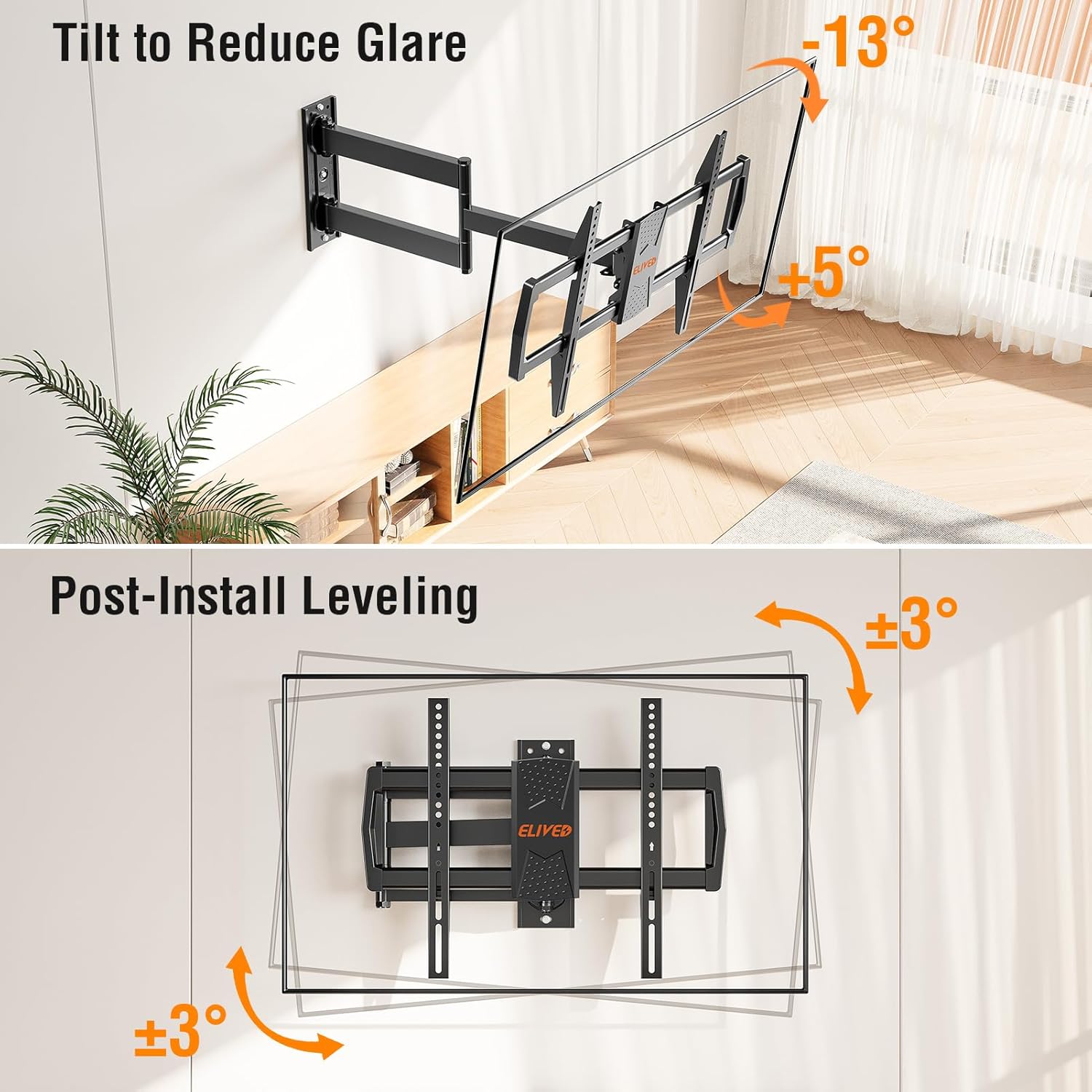
Image: Depicts the tilt and post-installation leveling adjustments.
Post-Installation Leveling:
After installation, you can fine-tune the TV's level by ±3° to ensure a perfectly straight display, even if the wall plate was not perfectly level during initial mounting.
Corner Installation:
The long articulating arms and single stud design make this mount ideal for corner installations. The mount can be folded or extended to fit snugly into corner spaces, maximizing your viewing field.

Image: Example of the mount's suitability for corner installations.
6. Maintenance
Regular maintenance ensures the longevity and safe operation of your ELIVED TV mount.
- Cleaning: Wipe the mount with a soft, dry cloth to remove dust. For stubborn marks, a slightly damp cloth can be used, followed by drying. Avoid abrasive cleaners or solvents.
- Periodic Inspection: Periodically check all screws and bolts to ensure they remain tight. Over time, vibrations or frequent adjustments can cause fasteners to loosen.
- Movement Check: Test the mount's articulation, swivel, and tilt functions occasionally to ensure smooth movement. If movement becomes stiff, check for any obstructions or debris.
7. Troubleshooting
If you encounter issues with your ELIVED TV mount, refer to the following common problems and solutions:
- Problem: TV appears unlevel after installation.
- Solution: Use the post-installation leveling feature (±3° adjustment) to correct the horizontal alignment. Refer to the installation manual for specific instructions on how to access and adjust this feature.
- Problem: Mount is difficult to move or adjust.
- Solution: The mount is designed to be sturdy. Check for any overtightened bolts that might restrict movement. Some joints may have adjustable tension screws that can be loosened slightly to facilitate smoother motion. Ensure no cables are snagged or obstructing movement.
- Problem: Missing parts or hardware.
- Solution: Double-check the package contents against the parts list in the installation manual. If parts are genuinely missing, contact ELIVED customer support immediately for replacements. For concrete anchors, these can be requested if not included in your package.
- Problem: TV is too heavy or VESA pattern does not match.
- Solution: This mount supports TVs up to 99 lbs and VESA patterns from 150x100mm to 600x400mm. If your TV falls outside these specifications, this mount is not compatible. Using an incompatible TV can lead to mount failure and damage.
8. Warranty and Customer Support
ELIVED is committed to providing high-quality products. While specific warranty details are typically provided with your purchase documentation, ELIVED products generally come with a manufacturer's warranty covering defects in materials and workmanship.
For warranty claims, technical assistance, or any questions regarding your ELIVED Long Arm TV Mount (Model YD1036), please contact ELIVED customer support. Contact information can usually be found on the ELIVED official website or through your purchase platform.
Remember: Concrete anchors will be sent per request if needed for your specific wall type and not included in your package.
