
1. Introduction
Thank you for choosing the ROTAI 4D Massage Chair A68PRO-DE. This manual provides essential information for the safe and effective use of your massage chair. Please read it thoroughly before operation and retain it for future reference. This chair is designed to provide a comprehensive deep tissue massage experience with advanced features such as 4D dual motors, an extended SL rail, Zero-Gravity recline, back heating, and Bluetooth connectivity.
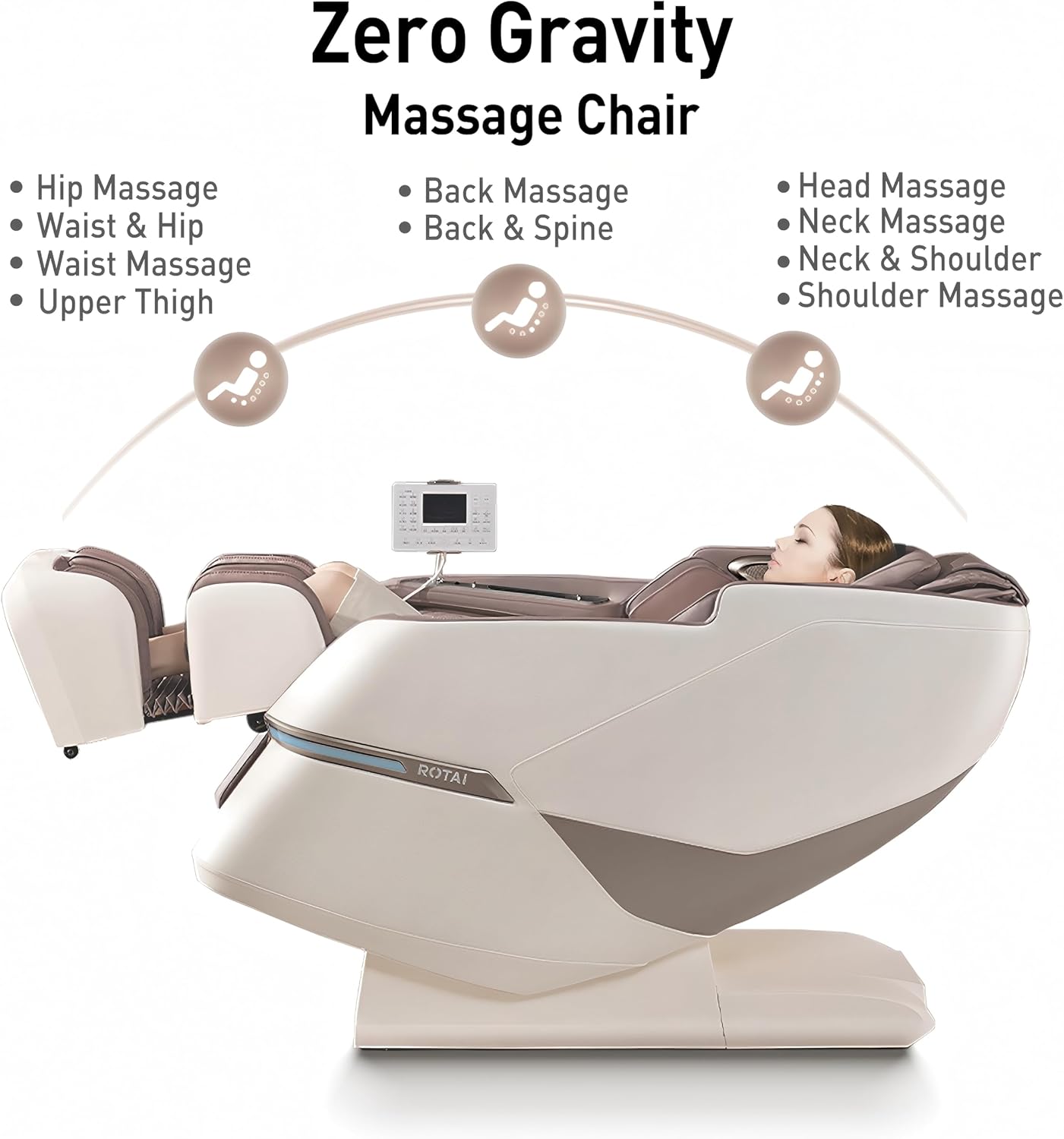
Image 1.1: The ROTAI 4D Massage Chair in a living room setting, with a person comfortably seated.
2. Important Safety Information
To reduce the risk of electric shock, burns, fire, or injury, always follow these basic precautions:
- Always unplug the massage chair from the electrical outlet immediately after use and before cleaning.
- Do not use the chair in wet or damp environments. Keep away from water.
- Close supervision is necessary when this appliance is used by, on, or near children, invalids, or disabled persons.
- Use this appliance only for its intended use as described in this manual. Do not use attachments not recommended by the manufacturer.
- Never operate the appliance if it has a damaged cord or plug, if it is not working properly, if it has been dropped or damaged, or dropped into water. Contact customer support for examination and repair.
- Keep the cord away from heated surfaces.
- Never drop or insert any object into any opening.
- Do not operate where aerosol (spray) products are being used or where oxygen is being administered.
- To disconnect, turn all controls to the off position, then remove the plug from the outlet.
- Do not stand on or in the massage chair. Use only while seated.
- Consult your doctor before using this product if you have any medical conditions, are pregnant, or have a pacemaker.
3. Package Contents
Upon unpacking, please ensure all components are present and undamaged:
- Main Massage Chair Unit
- Leg and Foot Section
- Power Cord
- Remote Control / Tablet Controller
- User Manual (this document)
- Any additional accessories (e.g., lumbar pillow, headrest pad)
4. Setup and Assembly
The ROTAI 4D Massage Chair A68PRO-DE requires minimal assembly. Follow these steps:
- Unpacking: Carefully remove all components from the packaging. Retain packaging materials for potential future transport or returns.
- Positioning: Place the main massage chair unit in your desired location. Ensure there is sufficient space around the chair for reclining and movement (refer to product dimensions).
- Attach Leg and Foot Section: Connect the leg and foot section to the main chair unit according to the alignment guides. Secure with the provided fasteners.
- Power Connection: Plug the power cord into the chair's power inlet, then into a suitable electrical outlet.

Image 4.1: Diagram illustrating the product dimensions (182cm L x 75cm W x 115cm H) and the packaged box size, alongside a standard door for reference.
5. Operating Instructions
5.1. Initial Power On and Body Scan
After connecting to power, press the power button on the remote control or side panel. The chair will typically perform an automatic body scan to detect your body shape and adjust the massage rollers for optimal coverage. This intelligent personalized adaptation ensures the massage is tailored to your physique.

Image 5.1: Illustration of the Hall sensor performing an automatic body scan to fit body curves for a personalized massage.
5.2. Control Panel Overview
The chair is controlled via a tablet-style remote control, which provides access to all functions and settings. Familiarize yourself with the layout and icons.
5.3. Zero-Gravity Recline
Activate the Zero-Gravity function for a weightless sensation that enhances the massage experience. This position elevates your legs above your heart, reducing pressure on the spine.

Image 5.2: Diagram showing the Zero Gravity recline feature, highlighting massage areas for hip, waist, back, head, neck, and shoulders.
5.4. Massage Programs and Customization
The chair offers 15 automatic massage programs and over 22+N intelligent programs designed to address various needs and fatigue levels. You can also customize your massage:
- 4D Dual Motors: Experience advanced 4D massage with rollers that move not only up/down, left/right, and in/out, but also vary in speed and rhythm to mimic human hands.
- SL Track: The extra-long SL track provides comprehensive massage coverage from your head to your thighs.
- Air Compression: Adjust 5 levels of air cushion intensity for compression massage on various body parts.
- Roller Speed: Select from 3 levels of roller speed adjustment.

Image 5.3: Cutaway view illustrating the internal 4D and 3D mechanism rollers along the SL track, showing their range of motion.
5.5. Heat and Lumbar Airflow Functions
Enjoy enhanced comfort with integrated heating functions for the back, shoulders, and legs, providing soothing warmth. The lumbar airflow feature offers cooling comfort, making the chair suitable for all seasons.

Image 5.4: Visual representation of the heat (red glow) and cooling (blue airflow) functions within the massage chair's backrest and leg areas.
5.6. Bluetooth Connectivity and Voice Control
Connect your smartphone via Bluetooth to enjoy music through the integrated speakers during your massage. The chair also features offline voice control for convenient operation without needing the remote.
6. Care and Maintenance
Proper care ensures the longevity of your massage chair:
- Cleaning: Unplug the chair before cleaning. Wipe surfaces with a soft, damp cloth. Do not use abrasive cleaners or solvents.
- Storage: When not in use for extended periods, store the chair in a clean, dry environment. Avoid direct sunlight and extreme temperatures.
- Moving the Chair: The chair is equipped with small wheels for easy movement. Tilt the chair slightly backward and roll it to the desired location.
7. Troubleshooting
If you encounter issues, refer to the following common problems and solutions:
| Problem | Possible Cause | Solution |
|---|---|---|
| Chair does not power on. | Power cord not properly connected; Power outlet malfunction. | Ensure power cord is securely plugged into both the chair and the wall outlet. Test the outlet with another device. |
| Massage rollers are not moving. | Chair is in standby mode; Program not selected. | Press the power button to activate. Select an automatic program or manual massage function. |
| No heat from heating function. | Heating function not activated; Low setting. | Ensure the heating function is turned on via the remote. Adjust to a higher heat level if available. Note that warmth can be subtle. |
| Bluetooth connection fails. | Bluetooth on device is off; Chair's Bluetooth is off; Device too far. | Ensure Bluetooth is enabled on your smartphone. Activate Bluetooth on the massage chair. Keep your device within range. |
If the problem persists, please contact customer support.
8. Product Specifications
| Feature | Detail |
|---|---|
| Brand | ROTAI |
| Model Number | A68PRO-DE |
| Dimensions (L x W x H) | 182 x 75 x 115 cm |
| Item Weight | 86 Kilograms |
| Massage Technology | 4D Dual Motors, SL Rail |
| Special Features | Heated, Ergonomic, Electric Recliner, Zero-Gravity, Bluetooth Speaker, Lumbar Airflow |
| Automatic Programs | 15 (plus 22+N intelligent programs) |
| Air Cushion Intensity Levels | 5 |
| Roller Speed Adjustment | 3 levels |
9. Warranty and Support
ROTAI provides a manufacturer's warranty for this product. Please refer to the warranty card included with your purchase for specific terms and conditions, including warranty duration and coverage details. For technical support, service, or parts inquiries, please contact ROTAI customer service through the official website or your retailer.
Spare parts availability information is currently unavailable. Please contact customer support for any specific part requirements.


