
ZWP RMF-TX820U
Instruction Manual for ZWP RMF-TX820U Replacement Remote Control
Model: RMF-TX820U
Introduction
This manual provides comprehensive instructions for the ZWP RMF-TX820U Replacement Remote Control, designed for Sony BRAVIA 3 Smart TVs. This remote offers a reliable and comfortable user experience, serving as a direct replacement without the need for complex programming. Please note that this specific model does not support voice control functionality.
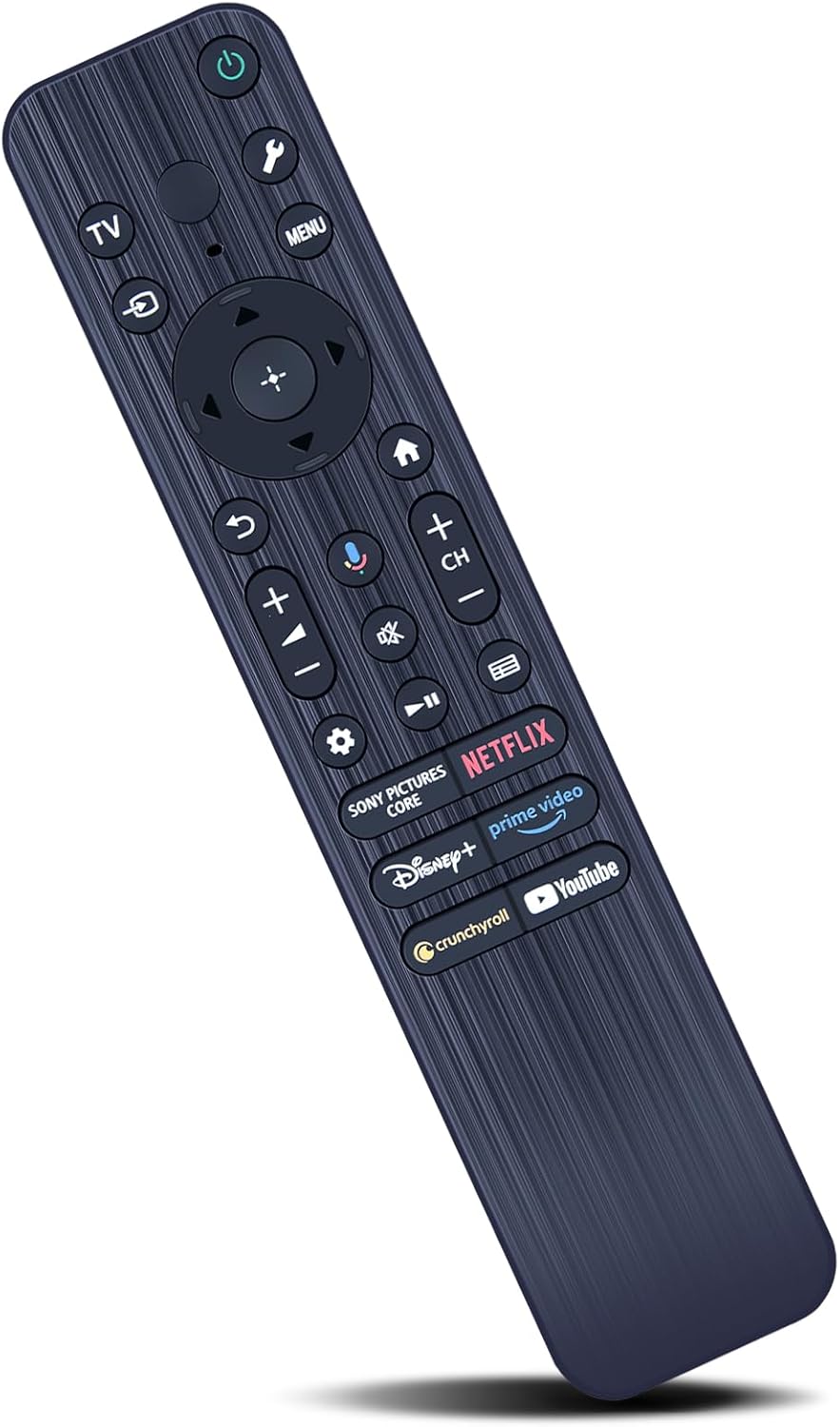
Figure 1: The ZWP RMF-TX820U Replacement Remote Control, showcasing its ergonomic design and button layout.
Setup
Battery Installation
The remote control requires two AAA batteries (not included). Follow these steps to install them:
- Locate the battery compartment on the back of the remote control.
- Slide the battery cover downwards to open it.
- Insert two AAA batteries, ensuring the positive (+) and negative (-) terminals align correctly with the markings inside the compartment.
- Slide the battery cover back into place until it clicks securely.

Figure 2: Illustration of battery installation, showing the battery compartment and required AAA batteries.
Initial Use
No programming is required for this remote control. Once batteries are installed, it is ready to operate your compatible Sony BRAVIA Smart TV directly.
Operating Instructions
The RMF-TX820U remote control is designed for intuitive operation of your Sony BRAVIA Smart TV. It provides a stable and quick response for an enhanced viewing experience.
Basic Functions
- Power Button: Located at the top, press to turn the TV on or off.
- Navigation Pad: Use the directional arrows and center 'OK' button to navigate menus and select options.
- Volume Control (+/-): Adjust the TV's volume.
- Channel Control (CH +/-): Change TV channels.
- Menu Button: Access the TV's main menu.
- Back Button: Return to the previous screen or menu.
- Home Button: Go to the TV's home screen.
App Shortcut Buttons
Dedicated shortcut buttons provide quick access to popular streaming services:
- Netflix
- Prime Video
- Disney+
- YouTube
- Crunchyroll
- Sony Pictures Core

Figure 3: The remote control highlighting the dedicated shortcut buttons for popular streaming applications.
Control Range and Responsiveness
This remote control offers a precise control distance of up to 40 feet (approximately 12 meters) and supports multi-angle control up to 120 degrees, ensuring reliable operation from various positions in your room.

Figure 4: Visual representation of the remote's long-range (26ft shown, product states 40ft) and multi-angle (120°) control capabilities.

Figure 5: Depiction of the remote's quick response time and strong signal transmission.
Important Note: As stated in the product title, this RMF-TX820U replacement remote control does not include voice function capabilities. Any visual representations or buttons on the remote that might suggest voice control are non-functional for this specific model.
Maintenance
Cleaning
To maintain the remote control's appearance and functionality:
- Wipe the surface with a soft, dry cloth.
- For stubborn dirt, slightly dampen the cloth with water or a mild, non-abrasive cleaner.
- Avoid using harsh chemicals, solvents, or abrasive cleaning materials, as these can damage the remote's finish or internal components.
Battery Replacement
Replace batteries when the remote's responsiveness decreases or it stops functioning. Always replace both batteries at the same time with new AAA batteries. Dispose of old batteries according to local regulations.
Storage
Store the remote control in a cool, dry place away from direct sunlight and extreme temperatures. If storing for an extended period, remove the batteries to prevent leakage.
Troubleshooting
| Problem | Possible Cause | Solution |
|---|---|---|
| Remote not responding. | Dead or incorrectly installed batteries. Obstruction between remote and TV. Remote out of range. | Replace batteries, ensuring correct polarity. Remove any objects blocking the signal path. Move closer to the TV (within 40 feet). |
| Specific buttons not working. | Button stuck or damaged. | Gently press the button multiple times. If still unresponsive, the button may be damaged. |
| Remote works intermittently. | Low battery power. Signal interference. | Replace batteries. Ensure no strong light sources (like direct sunlight) are interfering with the TV's IR receiver. |
| Voice function button does not work. | This model does not support voice control. | This is expected behavior. The RMF-TX820U model is explicitly stated to have no voice function. |
Specifications
- Model: RMF-TX820U
- Brand: ZWP
- Compatible TV Models: Sony BRAVIA K-43S30, K-43XR70, K-50S30, K-50XR70, K-55S30, K-55XR70, K-65S30, K-65XR70, K-75S30, K-75XR70, K-85S30, K-85XR70
- Material: High-quality ABS (Acrylonitrile Butadiene Styrene)
- Color: Black
- Dimensions: 7.6 x 1.77 x 0.98 inches (approximately 19.3 x 4.5 x 2.5 cm)
- Item Weight: 2.08 ounces (approximately 59 grams)
- Control Distance: Up to 40 feet (approx. 12 meters)
- Button Lifespan: Over 160,000 clicks
- Power Source: 2 x AAA batteries (not included)
- Special Feature: Ergonomic design for comfortable hand feeling
- Voice Function: Not supported

Figure 6: Detailed dimensions of the ZWP RMF-TX820U remote control.

Figure 7: Key features of the remote, including long life, ABS material, comfortable feel, and quality assurance.

Figure 8: Overview of the remote's stable and smart performance, including stable link, quick response, smart chip, and power saving.
Warranty and Support
After-Sales Service
ZWP provides up to 1 year of after-sales service for this remote control. Your satisfaction and product quality are our basic principles.
Contact Support
Should you encounter any issues or have questions regarding the use of your remote control, please contact ZWP customer support. Refer to your purchase documentation or the seller's information for specific contact details. We are committed to resolving any problems you may experience.
Ask a question about this manual
Ask about setup, troubleshooting, compatibility, parts, safety, or missing instructions. Manuals+ will review the question and use this page’s manual context to help answer it.