
1. Introduction
Welcome to the DEEPOWER Mini Electric Bike K100 user manual. This document provides essential information for the safe and efficient operation, maintenance, and troubleshooting of your new electric bicycle. Please read this manual thoroughly before your first ride and retain it for future reference.
The DEEPOWER K100 is a compact, foldable electric bike designed for urban commuting and leisure, featuring a 400W motor, 48V 10Ah removable battery, and 14-inch wheels.
2. Safety Information
Your safety is paramount. Adhere to all safety guidelines to prevent injury or damage.
- Always wear a helmet and appropriate safety gear while riding.
- Perform a pre-ride inspection: check brakes, tire pressure, battery charge, and ensure all components are securely fastened.
- Obey all local traffic laws and regulations.
- Do not ride under the influence of alcohol or drugs.
- Avoid riding in adverse weather conditions or on slippery surfaces.
- Keep hands and feet away from moving parts.
- Ensure the battery is charged in a well-ventilated area and avoid overcharging.
3. Product Overview
The DEEPOWER K100 electric bike is equipped with several features for a convenient riding experience.
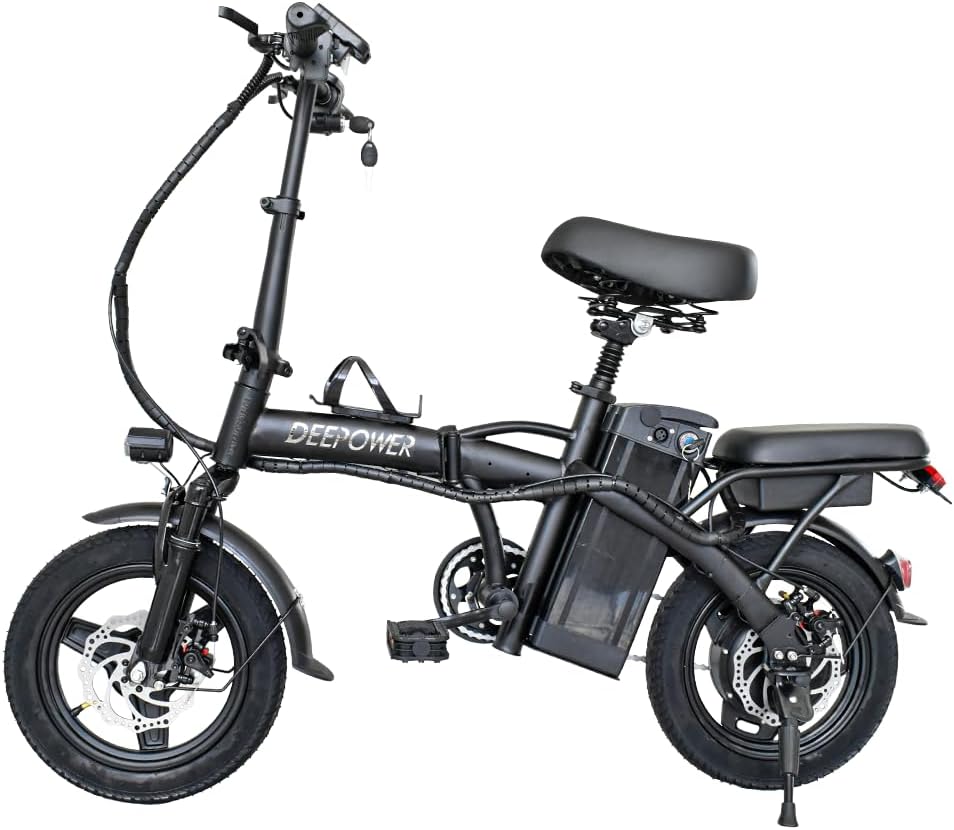
Figure 3.1: Overview of the DEEPOWER Mini Electric Bike K100.
Key Components:
- 400W Motor: Provides propulsion up to 20 MPH and assists with inclines up to 25 degrees.
- 48V 10Ah Removable Battery: Offers a range of 30-45 KM in PAS mode.
- 14-inch Aluminum Alloy Wheels: Equipped with rubber tires for shock absorption and traction.
- High Carbon Steel Frame: Durable and robust construction.
- Folding Design: Allows for compact storage and transport.
- Front Suspension: Enhances riding comfort.
- Disc Brakes: Provides reliable stopping power.

Figure 3.2: Illustration of the 400W motor and disc brake system, highlighting efficient energy utilization and quiet operation.
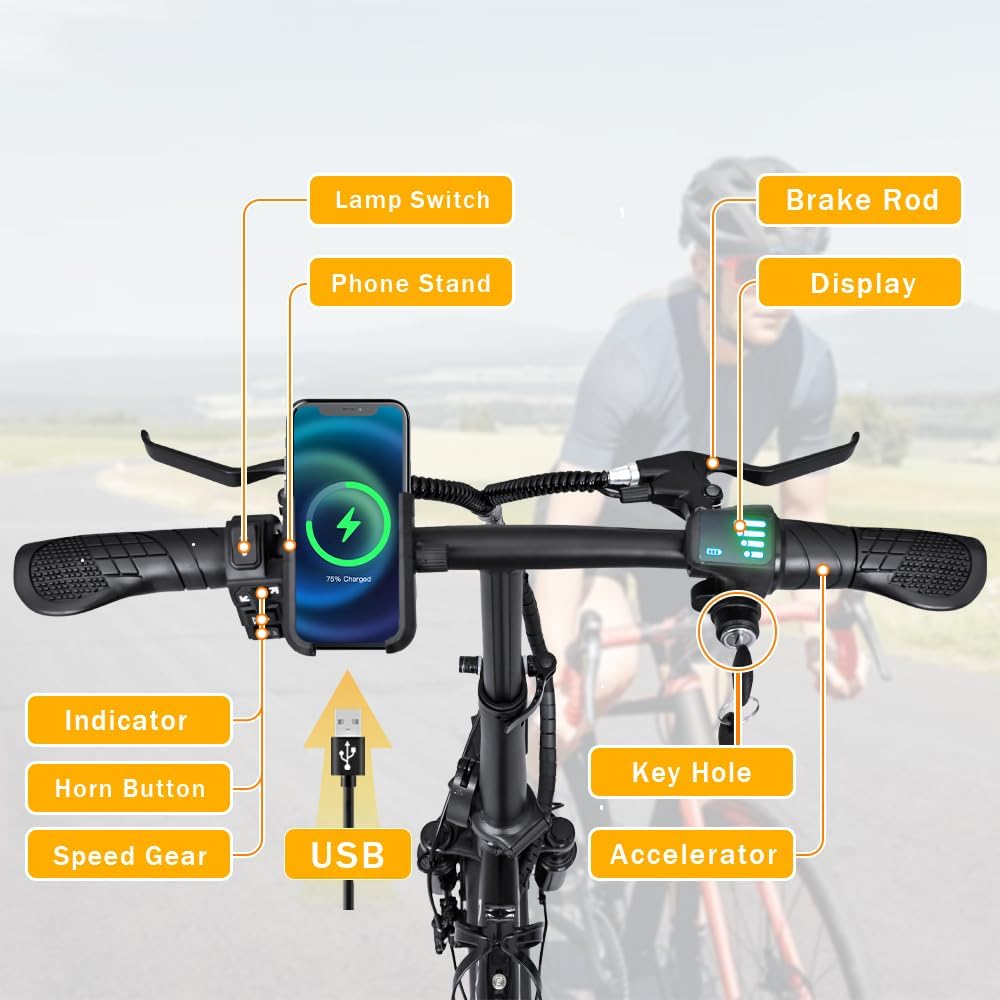
Figure 3.3: Detailed view of the handlebar controls, including the lamp switch, phone stand, brake rod, display, indicator, horn button, speed gear selector, USB port, key hole, and accelerator.

Figure 3.4: Visual representation of additional features such as dual lights for visibility, foldable pedals for compact storage, a rear seat for an additional passenger, and a folding handlebar for portability.
4. Setup and Assembly
The DEEPOWER K100 requires some assembly upon arrival. A tool kit is included.
4.1 Unboxing
Carefully remove the electric bike and all components from the packaging. Inspect for any shipping damage. Retain packaging for potential future transport or returns.

Figure 4.1: The DEEPOWER electric bike as received in its original shipping box.

Figure 4.2: The DEEPOWER electric bike unboxed, ready for initial assembly and inspection.
4.2 Initial Assembly and Adjustments
- Unfolding the Frame: Release the frame latch and carefully unfold the bike until the frame locks into place. Ensure the latch is securely engaged.
- Handlebar Setup: Raise the handlebar stem and secure it. Adjust the handlebar height to a comfortable position and tighten the quick-release lever.
- Seat Post Adjustment: Insert the seat post into the frame. Adjust the seat height to allow for a slight bend in your knee when the pedal is at its lowest point. Secure with the quick-release lever.
- Pedal Installation: Attach the pedals to the crank arms. Note that pedals are typically marked 'L' for left and 'R' for right. The left pedal tightens counter-clockwise, and the right pedal tightens clockwise.
- Battery Installation: Insert the 48V 10Ah removable battery into its compartment. Ensure it clicks into place securely.

Figure 4.3: Close-up view of the removable battery compartment on the DEEPOWER electric bike.
4.3 Battery Charging
Before your first ride, fully charge the battery. The charging time is approximately 4-5 hours.
- Connect the charger to the battery charging port.
- Plug the charger into a standard electrical outlet.
- The indicator light on the charger will change (e.g., from red to green) when charging is complete.
- Disconnect the charger once fully charged.
5. Operating Instructions
5.1 Powering On/Off
Insert the key into the keyhole on the handlebar and turn it to the 'ON' position to activate the bike's electrical system. The display will illuminate. To power off, turn the key to the 'OFF' position.
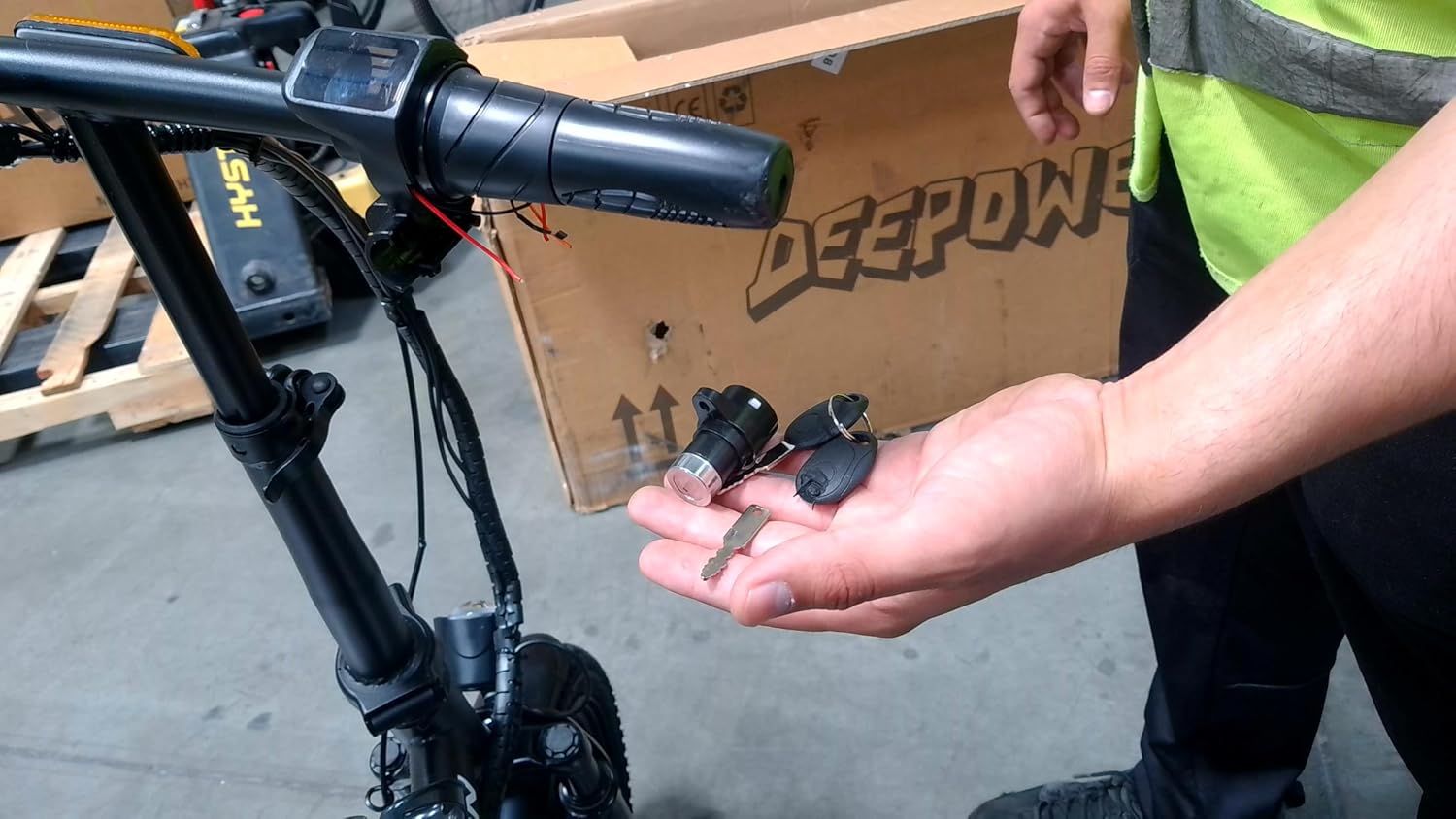
Figure 5.1: The ignition keys for the DEEPOWER electric bike, used to power on the system.
5.2 Riding Modes
The DEEPOWER K100 offers multiple riding modes:
- Pedal Assist System (PAS): The motor provides assistance as you pedal. Use the 'M' button on the LCD display to select from 3 speed levels.
- Throttle Mode: Engage the throttle on the handlebar to propel the bike without pedaling.
- Manual Mode: Ride the bike like a traditional bicycle without any motor assistance.
5.3 Speed Selection
Press the 'M' button on the LCD display to cycle through the 3 available speed settings for pedal assist or throttle mode.
5.4 Braking
The bike is equipped with disc brakes. Squeeze the brake levers on the handlebars to slow down or stop. Apply both brakes simultaneously for balanced stopping power.
5.5 Lights and Horn
Use the lamp switch on the handlebar to turn the front and rear lights on or off. Press the horn button to alert others.
5.6 Folding and Unfolding
To fold the bike, ensure the power is off. Release the frame and handlebar latches, then carefully fold the frame and handlebar stem. The foldable pedals also contribute to a more compact form factor.
6. Maintenance
Regular maintenance ensures the longevity and safe operation of your electric bike.
6.1 Battery Care
- Charge the battery regularly, even if not in use, to maintain its health.
- Avoid completely draining the battery.
- Store the battery in a cool, dry place, away from direct sunlight and extreme temperatures.
- If storing for an extended period, charge the battery to 50-70% capacity.
6.2 Tire Pressure
Check tire pressure before each ride. Maintain the recommended pressure (usually indicated on the tire sidewall) for optimal performance and safety.
6.3 Brake Inspection
Regularly inspect brake pads for wear and ensure brake levers provide firm and responsive stopping power. Adjust or replace components as needed.
6.4 General Cleaning
Clean the bike with a damp cloth and mild detergent. Avoid using high-pressure washers directly on electrical components. Lubricate the chain periodically.

Figure 6.1: View of the rear wheel, motor, and chain, areas requiring regular inspection and maintenance.
7. Troubleshooting
This section addresses common issues you might encounter.
| Problem | Possible Cause | Solution |
|---|---|---|
| Bike does not power on | Battery not installed correctly; Battery discharged; Key not in 'ON' position | Ensure battery is seated; Charge battery; Turn key to 'ON' |
| Motor not assisting | PAS level too low; Throttle not engaged; Brake levers engaged | Increase PAS level; Engage throttle; Release brake levers fully |
| Battery not charging | Charger not connected; Power outlet issue; Damaged charger/battery | Check connections; Test outlet; Contact support if damaged |
| Brakes feel weak | Worn brake pads; Loose brake cable; Air in hydraulic system (if applicable) | Inspect/replace pads; Adjust cable tension; Seek professional service |
8. Specifications
Technical specifications for the DEEPOWER Mini Electric Bike K100.
| Feature | Specification |
|---|---|
| Bike Type | Electric Bike |
| Model Name | K100 |
| Motor Power | 400W |
| Max Speed | 20 MPH |
| Battery | 48V 10Ah Li-ion (Removable) |
| Charging Time | 4-5 hours |
| Max Mileage (PAS) | 30-45 KM |
| Frame Material | High Carbon Steel |
| Wheel Size | 14 Inches |
| Wheel Material | Aluminum |
| Brake Style | Disc |
| Suspension Type | Front |
| Number of Speeds | 3 (Electronic) |
| Folded Size | Approx. 27x17x26 inches |
| Assembly Required | Yes |
| Included Components | Tool Kit |
9. Warranty and Support
The DEEPOWER Mini Electric Bike K100 comes with a 90-day warranty from the date of purchase. This warranty covers manufacturing defects under normal use.
For warranty claims, technical support, or inquiries regarding parts and service, please contact DEEPOWER customer service through the retailer where the product was purchased or refer to the contact information provided with your purchase documentation.